Customizing the Copy Settings
You can change the machine’s default settings and customize them to suit your needs. The settings you change and store in the Copy Settings in the Additional Functions menu are not returned to the factory default settings even when  (Reset) is pressed. For instructions on how to restore the settings to the factory default settings, see Restoring the Default Copy Settings.
(Reset) is pressed. For instructions on how to restore the settings to the factory default settings, see Restoring the Default Copy Settings.Copy Settings Table
The following table lists the settings in the Copy Settings menu. The default settings are indicated in bold.
|
Item
|
Settings
|
References
|
|
Auto Orientation
|
On, Off
|
|
|
Standard Settings
|
Store, Initialize
|
|
|
Initialize Copy Settings
|
Yes, No
|
Auto Orientation
If the Auto Orientation setting is set to ‘On’, the machine uses information such as the size of the original and the copy ratio to determine the most suitable orientation for the paper size, and then automatically rotates the image, if necessary. If this mode is set in combination with the Auto Paper Selection mode, the machine automatically selects the optimal paper to use, regardless of its orientation. (Automatic Paper Selection)
|
NOTE
|
|
The default Settings is ‘On’.
Even if the Auto Orientation setting is set to ‘On’, the image is not rotated when:
The paper size is selected manually.
The Different Size Originals mode is set in combination with the Auto Paper Selection mode.
The size of the original is not detected.
LTR or STMT originals are enlarged onto LGL or 11" × 17" paper.
Only standard size originals that are LTR or smaller can be rotated when the copy ratio is set to 100%.
|
1
Press  (Additional Functions).
(Additional Functions).The Additional Functions menu appears.
2
Press [Copy Settings].

3
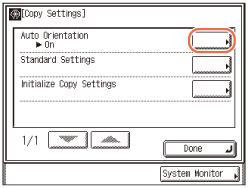
Press [Auto Orientation].
4
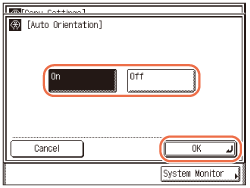
Select [On] or [Off] → press [OK].
5
Press  (Reset) to return to the top screen.
(Reset) to return to the top screen.Changing the Current Standard Settings
Standard Settings in the Copy Settings in the Additional Functions menu refers to a combination of copy modes that is applied such as when the machine is turned ON or when (Reset) is pressed. This section describes the procedure for changing the copy modes stored as the Standard Settings.
(Reset) is pressed. This section describes the procedure for changing the copy modes stored as the Standard Settings.|
NOTE
|
|
The setting combination stored as Standard Settings is applied when:
the machine is turned ON or wakes from the Sleep mode.
(Reset) is pressed (except while copying).the Auto Clear function initiates.
The Standard Settings (the factory default settings) are:
Number of Copies: 1
Copy Ratio: 100%
Paper Source Selection: Auto
Density and Original Type: Auto
2-Sided: Off
Finishing: Off
2-Page Separation: Off
Image Combination: Off
Frame Erase: Off
Different Size Originals: Off
Sharpness: middle (center)
ID Card Copy: Off
Booklet: Off
|
Storing New Standard Settings
You can store your own copy settings as the Standard Settings. To store your own Standard Settings, specify the desired settings on the top screen and/or the Special Features screen, and then follow the procedure below.
1
Press (Additional Functions) → [Copy Settings].
(Additional Functions) → [Copy Settings].For help, see step 2 in Auto Orientation.
2
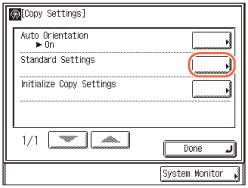
Press [Standard Settings].
3
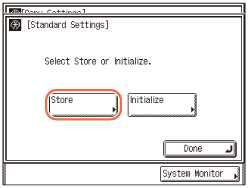
Press [Store].
4
Press [Yes].
The message <Stored in memory.> appears for approximately two seconds on the touch panel display.
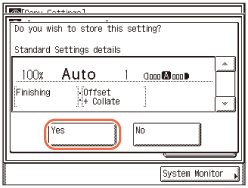
The displayed settings are stored as the Standard Settings.
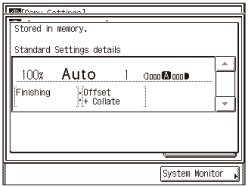
NOTE:
The settings displayed are the currently set copy settings. Press [ ] or [
 ] to display any copy settings that do not fit into the display area.
] or [] to display any copy settings that do not fit into the display area.5
Press (Reset) to return to the top screen.
(Reset) to return to the top screen.Initializing Standard Settings
You can restore the Standard Settings to their default settings.
1
Press (Additional Functions) → [Copy Settings].
(Additional Functions) → [Copy Settings].For help, see step 2 in Auto Orientation.
2
Press [Standard Settings].
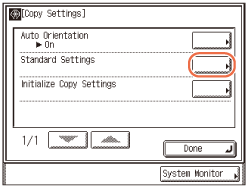
3
Press [Initialize].
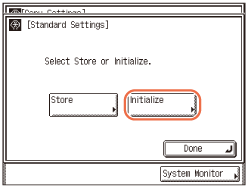
4
Check the settings → press [Yes].
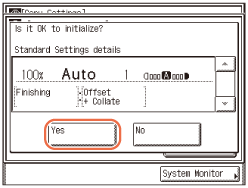
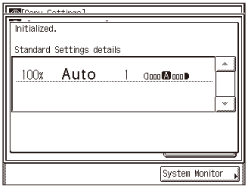
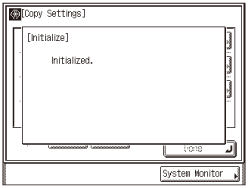
The message <Initialized.> appears for approximately two seconds on the touch panel display.
The Standard Settings are initialized.
5
Press (Reset) to return to the top screen.
(Reset) to return to the top screen.Restoring the Default Copy Settings
The modes that have been changed in Copy Settings can be restored to the factory default settings. (Copy Settings Table)
|
NOTE
|
|
The Standard Settings are also initialized. (Changing the Current Standard Settings)
|
1
Press (Additional Functions) → [Copy Settings].
(Additional Functions) → [Copy Settings].For help, see step 2 in Auto Orientation.
2
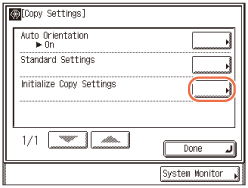
Press [Initialize Copy Settings].
3
Press [Yes].
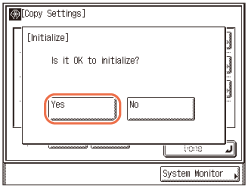
The message <Initialized.> appears for approximately two seconds on the touch panel display.
The Copy Settings are initialized.
4
Press (Reset) to return to the top screen.
(Reset) to return to the top screen.