
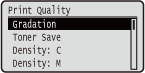
Print Quality
 |
The settings about print quality including the gradation and toner density are listed with short descriptions. Default settings are marked with a dagger (
 ). ). |
|
|
Asterisks (*)Settings marked with an asterisk (*) are not displayed depending on other settings.
|
Gradation
Specify the gradation for processing print data.
|
High 1
High 2
|
 (
( )
)  <Print Quality>
  <Gradation> <High 1> or <High 2>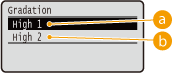
 <High 1>
This print mode is suitable for printing photos or the like at average quality.
 <High 2>
Specify this setting to print photos or the like at high quality.
Toner Save
Specify this setting when you want to check the finishing such as the layout before printing a large job, for example. Since this printing mode saves toner, fine lines and portions with lighter print density may become blurred.
|
Off
On
|
() <Print Quality> <Toner Save> <Off> or <On> Density: X (X=C, M, Y, K) *
For each CMYK color, adjust the toner density to apply to printing. This item is not displayed when <Toner Save> is set to <On>. Adjusting Print Density
|
-8 to 0
to +8 |
Density X (Fine Adj) (X=C, M, Y, K) *
For each CMYK color, you can make fine adjustment of the toner density applied to printing separately for three different density areas. This item is not displayed when <Toner Save> is set to <On>. Adjusting Print Density
|
High
-8 to 0
to +8Medium
-8 to 0
to +8Low
-8 to 0
to +8 |
Color Mode
Specify whether to print in color or black and white.
|
Auto (Color/Black)
Color
Black
|
() <Print Quality> <Color Mode> Select the color mode 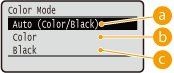
<Auto (Color/Black)>
Automatically select color or black and white printing depending on the type of document.
<Color>
Print in color.
 <Black>
Print in black and white even when the document is in color.
Halftones
You can select the printing method to reproduce halftones (the intermediate range between the lighter and darker areas of an image).
Error Diffusion
This mode is suitable for printing data with text and thin lines and the curved lines of CAD data, etc.
|
Off
On
|
() <Print Quality> <Halftones> <Error Diffusion> <Off> or <On>
 |
|
The stability of the texture and fixed toner may be reduced when <Error Diffusion> is used.
|
Resolution/Grad. *
Select the halftone reproduction method when <Error Diffusion> is set to <Off>. You can set this item for each of the types of image contained in one document.
|
Text
Resolution
Gradation
Graphics
Resolution
Gradation
Image
Resolution
Gradation
|
() <Print Quality> <Halftones> <Resolution/Grad.> Select the image data type <Resolution> or <Gradation> 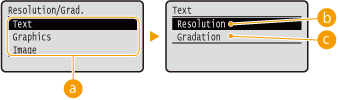
Image data type
Select the image data type for which the settings are changed. Select <Text> for characters, <Graphics> for lines and figures, or <Image> for images such as photos.
<Resolution>
Performs fine printing by sharply reproducing the edges of characters. This print mode is suitable for printing data of characters and thin lines with a clear finish.
<Gradation>
Prints gradation and lines with a smooth finish. This print mode is suitable for printing figures and charts with gradation.
Gray Compensation
For black or gray data with color information defining R=G=B, select whether to print with black (K) toner only or print with CMYK 4-color toner. You can set this item for each of the types of image contained in one document.
|
Text
Off
On
Graphics
Off
On
Image
Off
On
|
() <Print Quality> <Gray Compensation> Select the image data type <Off> or <On> 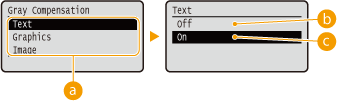
Image data type
Select the image data type for which the settings are changed. Select <Text> for characters, <Graphics> for lines and figures, or <Image> for images such as photos.
<Off>
Prints with CMYK 4-color toner. Reproducibility of gradation of dark colors is better than with <On>.
<On>
Prints with black (K) toner only. Color mismatch due to use of color (CMY) toner can be prevented.
CMS
Set the processing methods for color correction. You can make different settings for different data types contained in one document.
CMS Selection
Set whether to perform color correction on the printer side or the host side (printer driver side).
|
Printer
Host
|
() <Print Quality> <CMS> <CMS Selection> <Printer> or <Host> CMS/Gamma
Select the processing mode for color printing. You can set this item for each of the types of image contained in one document.
|
Text
CMS
Gamma
Graphics
CMS
Gamma
Image
CMS
Gamma
|
() <Print Quality> <CMS> <CMS/Gamma> Select the image data type <CMS> or <Gamma> 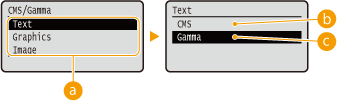
Image data type
Select the image data type for which the settings are changed. Select <Text> for characters, <Graphics> for lines and figures, or <Image> for images such as photos.
<CMS>
Use a profile for color matching.
<Gamma>
Perform color correction by setting a gamma value for brightness adjustment.
RGB Source Profile
Select a suitable profile for RGB data that matches the monitor that you are using. You can set this item for each of the types of image contained in one document.
|
Text
sRGB v3.0 (Canon)
Canon HDTV gamma 1.5
Canon HDTV gamma 1.8
Canon HDTV gamma 2.4
Graphics
sRGB v3.0 (Canon)
Canon HDTV gamma 1.5
Canon HDTV gamma 1.8
Canon HDTV gamma 2.4
Image
sRGB v3.0 (Canon)
Canon HDTV gamma 1.5
Canon HDTV gamma 1.8
Canon HDTV gamma 2.4
|
() <Print Quality> <CMS> <RGB Source Profile> Select the image data type Select the profile 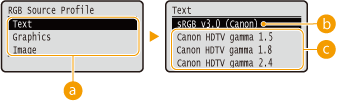
Image data type
Select the image data type for which the settings are changed. Select <Text> for characters, <Graphics> for lines and figures, or <Image> for images such as photos.
<sRGB v3.0 (Canon)>
An RGB profile is used that is similar to an average profile of most Windows PC monitors. When using a monitor that supports sRGB, you can print colors close to the colors displayed on the monitor.
<Canon HDTV gamma 1.5> to <Canon HDTV gamma 2.4>
When you want a brightness adjustment after making comparison between the printed colors and the colors displayed on the monitor, make a necessary setting here. The higher the value, the darker the printed colors.
|
|
|
This item is available when <CMS/Gamma> is set to <CMS>.
|
Output Profile
You can select suitable profiles for data that you are going to print. You can set this item for each of the types of image contained in one document.
|
Text
Normal
Photo
Graphics
Normal
Photo
Image
Normal
Photo
|
() <Print Quality> <CMS> <Output Profile> Select the image data type <Normal> or <Photo> 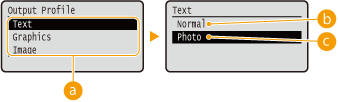
Image data type
Select the image data type for which the settings are changed. Select <Text> for characters, <Graphics> for lines and figures, or <Image> for images such as photos.
<Normal>
Color matching is performed so that data is printed in colors close to the colors displayed on the monitor.
<Photo>
Color matching is performed so that the print result is similar to photography.
|
|
|
This item is available when <CMS/Gamma> is set to <CMS>.
|
Matching Method
Specify which element to be given priority over others in color matching by <RGB Source Profile>. You can set this item for each of the types of image contained in one document.
|
Text
Perceptual
Saturation
Colorimetric
Graphics
Perceptual
Saturation
Colorimetric
Image
Perceptual
Saturation
Colorimetric
|
() <Print Quality> <CMS> <Matching Method> Select the image data type Select the matching method 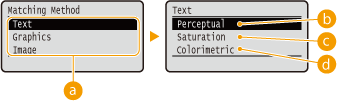
Image data type
Select the image data type for which the settings are changed. Select <Text> for characters, <Graphics> for lines and figures, or <Image> for images such as photos.
<Perceptual>
Matching is performed with priority given to color perceptual.
<Saturation>
Matching is performed with priority given to saturation.
 <Colorimetric>
Matching is performed so that color difference between originals and printouts is minimized.
Gamma Correction
Brightness adjustment can be performed so that the brightness of the brightest and darkest parts of the original is not effected in the print result. You can set this item for each of the types of image contained in one document.
|
Text
1.0
1.4
1.8
2.2
Graphics
1.0
1.4
1.8
2.2
Image
1.0
1.4
1.8
2.2
|
() <Print Quality> <CMS> <Gamma Correction> Select the image data type Select the setting value 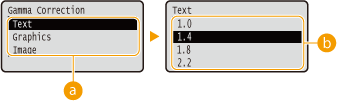
Image data type
Select the image data type for which the settings are changed. Select <Text> for characters, <Graphics> for lines and figures, or <Image> for images such as photos.
<1.0> to <2.2>
Set this item when you want to adjust the brightness of printouts. <1.4> is the standard setting (no correction), and the larger the setting value, the darker the print will be.
|
|
|
This item is available when <CMS/Gamma> is set to <Gamma>.
|
Gradation Settings
Make settings for the smoothing mode that enables gradations in lines, figures, or images such as photos to be printed smoothly.
Gradation
Specify whether to enable or disable the smoothing mode. Gradations are printed more smoothly with <Smooth 2> than with <Smooth 1>.
|
Off
Smooth 1
Smooth 2
|
() <Print Quality> <Gradation Settings> <Gradation> Select the processing method Graphics *
Specify whether to apply the smoothing mode to lines and figures when <Gradation> is set to <Smooth 1> or <Smooth 2>.
|
Off
On
|
() <Print Quality> <Gradation Settings> <Graphics> <Off> or <On> Image *
Specify whether to apply the smoothing mode to image data such as photos when <Gradation> is set to <Smooth 1> or <Smooth 2>.
|
Off
On
|
() <Print Quality> <Gradation Settings> <Image> <Off> or <On> Advanced Smoothing
Make settings for the smoothing mode that enables edges of lines, figures and text are printed smoothly.
Advanced Smoothing
Specify whether to enable or disable the smoothing mode. Edges will be smoother with <Smooth 2> than with <Smooth 1>.
|
Off
Smooth 1
Smooth 2
|
() <Print Quality> <Advanced Smoothing> <Advanced Smoothing> Select the processing method Graphics *
Specify whether to apply the smoothing mode to lines and figures when <Advanced Smoothing> is set to <Smooth 1> or <Smooth 2>.
|
Off
On
|
() <Print Quality> <Advanced Smoothing> <Graphics> <Off> or <On> Text *
Specify whether to apply the smoothing mode to text when <Advanced Smoothing> is set to <Smooth 1> or <Smooth 2>.
|
Off
On
|
() <Print Quality> <Advanced Smoothing> <Text> <Off> or <On> Toner Volume Corr.
Set how to adjust the toner volume when printing high density areas.
|
Normal
Gradation Priority
Text Priority
|
() <Print Quality> <Toner Volume Corr.> Select the correction method 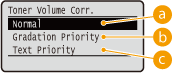
<Normal>
Prints text and lines using the toner volume that will preserve resolution, and prints the other types of data with the toner volume that will preserve hue.
<Gradation Priority>
Prints all types of data using the toner volume that will preserve hue.
<Text Priority>
Prints all types of data using the toner volume that will preserve resolution.
Line Control
Set the image processing method for lines.
|
Resolution Priority
Gradation Priority
|
() <Print Quality> <Line Control> <Resolution Priority> or <Gradation Priority> 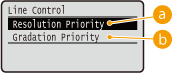
<Resolution Priority>
Processes lines so that resolution is preserved to a similar extent to the processing of text.
<Gradation Priority>
Processes lines so that hue and gradation are preserved to a similar extent to the processing of figures.
Reduce Quality
Select whether to continue printing by automatically reducing the quality when insufficient memory is available for the processing.
|
Continue Printing
Stop Printing
|
() <Print Quality> <Reduce Quality> <Continue Printing> or <Stop Printing> |
|
|
If you select <Stop Printing>, an error message is displayed and the printing is stopped when the machine runs out of memory. You can press
 ( ( ) to resume the printing by reducing the quality. ) to resume the printing by reducing the quality. |
Sp. Smoothing Mode
Change the setting if output print density is uneven or print finish is not smooth.
|
Mode 1
Mode 2
Mode 3
Mode 4
Mode 5
Mode 6
|
() <Print Quality> <Sp. Smoothing Mode> Select the mode 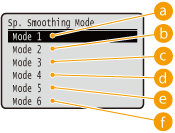
<Mode 1>
Use this setting for most environments.
<Mode 2>
Specify this setting if the internal area of high density figures, large characters, or thick lines cannot be printed with a smooth finish.

<Mode 3>
Specify this setting when the following symptoms are observed at a time.
The internal area of high density figures, large characters, or thick lines cannot be printed with a smooth finish.
The perimeter of low density figures, characters, or lines cannot be printed with a smooth finish.

Characters and lines on a solid background cannot be printed with a smooth finish.

<Mode 4>
Specify this setting when the perimeter of low density figures, characters, or lines cannot be printed with a smooth finish.
 <Mode 5>
Specify this setting when stripes appear on images such as photos, figures, gradations, or shaded patterns, resulting in uneven printouts.

 <Mode 6>
Specify this setting if printing is not smooth as a whole.
|
|
|
When <Mode 2> or <Mode 4> is specified, areas of low density may be unevenly colored.
When <Mode 3> is specified, areas of thin density or shaded patterns may be unevenly colored.
When <Mode 5> is specified, the perimeter of characters, lines, or figures may not be printed smoothly.
When <Mode 6> is specified, color unevenness may appear.
|