
Reset Menu
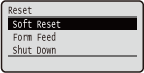 |
You can cancel all processes, delete data in memory, and turn OFF the power. When you press
 ( ( ) on the operation panel, the Reset menu is displayed. ) on the operation panel, the Reset menu is displayed. |
|
|
|
When the message Ennn-nnnn (n is a number) is displayed, only <Shut Down> can be executed.
|
Soft Reset
Select to erase all data of print jobs that are not yet finished (soft reset). You can also select this item to perform a hard reset for enabling the changed settings.
 |
|
Make sure to check that other users are not using the machine before performing a soft reset or hard reset, otherwise, all print data is erased before being printed.
|
Performing a Soft Reset
Perform a soft reset when you want to erase all print data that is being printed, waiting to be printed, or being received.
()  <Soft Reset>
  <Yes>
<Yes> Performing a Hard Reset
Perform a hard reset when you want to enable the changed settings of machine or to erase data registered in memory of the machine.
1
Press ().
().
If the setting menu is displayed, first press  (
( ) to return to the main screen and then perform this step 1.
() to return to the main screen and then perform this step 1.2
Use  /
/ to select <Soft Reset>, press and hold for 5 seconds or more, and release it.
/ to select <Soft Reset>, press and hold for 5 seconds or more, and release it.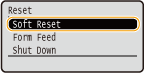
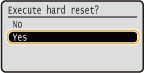
The message <Execute hard reset?> is displayed.
3
Select <Yes>, and press .
.
When a hard reset is executed, the machine is restarted.
|
|
|
When a soft reset or hard reset is performed, secured documents stored in the optional SD card are also deleted.
|
Form Feed
If printing is canceled from the computer or the communication is interrupted during data reception, the data may remain in the memory of the machine, preventing the printing from finishing. The next print data cannot be printed with the remaining data left as is. In this case, select <Form Feed> to forcibly print the data remaining in memory.
() <Form Feed> <Yes> |
|
|
If the remaining data is not printed, perform a soft reset.
If the data still remains in the memory of the machine after a form feed is performed (the [Job] indicator is lit on the machine), perform a soft reset.
|
Shut Down
When turning OFF the machine, shut down the machine from the operation panel without using the power switch. Turning OFF the Power (Performing a Shutdown)