Sending Faxes
1
Place the document. Placing Documents
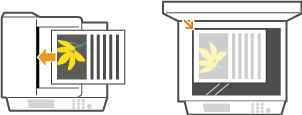
2
Press  .
.
.If a logon screen appears, see Logging on to Authorized Send (imageRUNNER 1435iF / 1435i Only).
3
Enter the destination using the numeric keys, and press  .
.
.If your machine is connected to a PBX (Private Branch Exchange), you can enter the outside line access number by pressing  before entering the destination. If the key does not work, you need to configure the R-key settings. R-Key Setting
before entering the destination. If the key does not work, you need to configure the R-key settings. R-Key SettingIf you enter the wrong characters, press  . (Press to delete each character one by one. Press and hold to delete all the input characters at once.)
. (Press to delete each character one by one. Press and hold to delete all the input characters at once.)To make it easier to specify destinations by using other methods, such as the Address Book, see Specifying Destinations for Faxes.
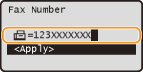
NOTE:
When <Confirm Fax Number> is set to <On>, a screen appears that prompts you to enter the destination again (Checking Destinations before Sending Documents). Enter the same destination again for confirmation.
 To send overseas
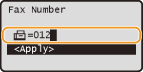
Enter the international access code, the country code, the area code, and the fax number to specify the destination.
|
1
|
Enter the international access code.
 |
|
2
|
Press
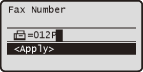
 (Recall Settings/Pause). (Recall Settings/Pause).<p> (pause) is inserted between numbers. In this case, 012 will be dialed first, then 2 seconds later, the next number will be dialed.
NOTE:
Inputting pauses is optional. However, consecutive numbers that are input without pauses may not be recognized correctly.
Pauses can be inserted continuously.
One pause inserts 2 seconds of waiting time. This time can be changed as necessary. Set Pause Time
 |
|
3
|
Enter the country code, the area code, and the fax number.
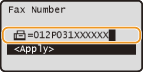 |
|
4
|
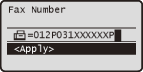
Press
(Recall Settings/Pause) to insert a pause at the end of the fax number as necessary, and press .The waiting time inserted here is fixed to 10 seconds. This time cannot be changed.
 |
4
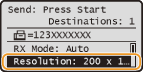
Specify the scanning settings as necessary.
5
Press  to start sending.
to start sending.Scanning starts.
If you want to cancel sending, press 
 <Yes> .
<Yes> .When placing documents in the feeder in step 1
When scanning is complete, the fax is sent.
When placing documents on the platen glass in step 1
Follow the procedure below.
|
1
|
Use
 / / to select the document size, and press . to select the document size, and press .When there is only one page to be scanned, proceed to step 3.
|
|
2
|
Place the next document on the platen glass, and press
.Repeat this step until you finish scanning all of the pages.
|
|
3
|
Select <Start Sending> and press
.The fax is sent.
|
|
TIPS
|
|
If you always want to send faxes with the same settings:
If you want to register frequently used setting combinations:
If you want to sound an alarm when the handset is off the hook:
|