Specifying with Numeric Keys (Fax)
 |
|
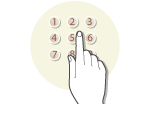
Use the numeric keys on the operation panel to specify destinations.
|
|
IMPORTANT
|
|
When <Restrict New Destinations> is set to <On>, you cannot use the numeric keys to specify destinations.
|
1
Press  .
.
.2
Enter the destination using the numeric keys, and press  .
.
.If you enter the wrong characters, press  . (Press to delete each character one by one. Press and hold to delete all the input characters at once.)
. (Press to delete each character one by one. Press and hold to delete all the input characters at once.)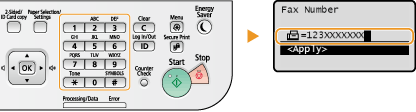
To specify any additional destinations, select <Specify Next Destination (New)> by using  /
/ before repeating the same procedure. Up to 10 destinations can be specified.
/ before repeating the same procedure. Up to 10 destinations can be specified.NOTE:
When <Confirm Entered Fax Number> is set to <On>, a screen appears that prompts you to enter the destination again (Displaying the Screen for Confirming the Fax Number (imageRUNNER 1435iF Only)). Enter the same destination again for confirmation.
The maximum number of destinations that you can specify when using the numeric keys in combination with an LDAP server is 10. For example, if seven destinations have been specified using an LDAP server, up to three destinations can be specified using the numeric keys.
 To delete destinations
If you specified multiple destinations, you can delete destinations as necessary.
|
1
|
Select <Confirm/Edit Destination>, and press
.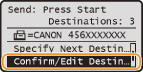 |
|
2
|
Select a destination you want to delete, and press
.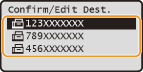 |
|
3
|
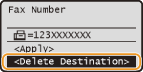
Select <Delete Destination>, and press
. |
|
4
|
Select <Yes>, and press
. |
|
NOTE
|
If you want to easily and quickly delete destinations without displaying a list of destinationsBefore selecting <Confirm/Edit Destination> in step 1, you can press
 / / to toggle the destinations you specified. Display a destination you want to delete to toggle the destinations you specified. Display a destination you want to delete  <Yes> . <Yes> . |