Feeder (imageRUNNER 1435iF / 1435i Only)
When dust and graphite powder adhere to the rollers inside the feeder, streaks and smudge marks may appear on scanned documents. If this happens, clean the rollers and scanning area of the feeder (Cleaning the Feeder Manually). You can also clean the rollers automatically by using paper set in the feeder (Cleaning the Feeder Automatically).
|
NOTE
|
|
You can set the machine to prompt you to clean the scanning area when the feeder is dirty. The prompt appears when documents are placed in the feeder.
|
|
TIPS
|
|
If you want to reduce the visibility of streaks caused by dust on the scanning area:
|
Cleaning the Feeder Manually
Clean the areas with a well-wrung-out cloth dampened with water. Then, wipe the area with a soft, dry cloth.
1
Turn OFF the machine, and unplug the power cord from the AC power outlet.
When you turn OFF the machine, data that is waiting to be printed is deleted. However, fax documents that were received by using the Memory Reception function, faxes that are waiting to be sent, and reports that are automatically printed after sending and receiving faxes are not deleted.
2
Clean the feeder rollers.
|
1
|
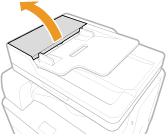
Open the feeder cover.
 |
|
2
|
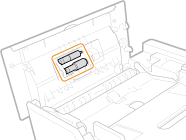
Clean the rollers (two locations) inside the feeder cover. Spin the rollers while cleaning them.
 |
3
Clean the inside of the inner cover.
|
1
|
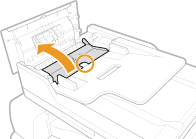
Place your finger in the hole indicated by the green mark, and lift the inner cover.
 |
|
2
|
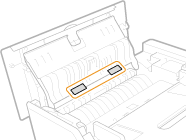
Clean the transparent plastic (two locations).
 |
4
Close the inner cover and feeder cover.
5
Clean the scanning area.
|
1
|
Open the feeder.
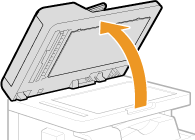 |
|
2
|
Wipe the white strip of plate (
 ) and the scanning area ( ) and the scanning area ( ). ).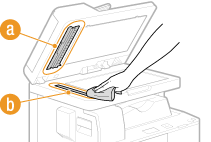 |
6
Wait for the cleaned area to dry completely.
7
Gently close the feeder.
8
Reconnect the power cord and turn ON the machine.
Cleaning the Feeder Automatically
Before you start cleaning, load ten sheets of plain A4 or Letter size paper in the feeder (Placing Documents). Then follow the procedure below.
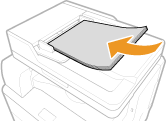
1
Press  .
.
.2
Use  /
/ to select <Adjustment/Maintenance>, and press
  .
.
/ to select <Adjustment/Maintenance>, and press .3
Select <Clean Feeder>, and press .
.4
Press .
.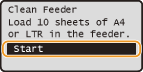
Cleaning starts. When the <Finished.> message is displayed approximately 30 seconds later, press to return to the main screen.
to return to the main screen.