
Logging on to the Machine
If Department ID Management is enabled or System Manager IDs are enabled, you must log in before using the machine. You also need to log in if use of the fax and scan functions is restricted.
|
|
|
The System Manager ID and PIN are set to "7654321" at the factory. It is recommended that you change this setting for higher security.
|
Department ID Management Login
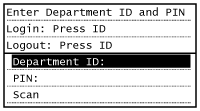
When the login screen appears, use the procedure below to enter the Department ID and PIN.
1
Tap <Department ID> (or <System Manager ID>).
2
Enter a number of up to seven digits using the numeric keys, and tap <Apply>.

If no PIN is registered, proceed to step 5.
3
Select <PIN>.
4
Enter a number of up to seven digits using the numeric keys, and tap <Apply>.
When <PIN (Confirm)> is displayed, enter the PIN once again to confirm.
5
Press  .
.
.The logon screen will be changed to the main screen.
After you finish using the machine, press again to display the logon screen.
again to display the logon screen.Logging in to Authorized Send
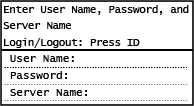
If the Send function authorization setting (LDAP Server Authentication) is enabled, the Authorized Send login screen appears when the fax or scan function is used.
|
|
|
For imageRUNNER 2206N, these functions can only be used when the optional Color Send Kit is attached.
|
1
Tap <User Name>.
2
Enter your user name using the numeric keys, and tap <Apply>.

3
Tap <Password>.
4
Enter the password using the numeric keys, and tap <Apply>.
5
Tap <Server Name> and select the server for your authentication.
6
Press
The logon screen will be changed to the main screen.
After you finish using the machine, press again to display the logon screen.
again to display the logon screen.
If the <Select Logout Type> screen appears
If you are logged in to both Authorized Send and Department ID Management, a dialog box appears in which you can select the items you want to log out of. In the case where you want to log out of Authorized Send (fax or scan function) while remaining logged in to Department ID Management, select <Log Out from Authenticated Sending>. In any other cases, select <Log Out from All Authenticated Functions>.