Replacing the Waste Toner Container
When the remaining capacity of the waste toner container is already small, the relevant message appears on the display. You can also check the status of the waste toner container on the display.
When a Message Appear
Depending on which message is displayed, you will need to make sure that you have a replacement waste toner container ready or replace the waste toner container. How to Replace the Waste Toner Container Consumables
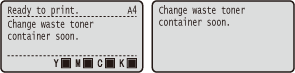
<Change waste toner container soon.>
This message notifies you that the waste toner container needs to be replaced soon. Make sure that you have a replacement waste toner container ready. Replace the waste toner container if you see this message before you start to print a large job.
 |
When the <Ready to print.> message is not displayed, the printing is temporarily stopped. To resume the printing, press  ( ( ). ).Which message is to be displayed depends on the <Action When Warning> setting in the setting menu of the operation panel. Action When Warning |
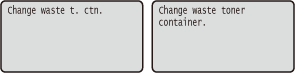
<Change waste t. ctn.>
<Change waste toner container.>
The waste toner container has become full. Replace the waste toner container with a new one.
Checking the Status of the Waste Toner Container
You can check the status of the waste toner container by <Waste Toner Status> under <Consumables Info.>. It is recommended that you check if you should prepare a new waster toner container at hand before you start to print a large job. Consumables Info.