
Replacing the Waste Toner Container
Replace the waste toner container at the appropriate time according to the displayed message. Manuals of the Machine
|
The waste toner container is a container for collecting unused toner that remains when printing. For information on the model number of the waste toner container, see Waste Toner Container. You can check the current amount of space remaining in the waste toner container. |
When to Replacing the Waste Toner Container
When a Message Appears on the Screen of the Control Panel or Remote UI
Follow the message on the screen to prepare a new waste toner container and replace the old one. For details about the message and how to resolve it, see the following:
A Message Appears
A Message Appears
Replacing Waste Toner Container
1
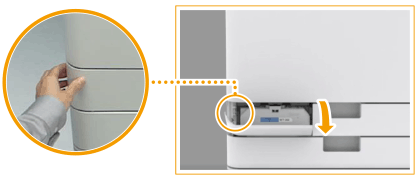
Open the waste toner container cover.
Hold the left edge of the cover when opening it.
2
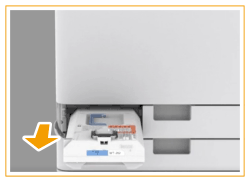
Pull out the waste toner container.
After pulling out the waste toner container half way, hold the handle on the top and pull it out all the way.
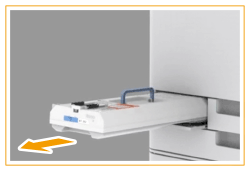
Do not tilt the waste toner container. Doing so may cause the toner in the container to spill.
3
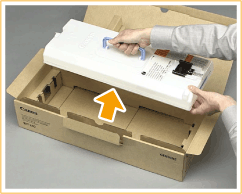
Remove the new waste toner container from its box.
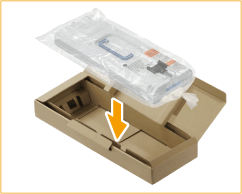
4
Place the waste toner container you removed into a box.
Use the bag included in the box for the new waste toner container. Tightly twist the opening of the bag so that the toner does not spill out, and then place the bag in the box.
5
Install the new waste toner container.
Insert the waste toner container with the Canon logo on top of the container towards the back of the machine, and push it in to load it.
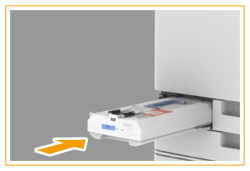
Push the waste toner container in as far as it will go. If the waste toner container is not installed correctly, the container shutter may stay open when the waste toner container is removed, which may cause toner to scatter.
6
Close the waste toner container cover.
 |
Used toner cannot be reused. Do not mix new and used toner together. The used waste toner container will be collected by your dealer or service representative. |