Parts and Their Functions
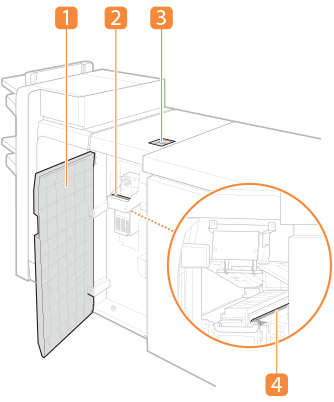
 Front cover
Open this cover to clear a paper jam.
 N-A guide
Open this guide to clear a paper jam.
 Operation panel
You can switch between the adjustment using the control panel (AUTO) and the adjustment using the setting dials (ON), or you can specify the static elimination adjustment value. Additionally, LED indicators or other lights are provided to display the status of theStatic Eliminator-A. Operation panel
 Static elimination rollers
Static of paper passing through the rollers is removed.
Operation panel
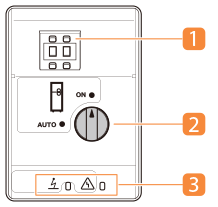
Setting dials
You can specify the de-static adjustment value from 00 to 65.
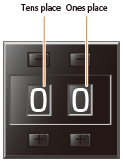

Even when a value greater than 65 is specified, it is counted as 65.
Static Elimination Switch
Use to select between adjustments using the control panel (AUTO) and adjustments using the setting dials (ON).
LED Indicators
The LED indicators display the status of the Static Eliminator-A.
LED indicators | Icon | Lit | Blinking | Off |
Green indicator |  | The Static Eliminator-A is working properly during a job. | - | Standby |
Red indicator |  | The Static Eliminator-A is malfunctioning or overcurrent protection worked.* | The Static Eliminator-A needs cleaning. | Standby |
*Contact your dealer or service representative.