
Adjusting Static Elimination Settings on the Control Panel
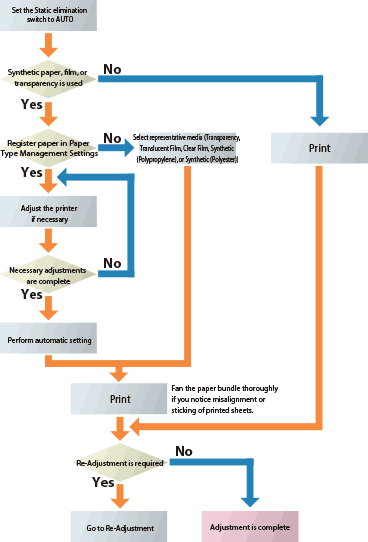
When you select AUTO for the Static elimination switch on the operation panel of the Static Eliminator, static removal is performed according to the static elimination adjustment value specified on the control panel. First, use automatic settings to specify the static elimination adjustment value. If necessary, adjust the static elimination adjustment value manually.
Automatic Setting
|
If you do not register a paper type in Paper Type Management Settings, select a representative type of media (Transparency, Translucent Film, Clear Film, Synthetic (Polypropylene), or Synthetic (Polyester)) as the paper type and proceed with printing. |
Initial Adjustment
1
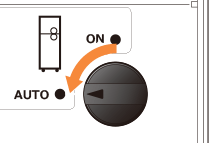
Set the Static elimination switch to AUTO.
2
In <Paper Type Management Settings>, adjust the printer settings to suit the type of paper that you are using.
|
If you have adjusted the printer settings in <Paper Type Management Settings> to suit the paper (especially when the secondary transfer voltage is adjusted), it is recommended to reconfigure the static elimination settings. |
3
Press <Static Elimination Adjust. Value>  <Adjust Using Test Page>.
<Adjust Using Test Page>.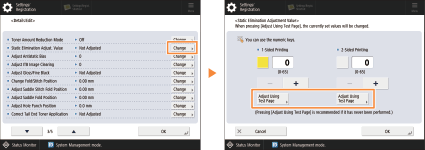
4
Select the paper source containing the paper for which the static elimination settings are being adjusted press <OK>.
press <OK>.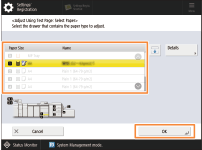
5
Press <Start Adjusting>.
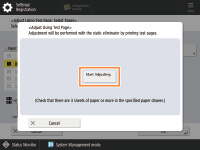
When the adjustment is complete, the display automatically returns to the adjustment screen of the Static Elimination Adjust. Value.
6
Press <OK> <OK> to complete editing the settings of the paper that you are using.
<OK> to complete editing the settings of the paper that you are using.7
Print using the paper for which the static elimination settings have been adjusted.
|
If you notice issues with the alignment or sticking of printed sheets, fan a bundle of paper thoroughly. If the problem persists even after fanning the bundle of paper, see Re-Adjustment. |
Re-Adjustment
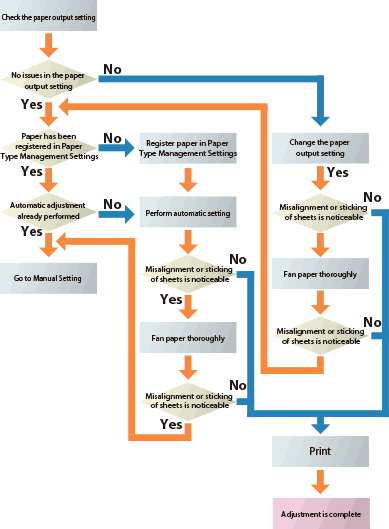
1
Check the paper output settings for printing after performing the initial adjustment.
1-sided printing: Face up
2-sided printing: Face down (Face up only when printing using Clear Film)
2
Specify the paper output setting and start printing.
 |
If the paper that you are using is not registered in Paper Type Management Settings, register the paper first. Initial Adjustment If the alignment or sticking of printed sheets is not improved even after registering the paper and specifying the static elimination settings, see Re-Adjustment. |
Manual Setting
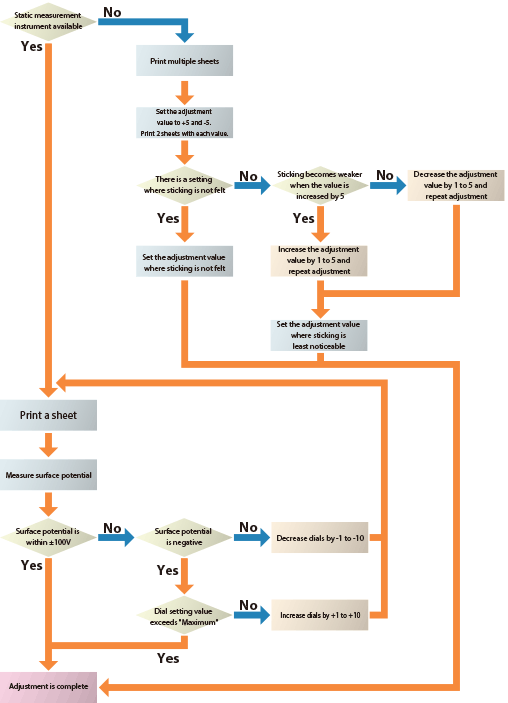
Adjustment using a static measurement instrument
 |
For a recommended static measurement instrument, contact your dealer or service representative. Set the value within the range between 00 and 65. |
1
Set the Static elimination switch to AUTO.
2
Load paper you want to use to a paper drawer and print a single page among the images you want to print.

When printing 1-sided, specify the paper output setting to face up*. When printing 2-sided, specify the paper output setting to face down.
*Only when using Clear Film, specify the paper output setting to face down.
3
Move the printed paper onto a metal board or conductive mat that is grounded without changing the facing sides.
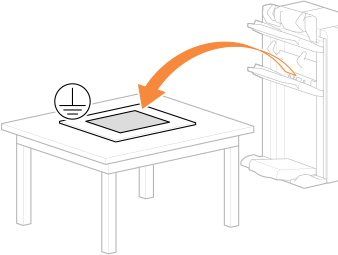
Move the output paper onto a metal board or conductive mat without changing the facing sides.
The surface of the metal board must not be covered by an insulated layer.
4
Measure the surface potential of the paper within ten seconds after the paper is put on the metal board or conductive mat.
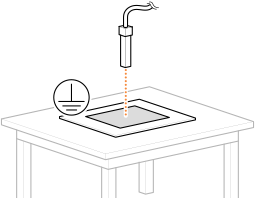
In order to measure the accurate surface potential of the paper, move the paper onto the metal board or conductive mat and perform measurement, soon after the paper is output (approximately within ten seconds).
Measure at the point where the paper and the grounded metal board or conductive mat are closely touching.
Perform measurement keeping the distance between the paper and the static measurement instrument to the distance that is recommended for the static measurement instrument you are using.
5
Check the measured electric potential and adjust the static elimination adjustment value.
Surface potential | How to change |
Within ±100V | Adjustment is done |
Smaller than -100V | Increase the adjustment value*1 |
Greater than +100V | Decrease the adjustment value*1 |
*1 Set the value within the range between 1 and 10.
6
Repeat Steps 2 to 5 if the surface potential is not within ±100V.
|
Set the value within the range between 00 and 65. If the setting value exceeds the designated maximum value, stop the adjustment by setting it to the designated maximum value and verify the static elimination effect. |
Adjustment without using a static measurement instrument
|
Set the value within the range between 00 and 65. |
1
Set the Static elimination switch to AUTO.
2
Load paper you want to use to a paper drawer and print a single page among the images you want to print.
When printing 1-sided, specify the paper output setting to face up*. When printing 2-sided, specify the paper output setting to face down.
*Only when using Clear Film, specify the paper output setting to face down.
3
Confirm whether you feel that the printed sheets of paper are sticking together.
When you do not feel sticking, the adjustment is done.
4
Increase the setting by 5 and print 2 pages of the images you want to print. Then, decrease the setting by 5 and print 2 pages of the images you want to print.
5
Confirm whether you feel that the printed sheets of paper are sticking together.
There is a setting where sticking is not felt
Set the adjustment value where sticking is not felt and the adjustment is done.
When the value is increased by 5, sticking becomes weaker
Increase the adjustment value by 1 to 5 and repeat the adjustment.
When the value is increased by 5, sticking becomes stronger
Decrease the adjustment value by 1 to 5 and repeat the adjustment.
|
Set the value within the range between 00 and 65. |