Staple Finisher-AH, Staple Finisher Lite-B ( [Americas]), Booklet Finisher-AH, and Puncher Unit-A
To staple paper, fold paper, and use other finishing functions, install the optional Staple Finisher-AH, Staple Finisher Lite-B (available only in the Americas), or Booklet Finisher-AH.
By installing the following puncher unit to the finisher, you can also use the punch function.
By installing the following puncher unit to the finisher, you can also use the punch function.
2/4 Hole Puncher Unit-A 


2/3 Hole Puncher Unit-A
4 Hole Puncher Unit-A
Available Finishing Functions
The finishing functions that are available when Staple Finisher-AH, Staple Finisher Lite-B (available only in the Americas), or Booklet Finisher-AH is installed are shown below.
Sorting Functions
Collate
Group
Offset
Stapling Functions
Corner
Double
Saddle Stitch*1
Staple-Free*2
Manual Staple
Folding Functions
Saddle Fold*1
Punch Functions
Hole Punch*3
*1Available only when Booklet Finisher-AH is installed.
*2Available only when Staple Finisher-AH or Booklet Finisher-AH is installed.
*3Available only when Puncher Unit-A is installed.
Precautions When Using Finishing Functions
Precautions When Using Collate and Group
If the load limit is reached during tray lowering, paper is ejected automatically to an available tray. If all available trays have reached their load limit, printing is paused. When the ejected paper is removed from the tray, printing resumes.
Precautions When Using Staple
The number of sheets that can be stapled varies depending on the paper type and thickness. Specifications
If the machine cannot staple the paper, change the paper or reduce the number of sheets to be stapled.
If the machine cannot staple the paper, change the paper or reduce the number of sheets to be stapled.
Remove stapled paper after it has been completely output to the tray and do not remove it while it is being stapled.
When [Load staples into the stapler unit.] appears, replace the staple case and add more staples. Adding Staples (Option)
If the tray reaches its lower limit position, printing is paused. When the ejected paper is removed from the tray, printing resumes.
Precautions When Using Saddle Stitch
The folding condition varies depending on the paper type and number of sheets.
When you output a large volume of saddle stitch booklets, you can lower the paper stopper to continue printing without being limited by the capacity of the booklet tray. If you lower the paper stopper, prepare a box or other container to receive the output paper so that it does not fall directly to the floor.
For details on how to operate the paper stopper, see the description of the exterior parts of the finisher. Exterior View
For details on how to operate the paper stopper, see the description of the exterior parts of the finisher. Exterior View
Precautions When Using Staple-Free
For details about the functions that cannot be used with Staple-Free, see the Restrictions on Combinations of Copy Functions at the online manual site.
https://oip.manual.canon/
https://oip.manual.canon/
Depending on the crimping position, you cannot use Staple-Free with paper that cannot be printed on both sides and paper with different sizes.
Depending on the usage environment and paper type, the part crimped with Staple-Free may easily come apart.
Using Manual Staple
Insert a stack of paper into the finisher slot and wait for a certain period of time. The stack of paper will be detected and stapled automatically.
When the stack of paper is detected, the staple button indicator blinks, and when stapling is done, it turns off. When the staple button indicator turns off, pull out the stack of paper.
When the stack of paper is detected, the staple button indicator blinks, and when stapling is done, it turns off. When the staple button indicator turns off, pull out the stack of paper.
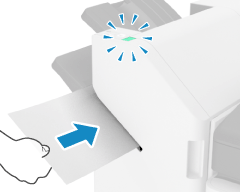
Place the stack of paper face down, and insert the corner to be stapled straight in.
Manual Staple cannot be performed during printing.
NOTE
You can change the amount of time it takes to automatically staple the stack of paper when inserted. [Time Until Stapling Starts in Stapler Mode]
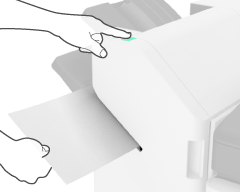
You can press the staple button to staple the paper without waiting for the machine to staple it for you.
Names of Parts and Their Functions
Exterior View
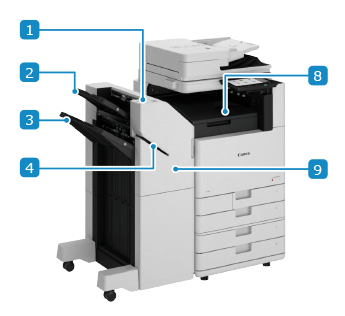
Staple Finisher-AH and Staple Finisher Lite-B (Available Only in the Americas)
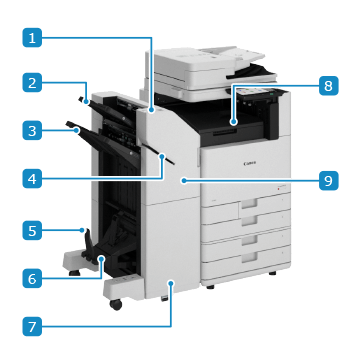
Booklet Finisher-AH
 Staple button
During Manual Staple, you can press the staple button to staple without waiting.
* Insert a stack of paper into the slot and wait for a certain period of time. The stack of paper will be stapled automatically without having to press the button. Using Manual Staple
 Output tray (Tray A)
Outputs printed and copied paper. You can set which function to use the tray as the output destination. Output Destination Settings
 Output tray (Tray B)
Outputs printed and copied paper. You can set which function to use the tray as the output destination. Output Destination Settings
 Slot
SlotInsert a stack of paper to manually staple.
 Paper stopper
Prevents saddle stitched booklet paper from falling out of the booklet tray when output.
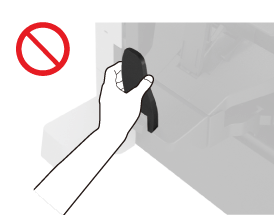
* Pull the lock release lever ( ) while lowering the paper stopper.
) while lowering the paper stopper.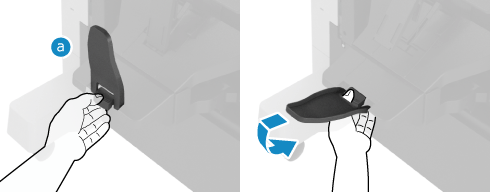
If you lower the paper stopper without pulling the lock release lever, the paper stopper may be damaged.
 Booklet tray
Outputs saddle stitch booklet paper.
 Front cover (lower)
Open this when a paper or staple jam occurs in the saddle stitch unit and when adding staples to the saddle stitch unit.
 Output tray (Tray C)
Outputs printed and copied paper. You can set which function to use the tray as the output destination. Output Destination Settings
 Front cover (upper)
Open this when a paper or staple jam occurs and when adding staples.
When Puncher Unit-A is installed, open this to dispose of punch waste.
When Puncher Unit-A is installed, open this to dispose of punch waste.
Interior
Staple Finisher-AH and Staple Finisher Lite-B (Available Only in the Americas)
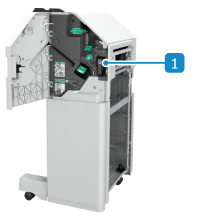
Booklet Finisher-AH
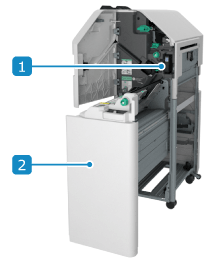 Punch waste tray (when Puncher Unit-A is installed)
Pull out to dispose of punch waste.
Saddle stitch unitPull this out when a paper or staple jam occurs and when adding staples.
Specifications
Paper Size, Type, and Basis Weight | All paper that can pass through the machine*1 Usable Paper |
Output Tray Capacity (Tray A)*2 | No Finishing Settings, Collate, Group A4, B5, A5, A5R, A6R, LTR, STMT, STMTR, EXEC, 16K: Height of 47 mm (1 7/8") (equivalent to 250 sheets) 320 x 450 mm (12 5/8" x 17 11/16") (SRA3)*3, 305 x 457 mm (12" x 18")*3, A3, B4, A4R, B5R, 11" x 17", LGL, LTRR, 8K, 16KR: Height of 24 mm (1") (equivalent to 125 sheets) No Finishing Settings, Collate, Group (When Using Various Sizes) Combination of A4, B5, and LTR only: Height of 47 mm (1 7/8") (equivalent to 250 sheets) Combination including 320 x 450 mm (12 5/8" x 17 11/16") (SRA3), 305 x 457 mm (12" x 18"): 30 sheets Combination other than above: Height of 24 mm (1") (equivalent to 125 sheets) Offset A4, B5, LTR, EXEC, 16K: Height of 47 mm (1 7/8") (equivalent to 250 sheets) A3, B4, 11" x 17", 8K: Height of 24 mm (1") (equivalent to 125 sheets) |
Output Tray Capacity (Tray B)*2 | No Finishing Settings, Collate, Group A4, B5, A5, A5R, LTR, STMT, STMTR, EXEC, 16K: 3,000 sheets or height of 423 mm (16 5/8")*4 320 x 450 mm (12 5/8" x 17 11/16") (SRA3), 305 x 457 mm (12" x 18"), A3, B4, A4R, B5R, 11" x 17", LGL, LTRR, 8K, 16KR: 1,500 sheets or height of 216 mm (8 1/2") A6R: 250 sheets*5 Envelopes: 100 (other than Monarch) or 30 (Monarch) No Finishing Settings, Collate, Group (When Using Various Sizes) Combination of A4, B5, and LTR only: 3,000 sheets or height of 423 mm (16 5/8") Combination including A6R: 250 sheets*5 Combination other than above: 1,500 sheets or height of 216 mm (8 1/2") Offset A4, B5, LTR, EXEC, 16K: 3,000 sheets or height of 423 mm (16 5/8")*4 A3, B4, A4R, 11" x 17", LGL, LTRR, 8K: 1,500 sheets or height of 216 mm (8 1/2") Staple (Corner, Double) A4, B5, LTR, EXEC, 16K: 200 copies, total of 3,000 sheets, or height of 423 mm (16 5/8")*6 A3, B4, A4R, 11" x 17", LGL, LTRR, 8K: 100 copies, total of 1,500 sheets, or height of 216 mm (8 1/2") Staple-Free (for Staple Finisher-AH and Booklet Finisher-AH) A4, LTR, 16K: 200 copies*7 A3, 11" x 17", 8K: 100 copies |
Booklet Tray Capacity (Booklet Finisher-AH only) | 52 g/m² to 81.4 g/m² (14 lb Bond to 21.7 lb Bond) Paper Binding 2 to 5 sheets: 25 copies Binding 6 to 10 sheets: 15 copies Binding 11 to 20 sheets: 10 copies 82 g/m² to 105 g/m² (21 lb Bond to 28 lb Bond) Paper Binding 2 to 5 sheets: 25 copies Binding 6 to 10 sheets: 15 copies 106 g/m² to 220 g/m² (29 lb Bond to 80 lb Cover) Paper Binding 2 to 5 sheets: 10 copies |
Number of Sheets That Can Be Stapled*8 | Corner and Double (Uncoated Paper) A4, B5, LTR, EXEC, 16K 52 g/m² to 90 g/m² (14 lb bond to 24 lb bond): 50 sheets 91 g/m² to 105 g/m² (25 lb bond to 28 lb bond): 30 sheets 106 g/m² to 256 g/m² (29 lb bond to 140 lb index): 2 sheets A4R, LTRR 52 g/m² to 90 g/m² (14 lb bond to 24 lb bond): 40 sheets 91 g/m² to 105 g/m² (25 lb bond to 28 lb bond): 30 sheets 106 g/m² to 256 g/m² (29 lb bond to 140 lb index): 2 sheets A3, B4, 11" x 17", LGL, 8K 52 g/m² to 90 g/m² (14 lb bond to 24 lb bond): 30 sheets 91 g/m² to 105 g/m² (25 lb bond to 28 lb bond): 25 sheets 106 g/m² to 256 g/m² (29 lb bond to 140 lb index): 2 sheets Corner and Double (Coated Paper) 106 g/m² to 256 g/m² (29 lb bond to 140 lb index): 2 sheets Staple-Free (for Staple Finisher-AH and Booklet Finisher-AH) A3, A4, 11" x 17", LTR, 8K, 16K 52 g/m² to 64 g/m² (13.8 lb bond to 17 lb bond): 10 sheets 65 g/m² to 81.4 g/m² (17.3 lb bond to 21.7 lb bond): 8 sheets 82 g/m² to 105 g/m² (22 lb bond to 28 lb bond): 6 sheets Manual Staple 50 sheets |
Punch (when Puncher Unit-A is installed) | Number of Holes Punched and Paper Size When 2/4 Hole Puncher Unit-A is installed: Two holes: A3, B4, A4, A4R, B5, B5R, A5, 11" x 17", LGL, LTR, LTRR, EXEC, 8K, 16K, 16KR Four holes: A3, A4, 11" x 17", LTR, EXEC, 8K, 16K When 2/3 Hole Puncher Unit-A is installed: Two holes: A3, B4, A4, A4R, B5, B5R, A5, 11" x 17", LGL, LTR, LTRR, EXEC, 8K, 16K, 16KR Three holes: A3, B4, A4, B5, 11" x 17", LTR, EXEC, 8K, 16K When 4 Hole Puncher Unit-A is installed: Four holes: A3, B4, A4, A4R, B5, B5R, A5, 11" x 17", LGL, LTR, LTRR, EXEC, 8K, 16K, 16KR Paper Basis Weight 52 g/m² to 300 g/m² (14 lb bond to 110 lb cover) |
Saddle Stitch and Fold (Booklet Finisher-AH only) | Paper Size A3, B4, A4R, 305 x 457 mm (12" x 18"), LGL, LTRR, 11" x 17" Paper Basis Weight Content pages basis weight: 52 g/m² to 220 g/m² (14 lb bond to 80 lb cover) Cover basis weight: 52 g/m² to 256 g/m² (14 lb bond to 140 lb index) (Basis weight must be equal to or greater than the content pages) Number of Sheets That Can Be Saddle Stitched (Uncoated Paper)*9 52 g/m² to 81.4 g/m² (14 lb bond to 21.7 lb bond): 20 sheets 82 g/m² to 105 g/m² (22 lb bond to 28 lb bond): 10 sheets 106 g/m² to 150 g/m² (29 lb bond to 40 lb bond): 5 sheets 151 g/m² to 209 g/m² (56 lb cover to 110 lb index): 4 sheets 210 g/m² to 220 g/m² (77.7 lb cover to 80 lb cover): 3 sheets Number of Sheets That Can Be Saddle Folded*10 52 g/m² to 105 g/m² (14 lb bond to 28 lb bond): 3 sheets 106 g/m² to 256 g/m² (29 lb bond to 140 lb index): 1 sheet |
Dimensions (W x D x H) | 537 mm x 623 mm x 974 mm (21 1/8" x 24 1/2" x 38 3/8")*11 When extension tray is extended: 637 mm x 623 mm x 1,021 mm (25 1/8" x 24 1/2" x 40 1/4")*11 |
Weight | Staple Finisher-AH Approx. 31 kg (68.3 lb) Staple Finisher Lite-B Approx. 30 kg (66.1 lb) Booklet Finisher-AH Approx. 54 kg (119.0 lb) |
*1Excluding 2-sided printing on Thin 2 (52 g/m² to 59 g/m² (14 lb bond to 15 lb bond)).
*2When using 64 g/m² (17 lb bond), 75 g/m² (20 lb bond), or 80 g/m² (21 lb bond) paper. Capacity varies in all other cases.
*330 sheets when using Thin paper (52 g/m² to 63 g/m² (14 lb bond to 16 lb bond)).
*41,500 sheets or height of 216 mm when using Thin paper (52 g/m² to 63 g/m² (14 lb bond to 16 lb bond)).
*550 sheets when using Thick paper (106 g/m² to 300 g/m² (29 lb bond to 110 lb cover)).
*6100 copies, total of 1,500 sheets, or height of 216 mm (8 1/2") when using Thin paper (52 g/m² to 63 g/m² (14 lb bond to 16 lb bond)).
*7100 copies when using Thin paper (52 g/m² to 63 g/m² (14 lb bond to 16 lb bond)).
*8When a standard staple cartridge is installed. Depending on the type and thickness of paper, the number of sheets that can be stapled may decrease.
*9Includes one sheet of paper up to 256 g/m² (140 lb index) as the cover.
*101 sheet when using Coated paper.
*11When this optional equipment is attached to the main unit or another optional equipment, there will be a gap of +5 mm (1/4") in the horizontal direction.