Supported Options
By attaching options to the machine, you can increase the functionality of the machine and provide for more convenient operations.
The lists below show the options available according to your purpose and finishing function.
The lists below show the options available according to your purpose and finishing function.
Exterior View with Options Installed
When Staple Finisher-AH, Staple Finisher Lite-B ( ), or Booklet Finisher-AH is installed
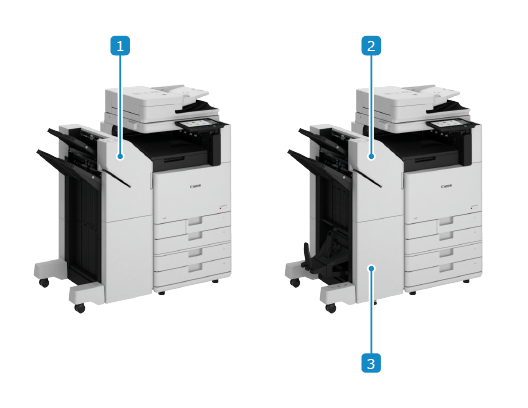
 Staple Finisher-AH and Staple Finisher Lite-B ()
Outputs printed and copied paper. You can staple paper and perform other finishing functions. Staple Finisher-AH, Staple Finisher Lite-B ([Americas]), Booklet Finisher-AH, and Puncher Unit-A
 Booklet Finisher-AH
Outputs printed and copied paper. You can staple paper, fold paper, and use other finishing functions. Staple Finisher-AH, Staple Finisher Lite-B ([Americas]), Booklet Finisher-AH, and Puncher Unit-A
 Puncher Unit-A
Punches holes in paper when installed to the finisher. Staple Finisher-AH, Staple Finisher Lite-B ([Americas]), Booklet Finisher-AH, and Puncher Unit-A
When Inner Finisher-N is installed
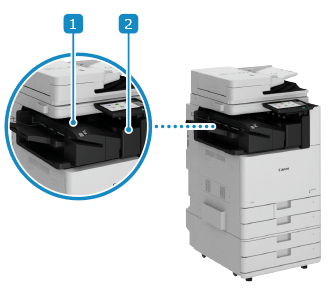 Inner Finisher-N
Outputs printed and copied paper. You can use the stapler and other finishing functions. Inner Finisher-N and Inner Puncher-D
Inner Puncher-DPunches holes in paper when installed to the finisher. Inner Finisher-N and Inner Puncher-D
When other options are installed
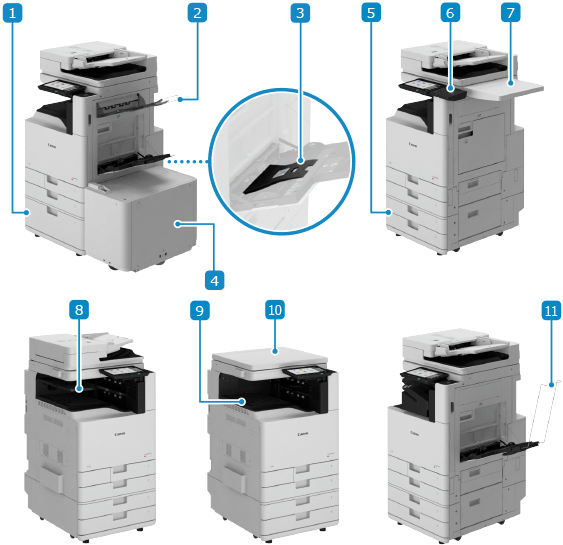 High Capacity Cassette Feeding Unit-G
Enables adding of a large-capacity paper drawer. High Capacity Cassette Feeding Unit-G
Copy Tray-TEnables adding of an output tray on the right side of the machine. Copy Tray-T
Media Adjustment kit-AEnables you to load heavy coated paper in the multi-purpose tray. Media Adjustment kit-A [Europe][Asia/Oceania][Latin America]
* This option is not available in North America.
 Paper Deck Unit-F
Enables adding of a large-capacity paper source for loading large amounts of paper. Paper Deck Unit-F
 Cassette Feeding Unit-AZ
Enables adding of paper drawers. Cassette Feeding Unit-AZ
 Numeric Keypad
Enables use of the hard keys to operate the control panel instead of the on-screen buttons. Numeric Keypad
 Utility Tray-B
Provides space for placing originals. Utility Tray-B
 Inner 2way Tray-M
Enables the use of two output trays, one on the top and one on the bottom when 1st Copy Tray Kit-C is installed. Inner 2way Tray-M
* In Asia/Oceania, 1st Copy Tray Kit-C is standard equipped depending on the region.
 1st Copy Tray Kit-C
Outputs printed and copied paper. 1st Copy Tray Kit-C
* In Asia/Oceania, 1st Copy Tray Kit-C is standard equipped depending on the region.
 Platen Cover-Y

Install this to use only the platen glass when placing originals on the machine. Platen Cover-Y [Europe][Asia/Oceania]
* In Asia/Oceania, the Platen Cover-Y is an optional product. However, depending on the country or region, this product may not be available.
 Long Sheet Feeding Tray-A
 Enables loading of Long Sheet paper. Long Sheet Feeding Tray-A [Asia/Oceania][Americas]
Precautions When Using Options

When the finisher is installed, do not place your hands into areas of the tray where stapling is performed or into the rollers. This can result in injury.
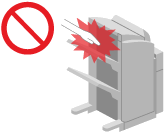
Do not touch the operating parts of the finisher with your hands or fingers. This can result in injury or damage to the finisher.
Do not place your hands in the output area of the finisher when removing paper from the tray of the finisher. The tray may rise, trapping your hand.
IMPORTANT
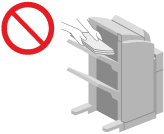
Do not place anything under the tray of the finisher, as the position of the tray moves during copying and printing. This can damage the tray or cause a malfunction.
Do not place anything other than output paper on the tray of the finisher. This can damage the tray.
NOTE
For details about options that can be used together, contact your dealer or service representative.
You can check the options installed to the machine and their functions. Checking the Options Attached to the Machine