 Settings/Registration] on the [Home] screen or other screen. [Check Maintenance Method]
Adding Staples to Staple Finisher-AG and Booklet Finisher-AG
When staples in the staple unit or the saddle stitch unit of Staple Finisher-AG or Booklet Finisher-AG run out, [ ] is displayed at the bottom right of the screen. In this case, replace the staple case with a new one and add more staples.
You can press [] to display a step-by-step video of how to replace the staple case.
] is displayed at the bottom right of the screen. In this case, replace the staple case with a new one and add more staples.You can press [
] to display a step-by-step video of how to replace the staple case.* You can play the replacement procedure video at any time by pressing [ Settings/Registration] on the [Home] screen or other screen. [Check Maintenance Method]
Settings/Registration] on the [Home] screen or other screen. [Check Maintenance Method]Replacing the Staple Case of the Staple Unit
1
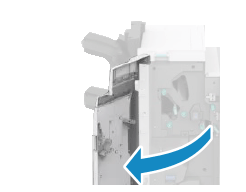
Open the front cover of the finisher.
2
Remove the staple cartridge.
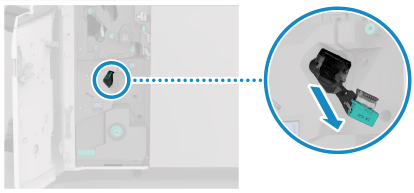
Hold the green knob on the staple cartridge and pull it straight out.
3
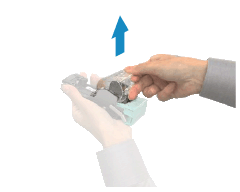
Remove the staple case from the staple cartridge.
4
Remove a new staple case from the box.
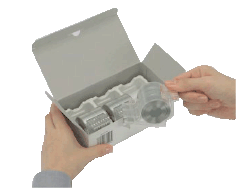
Remove the seal that holds the staples together after you place the staple case into the staple cartridge.
5
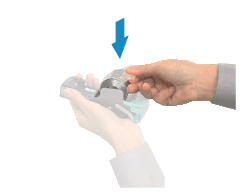
Install the new staple case into the staple cartridge.
6
Install the staple cartridge into the finisher.
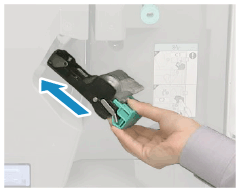
Hold the green knob on the staple cartridge, and firmly push in the cartridge as far as it will go.
7
Close the front cover of the finisher.
Replacing the Staple Case of the Saddle Stitch Unit (For Booklet Finisher-AG Only)
1
Open the front cover of the finisher.
2
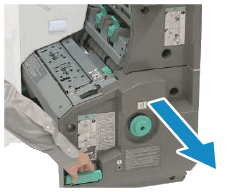
Pull out the saddle stitch unit.
3
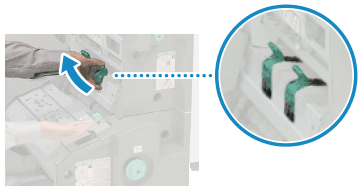
Remove the two staple cartridges.
4
Press the blue parts on both sides of the staple cartridge cover, and open it.
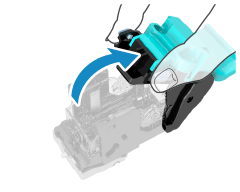
5
Remove the staple case while holding both sides of the staple case.
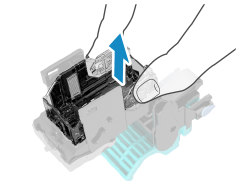
6
Remove a new staple case from the box.
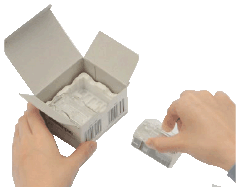
7
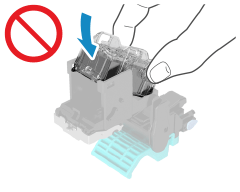
Load the new staple case in the staple cartridge.
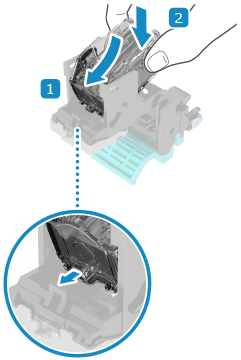
Diagonally insert the tab on the front of the staple case into the hole in the staple cartridge, and push down on the back of the staple case until it clicks into place.
* Make sure to insert the front part of the staple case first. Do not attempt to insert the back side of the staple case first.
* Make sure to insert the front part of the staple case first. Do not attempt to insert the back side of the staple case first.
8
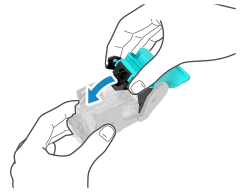
Close the staple cartridge cover.
9
Install the two staple cartridges into the saddle stitch unit.
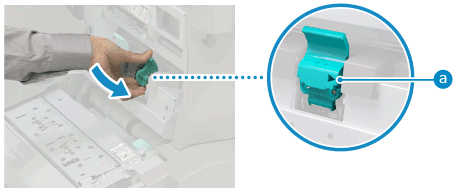
Make sure that the staple cartridges are inserted so that the setting position marks ( ) are aligned.
) are aligned.10
Push in the saddle stitch unit.
11
Close the front cover of the finisher.
NOTE
If the Machine Does Not Staple after Installing a New Staple Case
The staples may not be reaching the front end of the cartridge. Reposition the staples. [Saddle Stitch Staple Repositioning]