Paper Deck Unit-E
When frequently printing large volume documents, install the optional Paper Deck Unit-E. This option reduces the work of loading paper.
If the machine is in Sleep Mode, you may not be able to pull out the paper deck. Tap the display to exit Sleep Mode first, and then pull out the paper deck.
Names of Parts and Their Functions
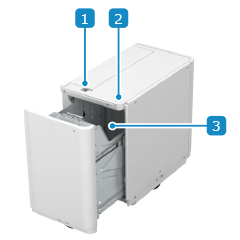
 Release lever
If a paper jam occurs, pull the Paper Deck Unit-E out of the main unit while pressing this lever.
 Open button
Press to pull the paper deck.
 Paper deck
Load the paper.
Specifications
Paper Size, Type, and Basis Weight | |
Paper Capacity | Paper Deck x 1 385 mm (15 1/8") or less in height 4,000 sheets (64 g/m² (17 lb bond)) 3,660 sheets (75 g/m² (20 lb bond)), 80 g/m² (21 lb bond)) |
Dimensions (W x D x H) | 363 mm x 630 mm x 572 mm (14 1/4" x 24 7/8" x 22 1/2") |
Weight | Approx. 34 kg (75.0 lb) |