Er wordt een bericht weergegeven
Als er op het bedieningspaneel een melding verschijnt, selecteer deze dan in onderstaand overzicht en kijk hoe u het probleem kunt oplossen.
23 MEMORY FULL
Er is onvoldoende geheugen om overlappende formulieren en externe tekens te registreren.
Druk op [Fout overslaan] om afdrukken voor te zetten.
Als u de fout overslaat, worden de gegevens die niet geregistreerd konden worden vanwege onvoldoende geheugen, niet afgedrukt.
Het afdrukken annuleren, de printerfunctie initialiseren en opnieuw proberen af te drukken.
Initialisatie van de printerfunctie vergroot het beschikbare geheugen. Hierdoor worden echter alle afdrukgegevens in het geheugen van de machine verwijderd. [Reset printer]
27 JOB REJECT
De opgegeven emulatie bestaat niet.
Druk op [Fout overslaan] om afdrukken voor te zetten.
Als u de fout overslaat, worden de gegevens die de fout hebben veroorzaakt niet afgedrukt.
Wordt de opgegeven emulatie ondersteund door de machine?
Specificeer, indien ondersteund, de bedieningsmodus en probeer opnieuw af te drukken. [Persoonlijkheid]
33 WORK FULL
Afdrukken kon niet worden uitgevoerd omdat het toegewezen werkgeheugen onvoldoende is.
Druk op [Fout overslaan] om afdrukken voor te zetten.
Als u de fout overslaat, worden de gegevens met de weergegeven fout niet correct afgedrukt.
*Geregistreerde gegevens zoals een overlay of macro kunnen worden verwijderd.
Annuleer het afdrukken, initialiseer de machine en probeer opnieuw af te drukken.
Door de machine te initialiseren wordt het beschikbare geheugen vergroot. Hierdoor worden echter alle afdrukgegevens in het geheugen van de machine verwijderd. [Reset printer]
52 IMAGEMODE REJECT
Er zijn afbeeldingsgegevens ontvangen die niet verwerkt kunnen worden tijdens het afdrukken van een afbeelding.
Druk op [Fout overslaan] om afdrukken voor te zetten.
Als u de fout overslaat, worden de gegevens die de fout hebben veroorzaakt niet afgedrukt.
Ondersteunt het printerstuurprogramma de indeling voor afbeeldingsgegevens?
Probeer opnieuw af te drukken met een printerstuurprogramma die de indeling voor afbeeldingsgegevens ondersteunt.
De sitegegevens van Active Directory zijn ongeldig. Neem contact op met systeembeheerder.
De Active Directory-sitegegevens zijn niet correct ingesteld.
Stel de Active Directory-sitegegevens opnieuw in.
Controleer in Remote UI (UI op afstand) of [Timing of Site Information Retrieval] en [Site Access Range] correct zijn ingesteld. Authenticatieserverinformatie registreren
Kan CRL niet controleren.
Het CA-certificaat van de certificeringsinstantie die de certificeringsherroepingslijst (CRL) heeft uitgegeven, kon niet worden geverifieerd.
Registreer het CA-certificaat van de certificeringsinstantie die de Certificeringsintrekkingslijst (CRL) heeft uitgegeven.
D0-nn fout (waarbij "nn" een alfanumeriek teken van twee cijfers is)
De printerfunctie van de machine werkt niet goed vanwege een fout.
Start het apparaat opnieuw op.
Als het bericht na het herstarten van de machine nog steeds wordt weergegeven, noteert u het bericht en neemt u contact op met uw dealer of verkoper.
Kon de nieuwe pincode niet via e-mail verzenden. Controleer de instellingen.
De e-mail om de PIN opnieuw in te stellen of het bijgevoegde bestand met het nieuwe patroon kon niet worden verzonden.
Is het e-mailadres van de ingelogde gebruiker correct ingesteld?
Controleer het e-mailadres van de inloggebruiker. Gebruikersinformatie registreren
Zijn de netwerk- en e-mailinstellingen juist ingesteld?
FF FONT FULL
Kon de lettertype-informatie niet registreren in het opslaggebied voor lettertype-informatie (lettertype-tabel) omdat er te veel lettertypes waren om te registreren.
Druk op [Fout overslaan] om afdrukken voor te zetten.
Als u de fout overslaat, worden de gegevens die niet geregistreerd konden worden, niet correct afgedrukt.
Annuleer het afdrukken, initialiseer de machine en probeer opnieuw af te drukken.
Door de machine te initialiseren wordt het beschikbare geheugen vergroot. Hierdoor worden echter alle afdrukgegevens in het geheugen van de machine verwijderd. [Reset printer]
FM DL SIZE ERROR n (waarbij "n" een alfanumeriek teken van één cijfer is)
De printerfunctie van de machine werkt niet goed vanwege een fout.
Start het apparaat opnieuw op.
Als het bericht na het herstarten van de machine nog steeds wordt weergegeven, noteert u het bericht en neemt u contact op met uw dealer of verkoper.
FM DL SCALE ERROR n (waarbij "n" een alfanumeriek teken van één cijfer is)
De printerfunctie van de machine werkt niet goed vanwege een fout.
Start het apparaat opnieuw op.
Als het bericht na het herstarten van de machine nog steeds wordt weergegeven, noteert u het bericht en neemt u contact op met uw dealer of verkoper.
FM DL FONT MEMORY FULL
De printerfunctie van de machine werkt niet goed vanwege een fout.
Start het apparaat opnieuw op.
Als het bericht na het herstarten van de machine nog steeds wordt weergegeven, noteert u het bericht en neemt u contact op met uw dealer of verkoper.
FM FILE ACCESS ERROR
De printerfunctie van de machine werkt niet goed vanwege een fout.
Start het apparaat opnieuw op.
Als het bericht na het herstarten van de machine nog steeds wordt weergegeven, noteert u het bericht en neemt u contact op met uw dealer of verkoper.
FM SC WORK MEM. ERROR n (waarbij "n" een alfanumeriek teken van één cijfer is)
De printerfunctie van de machine werkt niet goed vanwege een fout.
Start het apparaat opnieuw op.
Als het bericht na het herstarten van de machine nog steeds wordt weergegeven, noteert u het bericht en neemt u contact op met uw dealer of verkoper.
FM ALIGNMENT ERROR
De printerfunctie van de machine werkt niet goed vanwege een fout.
Start het apparaat opnieuw op.
Als het bericht na het herstarten van de machine nog steeds wordt weergegeven, noteert u het bericht en neemt u contact op met uw dealer of verkoper.
FM FONT PARSE ERROR
De printerfunctie van de machine werkt niet goed vanwege een fout.
Start het apparaat opnieuw op.
Als het bericht na het herstarten van de machine nog steeds wordt weergegeven, noteert u het bericht en neemt u contact op met uw dealer of verkoper.
FM FONT MEMORY FULL
De printerfunctie van de machine werkt niet goed vanwege een fout.
Start het apparaat opnieuw op.
Als het bericht na het herstarten van de machine nog steeds wordt weergegeven, noteert u het bericht en neemt u contact op met uw dealer of verkoper.
FM WORK MEMORY ERROR
De printerfunctie van de machine werkt niet goed vanwege een fout.
Start het apparaat opnieuw op.
Als het bericht na het herstarten van de machine nog steeds wordt weergegeven, noteert u het bericht en neemt u contact op met uw dealer of verkoper.
Kon de informatie niet ophalen uit Google Workspace. De instellingsinformatie voor Google Workspace is onjuist. Neem contact op met de systeembeheerder.
De Google Workspace-serverinformatie is niet correct ingesteld.
Controleer de Google Workspace-serverinformatie en wijzig de instellingen zo nodig.
Kon de informatie niet ophalen uit Google Workspace. Er is onvoldoende apparaatinformatie voor toegang. Neem contact op met de systeembeheerder.
De Google Workspace-serverinformatie is niet correct ingesteld.
Controleer de Google Workspace-serverinformatie en wijzig de instellingen zo nodig.
Kon de informatie niet ophalen uit Google Workspace. Er is onvoldoende gebruikersinformatie voor toegang. Neem contact op met de systeembeheerder.
De Google Workspace-serverinformatie is niet correct ingesteld.
Controleer de Google Workspace-serverinformatie en wijzig de instellingen zo nodig.
Kon niet aanmelden omdat er een fout is opgetreden in Google Workspace. Neem contact op met de systeembeheerder.
De machine werkt niet goed door een fout op de Google Workspace-server.
Start het apparaat opnieuw op.
Als het bericht na het herstarten van de machine nog steeds wordt weergegeven, noteert u het bericht en neemt u contact op met uw dealer of verkoper.
IEEE 802.1X Fout. Stel de juiste authenticatieinformatie in.
De verificatiemethode of de verificatiemethode van IEEE 802.1X is niet goed ingesteld.
Stel de Authenticatiemethode en Authenticatie-informatie (sleutel en certificaat, gebruikersnaam, wachtwoord en CA-certificaat) opnieuw in.
IEEE 802.1X-fout. Geen antwoord van de bestemming.
Er is een fout opgetreden tijdens de communicatie met de authenticator (LAN-schakelaar).
Controleer de verbindingsstatus van de uuthenticator (LAN schakelaar).
Controleer de status van de Ethernet-kabel en schakelaar.
Controleer de instellingen voor de authenticatieserver.
IEEE 802.1X-fout. Kan het certificaat niet analyseren.
Analyse van het servercertificaat verzonden vanaf de authenticatieserver is mislukt.
Controleer het certificaat van de verificatieserver, en verander de instelling, indien nodig.
IEEE 802.1X-fout. Het certificaat is onjuist.
Een CA-certificaat dat het certificaat van de verificatieserver ondersteunt, is niet geregistreerd voor het apparaat.
Controleer de certificaatinformatie van de verificatieserver en registreer een ondersteund CA-certificaat.
IEEE 802.1X-fout. Het certificaat is verlopen.
Het servercertificaat dat van de authenticatieserver is verzonden, is verlopen.
Controleer de geldigheidsperiode van het authenticatieservercertificaat.
IEEE 802.1X Fout. Wijzig het authenticatiewachtwoord.
Het wachtwoord is verlopen.
Stel een nieuw wachtwoord in.
IEEE 802.1X Fout. Controleer de authenticatieinstellingen.
De authenticatiemethode die op de machine is ingesteld, komt niet overeen met de methode die op de authenticatieserver is ingesteld.
Controleer de authenticatiemethode die is ingesteld op de authenticatieserver en stel deze opnieuw in.
Stel het IP-adres in.
Het IP-adres van de machine is niet ingesteld.
Stel het IP-adres opnieuw in en start de machine opnieuw op.
Kon de informatie niet ophalen uit Microsoft Entra ID. De instellingsinformatie voor Microsoft Entra ID is onjuist. Neem contact op met de systeembeheerder.
De Microsoft Entra ID-serverinformatie is niet correct ingesteld.
Controleer de Microsoft Entra ID-serverinformatie en wijzig de instellingen indien nodig.
Kon de informatie niet ophalen uit Micrososft Entra ID. Er is onvoldoende apparaatinformatie voor toegang. Neem contact op met de systeembeheerder.
De Microsoft Entra ID-serverinformatie is niet correct ingesteld.
Controleer de Microsoft Entra ID-serverinformatie en wijzig de instellingen indien nodig.
Kon de informatie niet ophalen uit Microsoft Entra ID. Er is onvoldoende gebruikersinformatie voor toegang. Neem contact op met de systeembeheerder.
De Microsoft Entra ID-serverinformatie is niet correct ingesteld.
Controleer de Microsoft Entra ID-serverinformatie en wijzig de instellingen indien nodig.
Kon niet aanmelden omdat er een Microsoft Entra ID-fout is opgetreden. Neem contact op met de systeembeheerder.
De machine werkt niet goed door een fout op de Microsoft Entra ID-server.
Start het apparaat opnieuw op.
Als het bericht na het herstarten van de machine nog steeds wordt weergegeven, noteert u het bericht en neemt u contact op met uw dealer of verkoper.
Er is een Microsoft Entra ID-fout opgetreden. Neem contact op met de systeembeheerder.
De machine werkt niet goed door een fout op de Microsoft Entra ID-server.
Start het apparaat opnieuw op.
Als het bericht na het herstarten van de machine nog steeds wordt weergegeven, noteert u het bericht en neemt u contact op met uw dealer of verkoper.
Kan geen verbinding maken met Microsoft Entra ID. Verificatie van servercertificaat van Microsoft Entra ID mislukt. Neem contact op met de systeembeheerder.
De Microsoft Entra ID-serverinformatie is niet correct ingesteld.
Controleer de Microsoft Entra ID-serverinformatie en wijzig de instellingen indien nodig.
Kan PDF (Indelen naar PDF/A) niet als standaard instellen. Alle andere instellingen zijn ingesteld.
U probeerde de standaardinstellingen voor elke functie te registreren met het PDF-formaat ingesteld op [Indelen naar PDF/A]. U kunt [Indelen naar PDF/A] niet registreren naar de standaardinstellingen.
*U kunt de instellingen registreren als de standaardinstellingen van de machine, maar niet voor elke functie. [Wijzig PDF naar PDF/A]
Controleer de servernaam in de SMB-serverinst.
Een computer of een andere machine met dezelfde naam als de computer waarvan de naam wordt gebruikt om de machine op het netwerk te identificeren, bestaat in de WINS-database of de werkgroep waartoe de machine behoort.
Controleer of de machine is geregistreerd met dezelfde computernaam als de computer of een andere machine.
TCP/IP-fout
Het IP-adres is niet juist ingesteld of kan niet automatisch worden verkregen.
Het IP-adres kan mogelijk niet automatisch worden verkregen met DHCP en Auto IP.
Ook al is het IPv4-adres geconfigureerd om automatisch te worden verworven, als het IP-adres wordt weergegeven als "0.0.0.0", kan het adres niet automatisch worden verworven. Controleer de aansluiting van de Ethernet-kabel en de instellingen van de DHCP-server.
Wanneer u een sublijn gebruikt, moet u het IPv4-adres van de sublijn correct instellen.
Wanneer u het IPv4-adres handmatig instelt, moet u het IPv4-adres correct instellen.
Als u een stateloos adres gebruikt, controleer dan of elk adres is verkregen.
Als er geen adres kan worden verkregen, controleer dan de instellingen van de router en de DHCPv6-server.
*Het kan enkele minuten duren voordat het stateless adres is ingesteld.
Is het adres van de DNS-server juist ingesteld?
Controleer of het adres van de DNS-server correct is ingesteld in IPv4 en IPv6. DNS configureren
Niet mogelijk. Wacht even en probeer het daarna opnieuw.
Er waren onvoldoende TCP/IP-bronnen tijdens of na het continu verzenden van de machine via FTP of Windows (SMB).
Wacht even en probeer het daarna opnieuw.
Wacht even en probeer het daarna opnieuw.
Controleer het TCP/IP.
De TCP of IP van de machine werkt niet.
Controleer de IPv4-adres-, DHCP- en Auto IP-instellingen.
Als u een sublijn gebruikt, controleer dan ook het IPv4-adres en de DHCP-instellingen van de sublijn.
Controleer het TCP/IP. (hoofdlijn)
Het IPv4-adres van de hoofdlijn is ingesteld op "0.0.0.0".
Stel een juiste IPv4-adres in.
Controleer het TCP/IP. (sublijn)
Het IPv4-adres van de sublijn is ingesteld op "0.0.0.0".
Stel een juiste IPv4-adres in.
TLS-fout
De WebDAV-server of proxyserver ondersteunt geen versleutelde TLS-communicatie.
Controleer de WebDAV-serverinstellingen.
Als u met TLS gecodeerde communicatie gebruikt, moet u met TLS gecodeerde communicatie configureren op de WebDAV-server.
Als u een proxyserver gebruikt, controleer dan de instellingen van de proxyserver.
Als u met TLS gecodeerde communicatie gebruikt, moet u met TLS gecodeerde communicatie op de proxyserver configureren.
Kan standaardsleutel niet verwijderen, omdat deze wordt gebruikt door TLS of andere instellingen. Controleer de instellingen.
De sleutel en het certificaat dat u probeerde te verwijderen, worden gebruikt in met TLS gecodeerde communicatie of [Beperk ontvangst voor elke functie] voor de distributie van apparaatinformatie.
Controleer de functies met behulp van TLS-gecodeerde communicatie.
Als een functie de sleutel en het certificaat gebruikt die u probeerde te verwijderen, schakelt u de TLS-gecodeerde communicatie-instelling uit. TLS gebruiken
Stel alle instellingen in [Beperk ontvangst voor elke functie] voor de distributie van apparaatinformatie naar [Aan].
Universal Print: Servercommunicatiefout opgetreden.
Er kan een probleem zijn met de netwerkverbinding of de server.
Controleer de netwerkverbindingsstatus en -instellingen.
Configureer de netwerkinstellingen opnieuw als de machine niet met een netwerk verbonden is.
Controleer de netwerksleutel (wachtwoord) van de draadloze LAN-router en configureer de instellingen correct op de machine.
Is er een fout op de server?
Controleer of de server goed functioneert.
Blokkeert een firewall de communicatie met de server?
Firewall-blokkering uitschakelen.
Universal Print: Kon niet met server verifiëren.
Er is een fout opgetreden bij de serverauthenticatie.
Start het apparaat opnieuw op.
Als het bericht na het herstarten van de machine nog steeds wordt weergegeven, noteert u het bericht en neemt u contact op met uw dealer of verkoper.
Universal Print: Het certificaat is verlopen.
Het certificaat is verlopen.
Verwijder de machine van Microsoft Entra ID en de computer, registreer de machine opnieuw en werk het certificaat bij.
Verwijder de machine van Microsoft Entra ID en de computer, registreer de machine opnieuw en werk het certificaat bij.
Universal Print: Er is een interne fout opgetreden.
De machine werkt niet goed door een fout.
Start het apparaat opnieuw op.
Als het bericht na het herstarten van de machine nog steeds wordt weergegeven, noteert u het bericht en neemt u contact op met uw dealer of verkoper.
Universal Print: De printer is niet geregistreerd.
Kan niet communiceren met de machine omdat deze is verwijderd uit Microsoft Entra ID.
Registreer de machine opnieuw bij Microsoft Entra ID.
Registreer de machine opnieuw bij Microsoft Entra ID.
Controleer op USB-poort aangesloten LAN-adapter.
Er zijn meerdere USB-LAN-adapters aangesloten of de USB-LAN-adapter is niet aangesloten of wordt niet herkend.
Controleer de aansluiting van de USB-LAN-adapter.
Start de machine opnieuw op als u de USB-LAN-adapter opnieuw hebt aangesloten.
De opgegeven x- en y-waarden zijn instellingen die niet kunnen worden gecombineerd. Voer de instellingen opnieuw in. Zie de handleiding voor meer informatie.
Er is een niet-ondersteunde getalcombinatie voor X en Y opgegeven.
Controleer de X- en Y-waarde en voer de instellingen opnieuw in.
Controleer de X- en Y-waarde en voer de instellingen opnieuw in.
XPS Print Range Error
Er zijn geen pagina's die in het opgegeven afdrukbereik kunnen worden verwerkt.
Geef het paginabereik correct op en probeer opnieuw af te drukken.
Geef het paginabereik correct op en probeer opnieuw af te drukken.
XPS Image Data Error
Kan de beeldgegevens niet uitbreiden.
Vervang de afbeeldingsgegevens in het XPS-bestand en probeer opnieuw af te drukken.
Vervang de afbeeldingsgegevens in het XPS-bestand en probeer opnieuw af te drukken.
XPS Spool Memory Full
Er is onvoldoende geheugen om de XPS-gegevens te verwerken.
Herstart de machine en probeer opnieuw af te drukken. Als u nog steeds niet kunt afdrukken, verdeel de pagina's dan in meerdere bestanden en druk deze afzonderlijk af.
Herstart de machine en probeer opnieuw af te drukken. Als u nog steeds niet kunt afdrukken, verdeel de pagina's dan in meerdere bestanden en druk deze afzonderlijk af.
XPS Data Error
Er is een ongeldige opdracht opgegeven vanwege corrupte gegevens of een andere factor en de verwerking kan niet doorgaan.
Probeer de XPS-gegevens af te drukken in een indeling die wordt ondersteund door de machine.
Probeer de XPS-gegevens af te drukken in een indeling die wordt ondersteund door de machine.
XPS Unsupport Image Err
Gegevens bevatten een niet-ondersteunde gegevensindeling.
Converteer de gegevens naar TIFF- of JPEG-formaat en probeer opnieuw af te drukken.
Converteer de gegevens naar TIFF- of JPEG-formaat en probeer opnieuw af te drukken.
XPS Font Error
Kan de lettertypegegevens niet analyseren.
Vervang de lettertypegegevens in het XPS-bestand en probeer opnieuw af te drukken.
Vervang de lettertypegegevens in het XPS-bestand en probeer opnieuw af te drukken.
XPS Page Data Error
Kan geen pagina's genereren omdat de beschrijving niet correct is.
Probeer de XPS-gegevens af te drukken in een indeling die wordt ondersteund door de machine.
Probeer de XPS-gegevens af te drukken in een indeling die wordt ondersteund door de machine.
XPS Memory Full
Er is onvoldoende geheugen om de XPS-gegevens te verwerken.
Druk op [Fout overslaan] om afdrukken voor te zetten.
Als u de fout overslaat, wordt de pagina die de fout veroorzaakte mogelijk niet correct afgedrukt.
U hebt geen bevoegdheden om de XXX-pagina te openen.
Een niet-geautoriseerde gebruiker heeft geprobeerd in te loggen.
Log in als een geautoriseerde gebruiker.
Log in als een geautoriseerde gebruiker.
De account is verlopen. Neem contact op met de systeembeheerder.
Het certificaat of de account kan verlopen zijn.
Controleer de geldigheidsduur van het certificaat dat op de machine is geregistreerd.
Als het certificaat verlopen is, registreer dan een nieuw certificaat. Een sleutel en certificaat of CA-certificaat registreren van een verlenende bevoegde instantie
Controleer de geldigheidsperiode van de account.
Als de account is verlopen, stelt u de geldigheidsperiode van de gebruikersaccount opnieuw in. Gebruikersinformatie registreren op een lokaal apparaat
Verbindingsfout toegangspunt. Contr. gegevens draadloos LAN.
Het toegangspunt is niet gevonden.
Controleer de draadloze LAN-instellingen.
AP-modus: beëindigd vanwege een fout.
Er is langer dan drie minuten geen gegevensoverdracht van of naar het verbonden mobiel apparaat geweest.
Maak opnieuw verbinding met het mobiele apparaat.
AP-modus: beëindigd omdat geen ander apparaat is gevonden.
Er kon geen koppelbaar mobiel apparaat worden gevonden.
Schakel wifi in op het mobiel apparaat en probeer opnieuw verbinding te maken.
Schakel Wi-Fi in op het mobiele apparaat als dit is uitgeschakeld.
Plaats het mobiele apparaat dichter bij de machine en probeer opnieuw verbinding te maken. Een mobiel apparaat rechtstreeks met de machine verbinden (directe verbinding)
Als u geen goede verbinding kunt maken met de machine, neem dan contact op met uw dealer of servicevertegenwoordiger.
* Afhankelijk van het mobiele apparaat werkt het mogelijk niet correct.
AP-modus: max.aantal apparaten voor aansluiting is bereikt.
Kan geen verbinding maken omdat het maximum aantal mobiele apparaten is bereikt waarmee tegelijkertijd verbinding kan worden gemaakt.
Ontkoppel een onnodig mobiel apparaat.
Nadat u de verbinding met een ander mobiel apparaat hebt verbroken, probeert u opnieuw verbinding te maken. Een mobiel apparaat rechtstreeks met de machine verbinden (directe verbinding)
AP-modus: aangesloten op andere apparaten.
Kan geen verbinding maken omdat de machine verbonden is met een ander mobiel apparaat.
Maak opnieuw verbinding nadat de verbinding met het andere mobiel apparaat is verbroken. Een mobiel apparaat rechtstreeks met de machine verbinden (directe verbinding)
Maak opnieuw verbinding nadat de verbinding met het andere mobiel apparaat is verbroken. Een mobiel apparaat rechtstreeks met de machine verbinden (directe verbinding)
Cannot start this application because system resources (memory, threads, sockets, file descriptors, disk space, or screen size) required to start the application may not be available. <Resources>
De toepassing kan niet worden gebruikt omdat de vereiste systeembronnen, zoals geheugen of schijfcapaciteit, mogelijk niet beschikbaar zijn.
Als u andere toepassingen sluit, kunt u mogelijk de gewenste toepassing gebruiken.
Als u andere toepassingen sluit, kunt u mogelijk de gewenste toepassing gebruiken.
Cannot download application logs because application logs do not exist.
Het toepassingslogboek bestaat niet.
Het logboek kan niet worden gebruikt omdat het niet bestaat. Druk op [Terug] om terug te keren naar het vorige scherm.
Het logboek kan niet worden gebruikt omdat het niet bestaat. Druk op [Terug] om terug te keren naar het vorige scherm.
The contents of the file for the application to install are incorrect or information is missing. Check the file.
De toepassing kan niet geïnstalleerd worden omdat de inhoud van het opgegeven bestand onjuist is of omdat er informatie ontbreekt.
Als de inhoud van het bestand onjuist is, kan de toepassing niet worden geïnstalleerd. Als u na het controleren van de bestandsinhoud nog steeds problemen ondervindt, neem dan contact op met de applicatieontwikkelaar of de ondersteuningsafdeling van de applicatie.
Als de inhoud van het bestand onjuist is, kan de toepassing niet worden geïnstalleerd. Als u na het controleren van de bestandsinhoud nog steeds problemen ondervindt, neem dan contact op met de applicatieontwikkelaar of de ondersteuningsafdeling van de applicatie.
The contents of the file for the license to install are incorrect or information is missing. Check the file.
Het licentiebestand kan niet worden geïnstalleerd omdat de inhoud van het opgegeven bestand onjuist is of omdat er informatie ontbreekt.
Als de inhoud van het bestand onjuist is, kan het licentiebestand niet worden geïnstalleerd. Als u na het controleren van de bestandsinhoud nog steeds problemen ondervindt, neem dan contact op met de applicatieontwikkelaar of de ondersteuningsafdeling van de applicatie.
Als de inhoud van het bestand onjuist is, kan het licentiebestand niet worden geïnstalleerd. Als u na het controleren van de bestandsinhoud nog steeds problemen ondervindt, neem dan contact op met de applicatieontwikkelaar of de ondersteuningsafdeling van de applicatie.
Risico op beveiligingsprobl. tijdens internetverb. is toegenomen.
Ongeautoriseerde toegang vanaf de Remote UI (UI op afstand) is mogelijk.
Het gebruik van tweefactorauthenticatie voor de Remote UI (UI op afstand) wordt aanbevolen.
|
Meld u als beheerder aan bij de Remote UI (UI op afstand)
 klik op [Settings/Registration] [User Management] [Authentication Management] [Basic Settings] [Edit] selecteer [All Users] of [Administrators Only] voor [Always Require Two-Factor Authentication] in [Remote UI Authentication] klik op [Settings/Registration] [User Management] [Authentication Management] [Basic Settings] [Edit] selecteer [All Users] of [Administrators Only] voor [Always Require Two-Factor Authentication] in [Remote UI Authentication] |
* Als u niet van plan bent tweefactorauthenticatie te gebruiken en u wilt voorkomen dat dit bericht verschijnt, schakelt u de melding uit wanneer er een internetbeveiligingsprobleem wordt gedetecteerd.
Could not delete application logs because an error occurred.
Het logboek kan niet worden verwijderd omdat er een onbekende fout is opgetreden.
Druk op [Terug] om terug te keren naar het vorige scherm.
Druk op [Terug] om terug te keren naar het vorige scherm.
Could not download application logs because an error occurred.
Het logboek kan niet worden gedownload omdat er een onbekende fout is opgetreden.
Druk op [Terug] om terug te keren naar het vorige scherm.
Druk op [Terug] om terug te keren naar het vorige scherm.
Could not delete authentication information because an error occurred.
De verificatiegegevens kunnen niet worden verwijderd omdat er een onbekende fout is opgetreden.
Neem contact op met uw dealer of verkoper.
Neem contact op met uw dealer of verkoper.
Could not set authentication information because an error occurred.
De authenticatiegegevens konden niet worden ingesteld omdat er een onbekende fout is opgetreden.
Neem contact op met uw dealer of verkoper.
Neem contact op met uw dealer of verkoper.
Er is een fout opgetreden. Neem contact op met de systeembeheerder.
De geselecteerde gebruiker is al verwijderd of er is een onverwachte fout opgetreden.
Log opnieuw in, of log in met beheerdersrechten en bewerk de gebruikersinformatie.
Als u niet kunt inloggen, neem dan contact op met de beheerder.
Log opnieuw in, of log in met beheerdersrechten en bewerk de gebruikersinformatie.
Als u niet kunt inloggen, neem dan contact op met de beheerder.
Geen respons.
Het verzenden kon niet worden uitgevoerd omdat er een serverfout of een TCP/IP-fout is opgetreden.
Controleer de netwerkverbindingsstatus en -instellingen.
Configureer de netwerkinstellingen opnieuw als de machine niet met een netwerk verbonden is.
Is er een fout op de server?
Controleer of de server goed functioneert.
Heroverweeg uw gebruiksomgeving voor aanbev. veiligheidsinst.
De gebruiksomgeving is gecontroleerd in de Aanbevolen beveiligingsinstellingen voor gebruiksomgeving, of het aanbevelingsresultaat is gewijzigd vanwege een wijziging in de verbindingsomgeving.
Het wordt aanbevolen dat u de aanbevolen gebruiksomgeving controleert en indien nodig de beveiligingsinstelling wijzigt.
* Als u niet van plan bent de beveiligingsinstellingen te wijzigen en wilt voorkomen dat dit bericht verschijnt, schakelt u de melding uit wanneer de aanbevolen gebruiksomgeving wordt bijgewerkt.
Kan de instellingen niet oproepen, omdat de functie voor de knop niet bestaat.
Er werd een persoonlijke of gedeelde knop gebruikt met een functie die niet door de machine wordt ondersteund.
Registreer de persoonlijke of gedeelde knop opnieuw op de machine.
Als u een persoonlijke of gedeelde knop die u van een andere multifunctionele Canon-machine hebt geïmporteerd, niet kunt gebruiken, registreert u de knop opnieuw op deze machine. Knoppen aan het scherm [Home] toevoegen (persoonlijke en gedeelde knoppen)
Kan de instellingen niet ophalen omdat de functie voor de knop uitgeschakeld is. Schakel de functie in en probeer het opnieuw.
De handeling kon niet worden uitgevoerd door op een knop te drukken omdat de te gebruiken functie is gestopt.
Schakel de stopfunctie in en druk nogmaals op de knop.
Schakel de stopfunctie in en druk nogmaals op de knop.
Aangepaste instell. synchroniseren: sommige instell. zijn beperkt.
De servermachine stond uit of werkt niet goed tijdens het synchroniseren van gepersonaliseerde gegevens.
*Door een fout in de synchronisatiegegevens kunnen de instellingen tijdens de berichtweergave mogelijk niet correct zijn uitgevoerd.
Is de servermachine gestart?
Start de servermachine als deze nog niet is gestart.
Is de servermachine klaar voor verbinding?
Als de Ethernet-kabel goed is aangesloten, controleert u de status en instellingen van de netwerkverbinding van de servermachine.
Aangepaste instellingen synchroniseren: een fout is opgetreden.
Er is een fout opgetreden in het synchronisatiestartproces.
Controleer de instellingen en synchronisatiestatus van de clientmachine.
Controleer of het adres van de servermachine waarmee u verbinding wilt maken correct is.
Controleer of de synchronisatie is gestart en start deze als deze is gestopt. Synchronisatie starten en stoppen (clientmachine)
Start het apparaat opnieuw op.
Als het probleem ook na het opnieuw opstarten blijft bestaan, stuur dan een ping-commando naar het IP-adres dat als verbindingsbestemming moet worden ingesteld om te zien of er een fout is opgetreden.
Synch. aangepaste instellingen: synchronisatie inschakelen...
Het proces voor het starten van de synchronisatie van de aangepaste instellingen wordt uitgevoerd.
Wacht even tot het proces voltooid is.
Wacht even tot het proces voltooid is.
Synch. aangepaste instell.: meld opnieuw aan voor synchronisatie.
De synchronisatiegegevens zijn inconsistent tussen de server en de clientmachines die worden gebruikt om de aangepaste instellingen te synchroniseren.
Log uit en log opnieuw in.
Log uit en log opnieuw in.
Aangepaste instellingen synchroniseren: kan server niet vinden.
De servermachine die wordt gebruikt om de aangepaste instellingen te synchroniseren, kon niet worden gevonden met automatische opsporing.
Is de servermachine gestart?
Start de servermachine als deze nog niet is gestart.
Is de netwerkkabel losgekoppeld van de servermachine?
Als er geen probleem is met de netwerkkabel, controleer dan de netwerkinstellingen.
Controleer de instellingen en synchronisatiestatus van de clientmachine.
Controleer of de servercomputer voldoet aan de voorwaarden voor automatische detectie. Als automatische opsporing niet kan worden gebruikt, stelt u het adres in van de servermachine waarmee u verbinding wilt maken en de zoekdiepte (router). Synchronisatie starten en stoppen (clientmachine)
Controleer of de synchronisatie is gestart en start deze als deze is gestopt. Synchronisatie starten en stoppen (clientmachine)
Start het apparaat opnieuw op.
Aangepaste instellingen synchroniseren: serververificatiefout.
Kan geen verificatie uitvoeren op de servermachine.
Hebt u de juiste gebruikersaccount voor verificatie ingesteld op de clientmachine?
Stel een gebruiker met beheerdersrechten in op de servermachine. Synchronisatie starten op een clientmachine
Is de synchronisatie van de aangepaste instellingen gestopt?
Start het apparaat opnieuw op.
Aangepaste instell. synchroniseren: kan server niet identificeren.
Meerdere servermachines die werden gebruikt om de aangepaste instellingen te synchroniseren, werden gevonden met automatische ontdekking.
Om de identificatie van de servermachine in te schakelen, stelt u de informatie van de servermachine in waarmee verbinding moet worden gemaakt op de clientmachine of stopt u alle onnodige servermachines.
Stel op de clientmachine het adres in van de servermachine waarmee u verbinding wilt maken en de zoekdiepte (router). Synchronisatie starten en stoppen (clientmachine)
Onnodige servermachines stoppen.
Zorg ervoor dat er slechts één servermachine op hetzelfde netwerk draait.
Controleer de panelen. / Controleer of de deksels zijn gesloten.
De klep van de optionele apparatuur staat open.
Sluit de klep van de optionele apparaten.
Sluit de klep van de optionele apparaten.
An error occurred when auto exporting the audit log.
Kon het auditlogboek niet exporteren. Er is een fout opgetreden op de server, de machine kan geen verbinding maken met de server of de instellingen voor automatisch exporteren zijn niet correct.
Is er een fout op de server?
Controleer of de server goed functioneert.
Controleer de netwerkverbindingsstatus en -instellingen.
Configureer de netwerkinstellingen opnieuw als de machine niet met een netwerk verbonden is.
Is automatisch exporteren juist ingesteld?
Genereren van sleutel apparaathandtekening is mislukt. Stel het e-mailadres in Communicatie-instellingen in.
Het e-mailadres van de machine werd niet ingesteld bij het gebruik van een apparaathandtekening.
Stel het e-mailadres van de machine in voordat u een apparaatsleutel voor de handtekening genereert.
The function may be stopped. Buttons could not be imported.
De geïmporteerde knoppen bevatten knoppen met niet-ondersteunde functies.
Controleer de machine om er zeker van te zijn dat alle benodigde knoppen zijn geïmporteerd.
Controleer de machine om er zeker van te zijn dat alle benodigde knoppen zijn geïmporteerd.
Routing-registratie mislukt. Controleer inst. voor Statische routing.
De statische routeringsinstellingen bevatten een entry die niet geregistreerd kon worden in de routeringstabel.
Controleer of het IP-adres en het gateway-adres voor statische routing juist zijn ingesteld.
Verwijder het origineel van de glasplaat.
Er bleef een origineel achter op de glasplaat.
Verwijder het origineel van de glasplaat en plaats een nieuw origineel op de glasplaat.
Verwijder het origineel van de glasplaat en plaats een nieuw origineel op de glasplaat.
Origineelscanvlak (Aanvoer) is verontreinigd.
Het scangebied van de documentinvoer is vuil door stof of ander vuil.
Reinig het scanvlak voor documenten.
Origineelscanvlak (glazen strook) is verontreinigd.
De dunne glasstrip van het scangebied van de documentinvoer is vuil door stof of ander vuil.
Reinig het scanvlak voor documenten.
Breng originelen terug in juiste volgorde en druk daarna op [Start].
Het scannen is geannuleerd omdat de invoer op een onbekend probleem stuitte.
Reset alle originelen en druk op [ Start].
Start].
* Als dit bericht verschijnt nadat u een papierstoring bij het origineel hebt verholpen en de machine het origineel per ongeluk heeft herkend als een geniet origineel, drukt u op [Sensor voor diagonaal ingevoerde originelen tijdelijk 'Uit' zetten], en druk vervolgens op [ Start].
Start].Zet de originelen terug in de juiste volgorde en druk daarna op [Start]. (De maximale gegevensgrootte van het gescande origineel is overschreden. Instellingen worden automatisch gecorrigeerd en deoriginelen worden opnieuw gescand.)
Het scannen is geannuleerd omdat de hoeveelheid gegevens van het gescande origineel groter is dan de ingestelde limiet van de machine.
Reset alle originelen en druk op [ Start].
Start].
*Als het bericht blijft verschijnen, kunt u mogelijk toch scannen door de scherpte lager in te stellen en het type origineel in te stellen op [Tekst].
The device is currently being used by another user. Wait a while, and then try to perform the operation again.
Een andere gebruiker gebruikt de machine.
Wacht even en probeer het daarna opnieuw.
Wacht even en probeer het daarna opnieuw.
Het aantal zoekresultaten is hoger dan de limiet. Wijzig zoekcondities en probeer het opnieuw.
Het aantal bestemmingen dat aan de zoekvoorwaarden voldoet, overschrijdt de zoeklimiet.
Wijzig de zoekvoorwaarden en zoek opnieuw.
Verhoog het maximumaantal te zoeken bestemmingen.
De zoekvoorwaarde bevat tekens die niet met de geselecteerde server kunnen worden gebruikt.
De zoekvoorwaarden bevatten tekens of een combinatie van tekens die niet kunnen worden gebruikt.
Bevatten de zoekvoorwaarden een backslash ("\")?
Verwijder de backslash en zoek opnieuw.
Bevatten de zoekvoorwaarden een juiste combinatie van haakjes en correct geplaatste sterretjes?
Controleer het volgende en zoek opnieuw:
Staan er evenveel haakjes aan het begin als aan het einde ("(" en ")")?
Staat het sterretje ("*") correct tussen haakjes ("( )")?
Bevatten de zoekvoorwaarden niet-ASCII-codekarakters?
Wanneer [LDAP-serverversie en tekencode] is ingesteld op [ver.2 (JIS)], kunt u alleen ASCII-code (0x20 tot 0x7E) tekens gebruiken. Verwijder de verboden tekens en zoek opnieuw.
Fout tijdens de controle.
Het wachtwoord is onjuist.
Registreer het juiste certificaat en configureer de instellingen opnieuw.
Deze CRL is ongeldig.
De certificeringsherroepingslijst (CRL) kan beschadigd zijn, of u gebruikt een handtekeningalgoritme dat niet door de machine wordt ondersteund.
Een correcte Certificeringsintrekkingslijst (CRL) registreren.
Deze CRL is verlopen.
De geldigheidsdatum van de certificaatintrekkingslijst (CRL) kan worden ingesteld op een datum in de toekomst.
Controleer de geldigheidsdatum van de certificaatintrekkingslijst (CRL) die op de machine is geregistreerd.
Als de geldig vanaf datum is ingesteld op een datum in de toekomst, gebruik dan de certificaatintrekkingslijst (CRL) na de geldig vanaf datum. Een CRL registreren om een certificaat te verifiëren
Controleer of de datum en tijd correct zijn ingesteld op de machine
This application does not support the security policy function.
De MEAP-toepassing die u probeerde te starten, werkt mogelijk niet volgens het beveiligingsbeleid van de machine.
Controleer de beveiligingsfuncties van de toepassing om te bepalen of u de toepassing wilt gebruiken.
Controleer de beveiligingsfuncties van de toepassing om te bepalen of u de toepassing wilt gebruiken.
Kan niet registreren omdat het algoritme van deze sleutel niet wordt ondersteund.
U probeerde een sleutel- en certificaatbestand van een niet-ondersteund encryptie-algoritme te registreren.
Een sleutel- en certificaatbestand van een ondersteund versleutelingsalgoritme registreren.
Kan niet als standaardsleutel instellen omdat deze sleutel onjuist of ongeldig is.
De sleutel die voor de machine geregistreerd is, is beschadigd en kan niet worden ingesteld.
De sleutel opnieuw registreren.
Dit certificaat is ingetrokken.
Het certificaat is opgenomen in de CRL (Certificate Revocation List).
Een nieuw certificaat registreren.
Dit certificaat is ongeldig.
Het wachtwoord is onjuist.
Registreer het juiste certificaat en configureer de instellingen opnieuw.
Dit certificaat is verlopen.
Het certificaat is mogelijk verlopen.
Controleer de geldigheidsduur van het certificaat dat op de machine is geregistreerd.
Als het certificaat is verlopen, registreert u een geldig certificaat. Een sleutel en certificaat of CA-certificaat registreren van een verlenende bevoegde instantie
Controleer of de datum en tijd correct zijn ingesteld op de machine
Kan deze opdracht niet afdrukken.
De opdracht is geannuleerd omdat het maximale aantal bladen dat kan worden geniet is bereikt.
Controleer het aantal bladen dat geniet kan worden en probeer het opnieuw.
*U kunt de verwerkingsmethode wijzigen wanneer het maximum aantal bladen is bereikt dat kan worden geniet.
The specified application cannot be installed on this device.
U probeerde een toepassing te installeren die geen systeemtoepassing voor uitbreiding is.
Geef aan welke toepassing u opnieuw wilt installeren.
Geef aan welke toepassing u opnieuw wilt installeren.
Geen respons van de server. Controleer de instellingen.
De opgegeven server is mogelijk niet correct ingesteld, de stroom is uitgeschakeld of er zijn onvoldoende bronnen.
Wacht even en geef de server opnieuw op. Als de server nog steeds niet reageert, selecteer dan een andere server.
Wacht even en geef de server opnieuw op. Als de server nog steeds niet reageert, selecteer dan een andere server.
Kan zoeken niet starten omdat de versie-instellingen van de server onjuist zijn. Controleer de instellingen.
De LDAP-versie-instellingen op de LDAP-server en de machine komen niet overeen.
Controleer de combinatie van de LDAP-serverversie en de tekencode.
Controleer de LDAP-server en stel de LDAP-versie in. LDAP-servers registreren
Controleer de server.
Kan niet communiceren met de WebDAV-server of de WebDAV-server heeft onvoldoende schijfruimte.
Controleer de instellingen voor WebDAV-server en proxyserver.
Configureer de instellingen correct zodat u via een proxy toegang krijgt tot de WebDAV-server.
Configureer de instellingen om toegang te verlenen tot de verzendbestemming.
Het is mogelijk dat de proxyserver geen verbinding kan maken met de upstreamserver. Controleer of de instellingen geconfigureerd zijn om communicatie mogelijk te maken.
Schakel de verdeelde gefragmenteerde verzending uit.
Controleer de schijfruimte van de WebDAV-server.
Zorg ervoor dat er voldoende schijfruimte is op de WebDAV-server voor aanvragen vanaf de machine.
Het juiste papierformaat, XX, is niet beschikbaar.
Papier van het optimale formaat is niet geplaatst, of er is papier geplaatst van een papiersoort die niet kan worden geselecteerd met automatische papierbronselectie.
*Het papierformaat wordt weergegeven in XX van het bericht.
Plaats papier van het weergegeven formaat.
De papierbron handmatig opgeven.
Geef de papierbron op waar het papier van het weergegeven formaat is geplaatst.
Configureer de instellingen om automatisch de papierbron te selecteren waarop papier van het optimale formaat is geplaatst.
*Als het selectievakje [Geef papiertype aan] is uitgeschakeld tijdens het kopiëren, wordt de papierbron alleen geselecteerd op basis van het papierformaat, zelfs als de papiersoort anders is. De juiste papierbron gebruiken voor elke functie
Verb. met sublijn verbroken door subnetmaskerconflict.
Er is een netwerkadresconflict tussen de hoofdlijn en de sublijn.
Controleer de instellingen van het IP-adres en subnetmasker op de hoofdlijn en sublijn.
Er is een niet-ondersteunde bekabelde LAN-adapter aangesloten.
De USB-LAN-adapter is niet aangesloten, of er is een USB-LAN-adapter aangesloten die niet geschikt is voor de machine.
Controleer de aansluiting van de USB-LAN-adapter.
De juiste USB-LAN-adapter voor de machine.
Neem contact op met uw dealer of verkoper voor meer details over geschikte USB-LAN-adapters.
Er zijn teveel subdirectories.
De hiërarchie is te diep en overschrijdt het aantal tekens dat kan worden ingesteld.
Een andere bestemming opgeven.
Een andere bestemming opgeven.
Verwijder al het uitvoerpapier.
Het opvangblad is vol.
Verwijder al het uitvoerpapier uit het opvangblad.
Verwijder al het uitvoerpapier uit het opvangblad.
Cannot install this application because an applet included in the specified application has exceeded the area that can be displayed in the device panel.
De toepassing kan niet worden geïnstalleerd omdat de weergave van het applet groter is dan het gebied dat op het scherm van de machine kan worden weergegeven.
Installeer een toepassing met een applet die in het weergavegebied van de machine past.
Installeer een toepassing met een applet die in het weergavegebied van de machine past.
The following information is missing in file for the specified application. Check the file. <Missing information>
De toepassing kan niet geïnstalleerd worden omdat het bestand niet de vereiste informatie voor de toepassing bevat.
Als u nog steeds problemen ondervindt nadat u de inhoud van het bestand hebt gecontroleerd, neemt u contact op met de ontwikkelaar van de toepassing of de ondersteuningsafdeling voor de toepassing over de ontbrekende informatie die op het scherm wordt weergegeven.
Als u nog steeds problemen ondervindt nadat u de inhoud van het bestand hebt gecontroleerd, neemt u contact op met de ontwikkelaar van de toepassing of de ondersteuningsafdeling voor de toepassing over de ontbrekende informatie die op het scherm wordt weergegeven.
The specified application does not support this device.
De opgegeven toepassing kan niet worden geïnstalleerd op de machine.
Sommige toepassingen kunnen alleen op bepaalde modellen geïnstalleerd worden. Installeer toepassingen die door de machine worden ondersteund.
Sommige toepassingen kunnen alleen op bepaalde modellen geïnstalleerd worden. Installeer toepassingen die door de machine worden ondersteund.
The contents of the specified file are incorrect or information is missing. Check the file.
Het opgegeven bestand is geen licentiebestand, of er is onvoldoende bestandsinformatie.
Geef een correct licentiebestand op.
Geef een correct licentiebestand op.
Cannot find the specified application. It may have been uninstalled by another user.
De opgegeven toepassing is niet op de machine geïnstalleerd.
Druk op [Terug] om terug te keren naar het vorige scherm.
Druk op [Terug] om terug te keren naar het vorige scherm.
The contents of the specified file may be incorrect.
U probeerde een knop te registreren door een ander bestand op te geven bij het importeren.
Geef het juiste bestand op en importeer opnieuw.
Geef het juiste bestand op en importeer opnieuw.
The specified license does not match this device. Specify an installable license.
Het opgegeven licentiebestand kan niet op de machine geïnstalleerd worden.
Geef een licentiebestand op dat door de machine wordt ondersteund.
Geef een licentiebestand op dat door de machine wordt ondersteund.
De standaardsleutel is niet ingesteld. Controleer TLS-instellingen.
De sleutel en het certificaat (TLS-servercertificaat) zijn niet geregistreerd.
Stel de sleutel en het certificaat in die u wilt gebruiken voor met TLS gecodeerde communicatie.
De standaardsleutel is niet ingesteld. Controleer de Lijst sleutel en certificaatinstellingen bij de Certificaatinstellingen.
De sleutel en het certificaat (TLS-servercertificaat) zijn niet geregistreerd.
Registreer de sleutel en het certificaat die u wilt gebruiken voor met TLS gecodeerde communicatie.
De combinatie van de toegestane versie en het geselecteerde algoritme past niet. Voer de instellingen opnieuw in.
De combinatie van de TLS-versie en het algoritme kan niet worden ingesteld.
Controleer de combinatie van de TLS-versie en het algoritme en stel deze opnieuw in.
Bekabld. LAN-adapt. die niet gebruikt kan worden, is aangesloten.
Er is een USB-LAN-adapter aangesloten die niet op de machine kan worden gebruikt.
Neem contact op met uw dealer of servicevertegenwoordiger over bruikbare USB-LAN-adapters.
Neem contact op met uw dealer of servicevertegenwoordiger over bruikbare USB-LAN-adapters.
Kon certificaat niet bevestigen.
Kon het CA-certificaat van de certificeringsinstantie niet verifiëren.
Registreer een CA-certificaat dat is uitgegeven door een certificeringsinstantie.
Informatie over de aanbevolen gebruiksomgeving is bijgewerkt.
De gebruiksomgeving is gecontroleerd in de Aanbevolen beveiligingsinstellingen voor gebruiksomgeving, of het aanbevelingsresultaat is gewijzigd vanwege een wijziging in de verbindingsomgeving.
Het wordt aanbevolen dat u de aanbevolen gebruiksomgeving controleert en indien nodig de beveiligingsinstelling wijzigt.
* Als u niet van plan bent de beveiligingsinstellingen te wijzigen en wilt voorkomen dat dit bericht verschijnt, schakelt u de melding uit wanneer de aanbevolen gebruiksomgeving wordt bijgewerkt.
Intern geheugen dient te worden vervangen. (Bel service.)
De opslag is defect of er is geen opslag geïnstalleerd.
Neem contact op met uw dealer of verkoper.
Neem contact op met uw dealer of verkoper.
Kon opdracht niet uitvoeren omdat de gescande originelen allemaal blanco pagina's waren.
Het gescande origineel bleek alleen blanco pagina's te bevatten.
Als het origineel pagina's bevat die niet blanco zijn, controleer dan de instelling Blanco pagina's overslaan.
Geen verbinding.
Kan papier niet bewerken/verwijderen door gebruik vr andere instellingen in Instellingen/Registratie.
U probeerde [Instellingen beheer type papier] te gebruiken om papier te bewerken of te verwijderen dat met een andere instelling is geregistreerd.
Als het papier geregistreerd is als "Favoriet papier", annuleert u de registratie.
Als het papier is ingesteld als het papier dat moet worden aangepast of gecorrigeerd, stel dan een ander papier in als het papier dat moet worden aangepast of gecorrigeerd.
Controleer pc-naam in Instellingen/Registratie.
Er bestaat een computer of een andere machine met dezelfde naam in de WINS-database of werkgroep waartoe deze machine behoort.
Stel [Instell. computernaam/werkgroepnaam] zo in dat deze niet dezelfde naam heeft als een andere computer of machine.
De taak is verwerkt voordat de instellingen waren toegepast. Controleer de instellingen.
Er is op de knop [Start] gedrukt terwijl het papierformaat en de papiersoort voor de multifunctionele lade niet waren ingesteld. Druk op [OK] om terug te keren naar het scherm Papierinstellingen.
Start] gedrukt terwijl het papierformaat en de papiersoort voor de multifunctionele lade niet waren ingesteld. Druk op [OK] om terug te keren naar het scherm Papierinstellingen.
Stel het papierformaat en de papiersoort in.
Kleur van cartridge kan verkeerd zijn. Indien deze tonercartridge gebruikt wordt, is het mogelijk dat een defect optreedt. Controleer de geplaatste tonercartridge.
De kleur van de gebruikte toner is mogelijk niet correct.
Controleer de status van de weergegeven tonercartridge.
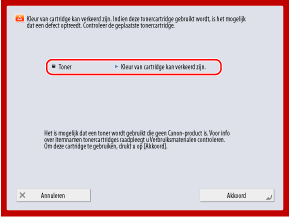
Druk op [Annuleren] om de tonercartridge te vervangen.
Als u het wilt blijven gebruiken zoals het is, drukt u op [Akkoord]. De garantie dekt echter geen problemen zoals een machinestoring of het niet goed werken van bepaalde functies.
Neem voor het oplossen van problemen contact op met uw dealer of servicevertegenwoordiger bij wie u de tonercartridge heeft gekocht.
Kan instellingen niet wijzigen, omdat geselecteerde sleutel wordt gebruikt.
De sleutel en het certificaat dat u probeerde te verwijderen, worden gebruikt in met TLS gecodeerde communicatie of [Beperk ontvangst voor elke functie] voor de distributie van apparaatinformatie.
Controleer de functies met behulp van TLS-gecodeerde communicatie.
Als een functie de sleutel en het certificaat gebruikt die u probeerde te verwijderen, schakelt u de TLS-gecodeerde communicatie-instelling uit. TLS gebruiken
Stel alle instellingen in [Beperk ontvangst voor elke functie] voor de distributie van apparaatinformatie naar [Aan].
Kan de geselecteerde server niet vinden. Controleer de instellingen.
Kon het IP-adres niet identificeren of de verificatie-informatie van de LDAP-server is ingesteld op [Gebr. (beveil. auth.)], waardoor de hostnaam niet kan worden geïdentificeerd.
Controleer of de DNS-instellingen op de machine en de instellingen op de DNS-server correct zijn.
Geen verbinding met de geselecteerde server. Controleer de instellingen.
Kan geen verbinding maken met de LDAP-server.
Controleer de instellingen en bedieningsstatus van de LDAP-server.
Controleer of het serveradres en poortnummer van de LDAP-server correct zijn ingesteld. LDAP-servers registreren
Als [Authentificatieinformatie] voor de LDAP-server is ingesteld op [Gebr. (beveil. auth.)], controleer dan of het UDP-pakket wordt geblokkeerd door een filter. LDAP-servers registreren
Controleer of de LDAP-server normaal functioneert.
Controleer of het gatewayadres van de TCP/IP-instellingen juist is ingesteld.
De instelling in het instellingenmenu kan nu niet worden gebruikt. Neem contact op met de systeembeheerder.
Het geselecteerde instellingsitem kan niet worden gewijzigd of wordt niet ondersteund.
Neem contact op met de systeembeheerder.
Neem contact op met de systeembeheerder.
De geselecteerde knop is misschien niet beschikbaar. Neem contact op met systeembeheerder.
De geselecteerde gebruiker bestaat niet, of de beheerdersrechten zijn uitgeschakeld.
Selecteer een andere gebruiker met beheerdersrechten.
Meld u aan als beheerder en registreer de knop opnieuw.
Kon niet verzenden.
Het verzenden kon niet worden uitgevoerd omdat er een probleem is met de verzonden gegevens of met de server.
Is er een fout op de WebDAV-server of proxyserver?
Als er een fout optreedt, controleer dan de instellingen van de WebDAV-server of de proxyserver.
Controleer of u toegang hebt tot het opgegeven bestand of de opgegeven map en controleer het pad naar de map.
Controleer of de WebDAV-server correct is ingesteld om externe toegang tot het opgegeven bestand of de opgegeven map mogelijk te maken.
Controleer of de bestemming correct is ingesteld en of de server (hostnaam) of het mappad te lang is.
Wacht even en probeer opnieuw te verzenden.
De WebDAV-server kan bezet zijn.
Schakel de verdeelde gefragmenteerde verzending uit.
Verminder de grootte van de verzonden gegevens en probeer opnieuw te verzenden.
Time-out opgetreden voor sessie. Wacht even en probeer daarna opnieuw toegang te krijgen tot de database.
De sessie is uitgetimed omdat een vaste tijdsperiode is verstreken.
Wacht even en probeer opnieuw toegang te krijgen tot de database.
Als sessie time-out niet is verholpen, start u de machine opnieuw. Herstarten van de machine
Kan zoeken niet afronden als gevolg van timeout. Controleer de instellingen.
Kon de zoekopdracht niet binnen de opgegeven tijd voltooien.
Stel een langere time-outtijd voor het zoeken in.
Kan niet uitvoeren omdat het bestand nietondersteunde gegevens bevat.
Kan geen pagina's genereren omdat de beschrijving niet correct is.
Probeer de gegevens af te drukken in een formaat dat door de machine wordt ondersteund.
Probeer de gegevens af te drukken in een formaat dat door de machine wordt ondersteund.
Directe verbinding: Beëindigd vanwege een fout.
Er is geen verbinding gemaakt met het mobiel apparaat, of er is gedurende een bepaalde tijd geen gegevensoverdracht van of naar het verbonden mobiel apparaat geweest.
Maak opnieuw verbinding met het mobiele apparaat.
Directe verb.: Beëindigd want geen ander apparaat vindbaar.
Er kon geen koppelbaar mobiel apparaat worden gevonden.
Controleer of wifi is ingeschakeld op het mobiel apparaat.
Schakel Wi-Fi in op het mobiele apparaat als dit is uitgeschakeld.
Plaats het mobiele apparaat dichter bij de machine en probeer opnieuw verbinding te maken.
Als u geen goede verbinding kunt maken met de machine, neem dan contact op met uw dealer of servicevertegenwoordiger.
* Afhankelijk van het mobiele apparaat werkt het mogelijk niet correct.
Kan niet aanmelden omdat multi-factor authenticatie is ingeschakeld. Neem contact op met de systeembeheerder.
De Microsoft Entra ID-serverinformatie is niet correct ingesteld.
Controleer de Microsoft Entra ID-serverinformatie en wijzig de instellingen indien nodig.
Aanpassen gradatie... Even geduld.
De machine past de gradatie automatisch aan.
Wanneer de aanpassing voltooid is, wordt het afdrukken automatisch hervat.
Wanneer de aanpassing voltooid is, wordt het afdrukken automatisch hervat.
Geen toegang tot de database. Start de machine opnieuw.
Geen toegang tot de gebruikersdatabase door corruptie van de gebruikersdatabase of een andere factor.
Start het apparaat opnieuw op.
Dig. handt. cert. toeg. fout
Geen toegang tot het certificaat bij het verzenden van de gebruikershandtekening of apparaathandtekening.
Controleer de inhoud van het gebruikerscertificaat of apparaatcertificaat dat op de machine is geregistreerd.
Fout vervaldatum certificaat
Het certificaat is verlopen.
Controleer de geldigheidsduur van het certificaat dat op de machine is geregistreerd.
Als het certificaat is verlopen, registreert u een geldig certificaat. Een sleutel en certificaat of CA-certificaat registreren van een verlenende bevoegde instantie
Controleer of de datum en tijd correct zijn ingesteld op de machine
Kan niet inloggen omdat meerdere gebruikers zijn geregistreerd onder dezelfde gebruikersnaam. Neem contact op met de systeembeheerder.
Kon de gebruikersnaam niet identificeren omdat hoofdlettergevoeligheid niet is ingeschakeld.
Hoofdlettergevoeligheid voor de gebruikersnaam inschakelen.
Registreer de gebruiker met een andere gebruikersnaam.
Kan geen nieuwe knoppen registreren omdat het maximumaantal opgeslagen knoppen is bereikt. Al opgeslagen knoppen kunnen worden overschreven.
Er kunnen geen extra knoppen worden geregistreerd omdat het maximum aantal geregistreerde knoppen is bereikt.
Overschrijf een geregistreerde knop of verwijder onnodige knoppen.
Cannot import because the number of buttons for registration has exceeded the upper limit.
Er kunnen geen extra knoppen worden geregistreerd omdat het maximum aantal geregistreerde persoonlijke of gedeelde knoppen is bereikt tijdens het importeren.
Verwijder onnodige persoonlijke of gedeelde knoppen en probeer opnieuw te importeren.
Kon niet opslaan omdat het maximaal aantal opgeslagen gebruikers was bereikt.
Extra gebruikers kunnen niet geregistreerd worden omdat het maximum aantal gebruikers bereikt is.
Onnodige gebruikers verwijderen.
Kan de apparaatgegevens niet ophalen. Wilt u het apparaat als een bestemming registreren?
Kan om onbekende reden niet goed communiceren met de clientmachine bij het registreren van de clientmachine voor het distribueren van apparaatinformatie.
*Als u op [Ja] in dit bericht drukt, wordt de clientmachine geregistreerd met [Verdeelinstellingen] in [Details] blanco gelaten, maar de apparaatinformatie kan niet worden gedistribueerd.
Is de clientmachine klaar voor verbinding?
Als de Ethernet-kabel goed is aangesloten, controleert u de status en instellingen van de netwerkverbinding van de clientmachine.
Controleer de instellingen van de clientmachine en het netwerk opnieuw en probeer opnieuw verbinding te maken.
Stel op de clientmachine de sleutel en het certificaat in om te gebruiken voor versleutelde TLS-communicatie.
Stel op de clientmachine een van de instellingen in [Beperk ontvangst voor elke functie] voor distributie van apparaatinformatie in op [Uit].
Configureer op de clientmachine de instellingen om HTTP te gebruiken.
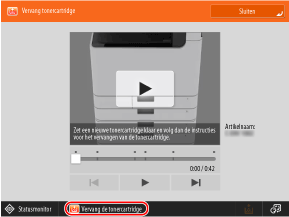
Vervang de tonercartridge.
De toner is op.
Plaats een nieuwe tonercartridge.
Volg de instructies op het scherm om de tonercartridge te vervangen. De tonercartridges vervangen
Kan de tonercartridge niet herkennen. Trek tonercartridge eruit en plaats hem terug, anders wordt informatie over resterende toner niet goed opgespoord.
De tonercartridge is niet correct geplaatst, de tonercartridge is defect of er is toner met een onjuiste artikelnaam geplaatst.
Controleer de status van de weergegeven tonercartridge.
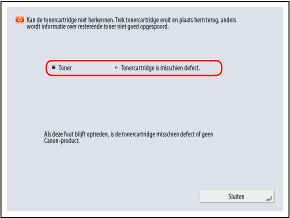
Installeer de tonercartridge opnieuw.
Als u het wilt blijven gebruiken zoals het is, drukt u op [Sluiten] of [Akkoord]. De garantie dekt echter geen problemen zoals een machinestoring of het niet goed werken van bepaalde functies.
Druk op [Annuleren] om de tonercartridge te vervangen.
Neem voor het oplossen van problemen contact op met uw dealer of servicevertegenwoordiger bij wie u de tonercartridge heeft gekocht.
Toner bijna op. Vervangen nog niet nodig.
De tonercartridge is bijna leeg.
Maak op elk moment een nieuwe tonercartridge klaar voor vervanging.
U hoeft de tonercartridge nu niet te vervangen.
Reinigen van de drum...Even geduld.
De drum in de machine wordt gereinigd.
Wanneer het reinigen voltooid is, wordt het afdrukken automatisch hervat.
Wanneer het reinigen voltooid is, wordt het afdrukken automatisch hervat.
De ingevoerde pincode is onjuist.
Er is een onjuiste pincode ingevoerd.
Voer de pincode opnieuw in.
Als u uw PIN kwijt bent, neem dan contact op met de beheerder.
De verificatieserver werkt niet. Neem contact op met systeembeheerder.
Kan om onbekende reden niet communiceren met de verificatieserver.
Is er een Ethernet-kabel losgekoppeld van de machine?
Is de Active Directory-server opgestart?
Start de Active Directory-server als deze nog niet gestart is.
Is de sleuteldistributiecentrum (KDC)-service van Active Directory gestopt?
Controleer de status van de service aan de hand van de volgende procedure:
1. Start de service in de Windows-beheertool van Active Directory.
2. Controleer de status van de Active Directory-domeinservice en start de service als deze niet is gestart.
Controleer of een firewall de communicatie met de Active Directory-server blokkeert.
Deblokkeer de Kerberos servicepoort (standaardinstelling: 88) van Active Directory indien geblokkeerd.
*Als Active Directory is opgegeven als aanmeldingsbestemming, wordt de communicatie normaal gesproken uitgevoerd met het UDP-protocol via poort 88, maar de communicatiegegevens kunnen worden verwerkt met het TCP-protocol als deze een bepaalde grootte overschrijden.
Kan de verificatieserver niet vinden. Neem contact op met systeembeheerder.
Kan om onbekende reden niet communiceren met de verificatieserver.
Is er een Ethernet-kabel losgekoppeld van de machine?
Is de DNS-server correct ingesteld?
Controleer de DNS-serverinstellingen op de machine en stel ze opnieuw in. Als u een secundaire DNS-server gebruikt, controleer dan ook de instellingen van die server. DNS configureren
Is de opgegeven DNS-server gestart?
Start de DNS-server als deze nog niet gestart is.
Is de service van de opgegeven DNS-server gestopt?
Controleer de status van de DNS-server aan de hand van de volgende procedure:
1. Start de service in de Windows-beheertool van de DNS-server.
2. Controleer de status van de DNS-server en start de service als deze nog niet gestart is.
Controleren of er een hostrecord bestaat in de DNS-server.
Controleer of de DNS-server een hostrecord heeft en of de forwarderinstellingen correct zijn.
Er is geen wachtwoord ingesteld op de verificatieserver. Neem contact op met systeembeheerder.
Er is geen geschikt wachtwoord ingesteld op de server bij het configureren of upgraden van Active Directory.
Reset het wachtwoord van de account en configureer de instellingen opnieuw.
Reset het wachtwoord van de account en configureer de instellingen opnieuw.
Kan niet inloggen omdat anonieme toegang op de verificatieserver niet is toegestaan. Neem contact op met de systeembeheerder.
Anonieme toegang is niet toegestaan op de LDAP-server.
Stel de verificatiegegevens voor toegang tot de LDAP-server in.
Op het informatie-invoerscherm van de LDAP-server selecteert u het vakje [Use authentication information] en geeft u de gebruikersnaam en het wachtwoord op afhankelijk van de gegevens die zijn geregistreerd op de LDAP-server. Authenticatieserverinformatie registreren
De accountgegevens voor het inloggen op de verificatieserver zijn ongeldig. Neem contact op met de systeembeheerder.
Kan niet inloggen als beheerder.
Zijn de gebruikersnaam en het wachtwoord correct?
Stel de accountinformatie correct in met beheerdersrechten.
Controleer of de attributen correct zijn ingesteld.
Als de attributen correct zijn ingesteld, controleert u of de waarden van de attributen die op de server zijn geregistreerd, correct zijn. Authenticatieserverinformatie registreren
Er werd een conc. IP-adres op het netwerk gevonden.
Hetzelfde IPv4-adres dat voor de machine is ingesteld, bestaat op hetzelfde netwerk als de machine.
Wijzig het IP-adres van de machine in zodat dit niet in conflict is met het IP-adres van een ander apparaat.
Een conflict met IP-adres is gedetecteerd op netwerk (hoofdlijn).
Hetzelfde IPv4-adres dat is ingesteld voor de hoofdlijn van de machine, bestaat op hetzelfde netwerk als de machine.
Wijzig het IP-adres van de hoofdlijn van de machine zodat het niet conflicteert met het IP-adres van een ander apparaat.
Een conflict met IP-adres is gedetecteerd op netwerk (sublijn).
Hetzelfde IPv4-adres dat is ingesteld voor de sublijn van de machine, bestaat op hetzelfde netwerk als de machine.
Wijzig het IP-adres van de sublijn van de machine zodat het niet conflicteert met het IP-adres van een ander apparaat.
Kon de bewerking niet uitvoeren vanwege een netwerkfout.
Kon de gescande gegevens of het computerbestand niet opslaan in Geavanceerde ruimte van de verbindingsbestemming.
Controleer of de instellingen voor Geavanceerde ruimte op de opslaglocatie zo zijn geconfigureerd dat het maken van mappen en het opslaan van bestanden wordt verboden.
Hebt u geprobeerd een bestand rechtstreeks onder een gedeelde ruimte of een persoonlijke ruimte op te slaan?
Bestanden kunnen niet rechtstreeks worden opgeslagen onder een Gedeelde ruimte (share) of Persoonlijke ruimte (gebruikers) in Geavanceerde ruimte. Sla het bestand op in een submap.
Is het volledige pad van de opslaglocatie (mapnaam die de bestandsnaam en opslagbestemming aangeeft) te lang?
Verkort de mapnaam of bestandsnaam of wijzig de opslaglocatie zodat het aantal tekens van het pad niet langer is dan 256 tekens, inclusief "/share" of "/users".
Onnodige bestanden uit de opslaglocatie verwijderen of de opslaglocatie wijzigen.
Het is mogelijk dat het aantal bestanden en mappen dat kan worden opgeslagen de bovenlimiet heeft overschreden, of dat de opslagcapaciteit onvoldoende is.
*Zie het volgende voor het aantal bestanden dat kan worden opgeslagen op Geavanceerde ruimte:
Controleer de netwerkaansluiting.
Een Ethernetkabel is niet correct aangesloten op de machine.
Is er een Ethernet-kabel losgekoppeld van de machine?
Als u de Ethernet-kabel opnieuw aansluit, herstart u de machine. Herstarten van de machine
Als u de machine gebruikt zonder verbinding met een netwerk, stelt u [Bevestig wijzigingen netwerkverbindingsinstelling] in op [Uit].
Controleer netwerkaansluit. (Hoofdlijn)
De Ethernetkabel van de hoofdlijn is niet correct aangesloten op de machine.
Is er een Ethernet-kabel losgekoppeld van de machine?
Als u de Ethernet-kabel opnieuw aansluit, herstart u de machine. Herstarten van de machine
Als u de machine gebruikt zonder verbinding met een netwerk, stelt u [Bevestig wijzigingen netwerkverbindingsinstelling] in op [Uit].
Controleer netwerkverbinding. (Sublijn)
De Ethernet-kabel van de sublijn is niet correct aangesloten op de machine.
Is er een Ethernet-kabel losgekoppeld van de machine?
Als u de Ethernet-kabel opnieuw aansluit, herstart u de machine. Herstarten van de machine
Als u de machine gebruikt zonder verbinding met een netwerk, stelt u [Bevestig wijzigingen netwerkverbindingsinstelling] in op [Uit].
Er is een periode ingesteld die langer is dan de geldigheidsduur van het wachtwoord. Voer de instellingen opnieuw in.
De instelling voor het wachtwoordwijzigingsverbod is langer dan de geldigheidsperiode van het wachtwoord.
Stel een wachtwoordwijzigingsverbod in dat korter is dan de geldigheidsperiode van het wachtwoord.
De opdracht is geannuleerd omdat functies niet kunnen worden gebruikt terwijl Eco (zonder nietjes) is ingesteld. Wijzig de instellingen en probeer het opnieuw. Door de nietpositie of het papiertype te wijzigen kan Eco (zonder nietjes) wel worden gebruikt.
De nietpositie is beperkt afhankelijk van de papiersoort.
Stel de nietpositie in op [Linksboven] of [Rechtsonder], of wijzig de papiersoort.
Stel de nietpositie in op [Linksboven] of [Rechtsonder], of wijzig de papiersoort.
Scannen is geannuleerd omdat origineel niet goed is ingevoerd.
Er is een papierstoring opgetreden in de invoer omdat er meerdere originelen tegelijk zijn ingevoerd of omdat er een origineel met een onbruikbare soort is ingevoerd.
Originelen uit de invoer verwijderen en opnieuw plaatsen.
Verwijder de vastgelopen originelen. Papierstoringen in de aanvoer
Controleer of de originelen geschikt zijn en plaats ze opnieuw. Originelen plaatsen
Verwijder vastgelopen originelen uit de aanvoer en originelen op het aanvoerblad. Plaats ze daarna terug op het aanvoerblad en druk op [Start].
Het scannen is geannuleerd omdat de originelen in de invoer zijn vastgelopen.
Reset de originelen en druk op [ Start].
Start].
* Als dit bericht verschijnt nadat u een papierstoring bij het origineel hebt verholpen en de machine het origineel per ongeluk heeft herkend als een geniet origineel, drukt u op [Sensor voor diagonaal ingevoerde originelen tijdelijk 'Uit' zetten], en druk vervolgens op [ Start].
Start].Verwijder het origineel van de aanvoer.
U gebruikt een functie die niet kan worden gebruikt om met de invoer te scannen.
Plaats het origineel vanuit de invoer op de glasplaat.
Plaats het origineel vanuit de invoer op de glasplaat.
De finisher moet worden gecontroleerd. Neem contact op met uw servicevertegenwoordiger. Afdrukken is mogelijk, maar de afdruksnelheid kan dalen.
De papieruitlijningsfunctie van de finisher is defect.
Start het apparaat opnieuw op.
Als het bericht na het herstarten van de machine nog steeds wordt weergegeven, noteert u het bericht en neemt u contact op met uw dealer of verkoper.
Voer het papier uit naar een lade met een functie voor het uitlijnen van werkpapier.
Opvangbladen finisher kunnen niet omhoog/omlaag.
Het opvangblad van de finisher werkt niet.
Is er een obstakel waardoor het opvangblad niet werkt?
Verwijder eventuele obstructies.
Start het apparaat opnieuw op.
Als het bericht na het herstarten van de machine nog steeds wordt weergegeven, noteert u het bericht en neemt u contact op met uw dealer of verkoper.
Voordeksel van de finisher is open.
Het voorpaneel van de finisher is open.
Controleer of het voorpaneel van de finisher gesloten is.
Controleer of het voorpaneel van de finisher gesloten is.
Kan niet verzenden omdat meerdere bestemmingen zijn aangegeven.
Groepsverzending is beperkt.
Stel [Beperk groepsverz. als faxbestemming is opgegeven] in op [Uit].
Bezig met meerdere opdr...
Meerdere opdrachten, zoals afdrukken en verzenden, worden tegelijkertijd met het scannen uitgevoerd.
Wacht even totdat het scannen wordt hervat.
Wacht even totdat het scannen wordt hervat.
Kan niet inloggen omdat een verificatiefout is opgetreden in de Afdelings-ID-beheer. Neem contact op met de systeembeheerder.
Als u gebruikersverificatie gebruikt, wordt afdelings-ID-beheer ingeschakeld, maar er zijn geen afdelings-ID's aan gebruikers toegewezen.
Afdeling-ID's toewijzen aan gebruikers.
Als er geen beheerder kan inloggen, neem dan contact op met uw dealer of servicevertegenwoordiger.
PDL Invalid DLG Input
De printerfunctie van de machine werkt niet goed vanwege een fout.
Start het apparaat opnieuw op.
Als het bericht na het herstarten van de machine nog steeds wordt weergegeven, noteert u het bericht en neemt u contact op met uw dealer of verkoper.
PDL DLG Rendering Error
De printerfunctie van de machine werkt niet goed vanwege een fout.
Start het apparaat opnieuw op.
Als het bericht na het herstarten van de machine nog steeds wordt weergegeven, noteert u het bericht en neemt u contact op met uw dealer of verkoper.
PDL DLG Unknown Error
De printerfunctie van de machine werkt niet goed vanwege een fout.
Start het apparaat opnieuw op.
Als het bericht na het herstarten van de machine nog steeds wordt weergegeven, noteert u het bericht en neemt u contact op met uw dealer of verkoper.
PDL DLG Memory Full
Het werkgeheugen was onvoldoende voor het systeem om gegevens te verwerken (met name grafische en tekstverwerking).
Druk op [Fout overslaan] om afdrukken voor te zetten.
Als u de fout overslaat, wordt de pagina met de gegevens die de fout hebben veroorzaakt mogelijk niet correct afgedrukt.
PDL DLG Mem. Alloc. Err
De printerfunctie van de machine werkt niet goed vanwege een fout.
Start het apparaat opnieuw op.
Als het bericht na het herstarten van de machine nog steeds wordt weergegeven, noteert u het bericht en neemt u contact op met uw dealer of verkoper.
PDL GL Orig. Pt Unknown
De printerfunctie van de machine werkt niet goed vanwege een fout.
Start het apparaat opnieuw op.
Als het bericht na het herstarten van de machine nog steeds wordt weergegeven, noteert u het bericht en neemt u contact op met uw dealer of verkoper.
PDL GL Coord.Result
De printerfunctie van de machine werkt niet goed vanwege een fout.
Start het apparaat opnieuw op.
Als het bericht na het herstarten van de machine nog steeds wordt weergegeven, noteert u het bericht en neemt u contact op met uw dealer of verkoper.
PDL Invalid GL Input
De printerfunctie van de machine werkt niet goed vanwege een fout.
Start het apparaat opnieuw op.
Als het bericht na het herstarten van de machine nog steeds wordt weergegeven, noteert u het bericht en neemt u contact op met uw dealer of verkoper.
PDL GL Range Check
De printerfunctie van de machine werkt niet goed vanwege een fout.
Start het apparaat opnieuw op.
Als het bericht na het herstarten van de machine nog steeds wordt weergegeven, noteert u het bericht en neemt u contact op met uw dealer of verkoper.
PDL GL Memory Full
Het werkgeheugen was onvoldoende voor het systeem om gegevens te verwerken (met name grafische en tekstverwerking).
Druk op [Fout overslaan] om afdrukken voor te zetten.
Als u de fout overslaat, wordt de pagina met de gegevens die de fout hebben veroorzaakt mogelijk niet correct afgedrukt.
PDL GL Mem. Alloc. Err
De printerfunctie van de machine werkt niet goed vanwege een fout.
Start het apparaat opnieuw op.
Als het bericht na het herstarten van de machine nog steeds wordt weergegeven, noteert u het bericht en neemt u contact op met uw dealer of verkoper.
PDL IMG Refer. Data Err
De TIFF- en JPEG-gegevens bevatten gegevens die niet kunnen worden verwerkt door de machine.
Annuleer het afdrukken, initialiseer de machine en probeer opnieuw af te drukken.
Door de machine te initialiseren wordt het beschikbare geheugen vergroot. Hierdoor worden echter alle afdrukgegevens in het geheugen van de machine verwijderd. [Reset printer]
PDL IMG Initial. Err
Er is onvoldoende geheugen voor het afdrukken van TIFF- of JPEG-gegevens.
Annuleer het afdrukken, initialiseer de machine en probeer opnieuw af te drukken.
Door de machine te initialiseren wordt het beschikbare geheugen vergroot. Hierdoor worden echter alle afdrukgegevens in het geheugen van de machine verwijderd. [Reset printer]
PDL IMG Process. Error
Er is een onbekende fout opgetreden tijdens het verwerken van TIFF- of JPEG-gegevens.
Annuleer het afdrukken, initialiseer de machine en probeer opnieuw af te drukken.
Alle afdrukgegevens in het geheugen van de machine worden gewist. [Reset printer]
PDL IMG Invalid Data
De TIFF- en JPEG-gegevens bevatten gegevens die niet kunnen worden verwerkt door de machine. Bovendien kunnen gegevens die niet door de machine kunnen worden verwerkt, worden verzonden omdat de machine hetzelfde IP-adres heeft als een ander apparaat op hetzelfde netwerk.
Wijzig het IP-adres van de machine in zodat dit niet in conflict is met het IP-adres van een ander apparaat.
Druk op [Fout overslaan] om afdrukken voor te zetten.
Als u de fout overslaat, worden de gegevens die de fout hebben veroorzaakt niet afgedrukt.
PDL IMG Work Memory Full
Er is onvoldoende geheugen voor het verwerken van TIFF- of JPEG-gegevens.
Annuleer het afdrukken, initialiseer de machine en probeer opnieuw af te drukken.
Door de machine te initialiseren wordt het beschikbare geheugen vergroot. Hierdoor worden echter alle afdrukgegevens in het geheugen van de machine verwijderd. [Reset printer]
Druk op [Fout overslaan] om afdrukken voor te zetten.
Als u de fout overslaat, worden de gegevens die de fout hebben veroorzaakt niet afgedrukt.
PDL nn Rendering Error (waarbij "nn" de naam van de module is)
De printerfunctie van de machine werkt niet goed vanwege een fout.
Start het apparaat opnieuw op.
Als het bericht na het herstarten van de machine nog steeds wordt weergegeven, noteert u het bericht en neemt u contact op met uw dealer of verkoper.
PDL PDF Error
Er zijn PDF-gegevens verzonden die niet kunnen worden verwerkt door de machine.
Optimaliseer de PDF met Adobe Acrobat en probeer opnieuw af te drukken.
Open het PDF-bestand in de toepassing en probeer opnieuw af te drukken met het printerstuurprogramma.
Als de bovenstaande oplossingen het probleem niet verhelpen, noteer dan het bericht en neem contact op met uw dealer of servicevertegenwoordiger.
PDL PDF Data Decode Err
Het gecodeerde PDF-bestand kan niet worden gedecodeerd.
Is het wachtwoord voor afdrukken onjuist?
Voer het juiste wachtwoord in en probeer opnieuw af te drukken.
Is afdrukken niet toegestaan in de beveiligingsinstellingen van het PDF-bestand?
Als afdrukken niet is toegestaan, wijzigt u het PDF-bestand om afdrukken toe te staan in een toepassing voor het bewerken van PDF-bestanden.
PDL PDF Memory Full
Er is onvoldoende geheugen om de PDF-gegevens te verwerken.
Optimaliseer de PDF met Adobe Acrobat en probeer opnieuw af te drukken.
Verdeel de pagina's van de PDF-gegevens met Adobe Acrobat in meerdere bestanden en probeer opnieuw af te drukken.
Open het PDF-bestand in de toepassing en probeer opnieuw af te drukken met het printerstuurprogramma.
PDL RIP Process. Error
De printerfunctie van de machine werkt niet goed vanwege een fout.
Start het apparaat opnieuw op.
Als het bericht na het herstarten van de machine nog steeds wordt weergegeven, noteert u het bericht en neemt u contact op met uw dealer of verkoper.
PDL XPS Error
Er is een ongedefinieerde fout opgetreden.
Start het apparaat opnieuw op.
Als het bericht na het herstarten van de machine nog steeds wordt weergegeven, noteert u het bericht en neemt u contact op met uw dealer of verkoper.
PDL XPS Initialize Error
Er is een onbekende fout opgetreden, zoals het niet kunnen ophalen van geheugen tijdens de initialisatie.
Start het apparaat opnieuw op.
Als het bericht na het herstarten van de machine nog steeds wordt weergegeven, noteert u het bericht en neemt u contact op met uw dealer of verkoper.
PDL XPS Rendering Error
Er is een fout opgetreden in het opbouwsysteem.
Start het apparaat opnieuw op.
Als het bericht na het herstarten van de machine nog steeds wordt weergegeven, noteert u het bericht en neemt u contact op met uw dealer of verkoper.
PDL Image Comp. Error
De printerfunctie van de machine werkt niet goed vanwege een fout.
Start het apparaat opnieuw op.
Als het bericht na het herstarten van de machine nog steeds wordt weergegeven, noteert u het bericht en neemt u contact op met uw dealer of verkoper.
PDL Rendering Timeout
De printerfunctie van de machine werkt niet goed vanwege een fout.
Start het apparaat opnieuw op.
Als het bericht na het herstarten van de machine nog steeds wordt weergegeven, noteert u het bericht en neemt u contact op met uw dealer of verkoper.
PDL Data Transfer Error
De printerfunctie van de machine werkt niet goed vanwege een fout.
Start het apparaat opnieuw op.
Als het bericht na het herstarten van de machine nog steeds wordt weergegeven, noteert u het bericht en neemt u contact op met uw dealer of verkoper.
PDL Reg. Access Error
De printerfunctie van de machine werkt niet goed vanwege een fout.
Start het apparaat opnieuw op.
Als het bericht na het herstarten van de machine nog steeds wordt weergegeven, noteert u het bericht en neemt u contact op met uw dealer of verkoper.
Kon geen verbinding maken met de proxyserver. Neem contact op met de systeembeheerder.
De proxyserverinformatie is niet correct ingesteld.
Controleer de proxyserverinformatie en wijzig de instellingen indien nodig.
Kan het wachtwoord niet wijzigen tijdens de verbodsperiode voor het wijzigen van wachtwoorden. Het huidige wachtwoord moet worden gebruikt gedurende het volgende aantal dagen nadat het is ingesteld: @1
U probeerde het wachtwoord te wijzigen tijdens de verbodsperiode voor wachtwoordwijzigingen.
Wijzig de verbodsperiode voor het wijzigen van wachtwoorden of wis de instelling.
Kan de knopinstellingen niet oproepen, omdat andere bewerkingen worden uitgevoerd.
De functie Persoonlijke of Gedeelde knop kan niet worden aangeroepen wanneer een andere functie wordt uitgevoerd.
Wacht tot de bediening van de andere functie is voltooid voordat u op de knop Persoonlijk of Gedeeld drukt.
Wacht tot de bediening van de andere functie is voltooid voordat u op de knop Persoonlijk of Gedeeld drukt.
Opslaan in Home zal worden geannuleerd en u gaat terug naar het functiescherm omdat u geen toestemming hebt voor het opslaan van knoppen. Meld u aan als beheerder en probeer het opnieuw.
Het registreren van Persoonlijke of Gedeelde knoppen is beperkt in de gebruikersauthenticatie.
Meld u aan als beheerder en registreer de knop opnieuw.
Gedeelde knoppen kunnen worden geregistreerd nadat u bent ingelogd als beheerder.
Registratie van Persoonlijke en Gedeelde knoppen toestaan.
Om de registratie van knoppen bij een gebruiker toe te staan, wijzigt u de volgende instellingen:
[Afstemmen van Home-scherm op alg. gebr. toestaan]
[Registratie/Bewerking van Persoonlijke knoppen toestaan]
Vul nietjes bij in het nietapparaat.
Er zitten geen nietjes in het nietpatroon van het nietapparaat in de finisher.
Nietjes plaatsen (vervang de nietjeshouder).
Het wachtwoord voldoet niet aan de eisen van het beleid. Wijzig het wachtwoord.
Het ingevoerde wachtwoord voldoet niet aan de regels van het wachtwoordbeleid.
Voer een wachtwoord in dat voldoet aan het wachtwoordbeleid.
Als u het wachtwoordbeleid niet kent, neem dan contact op met de beheerder.
Tijdklokinstellingen voor dit apparaat en de verificatieserver zijn misschien niet gesynchroniseerd. Neem contact op met de systeembeheerder.
De datum- en tijdinstellingen van de machine en de verificatieserver verschillen.
Synchroniseer de datum- en tijdinstellingen van de machine en de authenticatieserver.
Synchroniseer de datum- en tijdinstellingen van de machine en de authenticatieserver.
Control. toegangspuntselectie voor instellingen draadloos LAN.
Het draadloze LAN van de verbindingsbestemming is niet veilig omdat het toegangspunt niet is gecodeerd of omdat de WPA-beveiligingsstandaard gebruikt.
Gebruik een toegangspunt dat een andere beveiligingsstandaard dan WPA ondersteunt.
* Als u niet van plan bent het draadloze LAN van de verbindingsbestemming te wijzigen en u wilt voorkomen dat dit bericht verschijnt, schakelt u de melding uit wanneer er een kwetsbaarheid voor de coderingsmethode wordt gevonden voor het geselecteerde draadloze LAN.
Communicatiefout draadloze LAN. Zet machine UIT en weer AAN.
Er is een onbekende fout opgetreden bij het configureren van de verbinding met draadloos LAN.
Start het apparaat opnieuw op.
Comm.fout draadloos LAN. Controleer gegevens draadloos LAN.
Er is een onbekende fout opgetreden bij het configureren van de verbinding met draadloos LAN.
Controleer de draadloze LAN-instellingen.
Kwetsb. in toegangspuntverb. draadloos LAN gedetecteerd.
Het draadloze LAN van de verbindingsbestemming is niet veilig omdat het toegangspunt niet is gecodeerd of omdat de WPA-beveiligingsstandaard gebruikt.
Gebruik een toegangspunt dat een andere beveiligingsstandaard dan WPA ondersteunt.
* Als u niet van plan bent het draadloze LAN van de verbindingsbestemming te wijzigen en u wilt voorkomen dat dit bericht verschijnt, schakelt u de melding uit wanneer er een kwetsbaarheid voor de coderingsmethode wordt gevonden voor het geselecteerde draadloze LAN.
Kan niet verzenden omdat het geheugen vol is. Wacht even en probeer daarna opnieuw.
Kan de fax niet verzenden wegens onvoldoende geheugen.
De resolutie voor het scannen van het origineel verlagen.
Verwijder onnodige bestanden uit het geheugen om het beschikbare geheugen te vergroten.
*Als het bericht vaak verschijnt, zelfs na het toepassen van de bovenstaande oplossingen, neem dan contact op met uw dealer of servicevertegenwoordiger.
Kan niet uitvoeren omdat het geheugen vol is.
Tijdens het gebruik van de functie voor scannen en opslaan is het scannen geannuleerd omdat het geheugen volraakte tijdens het scannen van het origineel.
Verwijder onnodige gegevens om het beschikbare geheugen te vergroten en probeer het origineel opnieuw te scannen.
Verwijder onnodige gegevens om het beschikbare geheugen te vergroten en probeer het origineel opnieuw te scannen.
Scannen zal worden geannuleerd omdat het geheugen vol is. Wacht even en probeer opnieuw.
Tijdens het gebruik van de functie voor kopiëren is het kopiëren geannuleerd omdat het geheugen volraakte tijdens het scannen van het origineel.
Kopieer de resterende originelen nadat het afdrukken van de gegevens in het geheugen is voltooid.
Kopieer de resterende originelen nadat het afdrukken van de gegevens in het geheugen is voltooid.
Scannen zal worden geannuleerd omdat het geheugen vol is. Wilt u de gescande pagina's verzenden?
Tijdens het gebruik van de functie voor scannen en verzenden is het scannen geannuleerd omdat het geheugen volraakte tijdens het scannen van het origineel.
Druk op [Ja] om de gescande pagina's te verzenden. Scan de resterende originelen nadat het verzenden is voltooid.
Druk op [Ja] om de gescande pagina's te verzenden. Scan de resterende originelen nadat het verzenden is voltooid.
Scannen zal worden geannuleerd omdat het geheugen vol is. Wilt u de gescande pagina's afdrukken?
Tijdens het gebruik van de functie voor kopiëren is het kopiëren geannuleerd omdat het geheugen volraakte tijdens het scannen van het origineel.
Druk op [Ja] om de gescande pagina's af te drukken. Kopieer de resterende originelen nadat het afdrukken is voltooid.
Druk op [Ja] om de gescande pagina's af te drukken. Kopieer de resterende originelen nadat het afdrukken is voltooid.
Scannen zal worden geannuleerd omdat het geheugen vol is. Wilt u de gescande pagina's opslaan?
Tijdens het gebruik van de functie voor scannen en opslaan is het scannen geannuleerd omdat het geheugen volraakte tijdens het scannen van het origineel.
Druk op [Ja] om de gescande pagina's op te slaan. Scan de resterende originelen nadat het opslaan is voltooid.
Druk op [Ja] om de gescande pagina's op te slaan. Scan de resterende originelen nadat het opslaan is voltooid.
De maximale hoeveelheid gegevens die is opgeslagen voor geregistreerde gebruikers, is bereikt. U kunt bewerkingen uitvoeren, maar nu kunnen geen gegevens (logboeken voor opdrachtinstellingen, inhoud persoonlijke instellingen, etc.) worden opgeslagen. Om gegevens op te kunnen slaan van de volgende keer dat u zich aanmeldt, moeten onnodige gegevens van andere gebruikers worden verwijderd. Neem contact op met de systeembeheerder of raadpleeg de handleiding voor meer informatie.
Informatie over nieuwe gebruikersinstellingen kon niet worden opgeslagen omdat het maximale aantal geregistreerde gebruikers is bereikt.
Verwijder onnodige informatie over gebruikersinstellingen.
* U kunt de instellingen configureren om automatisch oude informatie over gebruikersinstellingen te verwijderen wanneer het maximale aantal geregistreerde gebruikers is bereikt. [Actie bij overschrijding max. aantal gebruikers]
Schakel de personalisatiefunctie uit als u deze niet gebruikt.
Wanneer de personalisatiefunctie is ingeschakeld, wordt informatie over gebruikersinstellingen opgeslagen. Als u deze functie niet gebruikt, verwijder dan de opgeslagen gebruikersinstellingen en schakel de personalisatiefunctie uit.
Opslaan in Home wordt geannuleerd omdat u niet bent ingelogd. Ga terug naar functiescherm, log in, probeer het opnieuw.
Het registreren van gedeelde knoppen is beperkt in de gebruikersauthenticatie.
Meld u aan als beheerder en registreer de knop opnieuw.
Gedeelde knoppen kunnen worden geregistreerd nadat u bent ingelogd als beheerder.
Controleer gebruikersnaam, wachtwoord of instellingen.
Er is een onjuiste gebruikersnaam, wachtwoord of domeinnaam gebruikt voor LDAP-serververificatie.
Stel de juiste authenticatie-informatie van de LDAP-server in.
Stel de gebruikersnaam, het wachtwoord en de domeinnaam correct in volgens de informatie die in de LDAP-server is geregistreerd. LDAP-servers registreren
Vul papier bij.
De papierbron is leeg of de papierinstellingen wijken af van het papier dat is geplaatst.
Plaats papier in de papierbron die op het bedieningspaneel wordt weergegeven.
Stel de papierbrongeleiders af op de randen van het papier.
Stel de papiergeleiders van de papierbron af op de randen van het papier.
Als de papiergeleiders niet goed zijn uitgelijnd, wordt het geplaatste papierformaat niet goed gedetecteerd.
Als de papiergeleiders niet goed zijn uitgelijnd, wordt het geplaatste papierformaat niet goed gedetecteerd.
Druk op [ Statusmonitor] en controleer de papierinstellingen in [Verbruiksmat./Overige].
Statusmonitor] en controleer de papierinstellingen in [Verbruiksmat./Overige].
Als de papierinstellingen afwijken van het geplaatste papier, wijzigt u de instellingen voor papierformaat en papiersoort.
Als u de multi-purpose tray gebruikt, stelt u het geplaatste papier opnieuw in en wijzigt u de instellingen.
Als u de multi-purpose tray gebruikt, stelt u het geplaatste papier opnieuw in en wijzigt u de instellingen.
Controleer de papierinstellingen in het printerstuurprogramma of de toepassing.
Controleer de papierinstellingen op het scherm [Voorkeursinstellingen voor afdrukken] van het printerstuurprogramma of het afdrukscherm van de toepassing. Als de papierinstellingen afwijken van het papier dat is geplaatst, stem ze dan af op het papier of plaats het juiste papier.
Scannen is geannuleerd, omdat de maximale gegevensgrootte van het gescande origineel is overschreden. Scannen is mogelijk als beeldscherpte wordt verlaagd of type origineel is ingesteld op tekst.
Het scannen is geannuleerd omdat de hoeveelheid gegevens van het gescande origineel groter is dan de ingestelde limiet van de machine.
Wijzig de instellingen en probeer opnieuw te scannen.
Probeer te scannen met de volgende instellingen: Beeldkwaliteit aanpassen
Pas de instelling [Beeldscherpte] aan naar een lager niveau.
Stel [Type origineel] in op [Tekst].
Some applications require license confirmation.
Het licentiebestand van een MEAP-toepassing zal spoedig verlopen.
Een licentiebestand toevoegen.
Een licentiebestand toevoegen.
Tweefactorauthent. altijd vereisen in UI op afstand aanbevolen.
Ongeautoriseerde toegang vanaf de Remote UI (UI op afstand) is mogelijk.
Het gebruik van tweefactorauthenticatie voor de Remote UI (UI op afstand) wordt aanbevolen.
|
Meld u als beheerder aan bij de Remote UI (UI op afstand)
klik op [Settings/Registration] [User Management] [Authentication Management] [Basic Settings] [Edit] selecteer [All Users] of [Administrators Only] voor [Always Require Two-Factor Authentication] in [Remote UI Authentication] |
* Als u niet van plan bent tweefactorauthenticatie te gebruiken en u wilt voorkomen dat dit bericht verschijnt, schakelt u de melding uit wanneer er een internetbeveiligingsprobleem wordt gedetecteerd.
Afkoelen... Even wachten.
De binnenkant van de machine wordt gekoeld omdat de inwendige temperatuur is gestegen.
Wacht een ogenblik totdat het proces is voltooid.
Wacht een ogenblik totdat het proces is voltooid.
Gegevens van aangemelde gebruiker worden niet opgeslagen.
Informatie over nieuwe gebruikersinstellingen kon niet worden opgeslagen omdat het maximale aantal geregistreerde gebruikers is bereikt.
Verwijder onnodige informatie over gebruikersinstellingen.
* U kunt de instellingen configureren om automatisch oude informatie over gebruikersinstellingen te verwijderen wanneer het maximale aantal geregistreerde gebruikers is bereikt. [Actie bij overschrijding max. aantal gebruikers]
Login failed. Anonymous access to the authentication server is not allowed. Contact the system manager.
Anonieme toegang is niet toegestaan op de LDAP-server.
Stel de verificatiegegevens van de LDAP-server in.
Op het informatie-invoerscherm van de LDAP-server selecteert u het vakje [Use authentication information] en geeft u de gebruikersnaam en het wachtwoord op afhankelijk van de gegevens die zijn geregistreerd op de LDAP-server. Authenticatieserverinformatie registreren
Login failed. The account information necessary to log in to the authentication server is invalid. Contact the system manager.
De gebruikersnaam of het wachtwoord van de LDAP-server is niet correct ingesteld.
Stel de juiste authenticatie-informatie van de LDAP-server in.
Stel de gebruikersnaam en het wachtwoord correct in volgens de informatie die in de LDAP-server is geregistreerd. Authenticatieserverinformatie registreren
Kan niet inloggen. Controleer de inlogbestemming.
De informatie over de inlogbestemming die op het mobiel apparaat is ingevoerd, is onjuist
Kijk de inlogbestemming na en log opnieuw in.
Kijk de inlogbestemming na en log opnieuw in.
Kan het wachtwoord niet opslaan, omdat het maximumaantal opgeslagen wachtwoorden per gebruiker, is bereikt.
Het gebruikerswachtwoord kan niet opgeslagen worden omdat het maximum aantal wachtwoorden bereikt is.
Verwijder onnodige wachtwoordinformatie.
Verwijder onnodige wachtwoordinformatie.