Finisher (For C611FZ / C611Z / C521FZ / C521Z / C431FZ / C431Z / C331FZ / C331Z)
The finisher enables you to use the following functions.
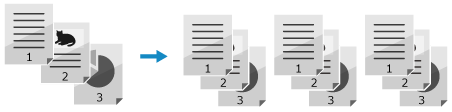
Collate
Outputs paper after sorting the copies into sets with the same page order as the original, when you print multiple copies of a multi-page original.
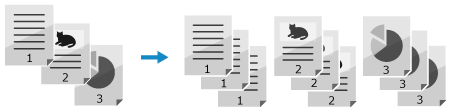
Group
Outputs the specified number of copies after grouping each page of the original together, when you print multiple copies of a multi-page original.
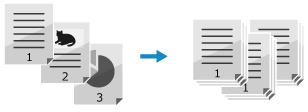
Offset
Offsets the output position per copy or per page.
Staple (Corner)
Outputs paper after stapling the corner of the paper for each copy or for a certain number of pages.

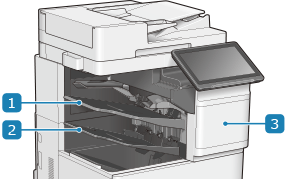
 Output tray (Tray C)
Outputs printed and copied paper. You can set which function to use the tray as the output destination. [Output Tray Settings] (For the Model with the Finisher)
 Output tray (Tray B)
Outputs printed and copied paper. You can set which function to use the tray as the output destination. [Output Tray Settings] (For the Model with the Finisher)
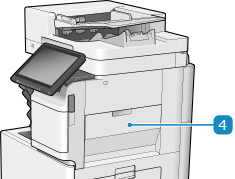
 Front cover of the Finisher
Open this when a staple jam occurs in the stapler unit or when replacing the staple cartridge. Staple Jams in the Finisher (For C611FZ / C611Z / C521FZ / C521Z / C431FZ / C431Z / C331FZ / C331Z Only)
 Right cover of the Finisher
Open this when a paper jam occurs inside the finisher. Paper Jams in the Finisher (For C611FZ / C611Z / C521FZ / C521Z / C431FZ / C431Z / C331FZ / C331Z Only)
NOTE
Once the output tray reaches its stacking limit while going down or reaches the lower end of travel, printing is suspended. Remove all of the output paper from the tray to resume printing.
If you select [Offset] in combination with the collate or group function, each printout group is shifted.
For information on the paper sizes that can be used for Staple, see Finisher Specifications (For C611FZ / C611Z / C521FZ / C521Z / C431FZ / C431Z / C331FZ / C331Z)
When you are using the Staple mode, do not remove the stack of paper from the output tray during the job. Remove the stack of paper when the job has been completed.
If the [Load staples into the stapler unit.] message appears, almost all of the staples have been used. To proceed, replace the staple cartridge.