Using Universal Print to Print Data
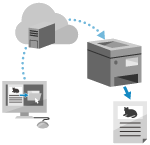
Universal Print is a service for printing documents via the Microsoft cloud. You can print data without having to install a printer driver. You can also print from a remote location when the machine is connected to the Internet.
* To use Universal Print, you must be a registered user of Microsoft 365 and use Microsoft Entra ID.
When Using Windows
Required Preparations
Register the machine for Microsoft Entra ID, and set the members and groups that will use the machine. Registering the Machine for the Cloud Service
On each computer that will use Universal Print, register the machine registered for Microsoft Entra ID. Registering the Machine on the Computer
For details about how to print using Universal Print and the supported operating systems, see the Microsoft website.
IMPORTANT
Universal Print cannot be used when a sub line network is used.
NOTE
When the machine is configured not to print data sent from a computer straight away, the Universal Print data is also put on hold on the machine. In this case, you need to operate the machine to perform printing. Printing Documents in Forced Hold State