Configuring the Fax Settings (Fax Setup Guide)
When you press [Fax] in the [Home] screen on the control panel for the first time, the screen (Fax Setup Guide) for setting the items so as to use the fax is displayed. Configure the fax settings using the procedure below by following the instructions on the screen.
Step 1: Starting the Fax Setup Guide
1
On the control panel, press [Fax] in the [Home] screen.
[Home] ScreenThe [Fax Setup Guide] screen is displayed.
 When the [Fax Setup Guide] Screen Is Not Displayed
If the [Fax Setup Guide] screen is not displayed after pressing [Fax] in the [Home] screen, or to reset the fax with the Fax Setup Guide, use the following procedure to display the [Fax Setup Guide].
[Home] screen on the control panel  [Menu] [Function Settings] [Common] [Fax Setup Guide]. |
2
Press [Set Up Now]
[Next].
The [Register Unit Tel. No.] screen is displayed.
Step 2: Registering the Fax Number and Unit Name
Register the fax number and unit name (name or company name). This information is printed together with the fax data at the destination.
1
On the [Register Unit Tel. No.] screen, enter the fax number of the machine, and press [Apply].
After the message [Settings applied.] appears, the screen guiding you to register the unit name is displayed.
2
Press [Next].
The [Register Unit Name] screen is displayed.
3
Enter the name or company name, and press [Apply].
After the message [Settings applied.] appears, the telephone line settings screen is displayed.
Step 3: Connecting to Telephone Line
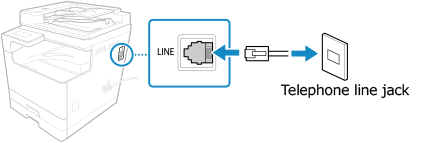
Use the supplied telephone cord to connect the machine to the telephone line.
1
Press [Next].
The [Connect to socket on back of device.] screen is displayed.
2
Connect the supplied telephone cord to the telephone line jack (LINE) on the machine and the telephone line connector on the wall.
3
Press [Next].
The screen confirming that you want to exit the Fax Setup Guide is displayed.
4
Press [Yes].
The settings configured in the Fax Setup Guide are applied, and the type of telephone line is configured automatically.
|
If the Type of Telephone Line Is Not Configured Automatically* If you do not know the type of your telephone line, contact your telephone company. Depending on your country, [Select Line Type] may not be available. |