
Loading Preprinted Paper
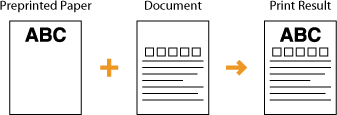
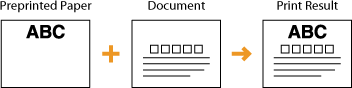
When you load paper that has been preprinted with a logo, pay attention to the orientation of the paper regardless of whether you use the paper drawer or the multi-purpose tray. Load the paper properly so that printing is performed on the same side as the logo.

| ||||||||||||||||||||
When performing a copy operation, also pay attention to the orientation of the original documentPlace the original in the feeder with the side to copy face up, or place the original on the platen glass with the side to copy face down, as shown in the following illustrations.
Also, of the copy settings, make sure that <Original Content Orientation> is set correctly. Basic Copy Operations |
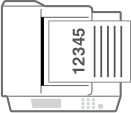
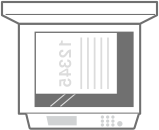
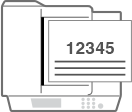
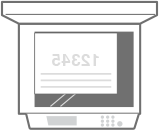
 |
This section describes how to load preprinted paper with the proper orientation. For a description of the general procedure for loading paper in the paper drawer or multi-purpose tray, see Basic Paper Loading Method. This section describes how to load preprinted paper when performing one-sided copying/printing. When performing two-sided copying/printing using preprinted paper, load paper by interpreting that the indications in this section referring to the facing of the paper mean the opposite. To ensure that pages are printed on the proper side of preprinted paper irrespective of one-sided or two-sided printing, you can use the following setting methods. By specifying the paper type each time to print: load the paper type registered with "Preprinted Paper" set to <On> in <Paper Type Management Settings>, specify that paper type and then perform the printing. By specifying the paper source each time to print: load paper in the paper source for which <Switch Paper Feed Method> is set to <Print Side Priority>, specify that paper source and then perform the printing. Proper manner of loading preprinted paper when "Preprinted Paper" is set to <On> in <Paper Type Management Settings> or when <Switch Paper Feed Method> is set to <Print Side Priority> Paper drawer: the logo side face up Paper source other than the paper drawer: the logo side face down |
Making 1-Sided Printouts on Paper with Logos
The loading method varies depending on whether the orientation of the logo printed paper is portrait or landscape.
Printing on Paper with Logos in Portrait Orientation
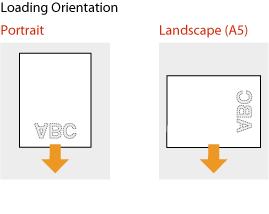
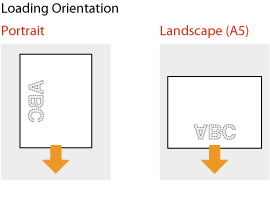
When loading paper in the paper drawer
Load the paper with the logo side (the side to print the document) face down.
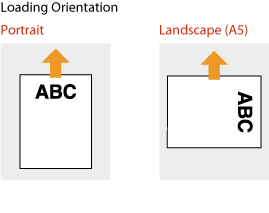
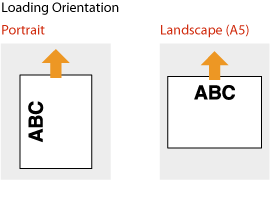
When loading paper in the multi-purpose tray
Load the paper with the logo side (the side to print the document) face up.
Printing on Paper with Logos in Landscape Orientation
When loading paper in the paper drawer
Load the paper with the logo side (the side to print the document) face down.
When loading paper in the multi-purpose tray
Load the paper with the logo side (the side to print the document) face up.
Making 2-Sided Printouts on Paper with Logos
The loading method varies depending on whether the orientation of the logo printed paper is portrait or landscape.
Printing on Paper with Logos in Portrait Orientation
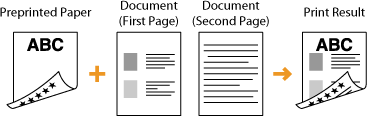
When loading paper in the paper drawer
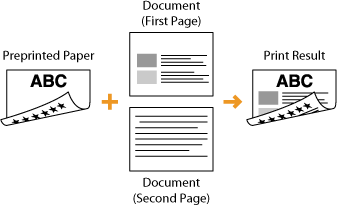
Load the paper with the front logo side (the side to print the first page of the document) face up.
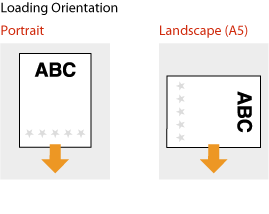
When loading paper in the multi-purpose tray
Load the paper with the front logo side (the side to print the first page of the document) face down.
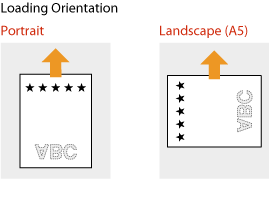
Printing on Paper with Logos in Landscape Orientation
When loading paper in the paper drawer
Load the paper with the front logo side (the side to print the first page of the document) face up.
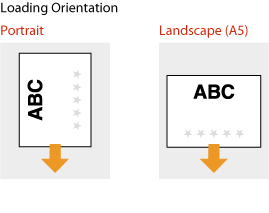
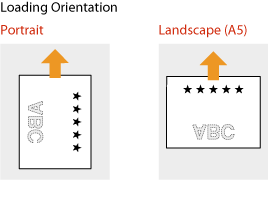
When loading paper in the multi-purpose tray
Load the paper with the front logo side (the side to print the first page of the document) face down.
 |
The <Switch Paper Feed Method> settingWhen you print on preprinted paper, you need to change the facing of the paper to load each time you perform 1-sided and 2-sided printing. However, if <Switch Paper Feed Method> is set to <Print Side Priority>, the facing that you use for loading preprinted paper for 2-sided printing can also be used for 1-sided printing. This setting is especially useful if you frequently perform both 1-sided and 2-sided printing. <Switch Paper Feed Method> |