Registering Destinations to the Address Book (Control Panel)
You can register destinations to the Address Book by directly entering their information using the control panel.
1
On the control panel, press [Address Book] in the [Home] screen,and press  . [Home] Screen
. [Home] Screen2
Press 
 [Register New Destination to Address Book] .
[Register New Destination to Address Book] .The [Register As] screen is displayed.
If the [Address Book PIN] screen is displayed, enter the PIN, and press [<Apply>] .
.3
Press [Coded Dial] or [One-Touch] [Fax] .
[Fax] .If [Coded Dial] is selected, unregistered coded dialing numbers are automatically set and the [Fax] screen is displayed.
When [One-Touch] is selected, select the number to register.
You can change this number to another number later.
You can change this number to another number later.
When registering group destinations, see the following.
Registering Groups to the Address Book (Control Panel)
Registering Groups to the Address Book (Control Panel)
4
Enter the destination information.
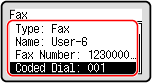
You can register a destination without entering its name, but by entering the name, you can search for it by its initials when specifying the destination.
Enter the name by pressing [Name] , and then press [<Apply>] .
, and then press [<Apply>] .Enter the destination by pressing [Fax Number] , and then press [<Apply>] .
, and then press [<Apply>] .When entering an international destination in [Fax Number], enter the international access number, country code, and fax number in that order. If you are unable to connect, press  twice in between the numbers to add a pause. You can change the pause time. [Set Pause Time]
twice in between the numbers to add a pause. You can change the pause time. [Set Pause Time]To change a [Coded Dial] number, press [Coded Dial] and press and enter a three-digit coded dialing number using the numeric keys.
and enter a three-digit coded dialing number using the numeric keys.5
Set the fax sending details, as needed. 
Set the details when a send error occurs or it takes time to send a fax to that number.
1 | Press [Fax Number] [<Details>] . |
2 | Set the items, and press [<Apply>] .[ECM TX]*1 When an error occurs for an image being sent, the machine corrects the image so as not to send a distorted image. [TX Speed]*1 If it takes time to start sending a fax, such as when there is a poor phone line connection, the machine lowers the communication start speed. [Long Distance] If a communication error occurs when sending a fax to an international destination, select [International (1)]. If the error does not improve, select [International (2)] and [International (3)] in that order. *1 If this is not set here, the settings that appear when selecting [Menu] in the [Home] screen and then selecting [Function Settings] are applied. [ECM TX] [TX Start Speed] |
3 | Press [<Apply>] . |
6
Press [<Apply>] .
.The destination is registered to the Address Book.
 |
Registering a Destination from the TX Job Log of a Fax JobIn addition to calling up the TX Job Log from the Address Book, you can also register destinations from the TX Job Log of a fax job to the Address Book. Checking the Status and Log for Sent and Received Faxes |