Specifying Destinations (Address Book)
When specifying destinations with the Address Book, use the [Home] screen or the fax screen on the control panel.
When specifying destinations by calling up the Address Book from the [Home] screen, use the destination list.
When specifying destinations on the fax screen, in addition to using the destination list, you can also enter the Coded Dial number to specify a destination.
When specifying destinations by calling up the Address Book from the [Home] screen, use the destination list.
When specifying destinations on the fax screen, in addition to using the destination list, you can also enter the Coded Dial number to specify a destination.
Specifying Destinations from a List
1
On the control panel, press [Address Book] in the [Home] screen, and press  . [Home] Screen
. [Home] ScreenThe Address Book is displayed.
For the fax screen, press [<Destination>]  [Specify from Address Book] .
[Specify from Address Book] .2
Select the destinations to specify.
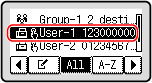
The destinations are specified.
When destinations are specified by calling up the Address Book from the [Home] screen, the fax screen is displayed with the specified destinations entered.
When destinations are specified by calling up the Address Book from the [Home] screen, the fax screen is displayed with the specified destinations entered.
Select the index at the top of the screen of the Address Book to filter and display the destinations.
Specifying Destinations with Coded Dial Numbers
You can enter a three-digit Coded Dial number to specify a destination.
1
On the control panel, press [Coded Dial] in the [Home] screen, and press . [Home] Screen
. [Home] ScreenThe [Enter Coded Dial No.] screen is displayed.
For the fax screen, press [<Destination>] [Specify from Coded Dial] .
[Specify from Coded Dial] .2
Enter a three-digit Coded Dial number.
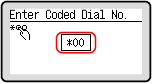
The destination is specified.
If you entered an incorrect number, press  to clear the numbers.
to clear the numbers.