Adjusting the Volume (MF275dw II only)
You can adjust the volume of sounds emitted by the machine.
You can also set whether the machine emits sounds notifying you of operations and statuses.
You can also set whether the machine emits sounds notifying you of operations and statuses.
Adjusting the Fax Volume
You can adjust the volume of the tone emitted when sending and receiving faxes.
This section describes how to adjust the volume using the control panel.
You can also adjust the volume using Remote UI from a computer. Managing the Machine from a Computer (Remote UI)
You can also adjust the volume using Remote UI from a computer. Managing the Machine from a Computer (Remote UI)
1
On the control panel, select [Menu] in the [Home] screen, and press  . [Home] Screen
. [Home] Screen2
Press [Preferences]  [Volume Settings] .
[Volume Settings] .The [Volume Settings] screen is displayed.
3
Press [Fax Tone] .
.4
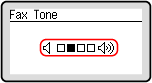
Move the slider to the left or right to adjust the volume, and press .
.
The volume is adjusted.
Moving the slider to the right increases the volume.
Moving the slider to the far left mutes the sound.
Adjusting Other Fax Function Sounds
You can adjust the volume of the incoming fax sound and the sounds notifying you when faxes are successfully sent and received, and when originals are successfully scanned.
You can also configure the [TX Done Tone], [RX Done Tone], and [Scanning Done Tone] settings to emit a sound only when an error occurs.
You can also configure the [TX Done Tone], [RX Done Tone], and [Scanning Done Tone] settings to emit a sound only when an error occurs.
This section describes how to adjust the volume using the control panel.
You can also adjust the volume using Remote UI from a computer. Managing the Machine from a Computer (Remote UI)
You can also adjust the volume using Remote UI from a computer. Managing the Machine from a Computer (Remote UI)
1
On the control panel, select [Menu] in the [Home] screen, and press . [Home] Screen
. [Home] Screen2
Press [Preferences] [Volume Settings] .
[Volume Settings] .The [Volume Settings] screen is displayed.
3
Select the item whose volume you want to adjust.
[Ring Tone]
Adjust the volume of the sound notifying you of incoming faxes.
[TX Done Tone]
Adjust the volume of the sound notifying you that sending of a fax is complete.
[RX Done Tone]
Adjust the volume of the sound notifying you that receiving of a fax is complete.
[Scanning Done Tone]
Adjust the volume of the sound notifying you that scanning of a fax original is complete.
4
Move the slider to the left or right to adjust the volume, and press .
.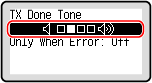
Moving the slider to the right increases the volume.
Moving the slider to the far left mutes the sound.
To emit a completion sound only when an error occurs, press [When Error] [On] .
[On] .The volume is adjusted.
Setting the Notification Sounds for Operations and Statuses
You can also set whether the machine emits sounds notifying you of operations and statuses, such as when operating the control panel and errors are detected.
This section describes how to configure the settings using the control panel.
You can also configure the settings using Remote UI from a computer. Managing the Machine from a Computer (Remote UI)
You can also configure the settings using Remote UI from a computer. Managing the Machine from a Computer (Remote UI)
1
On the control panel, select [Menu] in the [Home] screen, and press . [Home] Screen
. [Home] Screen2
Press [Preferences] [Volume Settings] .
[Volume Settings] .The [Volume Settings] screen is displayed.
3
Select the item to be set.
4
Set whether notification sounds are emitted. [Volume Settings] Screen (MF275dw II only)
To emit notification sounds, select [On].