Preparing the Machine to Send/Receive Faxes
To send and receive faxes with the machine, the initial fax settings must be configured, such as the fax number of the machine and the type of telephone line to use.
If you configured the fax settings on the screen that appeared when you started the machine for the first time (Setup Guide), you do not need to configure the initial fax settings. Configuring the Default Settings (Setup Guide)
If you configured the fax settings on the screen that appeared when you started the machine for the first time (Setup Guide), you do not need to configure the initial fax settings. Configuring the Default Settings (Setup Guide)
If you did not configure the fax settings with the Setup Guide, configure the initial fax settings in the [Settings/Registration] menu.
You can also change the settings configured with the Setup Guide individually.
You can also change the settings configured with the Setup Guide individually.
Initial TX Settings
Configure settings such as the fax number of the machine, unit name, and line type.
* When you use the machine as a Remote Fax client machine, only the fax number setting is required.
This section describes how to configure the settings using the control panel.
You can also configure the settings by using Remote UI from a computer. However, you cannot use Remote UI to configure some of the settings. Managing the Machine from a Computer (Remote UI)
Administrator or DeviceAdmin privileges are required.
You can also configure the settings by using Remote UI from a computer. However, you cannot use Remote UI to configure some of the settings. Managing the Machine from a Computer (Remote UI)
Administrator or DeviceAdmin privileges are required.
IMPORTANT
Faxes cannot be sent if the line type setting is not configured correctly. If you do not know the type of telephone line, contact your telephone company.
1
Log in to the machine as an administrator. Logging In to the Machine
2
On the control panel, press [ Settings/Register] in the [Home] screen or other screen. [Home] Screen
Settings/Register] in the [Home] screen or other screen. [Home] ScreenThe [Settings/Registration] screen is displayed.
3
Press [Function Settings]  [Send] [Fax Settings] [Set Line].
[Send] [Fax Settings] [Set Line].4
Press the line to be configured ([Line 1] to [Line X]).
The number of lines displayed varies depending on the options that are installed.
5
Set the fax number and unit name.
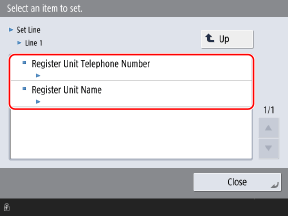
Set the fax number in [Register Unit Telephone Number].
Set a name or company name for the unit name. By default, the unit name is printed as the sender name at the destination.
6
Set the line name and the address list to display when you select the line, as needed.
[Edit Line Name for Select Line Screen]*1
Set the line name.
The line name that you set is displayed in the line selection list on the fax screen.
The line name that you set is displayed in the line selection list on the fax screen.
[Default Address List When Selecting Line]*1
Set the address list to display as the default setting when you select a line.
The set address list is displayed as the default setting when you specify a destination from the Address Book while a line is selected on the fax screen.
The set address list is displayed as the default setting when you specify a destination from the Address Book while a line is selected on the fax screen.
*1 Depending on the model, this item may not appear on the Settings/Registration screen.
7
Press [Close].
The settings are applied.
NOTE
Registering Sender Names
Register sender names if you want to be able to select a sender name other than the unit name, such as a department name or an individual's name, when you send a fax. [Register Sender Name (TTI)]
Initial Settings for Reception
Configure the fax reception mode.
When using the machine with a handset connected, you can also configure the time to emit the incoming fax tone.
When using the machine with a handset connected, you can also configure the time to emit the incoming fax tone.
This section describes how to configure the settings using the control panel.
You can also configure the settings using Remote UI from a computer. Managing the Machine from a Computer (Remote UI)
You can also configure the settings using Remote UI from a computer. Managing the Machine from a Computer (Remote UI)
* The reception mode settings only apply to the standard line (Line 1). They do not apply to any extra lines.
1
On the control panel, press [ Settings/Register] in the [Home] screen or other screen. [Home] Screen
Settings/Register] in the [Home] screen or other screen. [Home] ScreenThe [Settings/Registration] screen is displayed.
2
Press [Function Settings] [Receive/Forward] [Fax Settings] [RX Mode].
[Receive/Forward] [Fax Settings] [RX Mode].The [RX Mode] screen is displayed.
3
Select the reception mode.
When using the machine without a handset connected:
Select [Auto RX]. The machine will only be used for faxes.
The machine receives faxes automatically.
Even if someone makes a call to you, you cannot talk to the caller.
When performing automatic reception with a handset connected:
Select [Fax/Tel (Auto Switch)]. The machine can be used for both faxes and telephone calls.
The machine receives the fax automatically.
An incoming call rings. Pick up the handset to answer the call.
When performing manual reception with a handset connected:
Select [Manual RX]. The machine can be used for both faxes and telephone calls.
When a fax is received, the incoming fax tone is emitted, then fax reception starts after you pick up the handset and confirm the beep.
Press [  Home] [Fax] [On-Hook] [Start RX]. Home] [Fax] [On-Hook] [Start RX]. |
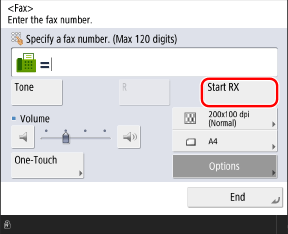
An incoming call rings. Pick up the handset. If you do not hear a beep, start your conversation.
When using the machine with an answering machine connected:
Select [Answering Machine]. The machine can be used for both faxes and telephone calls.
After an incoming call rings, the machine receives the fax automatically.
The answering machine activates, enabling the caller to leave a message. If you pick up the handset before the answering machine starts recording a message, you can talk with the caller.
* Set the answering machine to answer after a few rings.
* We recommend that you add approximately 4 seconds of silence at the beginning of the message or set the maximum recording time to 20 seconds.
* We recommend that you add approximately 4 seconds of silence at the beginning of the message or set the maximum recording time to 20 seconds.
When using the machine with a handset connected and a network switch service: 

Select [Net Switch]. This mode is only available for certain countries and requires a subscription to a network switch service.
Telstra FaxStream. Duet (Only for Australia)
In Australia, Telstra offers the FaxStream. Duet capability. If you subscribe to this service, your line is assigned two numbers: one for fax and one for phone. When the fax number is called, the network sends a specific ringing tone which your machine recognizes and automatically handles as a fax call. If the phone number is called, a different ringing tone is sent out from the network so that the call is handled as a voice call. This means that there is no switching delay at the caller's end. Contact Telstra for connection information.
Triple ring (short-short-short) for fax receiving.
Three short rings, at regular intervals.
Any ring except triple ring (depending on your switchboard) for telephone conversation.
* You need to subscribe to the FaxStream service beforehand.
Telecom FaxAbility (Only for New Zealand)
In New Zealand, Telecom N.Z. offers the FaxAbility capability. This service allows you to assign two numbers to your line: one for fax and one for telephone. When the fax number is called, the network sends a specific ring tone which your machine recognizes and automatically handles as a fax call. If the telephone number is called, a different ring tone is sent out from the network so that the call is handled as a voice call. This means that there is no switching delay at the caller's end. Contact Telecom for connection information.
* You need to subscribe to the FaxAbilty service beforehand.
When using the machine with a Distinctive Ring Pattern Detection (DRPD) service:
Select [DRPD: Select Fax]. This service assigns two or more telephone numbers with distinctive ring patterns to a single telephone line. You can use one of these numbers for faxes and one for telephone calls.
When the machine receives a call, it automatically recognizes the ring pattern and your telephone rings differently depending on whether the call is a fax or telephone call. If the ring pattern is for a fax, the machine automatically receives the fax.
* For more information about this service, contact your telephone company.
4
Set the incoming fax tone time and operation.
Configure these settings if you selected [Fax/Tel(Auto Switch)] or [DRPD: Select Fax] for the reception mode.
If you selected something other than [Fax/Tel(Auto Switch)] or [DRPD: Select Fax], this step is not required. Proceed to step 5.
If you selected [Fax/Tel (Auto Switch)]:
1
Configure the various settings, then press [OK].
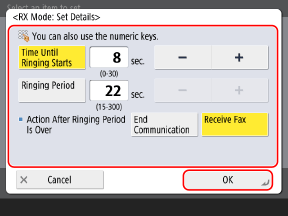
[Time Until Ringing Starts]
Specify the time for which the machine detects whether a fax or telephone call has been received. The machine will not emit a ring tone during this time.
When the machine detects a fax, reception starts.
[Ringing Period]
Specify the time for which the machine emits a ring tone when a fax is not detected.
[Action After Ringing Period Is Over]
Select the operation for the machine to perform if the handset is not picked up while the machine is emitting a ring tone.
If you select [End Communication], the machine will end communication. If you select [Receive Fax], the machine will receive a fax.
If you select [End Communication], the machine will end communication. If you select [Receive Fax], the machine will receive a fax.
If you selected [DRPD: Select Fax]:
1
Select the type of incoming fax tone, then press [OK].
Press [OK] [Close].
[Close].The settings are applied.
NOTE
Setting the Incoming Fax Tone
You can set the incoming fax tone when a handset is connected.Setting the Incoming Fax Tone
Configuring the Time Until the Machine Switches to Automatic Reception
When manual reception is selected for the reception mode, you can select whether to automatically receive faxes after the incoming fax tone is emitted for a certain time.[Switch to Auto RX]