Error Screen with Red Borders Appears in Pop-Up Window
If an error screen with red borders appears due to a problem, the machine may not be working properly.
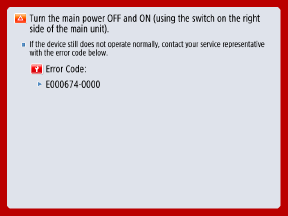
When Contacting Your Local Authorized Canon Dealer
Before contacting your local authorized Canon dealer, restart the machine and check if the error message disappears. If the error message is displayed again, contact your local authorized Canon dealer and describe the symptoms.

Do not plug in or unplug the power plug with wet hands. This can result in electric shock.
Be sure to hold the power plug when unplugging the power cord. Pulling on the power cord can damage it by exposing or disconnecting the inside wiring of the power cord, which can cause a leakage of electricity, resulting in fire or electric shock.
IMPORTANT
Turning OFF the machine deletes any data waiting to be processed.
Depending on the error, a message may appear asking you not to turn OFF the power of the machine, as the machine is saving the system information after the error occurred. In this case, do not turn OFF the machine until the data is saved.
1
Restart the machine. Restarting the Machine
2
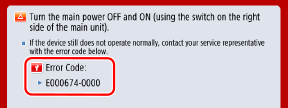
If the message reappears, make a note of the displayed error code.
Multiple error codes may be displayed.
3
Turn OFF the machine and unplug the power cord.
4
Contact your dealer or service representative.
Provide the following information:
Product name
Dealer or service representative from whom you purchased the machine
Details of the problem (such as operation details and their results, and phenomena)
Displayed error code
Using the Machine with Limited Functions After an Error Occurs
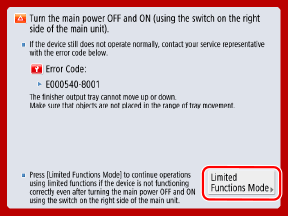
If [Limited Functions Mode] appears on the screen, you can press it and continue to use the machine prior to troubleshooting. However, the usable functions are limited.
1
Press [Limited Functions Mode].
2
Press [Yes].
The machine restarts and enters Limited Functions Mode.
If the problem is solved, the message "Call service representative." at the bottom left of the screen disappears.
Usable Functions When Print Functions are Limited
Fax, Scan, Scanner, MEAP Application, Status Monitor, Remote UI
Usable Functions When Scan Functions are Limited
Access Stored Files, Fax/I-Fax Inbox, Print, MEAP Application, Status Monitor, Remote UI