Booklet Printing
You can print with the pages automatically arranged so they create a booklet when folded in half.
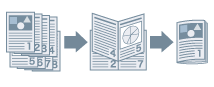
1.
Display the [Basic Settings] or [Finishing] sheet.
2.
Select [Booklet Printing] from [1-sided/2-sided/Booklet Printing] or [Print Style].
To set the binding position, follow the procedure below.
3.
Click [Booklet].
4.
In the displayed dialog box, select the binding position from [Book Opening].
5.
Click [OK].