[Finishing] Sheet
You can configure settings relating to layout printing and finishing such as sorting, collating, stapling, etc.
Depending on the device you are using, you may not be able to set some of the functions described herein.
[Print Style]
Specifies a method for outputting print data. According to what you select for [Print Style], the displayed settings change as follows.
When [1-sided Printing] or [2-sided Printing] is selected
[Print with Mixed Paper Sizes/Orientations]
Enables you to print data that combines different page sizes and orientations.
[Details] > [Detailed Settings] Dialog Box
Enables you to set the combination of page sizes and alignment method when printing data that combines different page sizes and orientations.
[Binding Location]
Sets the edge of the paper to bind.
If you change [Orientation] in the [Basic Settings]/[Page Setup] sheet, [Binding Location] is changed to the left or top. The long edge/short edge positional relationship is maintained.
[Finishing]
Sets the order of pages and whether to staple the pages when printing multiple copies.
 |  |  |
Collate | Group | Offset |
 |  |  |
Rotate | Hole Punch | Staple Eco (Staple-Free) |
[Off]
Follows the application setting.
[Collate]
Outputs the specified number of copies in page order.
[Group]
Outputs the specified number of copies with all pages having the same page number grouped together.
[Staple + Collate]/[Eco (Staple-Free) + Collate]/[Staple + Group]/[Eco (Staple-Free) + Group]
Outputs the pages in the order specified for [Collate] or [Group] stapled together. "Eco (Staple-Free)" is a method of fixing pages together without using staples, and can be used when a finisher that supports binding without staples is installed.
[Staple Position] > [Staple Position] Dialog Box
Enables you to set the position of the staple(s).
[Offset]
Outputs each copy separately. You can set how many copies are offset in [Number of Copies for Offset].
[Rotate]
Outputs each copy at a 90 degree angle relative to the copy before and after it.
[Hole Punch]
Outputs the document with multiple holes for ring binding.
[Fold]
Folds pages into one of a variety of forms when outputting them.
 |  |  |  |  |
C-fold (Saddle C-fold) | Z-fold | Half Fold (Saddle Fold) | Accordion Z-fold | Double Parallel Fold |
When [Booklet Printing] is selected
[Booklet] > [Detailed Settings for Booklet] Dialog Box
Enables you to set detailed settings for booklet printing, such as the binding position.
[Book Opening]
Specifies the direction in which the booklet opens.
[Saddle Stitch Setting]
Prints a booklet folded in half and stapled in the middle.
[Offset]
Outputs each copy separately. You can set how many copies are offset in [Number of Copies for Offset].
[Advanced Settings] > [Advanced Settings] Dialog Box
Enables you to set detailed finishing settings. Select the setting item you want to specify in [List of Settings], and select a setting from the drop-down list.
[Skip Blank Pages Mode]
Enables you to skip the output of blank pages that contain no print data.
When using this function, set the skip blank pages function also on the device side before printing. For information about how to operate the device, refer to the manual of the device.
Even if this function is set, blank pages are output when printing pages that includes data such as blank text and white objects.
[Auto 1]
Skips blank pages.
However, blank pages are output when the following functions are set to ensure that the page layout is not lost.
2-sided Printing/Booklet Printing
[Auto 2]
Skips blank pages.
[Off]
Outputs blank pages.
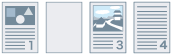
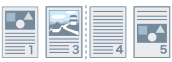
An example of performing two-sided printing with [Auto 2] specified for [Skip Blank Pages Mode] for an original with a blank second page is indicated below.
The blank second page is not output and the third page of the original is printed on the reverse side of the first printed sheet.
Original | ||
 | ... | |
Print result | ||
 | ... | |
1st sheet | 2nd sheet | |