Checking the Printer Settings
You can check the printer status, network settings, and so on by printing Status Print.
 |
Status Print is designed to be printed on Letter/A4 paper. Be sure to use Letter/A4 paper.
|
|
|
You can also check the network settings and so on using the following procedure.
|
|
Printing the "User Data List" using the Go key on the printer
|
|
|
Starting the Remote UI (
 "Starting the Remote UI"), logging in as Management Mode, and checking with the [Settings/Registration] - [Network Settings] page "Starting the Remote UI"), logging in as Management Mode, and checking with the [Settings/Registration] - [Network Settings] page |
1
Load Letter/A4 paper in the paper drawer.
2
Click [  ] in the Windows task tray, and then select the printer name.
] in the Windows task tray, and then select the printer name.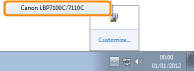
3
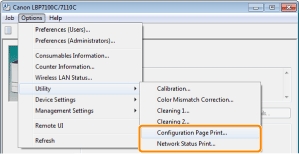
From the [Options] menu, select [Utility] → [Configuration Page Print] or [Network Status Print].
[Configuration Page Print]
Prints the settings of the printer unit and other current printer information.
[Network Status Print]
Prints the TCP/IP settings including the IP address and information including security settings.
4
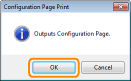
Click [OK] to print Status Print.