
PS
 |
All the settings about the PS control commands are listed with short descriptions. Default settings are marked with a dagger (
 ). ). |
|
|
Asterisks (*)Settings marked with an asterisk (*) are not displayed depending on other settings.
|
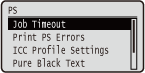
Job Timeout
If the time specified in this item has elapsed since a job process was started, the machine automatically finishes the job and receives the next job.
If you do not want to specify the timeout, specify "0 seconds."
If you do not want to specify the timeout, specify "0 seconds."
|
0
to 3600 seconds |
 (
( )
)  <PS>
<PS>  <Job Timeout> Use the numeric keys to enter the setting value
 Print PS Errors
Specifies whether an error page should be printed when a PostScript error is occurring.
|
Off
On
|
() <PS> <Print PS Errors> <Off> or <On> ICC Profile Settings
Set the profile to be used when performing color matching and specify which element to be given priority over others.
RGB Source Profile
Select a suitable profile for RGB data that matches the monitor that you are using.
|
sRGB v3.0 (Canon)
Canon HDTV gamma 1.5
Canon HDTV gamma 1.8
Canon HDTV gamma 2.4
None
|
() <PS> <ICC Profile Settings> <RGB Source Profile> Select the profile 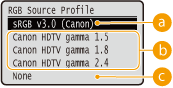
 <sRGB v3.0 (Canon)>
An RGB profile is used that is similar to an average profile of most Windows PC monitors. When using a monitor that supports sRGB, you can print colors close to the colors displayed on the monitor.
 <Canon HDTV gamma 1.5> to <Canon HDTV gamma 2.4>
When you want a brightness adjustment after making comparison between the printed colors and the colors displayed on the monitor, make a necessary setting here. The higher the value, the darker the printed colors.
 <None>
Performs color separation from RGB data to CMYK without applying any RGB source profile.
CMYK Sim. Profile
You can select a simulation target when printing CMYK data. The machine converts CMYK data to a device-dependent CMYK color model in accordance with the selected simulation target.
|
Euro Standard v1.00
JapanColor(Canon)
U.S. Web Coated v1.0
None
|
() <PS> <ICC Profile Settings> <CMYK Sim. Profile> Select the profile 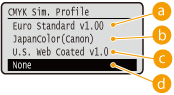
<Euro Standard v1.00>
Use the Euro Standard profile. Printing is performed in colors that are close to the European printing standards.
<JapanColor(Canon)>
Use the JapanColor profile. Printing is performed in colors that are close to the Japanese printing standards.
<U.S. Web Coated v1.0>
Use the U.S. Web Coated profile. Printing is performed in colors that are close to the U.S. printing standards.
 <None>
Prints CMYK data using a device-dependent CMYK color model without applying any CMYK simulation profile.
|
|
|
When this item is set to <None>, dark color gradation may collapse depending on the data.
|
Grayscale Profile
Set whether to convert gray data to CMYK data using the machine's grayscale profile.
|
Off
On
|
() <PS> <ICC Profile Settings> <Grayscale Profile> <Off> or <On> 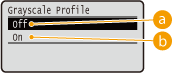
<Off>
Prints only with K (black) toner without converting the data to CMYK data.
<On>
Converts the data to CMYK data using the machine's grayscale profile. However, printing may be performed only with K (black) toner depending on the setting of <Output Profile> or <Pure Black Text>.
Output Profile
You can select suitable profiles for data that you are going to print. You can set this item for each of the types of image contained in one document.
|
Text
PS Normal
PS Photo
PS TR Normal
PS TR Photo
Graphics
PS Normal
PS Photo
PS TR Normal
PS TR Photo
Image
PS Normal
PS Photo
PS TR Normal
PS TR Photo
|
() <PS> <ICC Profile Settings> <Output Profile> Select the image data type Select the profile 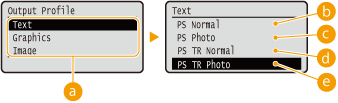
Image data type
Select the image data type for which the settings are changed. Select <Text> for characters, <Graphics> for lines and figures, or <Image> for images such as photos.
<PS Normal>
Color matching is performed so that data is printed in colors close to the colors displayed on the monitor.
<PS Photo>
Color matching is performed so that the print result is similar to photography.
<PS TR Normal>
Color matching is performed so that data is printed in colors close to the colors displayed on the monitor and that bleeding of toner into text and fine lines is well controlled.
 <PS TR Photo>
Color matching is performed so that the print result is similar to photography and that bleeding of toner into text and fine lines is well controlled.
|
|
This item is disabled when one of the following settings is made.<RGB Source Profile> is set to <None>.
<CMYK Sim. Profile> is set to <None>.
<Grayscale Profile> is set to <Off>.
|
Matching Method
Specify which element to be given priority over others in color matching by <RGB Source Profile>.
|
Perceptual
Saturation
Colorimetric
|
() <PS> <ICC Profile Settings> <Matching Method> Select the matching method 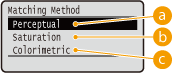
<Perceptual>
Matching is performed with priority given to perceptual.
<Saturation>
Matching is performed with priority given to saturation.
<Colorimetric>
Matching is performed so that color difference between originals and printouts is minimized.
|
|
|
This item is disabled when <RGB Source Profile> is set to <None>.
|
Pure Black Text
For black text whose color information defines "R=G=B=0%," "C=M=Y=100%," or "C=M=Y=0%/K=100%," select whether to print it with K (black) toner only or according to the setting of <Output Profile>.
|
Off
On
|
() <PS> <Pure Black Text> <Off> or <On> 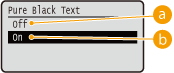
<Off>
Prints according to the setting of <Output Profile>. The print result may be better than with <On> depending on the print data.
<On>
Prints black text with K (black) toner only. Unlike printing with color (CMY) toner, color toner slurring around the edges will not occur. It is recommended that normally you use this setting.
Black Overprint *
Set how to print when black text is on a color background or color figure. This item is not displayed when <Pure Black Text> is set to <Off>.
|
Off
On
|
() <PS> <Black Overprint> <Off> or <On> 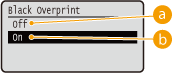
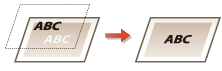
<Off>
First the data is printed after the black text is cut out from the color background or figure, leaving the corresponding white blank, and then the black text is printed on the white blank. The print may be fainter than with the <On> setting, and the edges of the text may be rimmed with white.
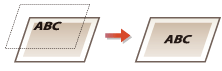
<On>
First only the color background or figure is printed, and then the black text is printed onto the background or figure.
Brightness
You can adjust the brightness of the whole image in steps of 5%. The smaller the value, the brighter the image.
|
85 to 100
to 115 (%) |
() <PS> <Brightness> Use  /
/ to enter the setting value
 Halftones
You can select the printing method to reproduce halftones (the intermediate range between the lighter and darker areas of an image).
Error Diffusion
You can perform finer printing than with <Resolution/Grad.>. This print mode is suitable for sharply printing edges of fine granularity data such as characters or thin lines.
|
Off
On
|
() <PS> <Halftones> <Error Diffusion> <Off> or <On> Resolution/Grad. *
Select the halftone reproduction method when <Error Diffusion> is set to <Off>. You can set this item for each of the types of image contained in one document.
|
Text
Resolution
Gradation
Graphics
Resolution
Gradation
Image
Resolution
Gradation
|
() <PS> <Halftones> <Resolution/Grad.> Select the image data type <Resolution> or <Gradation> 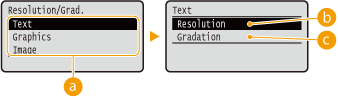
Image data type
Select the image data type for which the settings are changed. Select <Text> for characters, <Graphics> for lines and figures, or <Image> for images such as photos.
<Resolution>
Performs fine printing by sharply reproducing the edges of characters. This print mode is suitable for printing data of characters and thin lines with a clear finish.
<Gradation>
Prints gradation and lines with a smooth finish. This print mode is suitable for printing figures and charts with gradation.
Composite Overprint
Set whether CMYK data for which overprint is set is to be overprinted as composite data.
|
Off
On
|
() <PS> <Composite Overprint> <Off> or <On> |
|
|
Setting this item to <On> does not enable overprint if <CMYK Sim. Profile> is set to other than <None>.
|
Advanced Smoothing
Make settings for the smoothing mode that enables edges of lines, figures and text are printed smoothly.
Advanced Smoothing
Specify whether to enable or disable the smoothing mode. Edges will be smoother with <Smooth 2> than with <Smooth 1>.
|
Off
Smooth 1
Smooth 2
|
() <PS> <Advanced Smoothing> <Advanced Smoothing> Select the processing method Graphics *
Specify whether to apply the smoothing mode to lines and figures when <Advanced Smoothing> is set to <Smooth 1> or <Smooth 2>.
|
Off
On
|
() <PS> <Advanced Smoothing> <Graphics> <Off> or <On> Text *
Specify whether to apply the smoothing mode to text when <Advanced Smoothing> is set to <Smooth 1> or <Smooth 2>.
|
Off
On
|
() <PS> <Advanced Smoothing> <Text> <Off> or <On> Grayscale Conversion *
You can select the method to convert color pint data to black-and-white data.
|
sRGB
NTSC
Uniform RGB
|
() <PS> <Grayscale Conversion> Select the conversion method 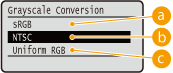
<sRGB>
Color data is converted to black-and-white data to generate color-conscious smooth gradation.
<NTSC>
Color data is converted to black-and-white data to generate appearances equivalent to television pictures (NTSC).
<Uniform RGB>
Color data is converted to black-and-white data to equalize all RGB levels based on the brightness only.
|
|
|
This item is available when <Color Mode> (Color Mode) under <Print Quality> is set to <Black>.
|