
Network
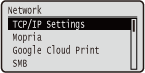 |
All the settings about the network are listed with short descriptions. Default settings are marked with a dagger (
 ). ). |
|
|
If <Network> is not displayedIf <Network> under <Interface Selection> is set to <Off>, <Network> is not displayed in the Setup menu. Interface Selection
Asterisks (*)Settings marked with an asterisk (*) are not displayed depending on other settings or whether an optional SD card is installed on the machine.
|
|
|
TCP/IP Settings
Specify settings for using the machine in a TCP/IP network, such as IP address settings.
IPv4 Settings
Specify settings for using the machine in an IPv4 network.
IPv4
Enable or disable IPv4 in the machine.
|
Off
On
|
 (
( )
)  <Network>
  Check the message <TCP/IP Settings> <IPv4 Settings> <IPv4> <Off> or <On> Perform a hard reset (Performing a Hard Reset)
IP Mode
Select how to set the IP address. Setting IPv4 Address
|
Auto
Manual
|
Protocol *
Select the protocol to use when <IP Mode> is set to <Auto>. If you set the selected protocol to <On>, the other two protocols are automatically set to <Off>. Setting IPv4 Address
Use DHCP
|
Off
On |
Use BOOTP
|
Off
On |
Use RARP
|
Off
On |
Auto IP *
Select whether to automatically obtain an IP address. Specify <On> when <IP Mode> is set to <Auto>. Setting IPv4 Address
|
Off
On |
IP Address Settings
Configure the IP address, which is used for identifying devices, such as computers and printers, on a TCP/IP network. Setting IPv4 Address
IP Address
|
0.0.0.0
to 255.255.255.255 |
Subnet Mask
|
0.0.0.0
to 255.255.255.255 |
Gateway Address
|
0.0.0.0
to 255.255.255.255 |
DNS
Specify settings for the server address of the Domain Name System (DNS), which provides a host name for IP address resolutions. Use  /
/ to move the cursor, and use the numeric keys to specify the address. Use the Remote UI to specify other settings for DNS. Configuring DNS
/ to move the cursor, and use the numeric keys to specify the address. Use the Remote UI to specify other settings for DNS. Configuring DNSPrimary Address
|
0.0.0.0
to 255.255.255.255 |
Secondary Address
|
0.0.0.0
to 255.255.255.255 |
() <Network> Check the message <TCP/IP Settings> <IPv4 Settings> <DNS> Select the server to configure Set the address Perform a hard reset (Performing a Hard Reset)mDNS Settings *
Specify settings for using DNS functions without DNS servers. Configuring DNS
mDNS
|
Off
On
|
() <Network> Check the message <TCP/IP Settings> <IPv4 Settings> <mDNS Settings> <mDNS>  <Off> or <On> Perform a hard reset (Performing a Hard Reset)
mDNS Name *
When <mDNS> is set to <On>, set this item.
() <Network> Check the message <TCP/IP Settings> <IPv4 Settings> <mDNS Settings> <mDNS Name> Set the name Perform a hard reset (Performing a Hard Reset)DHCP Option
When DHCP is enabled, select whether to acquire the host name and whether to perform dynamic update of the DNS using the DHCP options.
Acquire Host Name
|
Off
On
|
DNS Dynamic Update
|
Off
On
|
() <Network> Check the message <TCP/IP Settings> <IPv4 Settings> <DHCP Option> <Acquire Host Name> or <DNS Dynamic Update> <Off> or <On> Perform a hard reset (Performing a Hard Reset)IPv6 Settings
Select whether to use the machine in an IPv6 network. Use the Remote UI to specify the IPv6 address settings. Setting IPv6 Addresses
IPv6
Enable or disable IPv6 in the machine.
|
Off
On
|
() <Network> Check the message <TCP/IP Settings> <IPv6 Settings> <IPv6> <Off> or <On> Perform a hard reset (Performing a Hard Reset)mDNS Settings *
Specify settings for using DNS functions without DNS servers. Configuring DNS
mDNS
|
Off
On
|
() <Network> Check the message <TCP/IP Settings> <IPv6 Settings> <mDNS Settings> <mDNS> <Off> or <On> Perform a hard reset (Performing a Hard Reset)Use IPv4 Name (mDNS) *
|
Off
On
|
() <Network> Check the message <TCP/IP Settings> <IPv6 Settings> <mDNS Settings> <Use IPv4 Name (mDNS)> <Off> or <On> Perform a hard reset (Performing a Hard Reset)mDNS Name *
When <Use IPv4 Name (mDNS)> is set to <Off>, set this item.
() <Network> Check the message <TCP/IP Settings> <IPv6 Settings> <mDNS Settings> <mDNS Name> Set the name Perform a hard reset (Performing a Hard Reset)WINS Resolution
Select whether to use Windows Internet Name Service (WINS), which provides a NetBIOS name for IP address resolutions in a mixed network environment of NetBIOS and TCP/IP. Use the Remote UI to specify detailed settings that are applied when WINS is enabled. Configuring WINS
|
Off
On
|
() <Network> Check the message <TCP/IP Settings> <WINS Resolution> <Off> or <On> Perform a hard reset (Performing a Hard Reset)FTP
Select whether to change the settings for printing and those configured in the machine from FTP.
FTP Print
Select whether to print from FTP. Use the Remote UI to set the user name and password that are used to print from FTP. Preparing for Using the FTP Server
|
Off
On
|
() <Network> Check the message <TCP/IP Settings> <FTP> <FTP Print> <Off> or <On> Perform a hard reset (Performing a Hard Reset)Allow Set. via FTP
Select whether to change the settings configured in the machine from FTP.
|
Off
On
|
() <Network> Check the message <TCP/IP Settings> <FTP> <Allow Set. via FTP> <Off> or <On> Perform a hard reset (Performing a Hard Reset)LPD Settings
Enable or disable LPD, a printing protocol that can be used on any hardware platform or operating system. Also, set the time period after which the print job automatically ends when print data cannot be received due to a communication error or some other problem. Use the Remote UI to specify settings for banner page printing when LPD is enabled. Configuring Printing Protocols and WSD Functions
LPD Print
|
Off
On
|
() <Network> Check the message <TCP/IP Settings> <LPD Settings> <LPD Print> <Off> or <On> Perform a hard reset (Performing a Hard Reset)RX Timeout *
|
1 to 60
(min.) |
() <Network> Check the message <TCP/IP Settings> <LPD Settings> <RX Timeout> Set Timeout Time Perform a hard reset (Performing a Hard Reset)RAW Settings
Enable or disable RAW, a Windows specific printing protocol. Also, set the time period after which the print job automatically ends when print data cannot be received due to a communication error or some other problem. Use the Remote UI to specify settings for bidirectional communication.Configuring Printing Protocols and WSD Functions
RAW Print
|
Off
On
|
() <Network> Check the message <TCP/IP Settings> <RAW Settings> <RAW Print> <Off> or <On> Perform a hard reset (Performing a Hard Reset)RX Timeout *
|
1 to 60
(min.) |
() <Network> Check the message <TCP/IP Settings> <RAW Settings> <RX Timeout> Set Timeout Time Perform a hard reset (Performing a Hard Reset)IPP Print
Enable or disable IPP, which enables printing from an external network via Internet. Use the Remote UI to specify settings for TLS encryption of data to send and user authentication. Configuring Printing Protocols and WSD Functions
|
Off
On
|
() <Network> Check the message <TCP/IP Settings> <IPP Print> <Off> or <On> Perform a hard reset (Performing a Hard Reset)WSD
Enable or disable automatic browsing and acquiring information for the machine by using the WSD protocol. Configuring Printing Protocols and WSD Functions
WSD Print
Select whether to print with the machine by using WSD.
|
Off
On
|
() <Network> Check the message <TCP/IP Settings> <WSD> <WSD Print> <Off> or <On> Perform a hard reset (Performing a Hard Reset)WSD Browsing *
Select whether to acquire information of the machine from a computer by using WSD. If <WSD Print> is set to <On>, <WSD Browsing> is fixed to <On> and is not displayed in the setting menu.
|
Off
On
|
() <Network> Check the message <TCP/IP Settings> <WSD> <WSD Browsing> <Off> or <On> Perform a hard reset (Performing a Hard Reset)Multicast Discovery
Select whether to set the machine to reply to multicast discovery messages.
|
Off
On
|
() <Network> Check the message <TCP/IP Settings> <WSD> <Multicast Discovery> <Off> or <On> Perform a hard reset (Performing a Hard Reset)|
|
|
If <Multicast Discovery> is set to <Off>, the machine stays in sleep mode even when multicast discovery messages are flowing on the network.
|
HTTP
Enable or disable HTTP. HTTP is required for communications with a computer, such as when using the Remote UI and performing WSD printing. Disabling HTTP Communication
|
Off
On
|
Proxy Settings
Specify settings for using the proxy server that relays HTTP communications. Setting a Proxy
Proxy
Enable or disable the proxy server when the machine performs HTTP communications.
|
Off
On
|
() <Network> Check the message <TCP/IP Settings> <Proxy Settings> <Proxy> <Off> or <On> Perform a hard reset (Performing a Hard Reset)Server Address *
Set the address of the proxy server to use. Specify the IP address, domain name, and other necessary information that suit your operational environment. Use / to move the cursor, and use the numeric keys to enter the address (Entering Text).
/ to move the cursor, and use the numeric keys to enter the address (Entering Text). () <Network> Check the message <TCP/IP Settings> <Proxy Settings> <Server Address> Enter the server address Perform a hard reset (Performing a Hard Reset)Port Number *
Specify the port number of the proxy server to use.
|
1 to 80
to 65535 |
() <Network> Check the message <TCP/IP Settings> <Proxy Settings> <Port Number> Enter the port number Perform a hard reset (Performing a Hard Reset)Same Domain *
Enable or disable the proxy server even for performing HTTP communications with devices in the same domain.
|
Use Proxy
Do Not Use Proxy
|
() <Network> Check the message <TCP/IP Settings> <Proxy Settings> <Same Domain> <Use Proxy> or <Do Not Use Proxy> Perform a hard reset (Performing a Hard Reset)Proxy Authentication *
Enable or disable the authentication function of the proxy server.
|
Off
On
|
() <Network> Check the message <TCP/IP Settings> <Proxy Settings> <Proxy Authentication> <Off> or <On> Perform a hard reset (Performing a Hard Reset)User Name *
To enable the proxy authentication, enter up to 24 alphanumeric characters for the user name to authenticate. Use the numeric keys to enter the user name. (Entering Text)
() <Network> Check the message <TCP/IP Settings> <Proxy Settings> <User Name> Enter the user name Perform a hard reset (Performing a Hard Reset)Password *
To set the password for the proxy authentication, enter up to 24 alphanumeric characters. Use the numeric keys to enter the password. (Entering Text)
() <Network> Check the message <TCP/IP Settings> <Proxy Settings> <Password> Enter the password Perform a hard reset (Performing a Hard Reset)SNTP
Select whether to acquire time from a network time server. Use the Remote UI to specify the server address settings. Configuring SNTP
|
Off
On
|
() <Network> Check the message <TCP/IP Settings> <SNTP> <Off> or <On> Perform a hard reset (Performing a Hard Reset)Discovery Response
Select whether to set the machine to respond to multicast discovery packets on the network. Use the Remote UI to specify the scope name that is used to include the machine into a specific scope. Configuring Settings for Device Management Software
|
Off
On
|
() <Network> Check the message <TCP/IP Settings> <Discovery Response> <Off> or <On> Perform a hard reset (Performing a Hard Reset)IPSec
Select whether to perform encrypted communication by establishing a virtual private network (VPN) via IPSec. Use the Remote UI to register and specify the security policies. Configuring IPSec Settings
|
Off
On
|
() <Network> Check the message <TCP/IP Settings> <IPSec> <Off> or <On> Perform a hard reset (Performing a Hard Reset)Sleep Notif. Set.
Specify settings for SLP communication to notify imageWARE of the power status of the machine. If you set <Sleep Mode Notif.> to <On>, you can expect the machine to avoid unnecessary communication during sleep mode and reduce the total power consumption. Configuring Settings for Device Management Software
Sleep Mode Notif.
Enable or disable SLP communication. If you select <On>, the power status of the machine is notified to imageWARE.
|
Off
On
|
() <Network> Check the message <TCP/IP Settings> <Sleep Notif. Set.> <Sleep Mode Notif.> <Off> or <On> Perform a hard reset (Performing a Hard Reset)Port Number *
Enter the port number for SLP communications with management software.
|
1 to 11427
to 65535 |
() <Network> Check the message <TCP/IP Settings> <Sleep Notif. Set.> <Port Number> Use the numeric keys to enter the port number Perform a hard reset (Performing a Hard Reset)Routers to Traverse *
Specify how many routers the notification packets can pass. Enter a number from 0 to 254.
|
0 to 3
to 254 |
() <Network> Check the message <TCP/IP Settings> <Sleep Notif. Set.> <Routers to Traverse> Use the numeric keys to enter the number of routers to traverse Perform a hard reset (Performing a Hard Reset)Notif. Interval *
Specify how often the machine notifies imageWARE of its power status. Enter a number in seconds from 60 to 65535.
|
60 to 600
to 65535 |
() <Network> Check the message <TCP/IP Settings> <Sleep Notif. Set.> <Notif. Interval> Use the numeric keys to enter the notification interval Perform a hard reset (Performing a Hard Reset)Mopria
Select whether to use Mopria™. Printing with Mopria™
|
Off
On
|
() <Network> Check the message <Mopria> <Off> or <On> Perform a hard reset (Performing a Hard Reset)Google Cloud Print
Enable or disable Google Cloud Print. Changing Google Cloud Print Settings
|
Use Cloud Print
Off
On
Registration Status
|
SMB *
Select whether to use the machine as a shared printer on the SMB network. Use the Remote UI to specify other SMB settings including the server name and the workgroup name. Configuring SMB
SMB Server
Select whether to display the machine as an SMB Server on the SMB network configuration screen.
|
Off
On
|
() <Network> Check the message <SMB> <SMB Server> <Off> or <On> Perform a hard reset (Performing a Hard Reset)SMB Print *
Enable or disable SMB Print.
|
Off
On
|
() <Network> Check the message <SMB> <SMB Print> <Off> or <On> Perform a hard reset (Performing a Hard Reset)SNMP Settings
Specify the settings for monitoring and controlling the machine from a computer running SNMP-compatible software. Monitoring and Controlling the Machine with SNMP
SNMPv1 Settings
Specify settings for using SNMPv1. Use the Remote UI to specify a community name and access privileges to Management Information Base (MIB) objects.
SNMPv1
Enable or disable SNMPv1.
|
Off
On
|
() <Network> Check the message <SNMP Settings> <SNMPv1 Settings> <SNMPv1> <Off> or <On> Perform a hard reset (Performing a Hard Reset)Dctd. Community Set.
Dedicated Community is a preset community, intended exclusively for administrators using Canon software, such as imageWARE Enterprise Management Console. Select the access privilege to Management Information Base (MIB) objects.
Dctd. Community
|
Off
Read/Write
Read Only
|
() <Network> Check the message <SNMP Settings> <SNMPv1 Settings> <Dctd. Community Set.> <Dctd. Community> Select the access privilege Perform a hard reset (Performing a Hard Reset)SNMPv3 Settings
Specify settings for using SNMPv3. Use the Remote UI to specify detailed settings that are applied when SNMPv3 is enabled.
SNMPv3
Enable or disable SNMPv3.
|
Off
On
|
() <Network> Check the message <SNMP Settings> <SNMPv3 Settings> <SNMPv3> <Off> or <On> Perform a hard reset (Performing a Hard Reset)User Settings N (N=1, 2, 3, 4, 5) *
Specify the authentication password and encryption password as the user information used on SNMPv3. Use the Remote UI to register the user information. Monitoring and Controlling the Machine with SNMP
Auth. Password/Encryption Password
Enter 6 to 16 alphanumeric characters for each password. Use the numeric keys to enter the password.
() <Network> Check the message <SNMP Settings> <SNMPv3 Settings> Select the user settings number Check the user name <Auth. Password> or <Encryption Password> Enter the password Perform a hard reset (Performing a Hard Reset)Rjct Packet in Sleep
Select whether to discard SNMP packets received during sleep mode.
|
Off
On
|
() <Network> Check the message <SNMP Settings> <Rjct Packet in Sleep> <Off> or <On> Perform a hard reset (Performing a Hard Reset)|
|
|
If you select <On>, applications that use the SNMP protocol, such as Canon software imageWARE Series, may be disabled to access the machine.
|
Spooler *
Select whether to include the SD card in the storage locations of received print data. If you select <On>, the machine capacity of receiving print data is increased.
|
Off
On
|
() <Network> Check the message <Spooler> <Off> or <On> Perform a hard reset (Performing a Hard Reset)Receive in Parallel
Specifies whether to print jobs in the order received when print data for several jobs are sent to the printer from one computer.
|
Off
On
|
() <Network> Check the message <Receive in Parallel> <Off> or <On> Perform a hard reset (Performing a Hard Reset)Wait Time at Startup
Specify a wait time for connecting to a network. Select the setting depending on the network environment. Setting a Wait Time for Connecting to a Network
|
0
to 300 (sec.) |
Remote UI Settings
Specify settings for using the Remote UI. You can use the Remote UI to specify settings for the machine from a Web browser.
Remote UI
Enable or disable the Remote UI. Disabling Remote UI
|
Off
On
|
RUI Access Sec. Set.
Select whether to use a PIN to access the Remote UI. Setting a Remote UI PIN
|
Off
On
|
TLS *
Enable or disable TLS for Remote UI communications. To use TLS for encrypted communications, you need to set key pairs by using the Remote UI (Using TLS for Encrypted Communications), respectively.
|
Off
On
|
() <Network> Check the message <Remote UI Settings> <TLS> <Off> or <On> Perform a hard reset (Performing a Hard Reset)Ethernet Driver
Specify the Ethernet communication mode (half duplex/full duplex) and Ethernet type (10 Base-T/100 Base-TX/1000 Base-T). Configuring Ethernet Settings
Auto Detect
Select whether to automatically detect or manually select the communication mode and the Ethernet type.
|
Off
On
|
Communication Mode *
If <Auto Detect> is set to <Off>, select the Ethernet communication mode.
|
Half Duplex
Full Duplex
|
Ethernet Type *
If <Auto Detect> is set to <Off>, select the Ethernet type.
|
10 Base-T
100 Base-TX
1000 Base-T
|
Sleep Mode Priority
Select whether to give priority to rapid returning from sleep mode or greater energy saving effect of sleep mode.
|
Optimal Balance
Exit Speed
Energy Saving
|
() <Network> Check the message <Sleep Mode Priority> Select the settings item Perform a hard reset (Performing a Hard Reset)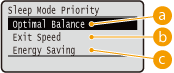
 Optimal Balance
The machine returns from sleep mode rapidly. When the devices directly connected to the machine support EEE (Energy Efficient Ethernet), power consumption can be reduced to a greater degree. Normally use this setting.
 Exit Speed
The machine returns from sleep mode more rapidly.
 Energy Saving
Communication speed during sleep mode is reduced for lowest power consumption.
|
|
|
This item is available when <Sleep Mode> is set to <High (Deep Sleep)>. Entering Sleep Mode
|
IEEE802.1X
Enable or disable IEEE 802.1X authentication. Use the Remote UI to specify detailed settings that are applied when IEEE802.1X authentication is enabled. Configuring IEEE 802.1X Authentication
|
Off
On
|
() <Network> Check the message <IEEE802.1X> Check the message <Off> or <On> Perform a hard reset (Performing a Hard Reset)Address Filter
Enable or disable communication restricted with the IP address and MAC address. Use the Remote UI to specify the address to restrict. Basic Printing Operations
|
Off
On
|
() <Network> Check the message <Address Filter> <Off> or <On> Perform a hard reset (Performing a Hard Reset)MAC Address
Check the MAC address of the machine, which is a number unique to each communication device.
|
(Display only)
|
() <Network> Check the message <MAC Address> E-Mail Print Set.
Specify settings for using the E-Mail Print function. Use the Remote UI to specify other settings for E-Mail Print including the mail server settings. Printing Received E-mail (E-Mail Print)
POP3 RX Interval
Specify the interval for automatically connecting to the mail server in minutes. New e-mails in the mailbox of the mail server are automatically received and printed at the specified time intervals.
|
0
to 90 (min.) |
() <Network> Check the message <E-Mail Print Set.> <POP3 RX Interval> Use the numeric keys to enter the interval of auto e-mail reception Perform a hard reset (Performing a Hard Reset)|
|
|
If you select "0," e-mails are not automatically received. In this case, receive e-mails manually. Manually Receiving E-Mails
|
POP3 RX
Enable or disable E-Mail Print for the POP3 mail server.
|
Off
On
|
() <Network> Check the message <E-Mail Print Set.> <POP3 RX> <Off> or <On> Perform a hard reset (Performing a Hard Reset)SMTP RX
Enable or disable E-Mail Print for the SMTP protocol.
|
Off
On
|
() <Network> Check the message <E-Mail Print Set.> <SMTP RX> <Off> or <On> Perform a hard reset (Performing a Hard Reset)Monitoring Service
Enable communication with a remote monitoring server and display of communication logs.
Comm. Test
Enable communication with a remote monitoring server. Execution of this item enables information about the machine to be periodically sent to the remote monitoring server connected to the machine.
() <Network> Check the message <Monitoring Service> <Comm. Test> Check the message <Yes> Comm. Log
Display communication logs including error information generated with <Comm. Test>.
|
(Display only)
|
() <Network> Check the message <Monitoring Service> <Comm. Log> Select the log Select the time Init. Network Set.
Select to return the Network Settings to the factory defaults. Initializing the Network Settings