Deleting Original Documents
Desktop Editor enables you to delete original documents stored in an IWB document.
|
NOTE
|
|
If you select the [Save the original document in Canon Desktop Document] check box in [System Settings], the original document is stored in the IWB document when the IWB document is imported to Desktop Editor.
[File] menu > [Option] > [System Settings] > [Editor] > [Options] > [Save the original document in Canon Desktop Document]
|
1.
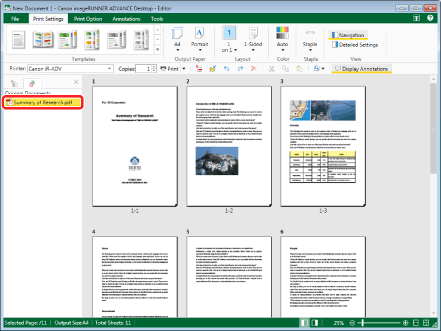
Select the original documents to delete from the [Original Documents] tab on the Navigation Window.
|
NOTE
|
|
If the [Original Documents] tab is not displayed on the Navigation Window, see the following to display it.
|
2.
Click [Delete Original Documents] on the ribbon.
Or, follow one of the steps described below.
Right-click and select [Delete Original Documents].
Press the [Delete] key on the keyboard.
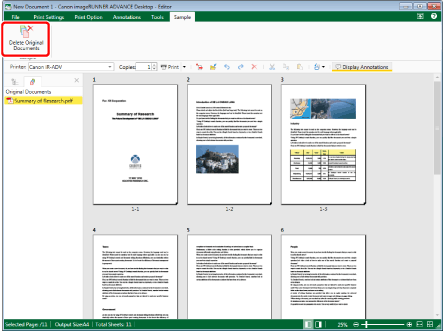
A confirmation message is displayed.
|
NOTE
|
|
If commands are not displayed on the ribbon of Desktop Editor, see the following to display them.
The same operation can also be performed with the tool buttons. If tool buttons are not displayed on the toolbar of Desktop Editor, see the following to display them.
|
3.
Click [Yes].
The selected original documents are deleted from the IWB document.