Removing Password Settings from a PDF Document
You can remove the password settings from a PDF document.
|
NOTE
|
|
You cannot remove the password settings from the following PDF documents.
PDF documents with digital stamps attached
PDF documents that have had digital stamps attached
|
1.
Open the PDF document to remove the password settings from with Desktop Editor.
For information on how to open a document with Desktop Editor, see the following.
|
NOTE
|
|
To start Desktop Editor from Desktop Browser to open a PDF document, perform one of the following operations.
Click [Annotations] on the ribbon.
Select [Open] on the ribbon > [Open].
Click the icon for the ribbon command.
Click [Open] on the ribbon.
Right-click and select [Open] or [Insert Annotations].
Double-click the PDF document (*.pdf).
If commands are not displayed on the ribbon of Desktop Browser, see the following to display them.
The same operation can also be performed with the tool buttons. If tool buttons are not displayed on the toolbar of Desktop Browser, see the following to display them.
If you drag and drop a PDF document to a Desktop Editor shortcut icon created on the desktop to open the document with Desktop Editor, it is converted to an IWB document.
|
2.
Click [Delete Password] on the ribbon.
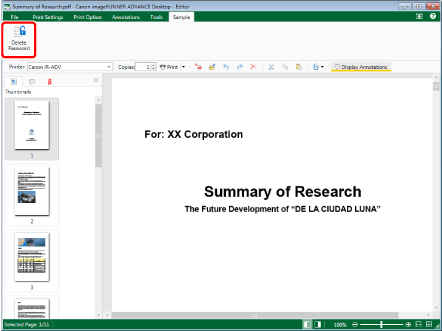
A confirmation message is displayed.
|
NOTE
|
|
If commands are not displayed on the ribbon of Desktop Editor, see the following to display them.
The same operation can also be performed with the tool buttons. If tool buttons are not displayed on the toolbar of Desktop Editor, see the following to display them.
|
3.
Click [Yes].
The password settings of the PDF document are removed.
4.
Save the PDF document.
For information on how to save a PDF document, see the following.