
<System Management Settings>
Усі параметри, пов’язані із System Management Settings, супроводжуються описом. Параметри за промовчанням позначено хрестиком ( ).
).
).|
|
Зірочки (*)Параметри, позначені «*1», можуть бути недоступні або мати різні поточні значення чи значення за промовчанням залежно від країни або регіону.
Параметри, позначені «*2», можуть не відображатися залежно від моделі, що використовується, або інших елементів налаштування.
|
<Network Settings>
Див. розділ <Network Settings>.
<System Manager Information Settings>
Укажіть PIN-код виключно для адміністраторів, які мають права доступу до параметрів <Network Settings> та <System Management Settings>. PIN-код можна встановити в пункті <System Manager PIN>. Можна також зареєструвати ім’я адміністратора. Налаштування System Manager PIN (PIN-код адміністратора системи)
<System Manager PIN>
Введіть число для System Manager PIN.
<System Manager Name>
Введіть ім’я адміністратора за допомогою буквено-цифрових символів.
<Device Information Settings> 
Введіть ім’я та місце встановлення апарата за допомогою буквено-цифрових символів для ідентифікації апарата.
|
<Device Name>
<Location>
|
<Menu> ( )
)  <System Management Settings> <Device Information Settings> Виберіть параметр <Device Name> або <Location> Введіть ім’я пристрою або його місцезнаходження (Введення тексту) <Apply>
) <System Management Settings> <Device Information Settings> Виберіть параметр <Device Name> або <Location> Введіть ім’я пристрою або його місцезнаходження (Введення тексту) <Apply><Security Settings>
Увімкніть або вимкніть параметри для фільтрування пакетів IP-адрес або MAC-адрес.
<Use TLS>
Укажіть, чи потрібно використовувати зашифрований зв’язок TLS. Налаштування ключа та сертифіката для протоколу TLS
|
<Off>
<On> |
<IPv4 Address Filter>
Увімкніть або вимкніть параметри для фільтрування пакетів, отриманих завдяки пристроям із вказаними адресами IPv4. Зазначення IP-адрес для налаштувань брандмауера
|
<Inbound Filter>
<Off>
<On>
|
<Menu> () <System Management Settings> <Security Settings> <IPv4 Address Filter> <Inbound Filter> Виберіть значення <Off> або <On>
) <System Management Settings> <Security Settings> <IPv4 Address Filter> <Inbound Filter> Виберіть значення <Off> або <On><IPv6 Address Filter>
Увімкніть або вимкніть параметри для фільтрування пакетів, отриманих завдяки пристроям із вказаними адресами IPv6. Зазначення IP-адрес для налаштувань брандмауера
|
<Inbound Filter>
<Off>
<On>
|
<Menu> () <System Management Settings> <Security Settings> <IPv6 Address Filter> <Inbound Filter> Виберіть значення <Off> або <On>
) <System Management Settings> <Security Settings> <IPv6 Address Filter> <Inbound Filter> Виберіть значення <Off> або <On><MAC Address Filter>
Увімкніть або вимкніть параметри для фільтрування пакетів, отриманих із пристроїв зі вказаними MAC-адресами. Зазначення MAC-адрес для налаштувань брандмауера
|
<Inbound Filter>
<Off>
<On>
|
<Menu> () <System Management Settings> <Security Settings> <MAC Address Filter> <Inbound Filter> Виберіть значення <Off> або <On>
) <System Management Settings> <Security Settings> <MAC Address Filter> <Inbound Filter> Виберіть значення <Off> або <On><Select Country/Region> *1
Укажіть країну або регіон, де використовується апарат. Значення за промовчанням може залежати від параметра, який було вибрано під час першого ввімкнення.
|
<Austria (AT)>
<Belarus (BY)>
<Belgium (BE)>
<Czech Republic (CZ)>
<Denmark (DK)>
<Egypt (EG)>
<Finland (FI)>
<France (FR)>
<Germany (DE)>
<Greece (GR)>
<Hungary (HU)>
<Ireland (IE)>
<Italy (IT)>
<Jordan (JO)>
<Luxembourg (LU)>
<Netherlands (NL)>
<Norway (NO)>
<Poland (PL)>
<Portugal (PT)>
<Russia (RU)>
<Saudi Arabia (SA)>
<Slovenia (SI)>
<South Africa (ZA)>
<Spain (ES)>
<Sweden (SE)>
<Switzerland (CH)>
<Ukraine (UA)>
<Great Britain (GB)>
<Other>
|
<Menu> () <System Management Settings> <Select Country/Region> Виберіть країну або регіон
) <System Management Settings> <Select Country/Region> Виберіть країну або регіон<Remote UI Settings>
Налаштуйте параметри для використання функції Remote UI (Інтерфейс віддаленого користувача). Використання функції Remote UI (Інтерфейс віддаленого користувача) дає змогу налаштовувати параметри апарата, використовуючи для цього веб-браузер.
<Use Remote UI>
Укажіть, чи потрібно використовувати Remote UI. Вимкнення Remote UI (Інтерфейс віддаленого користувача)
|
<Off>
<On>
|
<Menu> () <System Management Settings> <Remote UI Settings> <Use Remote UI> Виберіть значення <Off> або <On>
) <System Management Settings> <Remote UI Settings> <Use Remote UI> Виберіть значення <Off> або <On><Remote UI Access Security Settings>
Укажіть цей параметр, щоб для доступу до Remote UI (Інтерфейс віддаленого користувача) було потрібно вводити PIN-код. Установіть PIN-код, що складається з не більше 7 цифр. Усі користувачі застосовують спільний PIN-код. Установлення PIN-коду для Remote UI (Інтерфейс віддаленого користувача)
|
<Off>
<On>
<Remote UI Access PIN>
|
<Menu> () <System Management Settings> <Remote UI Settings> <Remote UI Access Security Settings> <On> Введіть PIN-код <Apply> Введіть PIN-код (підтвердження) <Apply>
) <System Management Settings> <Remote UI Settings> <Remote UI Access Security Settings> <On> Введіть PIN-код <Apply> Введіть PIN-код (підтвердження) <Apply><Auto Online for Remote Scan>
Укажіть, чи потрібно використовувати цю функцію для віддаленого сканування онлайн, не використовуючи панель керування.
|
<Off>
<On> |
<Menu> () <System Management Settings> <Auto Online for Remote Scan> Виберіть значення <Off> або <On>
) <System Management Settings> <Auto Online for Remote Scan> Виберіть значення <Off> або <On><Restrict TX Function> *2
Укажіть параметри обмеженого доступу щодо надсилання функцій вибраним адресатам.
<Address Book PIN>
Укажіть PIN-код і встановіть параметр, за якого нові записи або редагування наявних записів у адресній книзі вимагає введення цього PIN-коду. Обмеження використання адресної книги
<Restrict New Destinations>
Укажіть, чи слід обмежити номери факсів та адреси електронної пошти, які можуть бути вказані як адресати, до вже зареєстрованих в адресній книзі. Обмеження доступних адресатів
|
<Off>
<On>
|
<Restrict Resending from Log>
Укажіть, чи потрібно заборонити вибір адресата з надісланих журналів обліку завдань. Вимкнення раніше використовуваних адресатів
|
<Off>
<On>
|
<One-Touch/Coded Dial TX Confirmation>
Укажіть, чи потрібно відображати відомості про введений номер кодованого набирання, коли його вибрано як адресат. Відображення адресатів в адресній книзі
|
<Off>
<On>
|
<Display Job Log>
Укажіть, чи слід відображати журнали копіювання, друку, надсилання й отримання факсу та сканування на дисплеї апарата й у звіті про стан зв’язку.
|
<Off>
<On>
|
<Menu> () <System Management Settings> <Display Job Log> Виберіть значення <Off> або <On>
) <System Management Settings> <Display Job Log> Виберіть значення <Off> або <On><Use as USB Device>
Активація або блокування USB-порту, що використовується для підключення апарата до комп’ютера. Обмеження USB-з’єднання з комп’ютером
|
<Off>
<On>
|
<Enable Product Extended Survey Program>
Увімкніть або вимкніть Product Extended Survey Program (програму розширеного опитування щодо якості продукту).
|
<Off>
<On>
|
<Menu> () <System Management Settings> <Enable Product Extended Survey Program> Виберіть значення <Off> або <On>
) <System Management Settings> <Enable Product Extended Survey Program> Виберіть значення <Off> або <On><Displ. Consmbls. Info (RUI/Toner Status)>
Укажіть, чи в межах Remote UI або Toner Status потрібно відображати кнопку для отримання доступу до веб-сайту, щоб придбати картриджі з тонером тощо. Укажіть також, чи потрібно використовувати Toner Status.
|
<Displ. Consumables Purchase Button (RUI)>
<Off>
<On>
<Toner Status Settings>
<Off>
<On>
<Displ. Purchase Button>
<Off>
<On>
|
<Menu> () <System Management Settings> <Displ. Consmbls. Info (RUI/Toner Status)> Укажіть параметри
) <System Management Settings> <Displ. Consmbls. Info (RUI/Toner Status)> Укажіть параметри
<Displ. Consumables Purchase Button (RUI)>
Виберіть значення <Off>, щоб кнопка, яка спрямовує на сайти для придбання картриджів із тонером тощо, не відображалась у Remote UI (Інтерфейсі віддаленого користувача).
Виберіть значення <Off>, щоб кнопка, яка спрямовує на сайти для придбання картриджів із тонером тощо, не відображалась у Remote UI (Інтерфейсі віддаленого користувача).
<Toner Status Settings>
Якщо не потрібно використовувати параметр Toner Status, виберіть <Off>. Щоб кнопка, яка спрямовує на сайти для придбання картриджів із тонером, не відображалася на екрані Toner Status, виберіть значення <On>, а потім – <Off>.
Якщо не потрібно використовувати параметр Toner Status, виберіть <Off>. Щоб кнопка, яка спрямовує на сайти для придбання картриджів із тонером, не відображалася на екрані Toner Status, виберіть значення <On>, а потім – <Off>.
<Google Cloud Print Settings>
Увімкнення або вимкнення технології Google Cloud Print. Реєстрація апарата в службі Google Cloud Print
|
<Enable Google Cloud Print>
<Off>
<On>
<Google Cloud Print Registration Status>
|
<Import/Export Address Book> *2
Адресну книгу можна імпортувати з комп’ютера або експортувати її з апарата. Імпорт/експорт даних адресної книги за допомогою програмного забезпечення з комплекту постачання
<PDL Selection (Plug and Play)>
Виберіть мову опису сторінки, щоб під час підключення апарата до комп’ютера за допомогою технології Plug and Play комп’ютер виявляв апарат як принтер, сумісний із цією мовою.
<Network>
Виберіть мову опису сторінки, щоб під час підключення апарата через мережу комп’ютер виявляв апарат як принтер, сумісний з цією мовою.
|
<FAX>*2
<UFRII LT>
<UFRII LT (V4)>
<PCL6>
<PCL6 (V4)>
|
<USB>
Виберіть мову опису сторінки, щоб під час підключення апарата до комп’ютера за допомогою пристрою USB комп’ютер виявляв апарат як принтер, сумісний з цією мовою.
|
<UFRII LT>
<UFRII LT (V4)>
<PCL6>
<PCL6 (V4)>
|
<Menu> () <System Management Settings> <PDL Selection (Plug and Play)> Виберіть елемент <Network> або <USB> Виберіть мову опису сторінки Перезапустіть апарат
) <System Management Settings> <PDL Selection (Plug and Play)> Виберіть елемент <Network> або <USB> Виберіть мову опису сторінки Перезапустіть апарат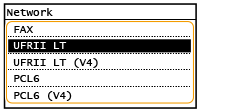
<FAX>*2
Виявляє та підключає апарат як факс.
Виявляє та підключає апарат як факс.
<UFRII LT>
Виявляє та підключає апарат як принтер UFRII.
Виявляє та підключає апарат як принтер UFRII.
<UFRII LT (V4)>
Виявляє та підключає апарат як принтер UFRII, сумісний із технічними характеристиками XML Paper Specification (XPS).
Виявляє та підключає апарат як принтер UFRII, сумісний із технічними характеристиками XML Paper Specification (XPS).
<PCL6>
Виявляє та підключає апарат як принтер PCL6.
Виявляє та підключає апарат як принтер PCL6.
<PCL6 (V4)>
Виявляє та підключає апарат як принтер PCL6.
Виявляє та підключає апарат як принтер PCL6.
<Update Firmware>
Виберіть спосіб інсталяції оновлення мікропрограми відповідно до середовища апарата. Оновлення мікропрограми
|
<Via PC>
<Via Internet>
<Version Information>
|
<Initialize Address Book> *2
Повертає параметри адресної книги до встановлених на заводі значень за промовчанням. Ініціалізація адресної книги
<Initialize Eco Report Counter>
Відновлює заводські значення за промовчанням для параметрів лічильника звіту з економічними даними. Ініціалізація лічильника звіту з економічними даними
<Initialize Menu>
Повертає наведені нижче параметри до встановлених на заводі значень за промовчанням. Можна одночасно відновити всі наведені нижче параметри або окремо відновити лише потрібні параметри. Ініціалізація меню
|
<Preferences>
<Timer Settings>
<Common Settings>
<Copy Settings>
<Fax Settings>*2
<Scan Settings>
<Printer Settings>
<Adjustment/Maintenance>
<System Management Settings>
<Initialize All>
|
<Initialize All Data/Settings>
Відновлює всі дані, включно з журналами та значеннями параметрів, до параметрів за промовчанням. Ініціалізація всіх даних/параметрів