Specifying Paper Size and Type in the Paper Drawer
Specify the paper size and type as necessary depending on the paper you load in the paper drawer.
1
Press  (
( ).
).
().2
Use  /
/ to select one of <Drawer 1 Paper Size> to <Drawer 5 Paper Size>, and press
  .
.
/ to select one of <Drawer 1 Paper Size> to <Drawer 5 Paper Size>, and press .<Drawer 2 Paper Size> to <Drawer 5 Paper Size> are displayed when the optional paper feeder or cassette feeding unit is installed.
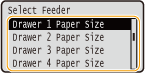
3
Select the paper size, and press .
.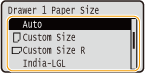

About <Auto>
For the following paper sizes, specify <Auto>.
A3 B4 A4 B5 (portrait) A5 (portrait) | Ledger Legal Letter Executive (portrait) |
Paper sizes that can be loaded in either portrait or landscape orientation
Paper of the following sizes can be loaded in either portrait or landscape orientation. See the table below to select the setting according to the orientation of the paper.
Paper size | Orientation | Setting |
A4 |  | <Auto> |
 | <Auto> | |
A5 | *1 | <  A5R> A5R> |
| <Auto> | |
B5 | | < B5R> |
| <Auto> | |
Letter | | <Auto> |
| <Auto> | |
Executive | | < EXECR> |
| <Auto> | |
16K | | < 16KR> |
| <  16K> 16K> | |
Custom Paper Size | *2 | < Custom Size R> |
| < Custom Size> |
*1 When using the Canon Generic Plus UFR II printer driver, select the [Feed Standard Paper Sizes Vertically] check box in the [Paper Source] tab before printing. *2 When using the Canon Generic Plus UFR II printer driver, select the [Feed Custom Paper Vertically] check box in the [Paper Source] tab before printing. |
About <Free Size>
If you frequently change sizes of paper to load, you can specify <Free Size>, which saves you the trouble of changing the paper size setting each time you print. However, take note that this setting lets the machine print even if there is mismatch between the paper size setting in the printer driver and the paper size actually loaded in the machine.
If you select <Free Size>, the print speed will be slower.
4
Select one of <Drawer 1 Paper Type> to <Drawer 5 Paper Type>, and press .
.<Drawer 2 Paper Type> to <Drawer 5 Paper Type> are displayed when the optional paper feeder or cassette feeding unit is installed.
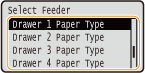
5
Select the paper type, and press .
.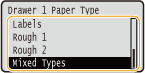
About <Mixed Types>
If you frequently change sizes of paper to load, you can specify <Mixed Types>, which saves you the trouble of changing the paper type setting each time you print. However, take note that this setting lets the machine print even if there is mismatch between the paper type setting in the printer driver and the paper type actually loaded in the machine.
Automatic detection of paper type
The machine is provided with a function for automatic paper type detection. If this function is enabled, it is not necessary to change paper type settings when you load plain or heavy paper. Auto Detect Ppr Type