Saving Scanned Data to a Cloud Service
Required Preparations |
User registration must be performed and authentication settings must be configured in advance. Prepare the PIN code obtained during the user registration process. |
1
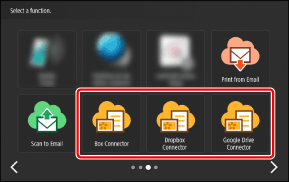
On the Home screen, press the button for the cloud service.
Select the cloud service to save the scanned data to.
2
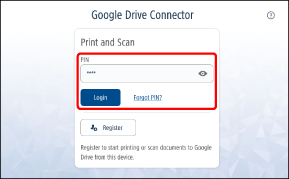
Enter the PIN code, and press [Login].
 |
If you forget the PIN Code, you can issue another one. For more information, see the following. |
3
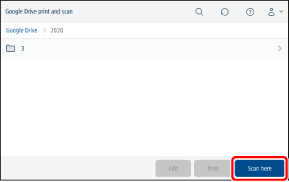
Open the destination folder, and press [Scan here].
Press a folder with the [>] icon to switch the folder.
When you press [Scan here], the scanned data is saved to the displayed folder.
|
Press [  ] and enter part of the folder name to perform a search. The folders below the current folder are searched. ([] is not displayed for some folders.) ] and enter part of the folder name to perform a search. The folders below the current folder are searched. ([] is not displayed for some folders.) |
4
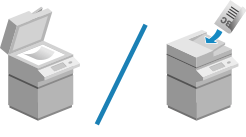
Place the originals.
For details on placing originals, see the manual for your multifunction printer.
5
Check the scan settings.
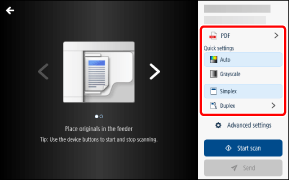
For information on changing the scan settings, see the following.
To cancel scanning, press [ ] on the top left of the screen to return to the previous screen.
] on the top left of the screen to return to the previous screen.6
Press [Start scan].
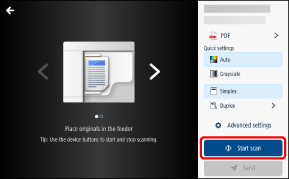
You can press the  (Stop) button while scanning to cancel scanning.
(Stop) button while scanning to cancel scanning.7
When all the pages have been scanned, check the preview, and press [Send].
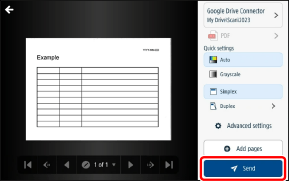
To scan additional pages, press [Add pages] before pressing [Send].
To cancel saving to the cloud service, press [] on the top left of the screen before pressing [Send] to return to the previous screen.
] on the top left of the screen before pressing [Send] to return to the previous screen.Press [Send] to save the scanned images to the cloud service and return to the screen in step 3. To scan another document, press [New scan].
|
If the file format is PDF, you may not be able to scan additional pages, depending on the version you are using. If saving the files is taking too long or saving fails, notification is sent via e-mail. |
8
Log out to complete the operation.
 To return Cloud Connector to the initial screen
Press [ ] on the top right of the screen and select [Logout] from the menu.
] on the top right of the screen and select [Logout] from the menu.To exit Cloud Connector
Log out from the multifunction printer, or press [ ].
].
].Changing the Scan Settings
Some settings cannot be configured with some models.
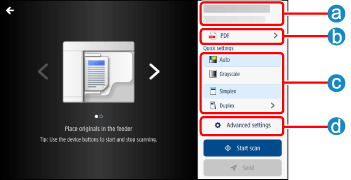
 Destination
Enables you to check the destination folder. You can also change the file name of the scanned images.
|
If you are using MS Teams, you can post a message including the scanned document in addition to saving to the folder. |
 File Formats
Setting | Options |
File format | TIFF (a file format suitable for images) PDF*1 (a standard PDF file that includes searchable text*3) PDF/A*1 (a PDF file compatible with PDF/A-1b that includes searchable text*3 and is suitable for long-term storage) PDF (Compact)*2 (a PDF file that includes searchable text*3 and has a higher compression rate than a standard PDF file) |
*1 When the file format is PDF or PDF/A, [Scan resolution] cannot be set to a resolution other than 300 dpi or 600 dpi.
*2 When the file format is PDF (Compact), [Scan resolution] cannot be set to a resolution other than 300 dpi. Also, [Color] cannot be set to [Black/White].
*3 If the multifunction printer does not support OCR (optical character recognition), the text of the PDF file will not be searchable.
 [Quick settings]
Setting | Options |
Color | Auto Color, Grayscale, Black/White*1(The mode selected on the settings screen for administrators is displayed.) |
Duplex mode | Simplex Duplex (Long Edge, Short Edge) |
*1 When the file format is PDF (Compact), [Color] cannot be set to [Black/White].
 [Advanced settings]
Setting | Options |
Color | Auto Color Grayscale Black/White*1 |
Duplex mode | Simplex Duplex long edge Duplex short edge |
Image mode | Text/Image Image Photo Text Text/Photo Map Map Text/Photo Second Copy |
Scan size*2 | Auto Free size Manual Originals have different sizes (On, Off) |
Scan resolution*2 | TIFF: 100x100, 150x150, 200x100, 200x200, 200x400, 300x300 PDF: 300x300, 600x600 PDF (Compact): 300x300 PDF/A: 300x300, 600x600 |
Density | 0 to 10 |
*1 When the file format is PDF (Compact), [Color] cannot be set to [Black/White].
*2 When the file format is set to PDF, the settings used for scanning the first page are carried over to the second and subsequent pages. When scanning additional pages, the settings cannot be changed.