
Cleaning the Fixing Belts (FM2)
Remove any ink or paper dust attached to the fixing belts.
The fixing belt and the area around it may be at a high temperature. Wait until they have cooled sufficiently before cleaning them.
Required Preparations
Wear plastic gloves and protective goggles.
Prepare the following cleaning materials.
AlphaWipe TX1004 (commercially available)
Anhydrous ethanol (commercially available)
1
Select [System]  [Maintenance] [Go to maintenance tasks].
[Maintenance] [Go to maintenance tasks].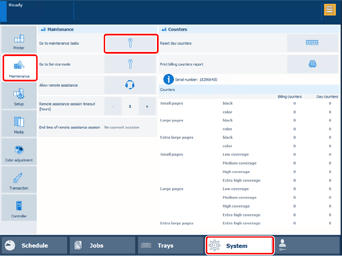
2
Select [Secondary fixing belt cleaning] [Start].
[Start].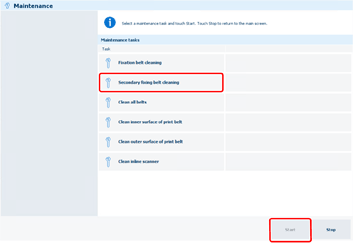
* You can also select [Clean all belts] to clean the outside of the print belt and the belts of FM1/FM2 at the same time. In this case, follow the procedures from step 4 of each section.
3
Select [Unlock] on the main control panel.
If a screen prompting you to enter a password appears, enter the password.
Open the top cover of FM2.
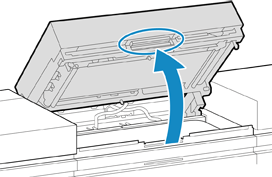
5
Dampen the AlphaWipe with anhydrous ethanol.
6
Wipe the upper fixing belt of FM2 with the damp AlphaWipe.
1
Wipe the upper fixing belt of FM2.
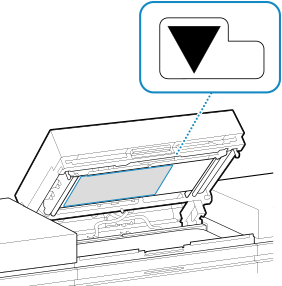
Wipe the area indicated in the illustration horizontally.
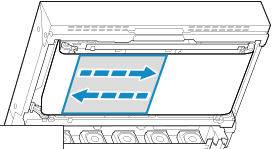
Do not wipe the area indicated in the illustration.
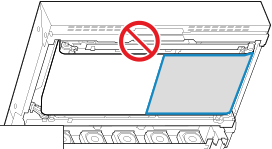
7
Wipe the lower fixing belt of FM2 with the damp AlphaWipe.
1
Wipe the lower fixing belt of FM2.
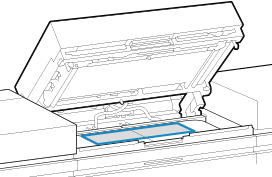
Wipe the area indicated in the illustration horizontally.
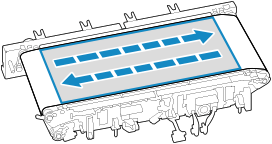
8
Wipe the upper and lower fixing belts with a dry AlphaWipe.
9
Close the top cover of FM2.
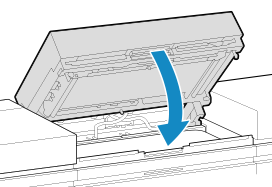
Lower the top cover until it clicks into place in the closed position.
Select [Move belt].
11
12
Select [Finishing cleaning.].
13
Dispose of the used AlphaWipe.