Cleaning the Outside of the Print Belt
Remove any ink or paper dust attached to the outer surface of the print belt.
Required Preparations
Wear plastic gloves and protective goggles.
Prepare the following cleaning materials.
AlphaWipe TX1004 (commercially available)
Anhydrous ethanol (commercially available)
1
Select [System]  [Maintenance] [Go to maintenance tasks].
[Maintenance] [Go to maintenance tasks].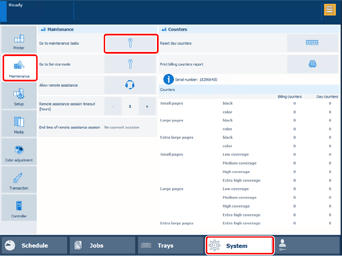
2
Select [Clean outer surface of print belt] [Start].
[Start].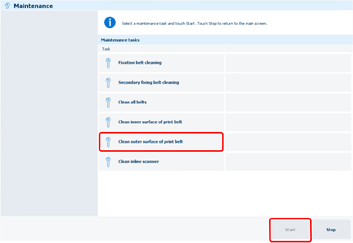
* You can also select [Clean all belts] to clean the outside of the print belt and the belts of FM1/FM2 at the same time. In this case, follow the procedures from step 4 of each section.
3
Select [Unlock] on the main control panel.
If a screen prompting you to enter a password appears, enter the password.
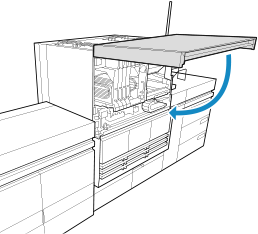
Open the front upper cover of the PM.
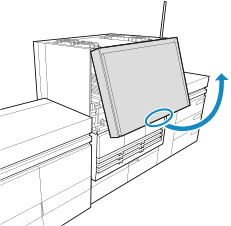
5
Dampen the AlphaWipe with anhydrous ethanol.
6
Wipe the print belt with the damp AlphaWipe.
1
Wipe the outside of the print belt.
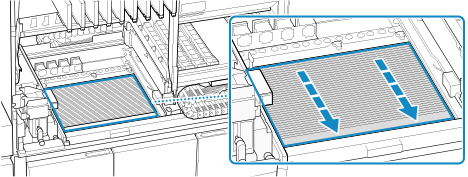
Wipe the area indicated in the illustration.
Wipe the print belt from the far side to the near side.
Do not touch any parts further away from the area enclosed in blue in the illustration.
7
Close the front upper cover of the PM.
Select [Move belt].
9
10
Select [Finishing cleaning.].
11
Dispose of the used AlphaWipe.