When Media Is Repeatedly Output to the Waste Tray
If the media deformation detection unit detects media deformation, the deformed media is rejected by the press and output to the TM waste tray or PIM waste tray.
When the media is ejected, the order and content of the printed pages are automatically corrected.
Cause
The method for ejecting the media depends on the reason that the media was rejected.
Media rejection occurs in the primary path or secondary path where the media passes through the media deformation detection unit.
If blank media is output
Media was rejected in the primary path.
The following deformation may have occurred on the media before it passed through the media deformation detection unit.
Curling | Bulging or waving | Other damage |
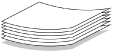 |  | 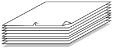 |
Media deformation may occur if the relative humidity when packaged differs from the relative humidity of the warehouse or PIM (Paper Input Module).
*The thick line below indicates the primary path.
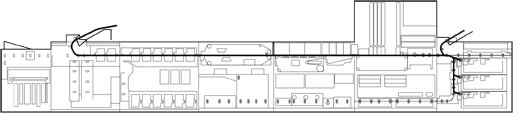
If media printed only on the front side is output or media is quickly output in succession
Media was rejected in the secondary path.
Most media is output to restore the page order, rather than because of deformation. Or, the media deformation may have occurred in the drying process during one-sided printing. Whether media deformation occurs after the first print process is determined by the media surface and the amount and position of the ink.
*The thick line below indicates the secondary path.
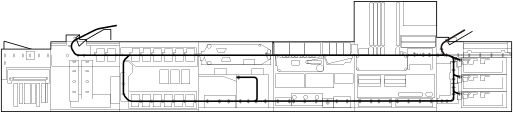
NOTE
Primary path: The transport path used when printing on the front side of the media
Secondary path: The transport path used when printing on the back side of the media
Solution
Load paper that has been stored appropriately.
Perform steps  to
to  indicated in the table below.
to indicated in the table below.Symptom | If blank paper is ejected (first pass) | If paper printed only on the front side is ejected (second pass) | Remedy |
Curling | Yes | Yes |  , ,  , ,  , , |
Bulging or waving | Yes | No | , , |
No | Yes | , , ,  , ,  , ,  , ,  , ,  , , | |
Other damage (such as corner folds or burrs) | Yes | Yes | , , ,  , , |
Remove the deformed paper.Remove the loaded paper and load new paper.Use other paper.Example: If the paper used is too thin
Use thicker paper.
Note the following precautions for using cut paper.If the ejected paper is curled, remove the loaded paper, turn the paper over, and load it again.Increase the margin or print on larger paper (especially when using thin paper).We recommend that the margin is 10 mm to 20 mm (0.39" to 0.79").
Set the side that uses less ink as the first side.Reduce the amount of ink printed.Check the paper family of the paper you are using, and reduce the value of [Volume limitation total in ul/m2] in the print mode for that paper.
* This may lower the image quality.
Reduce the amount of conditioning liquid used.Check the paper family of the paper you are using, and reduce the value of [ColorGrip coverage] in the print mode for that paper.
* This may lower the image quality.
Contact your maintenance representative or service representative to adjust the suction pressure of the print belt.If the problem persists after trying the above, contact your maintenance representative or service representative. If necessary, adjust the precision of media deformation detection.NOTE
For information on job management, paper output history, and media print mode settings, see the PRISMAsync Print Server for iX1700 Operation guide.