Finisher (For 710Z / 610Z / 520Z)
Finishing functions are available on a product with a finisher (for 710Z / 610Z / 520Z).
Available Finishing Functions
The finishing functions that are available.
Sorting Functions
Collate
Group
Offset
Stapling Functions
Corner
NOTE
For details about the finishing functions, see the following:
Precautions When Using Finishing Functions
Precautions When Using Staple
The number of sheets that can be stapled varies depending on the paper type and thickness. Finisher Specification (For 710Z / 610Z / 520Z)
If the machine cannot staple the paper, change the paper or reduce the number of sheets to be stapled.
If the machine cannot staple the paper, change the paper or reduce the number of sheets to be stapled.
Remove stapled paper after it has been completely output to the tray and do not remove it while it is being stapled.
When [Load staples into the stapler unit.] appears, replace the staple case and add more staples. Adding Staples to the Finisher (For 710Z / 610Z / 520Z)
If the tray reaches its lower limit position or 30 copies have been stapled, printing is paused. When the ejected paper is removed from the tray, printing resumes.
Names of Parts and Their Functions
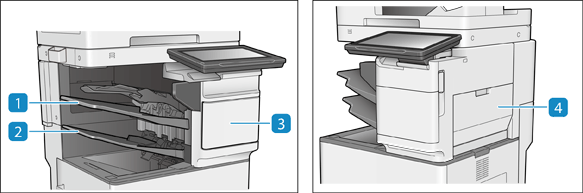
 Output tray (Tray C)
The prints are output to this tray. You can specify functions for which the tray is used by configuring [Output Tray Settings]. Output Destination Settings (For 710Z / 610Z / 520Z)
 Output tray (Tray B)
The prints are output to this tray. You can specify functions for which the tray is used by configuring [Output Tray Settings]. Output Destination Settings (For 710Z / 610Z / 520Z)
 Front cover of the Finisher
Open to clear a staple jam in the stapler unit or replace the staple cartridge. Adding Staples to the Finisher (For 710Z / 610Z / 520Z)
 Right cover of the Finisher
Open this cover when clearing a paper jam inside the finisher. Paper Jams in the Finisher (For 710Z / 610Z / 520Z)