Copying Multiple Passports onto One Sheet
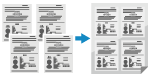 | You can use the Passport Copy function to copy multiple passports together onto one sheet of paper. This can be quickly performed from the [Home] screen on the control panel. |
1
Place a passport on the platen glass.
1 | Open the feeder or platen glass cover. 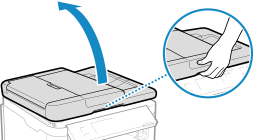 |
2 | Place the page to be scanned face down while aligning the corner of the passport with the top left corner of the platen glass, as shown. 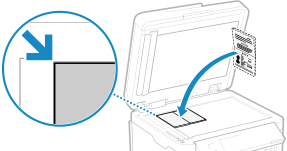 |
3 | Gently close the feeder or platen glass cover. |
2
On the control panel, press [Passport Copy] in the [Home] screen, and press  . [Home] Screen
. [Home] ScreenThe [Passport Copy] screen is displayed.
3
Select a combination of the number of passports and whether to use 2-sided printing.
[2 on 1 (2-Sided)]
Combines two passports onto one side of a sheet of paper by copying with 2-sided printing. Copies four passports onto both sides of a sheet of paper with 2-sided printing.
[4 on 1 (2-Sided)]
Combines four passports onto one side of a sheet of paper by copying with 2-sided printing. Copies eight passports onto both sides of a sheet of paper with 2-sided printing.
[2 on 1]
Combines two passports onto one side of a sheet of paper.
[4 on 1]
Combines four passports onto one side of a sheet of paper.
4
Press .
.The copy screen is displayed.
5
Set the number of copies.
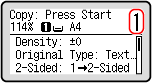
 For MF275dw II
Specify the number of copies.
Use the numeric keys to enter the number of copies.
Use the numeric keys to enter the number of copies.
For MF272dw IISpecify the number of copies.
Press [Number of Copies]
 /
/  /
/  /
/  to enter the number of copies, and then press .
Press [Number of Copies]
/ / / to enter the number of copies, and then press .* When you use Passport Copy to make copies, the zoom is set automatically according to the size of the paper used for copying and the number of passports to combine. You can also press [Zoom] to change the zoom manually.
6
Configure the other copy settings, as needed. Additional Copying Features
You can adjust the density and image quality.
You can change the number of passports to combine (N on 1) and the 2-sided copy settings selected in 3.
7
Press  .
.
.The first passport is scanned.
8
When [*Scan Next:Press Start] is displayed, place the next passport on the platen glass, and press .
.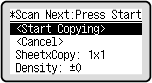
The next passport is scanned, and the same screen is displayed.
Repeat this process until scanning of all passports is completed.
Repeat this process until scanning of all passports is completed.
You can also press [Density] to change the settings for each passport.
9
Press [<Start Copying>] .
.The scanned passports are printed.
Use [Status Monitor] to view the copy job status. Viewing the Print Job Status and Log