You can set the zoom (for enlarging or reducing), number of copies, and other basic settings.
Copy Operations
Copying
You can easily copy documents, photos, and other printed materials ("originals") using the copy function of the machine. In addition to basic copy settings, the machine also has settings for copying according to your original and purpose. Configure these settings when copying for more efficient operations and to save paper.
For details on supported models, see the following: Supported Functions and Options
For details on supported models, see the following: Supported Functions and Options
Basic Copy Operations
Copying According to Your Original and Purpose
You can perform 2-sided copying and adjust the image quality and other settings to suit your original and purpose.
Additional Copying Features
Additional Copying Features
Copying for Specific Operations
The ID Card Copy function can be quickly performed from  on the control panel or from the [Home] screen, and the Passport Copy function can be quickly performed from the [Home] screen.
on the control panel or from the [Home] screen, and the Passport Copy function can be quickly performed from the [Home] screen.ID Card Copy
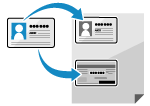 | Copies the front and back sides of a driver's license or other ID card on the same sheet of paper at 100% magnification. This is convenient, for example, when copying ID cards at reception. Copying Both Sides of ID Cards onto One Sheet |
Passport Copy
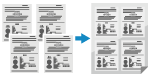 | Copies multiple passports together onto one sheet of paper. Copying Multiple Passports onto One Sheet |
See Also
When Results Are Not as Expected
If print results are too dark or too faint, adjust the print density.
Adjusting the Print Quality
Adjusting the Print Quality