Setting Menu List
This section describes the menu items that can be set using the Remote UI. Default settings are marked with a dagger ( ).
).
).|
[Preferences] Menu
[Function Settings] Menu
[System Management Settings] Menu
|
Paper Settings
When printing from an application with which you cannot set the paper size and paper type, the document is printed with the paper size and paper type set here. When printing with Google Cloud Print, the paper type setting here is applied.
|
Mobile Print
Paper Size
Custom
X: 3" to 8_1/2"
Y: 5" to 14"
Letter
Legal Statement
Executive Foolscap
Oficio
Envelope No. 10 (COM10)
Envelope Monarch
Letter (Government)
Legal (Government)
Legal (India)
Foolscap (Australia)
Oficio (Brazil)
Oficio (Mexico)
3x5inch
A4
A5
B5
Envelope DL
Envelope C5
Paper Type
Plain (16 lb Bond-23 lb Bond)
Plain L (16 lb Bond-23 lb Bond)
Recycled (16 lb Bond-23 lb Bond)
Color (16 lb Bond-23 lb Bond)
Heavy 1 (24 lb Bond-32 lb Bond)
Heavy 2 (45 lb Cover-60 lb Cover)
Envelope
Bond 1 (16 lb Bond-24 lb Bond)
Bond 2 (25 lb Bond-32 lb Bond)
Bond 3 (45 lb Cover-60 lb Cover)
Index Card
Labels
|
Log on to the Remote UI (Starting the Remote UI)  [Settings/Registration] [Paper Settings] [Edit] Set the paper size and type [OK]
[Settings/Registration] [Paper Settings] [Edit] Set the paper size and type [OK]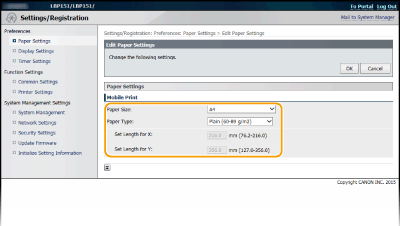
[Paper Size]
Specify the paper size when printing from a mobile device. If [Custom] is selected, you can specify any value for width and length.
Specify the paper size when printing from a mobile device. If [Custom] is selected, you can specify any value for width and length.
[Paper Type]
Specify the paper type when printing from a mobile device.
Specify the paper type when printing from a mobile device.
Display Settings
Select the display units and language for the Remote UI.
|
Millimeter/Inch Entry
Millimeter
Inch
Gram/Pound
Gram
Pound
Remote UI Language
English
French
Portuguese
Spanish
|
Log on to the Remote UI (Starting the Remote UI) [Settings/Registration] [Display Settings] [Edit] Select the display units and language [OK]
[Settings/Registration] [Display Settings] [Edit] Select the display units and language [OK]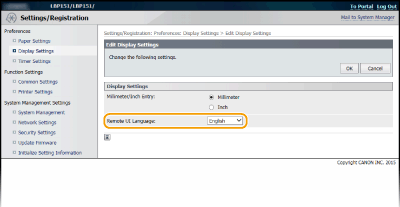
[Millimeter/Inch Entry]
Select the unit of measurement for the Remote UI screens.
Select the unit of measurement for the Remote UI screens.
[Gram/Pound]
Select the unit of measurement for the basis weight.
Select the unit of measurement for the basis weight.
[Remote UI Language]
Select the display language used for the Remote UI screens.
Select the display language used for the Remote UI screens.
Timer Settings
Specify date and time settings, including the date format and the 12- or 24-hour clock display setting. The date and time that are printed on each report and list are determined by these settings.
|
Date Format
MM/DD/YYYY
DD/MM YYYY
YYYY MM/DD
Time Format
12 Hour (AM/PM)
24 Hour
Current Date
Current Time
Time Zone
(UTC-12:00) International Date Line West to (UTC-05:00) Eastern Time (US & Canada)
to (UTC+14:00) Christmas IslandUse Daylight Saving Time
Off
On
Start
January to March
to December1st to 2nd
to LastMonday to Sunday
End
January to November
to December1st
to LastMonday to Sunday
Auto Sleep Time
After 1 min.
After 5 min.
After 10 min.
After 15 min.
After 30 min.
|
Log on to the Remote UI (Starting the Remote UI) [Settings/Registration] [Timer Settings] [Edit] Item settings [OK]
[Settings/Registration] [Timer Settings] [Edit] Item settings [OK]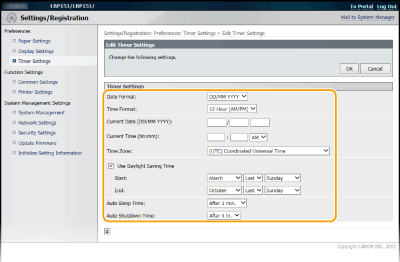
[Date Format]
Select the date format (order of year, month, and day).
Select the date format (order of year, month, and day).
[Time Format]
Select the 12- or 24-hour clock display setting.
Select the 12- or 24-hour clock display setting.
[Current Date/Time Settings]
Set the current date and time.

Set [Time Zone] before setting the current date and time. If the [Time Zone] setting is changed, the current date and time are also changed accordingly.
Set the current date and time.
Set [Time Zone] before setting the current date and time. If the [Time Zone] setting is changed, the current date and time are also changed accordingly.
[Time Zone]
Set the time zone of the region where the machine will be used.

UTC
Coordinated Universal Time (UTC) is the primary time standard by which the world regulates clocks and time. The correct UTC time zone setting is required for Internet communications.
Set the time zone of the region where the machine will be used.
UTC
Coordinated Universal Time (UTC) is the primary time standard by which the world regulates clocks and time. The correct UTC time zone setting is required for Internet communications.
[Use Daylight Saving Time]
Enable or disable daylight saving time. If daylight saving time is enabled, specify the dates from which and to which daylight saving time is in effect.
Enable or disable daylight saving time. If daylight saving time is enabled, specify the dates from which and to which daylight saving time is in effect.
[Auto Sleep Time]
The machine enters sleep mode automatically when it remains idle for a certain length of time. Specify the length of time until the machine enters auto sleep. We recommend using the factory default settings to save the most power. Setting Sleep Mode
The machine enters sleep mode automatically when it remains idle for a certain length of time. Specify the length of time until the machine enters auto sleep. We recommend using the factory default settings to save the most power. Setting Sleep Mode
Common Settings
Specify this setting when you print a document on paper with logos. To print on paper with logos, you need to change how the paper loaded in the paper source is facing depending on whether you are performing 1- or 2-sided printing. However, if you change the setting to [Print Side Priority], you can just load paper in the same way (which side up or down) both for 1- and 2-sided printing (the logo side face up when using the drawer, or the logo side face down when using the multi-purpose tray). For more information, see Loading Preprinted Paper.
|
Switch Paper Feed Method
Multi-Purpose Tray
Speed Priority
Print Side Priority
Drawer 1
Speed Priority
Print Side Priority
|
Log on to the Remote UI (Starting the Remote UI) [Settings/Registration] [Common Settings] [Edit] Select the paper source Select [Speed Priority] or [Print Side Priority] [OK]
[Settings/Registration] [Common Settings] [Edit] Select the paper source Select [Speed Priority] or [Print Side Priority] [OK]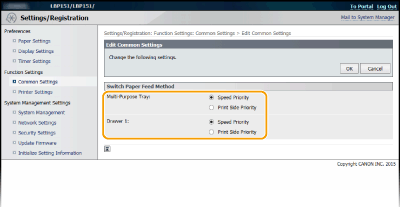
[Speed Priority]
When using paper that has been preprinted with a logo, you need to change how it is facing when you perform 1-sided and 2-sided printing.
When using paper that has been preprinted with a logo, you need to change how it is facing when you perform 1-sided and 2-sided printing.
|
We recommend selecting [Speed Priority] if you do not need to consider which side to print on.
|
[Print Side Priority]
To print on a specific side of paper, you do not need to flip over paper in the paper source whether 1- or 2-sided printing is selected.
To print on a specific side of paper, you do not need to flip over paper in the paper source whether 1- or 2-sided printing is selected.
|
If [Print Side Priority] is set for a paper source that is loaded with paper you cannot use for 2-sided printing (Paper), [Speed Priority] is applied to the paper source instead. In this case, you need to load the paper in the same way as when [Speed Priority] is selected (Loading Preprinted Paper).
1-sided printing speed may be slower when [Print Side Priority] is selected.
|
Printer Settings
Specify basic printing settings and PCL printing settings.
Custom Settings
Specify basic printing settings.
|
Copies
1
to 99 2-Sided Printing
Off
On
Action When Paper Size Mismatch
Force Output
Display Error
Paper
Default Paper Size
Letter
Legal
Statement
Executive
Envelope No. 10 (COM10)
Envelope Monarch
3x5inch
A4
A5
B5
Envelope C5
Envelope DL
Print Quality
Density
17 Levels
Toner Save
Off
On
Layout
Binding Location
Long Edge
Short Edge
Timeout
Timeout
5
to 300 (sec.) Mobile Print Settings
Halftones
Gradation
Error Diffusion
Other
Special Print Mode
Off
Special Settings 1
Special Settings 2
|
Log on to the Remote UI (Starting the Remote UI) [Settings/Registration] [Printer Settings] [Edit] in [Custom Settings] Specify the necessary settings [OK]
[Settings/Registration] [Printer Settings] [Edit] in [Custom Settings] Specify the necessary settings [OK]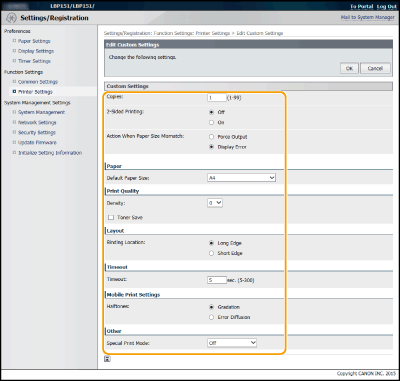
[Copies]
Set the number of copies to print.
Set the number of copies to print.
[2-Sided Printing]
Select whether to make 2-sided printouts.
Select whether to make 2-sided printouts.
[Action When Paper Size Mismatch]
Select whether to go ahead with printing or to display an alert when the paper size that is loaded in the paper source and that specified in the printer driver are different.
Select whether to go ahead with printing or to display an alert when the paper size that is loaded in the paper source and that specified in the printer driver are different.
[Density]
Adjust the toner density.
Adjust the toner density.
[Toner Save]
You can save toner consumption. Select when you want to check the layout or other appearance characteristics before proceeding to final printing of a large job.
You can save toner consumption. Select when you want to check the layout or other appearance characteristics before proceeding to final printing of a large job.
[Binding Location]
If you are binding the printouts with a binding tool such as a stapler, use this item to specify whether to bind on the long or short edge.
[Timeout]
Set the time period after which the current print job is automatically canceled in the case of a print data reception interruption.
If you are binding the printouts with a binding tool such as a stapler, use this item to specify whether to bind on the long or short edge.
[Timeout]
Set the time period after which the current print job is automatically canceled in the case of a print data reception interruption.
[Halftones]
Select the image processing when printing from a mobile device with Mopria™, etc. Select [Gradation] for photos and illustrations, and [Error Diffusion] for mostly text documents for more attractive printouts.
Select the image processing when printing from a mobile device with Mopria™, etc. Select [Gradation] for photos and illustrations, and [Error Diffusion] for mostly text documents for more attractive printouts.
[Special Print Mode]
In instances such as when a printed barcode is difficult to read, or text and image outlines are partially not printed, these problems may be improved by changing the setting of this option.
In instances such as when a printed barcode is difficult to read, or text and image outlines are partially not printed, these problems may be improved by changing the setting of this option.
|
If this option is set to [Special Settings 1], printing is at a lower density compared to when set to [Off]. Text and lines may also be faint. Images may also be partially not printed if this option is specified when printing on paper other than thin paper.
If this option is set to [Special Settings 2], printing is at a lower density compared to when set to [Off] or [Special Settings 1]. Text and lines may also be faint.
|
PCL
Specify the PCL printing settings such as page layout and print quality.
|
Resolution
600 dpi
1200 dpi
Density Fine Adjustment
-1 to 0
to 1Paper Save
Off
On
Orientation
Portrait
Landscape
Font Number
0
to 54 Point Size
4.00 to 12.00
to 999.75 Pitch
0.44 to 10.00
to 99.99 Form Lines
5 to 60
to 128 Character Code
PC8
ROMAN8
ISOL1
ISOL2
ISOL5
ISOL6
PC775
PC8DN
PC850
PC852
PC8TK
PC1004
WINL1
WINL2
WINL5
WINBALT
DESKTOP
PSTEXT
LEGAL
ISO4
ISO6
ISO11
ISO15
ISO17
ISO21
ISO60
ISO69
WIN30
MCTEXT
MATH8 MSPUBL
PIFONT
PSMATH
VNINTL
VNMATH
VNUS
Set Custom Paper
Off
On
Unit of Measure
Millimeters
Inches
X dimension
3 to 8 1/2
(inches) Y dimension
5 to 14
(inches) Append CR to LF
Yes
No
Enlarge A4 Print Width
Off
On
Halftones
Text
Resolution
Gradation
Color Tone Graphics
Resolution
Gradation
Color Tone Image
Resolution
Gradation
Color Tone |
Log on to the Remote UI (Starting the Remote UI) [Settings/Registration] [Printer Settings] [Edit] in [PCL] Specify the necessary settings [OK]
[Settings/Registration] [Printer Settings] [Edit] in [PCL] Specify the necessary settings [OK]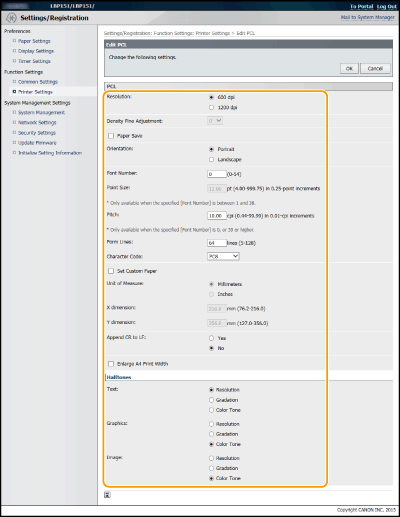
[Resolution]
Specify the resolution to be used for print data processing.
Specify the resolution to be used for print data processing.
[Density Fine Adjustment]
Adjust the toner density. This setting is enabled when [1200 dpi] is set in [Resolution].
Adjust the toner density. This setting is enabled when [1200 dpi] is set in [Resolution].
[Paper Save]
Specify whether to output blank pages, if any in the print data.
Specify whether to output blank pages, if any in the print data.
[Orientation]
Select [Portrait] (vertical orientation) or [Landscape] (horizontal orientation) for the page orientation.
Select [Portrait] (vertical orientation) or [Landscape] (horizontal orientation) for the page orientation.
[Font Number]
Specify the font to use by selecting a corresponding font ID number. You can print the PCL font list with font samples from the Printer Status Window. Printing Setting Lists
Specify the font to use by selecting a corresponding font ID number. You can print the PCL font list with font samples from the Printer Status Window. Printing Setting Lists
[Point Size]
Set the font size in points, adjustable in 0.25 increments. You can specify this setting only when a proportionally-spaced scalable font is selected in [Font Number].
Set the font size in points, adjustable in 0.25 increments. You can specify this setting only when a proportionally-spaced scalable font is selected in [Font Number].
[Pitch]
Set the font pitch, or cpi (characters per inch), adjustable in 0.01 increments. You can specify this setting only when a fixed-pitch scalable font or a bitmap font is selected in [Font Number].
Set the font pitch, or cpi (characters per inch), adjustable in 0.01 increments. You can specify this setting only when a fixed-pitch scalable font or a bitmap font is selected in [Font Number].
[Form Lines]
Set the number of lines printed on one page from 5 to 128. This setting is automatically changed according to the settings specified in [Default Paper Size] and [Orientation].
Set the number of lines printed on one page from 5 to 128. This setting is automatically changed according to the settings specified in [Default Paper Size] and [Orientation].
[Character Code]
Select the character code that is most suited for the computer you send print data from. The specified setting is ignored when the character code is controlled by the font specified in [Font Number].
Select the character code that is most suited for the computer you send print data from. The specified setting is ignored when the character code is controlled by the font specified in [Font Number].
[Set Custom Paper]
Select whether to set a custom paper size. Select [On] to set the dimensions of the paper in [X dimension] and [Y dimension].
Select whether to set a custom paper size. Select [On] to set the dimensions of the paper in [X dimension] and [Y dimension].
[Unit of Measure]
Select the unit of measurement to use to set a custom paper size.
Select the unit of measurement to use to set a custom paper size.
[X dimension]
Specify the horizontal dimension (short edge) of the custom paper.
Specify the horizontal dimension (short edge) of the custom paper.
[Y dimension]
Specify the vertical dimension (long edge) of the custom paper.
Specify the vertical dimension (long edge) of the custom paper.
[Append CR to LF]
Select whether to append a carriage return (CR) when the machine receives a line feed code (LF). If [Yes] is selected, the print position moves to the beginning of the next line when the machine receives an LF code. If [No] is selected, the print position moves to the next line, just under the received LF code.
Select whether to append a carriage return (CR) when the machine receives a line feed code (LF). If [Yes] is selected, the print position moves to the beginning of the next line when the machine receives an LF code. If [No] is selected, the print position moves to the next line, just under the received LF code.
[Enlarge A4 Print Width]
Select whether to expand the width of the printable area of A4 size paper in portrait orientation to that of LTR size.
Select whether to expand the width of the printable area of A4 size paper in portrait orientation to that of LTR size.
[Halftones]
You can select the printing method to reproduce halftones (the intermediate range between the lighter and darker areas of an image) for optimal image quality. For each document, you can make settings by type of image.
You can select the printing method to reproduce halftones (the intermediate range between the lighter and darker areas of an image) for optimal image quality. For each document, you can make settings by type of image.
System Management
You can specify that a PIN (system manager password) is required when logging in to the Remote UI in System Manager Mode, and you can register information about the system manager, such as name and contact information. You can also register a name to identify this machine, and register its location.
|
System Manager Information
Set System Manager PIN
Off
On
Set/Change PIN
 OffOnPIN/Confirm OffOnPIN/ConfirmSystem Manager Name
Contact Information
E-Mail Address
System Manager Comment
Device Information
Device Name
Location
Support Link
Consumables Supplier Information
Purchase From
E-Mail Address
URL Specification Method
Select Country/Region
Country/Region
USACanadaBrazilMexicoOthersCustom
URL
Display Button for Purchasing Consumables
Off
On
USB Device Settings
Use as USB Device
Off
On
Product Extended Survey Program Settings
Use Product Extended Survey Program
Off
On
PDL Selection (Plug and Play)
Network
UFR II LT
UFR II LT (V4)
PCL6
USB
UFR II LT
UFR II LT (V4)
PCL6
|
Log on to the Remote UI in System Manager Mode (Starting the Remote UI) [Settings/Registration] [System Management] [Edit] Item settings [OK]
[Settings/Registration] [System Management] [Edit] Item settings [OK]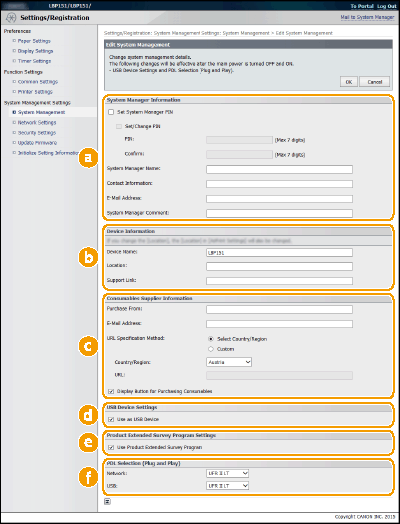
 [System Manager Information]
Specify the PIN and other system manager information. Setting System Manager Passwords
 [Device Information]
[Device Name]
Enter up to 32 alphanumeric characters for the name of the machine.
Enter up to 32 alphanumeric characters for the name of the machine.
[Location]
Enter up to 32 alphanumeric characters for the location of the machine.
Enter up to 32 alphanumeric characters for the location of the machine.
[Support Link]
Enter a link to support information about the machine. The link can be up to 128 alphanumeric characters long. The link is displayed on the Portal Page (main page) of the Remote UI.
Enter a link to support information about the machine. The link can be up to 128 alphanumeric characters long. The link is displayed on the Portal Page (main page) of the Remote UI.
 [Consumables Supplier Information]
Specify information on where to purchase consumables.
[Purchase From]
Enter up to 32 alphanumeric characters for the name of where to purchase consumables.
Enter up to 32 alphanumeric characters for the name of where to purchase consumables.
[E-Mail Address]
Enter up to 64 alphanumeric characters for the e-mail address of where to purchase consumables. If an address is specified, you can click the address to launch mail software and send e-mail.
Enter up to 64 alphanumeric characters for the e-mail address of where to purchase consumables. If an address is specified, you can click the address to launch mail software and send e-mail.
[URL Specification Method]
Select a method for specifying information on where to purchase consumables. If [Custom] is selected, specify the URL of where to purchase. If [Select Country/Region] is selected, select the country or region of where to purchase.
Select a method for specifying information on where to purchase consumables. If [Custom] is selected, specify the URL of where to purchase. If [Select Country/Region] is selected, select the country or region of where to purchase.
[Display Button for Purchasing Consumables]
Specify whether to display the [Access Purchasing Site] button on the [Consumables] page in the Remote UI.
Specify whether to display the [Access Purchasing Site] button on the [Consumables] page in the Remote UI.
 [USB Device Settings]
Specify settings as a USB device. To enable settings, you must restart the machine.
[Use as USB Device]
Enable or disable the USB port that is used for connecting the machine to a computer.
Enable or disable the USB port that is used for connecting the machine to a computer.
 [Product Extended Survey Program Settings]
Specify settings for the Product Extended Survey Program.
[Use Product Extended Survey Program]
Enable or disable the Product Extended Survey Program (a program for the machine usage survey).
Enable or disable the Product Extended Survey Program (a program for the machine usage survey).
 [PDL Selection (Plug and Play)]
Select a page description language so that the machine is detected as a printer that is compatible with that language when it is connected to a computer by using Plug and Play. For more information, see the Printer Driver Installation Guide. To enable settings, you must restart the machine.
[Network]
Select a page description language so that the machine is detected as a printer that is compatible with that language when it is detected over the network.
Select a page description language so that the machine is detected as a printer that is compatible with that language when it is detected over the network.
[USB]
Select a page description language so that the machine is detected as a printer that is compatible with that language when it is connected to a computer via USB.
Select a page description language so that the machine is detected as a printer that is compatible with that language when it is connected to a computer via USB.
Network Settings
Make settings related to network functions.
TCP/IP Settings
Specify settings for using the machine in a TCP/IP network, such as IP address settings.
IPv4 Settings
Specify settings for using the machine in an IPv4 network. Setting IPv4 Address Configuring DNS
|
IP Address Settings
Auto Acquire
Select Protocol
Off
DHCP
BOOTP
RARP
Auto IP
Off
On
IP Address
Subnet Mask
Gateway Address
DNS Settings
Primary DNS Server Address
Secondary DNS Server Address
Host Name
Domain Name
DNS Dynamic Update
Off
On
DNS Dynamic Update Interval: 0 to 24
to 48 (hours) mDNS Settings
Use mDNS
Off
On
mDNS Name
DHCP Option Settings
Acquire Host Name
Off
On
DNS Dynamic Update
Off
On
|
IPv6 Settings
Specify settings for using the machine in an IPv6 network. Setting IPv6 Addresses Configuring DNS
|
IP Address Settings
Use IPv6
Off
On
Use Stateless Address
Off
On
Use Manual Address
Off
On
IP Address
Prefix Length: 0 to 064
to 128Default Router Address
Use DHCPv6
Off
On
DNS Settings
Primary DNS Server Address
Secondary DNS Server Address
Use Same Host Name/Domain Name as IPv4
Off
On
Host Name
Domain Name
DNS Dynamic Update
Off
On
Register Manual Address
OffOnRegister Stateful Address
OffOnRegister Stateless Address
OffOnDNS Dynamic Update Interval: 0 to 24
to 48 (hours) mDNS Settings
Use mDNS
Off
On
Use Same mDNS Name as IPv4
Off
On
mDNS Name
|
LPD Settings
Enable or disable LPD, a printing protocol that can be used on any hardware platform or operating system. Configuring Printing Protocols and Web Services
|
Use LPD Printing
Off
On
|
RAW Settings
Enable or disable RAW, a Windows specific printing protocol. Configuring Printing Protocols and Web Services
|
Use RAW Printing
Off
On
|
WSD Settings
Enable or disable automatic browsing and acquiring information for the machine by using the WSD protocol that is available on Windows Vista/7/8/Server 2008/Server 2012. Configuring Printing Protocols and Web Services
|
Use WSD Printing
Off
On Use WSD Browsing
Off
On
Use Multicast Discovery
Off
On
|
TLS Settings
Specify the key pair to use when conducting TLS encrypted communication with the Remote UI. Enabling TLS Encrypted Communication for the Remote UI
Proxy Settings
Specify settings for a proxy server. Setting a Proxy
Port Number Settings
Change port numbers for protocols according to your network environment. Changing Port Numbers
|
LPD
1 to 515
to 65535RAW
1 to 9100
to 65535WSD Multicast Discovery
1 to 3702
to 65535HTTP
1 to 80
to 65535SNMP
1 to 161
to 65535 |
MTU Size Settings
Select the maximum size of packets the machine sends or receives. Changing the Maximum Transmission Unit
|
MTU Size
1300
1400
1500
|
SNTP Settings
Specify whether to acquire the time from a time server on the network. Configuring SNTP
|
Use SNTP
Off
On
NTP Server Name
Polling Interval: 1 to 24
to 48 (hours) |
Google Cloud Print Settings
Specify settings for using Google Cloud Print.
Basic Settings
Specify settings such as whether to use Google Cloud Print. Changing Google Cloud Print Settings
Registration Status
Register or deregister the machine with Google Cloud Print. Registering the Machine with Google Cloud Print
SNMP Settings
Specify the settings for monitoring and controlling the machine from a computer running SNMP-compatible software. Monitoring and Controlling the Machine with SNMP
|
SNMPv1 Settings
Use SNMPv1
Off
On
Use Community Name 1
OffOnCommunity NameMIB Access PermissionRead/WriteRead OnlyUse Community Name 2
OffOnCommunity NameMIB Access PermissionRead/WriteRead OnlyUse Dedicated Community
OffOnMIB Access PermissionRead/WriteRead OnlySNMPv3 Settings
Use SNMPv3
Off
On
User Settings 1/User Settings 2/User Settings 3
Context Settings
Printer Management Information Acquisition Settings
Acquire Printer Management Information from Host
Off
On
|
Dedicated Port Settings
Enable or disable the dedicated port. The dedicated port is used when using the Printer Status Window to make machine settings and acquire information about the machine.
|
Use Dedicated Port
Off
On
|
Log on to the Remote UI in System Manager Mode (Starting the Remote UI) [Settings/Registration] [Network Settings] [Dedicated Port Settings] [Edit] Select whether to use [OK]
[Settings/Registration] [Network Settings] [Dedicated Port Settings] [Edit] Select whether to use [OK]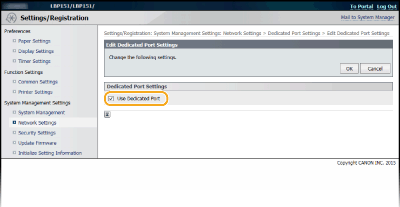
[Use Dedicated Port]
Select the check box to use the dedicated port. Clear the check box if you do not want to use it.
If you clear the check box, the Printer Status Window cannot acquire machine information.
Select the check box to use the dedicated port. Clear the check box if you do not want to use it.
If you clear the check box, the Printer Status Window cannot acquire machine information.
Waiting Time for Connection at Startup
Specify a wait time for connecting to a network. Select the setting depending on your network environment. Setting a Wait Time for Connecting to a Network
|
Waiting Time
0
to 300 (seconds) |
Ethernet Driver Settings
You can specify the Ethernet communication mode (Half Duplex/Full Duplex) and Ethernet type (10BASE-T/100BASE-TX), and display the MAC address. Configuring Ethernet Settings
|
Auto Detect
Off
On
Communication Mode
Half Duplex
Full Duplex
Ethernet Type
10BASE-T
100BASE-TX
MAC Address (Display only)
|
IEEE 802.1X Settings
Specify settings when using IEEE 802.1X. Configuring IEEE 802.1X Authentication
Wireless LAN Settings
You can check wireless LAN settings and status information. Wireless LAN settings cannot be changed from the Remote UI. Make wireless LAN settings from the computer using the MF/LBP Network Setup Tool. (Connecting to a Wireless LAN)
Log on to the Remote UI in System Manager Mode (Starting the Remote UI) [Settings/Registration] [Network Settings] [Wireless LAN Settings] Check settings and information
[Settings/Registration] [Network Settings] [Wireless LAN Settings] Check settings and information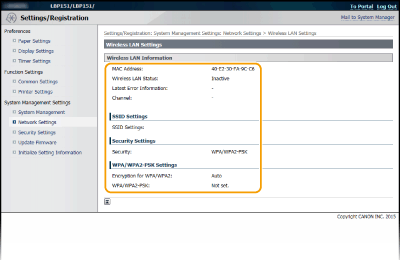
[MAC Address]
Displays the MAC address of the wireless LAN.
Displays the MAC address of the wireless LAN.
[Wireless LAN Status]
Displays the connection status (signal strength) of the wireless LAN.
Displays the connection status (signal strength) of the wireless LAN.
[Latest Error Information]
Displays information about the latest failure to make a wireless LAN connection.
Displays information about the latest failure to make a wireless LAN connection.
[Channel]
Displays the wireless LAN channel that is currently in use.
Displays the wireless LAN channel that is currently in use.
[SSID Settings]
Displays the SSID of the connected wireless LAN router.
Displays the SSID of the connected wireless LAN router.
[Security Settings]
Displays the type of encryption that is currently being applied.
Displays the type of encryption that is currently being applied.
[WPA/WPA2-PSK Settings]
Displays the current WPA/WPA2-PSK settings.
Displays the current WPA/WPA2-PSK settings.
Select Wired/Wireless LAN
Displays whether the used LAN is wireless or wired. Change settings using Network Setting Tool.
Security Settings
Enable or disable encrypted communication via TLS and IP address packet filtering.
Remote UI Settings
Select whether to use TLS encrypted communication. Enabling TLS Encrypted Communication for the Remote UI
|
Use TLS
Off
On
|
Key and Certificate Settings
Register key pairs, or generate them on the machine. You can check and verify registered key pairs. Configuring Settings for Key Pairs and Digital Certificates
CA Certificate Settings
Register a CA certificate. 62 CA certificates are preinstalled. You can check and verify registered CA certificates. Configuring Settings for Key Pairs and Digital Certificates
IP Address Filter
Specify whether to allow or reject packets sent to or received from devices with specified IP addresses.
IPv4 Address: Inbound Filter
Reject data received by the machine from a computer with a specified IPv4 address. Specifying IP Addresses for Firewall Rules
|
Use Filter
Off
On
Blocked Addresses
Allowed Addresses
|
IPv6 Address: Inbound Filter
Reject data received by the machine from a computer with a specified IPv6 address. Specifying IP Addresses for Firewall Rules
|
Use Filter
Off
On
Blocked Addresses
Allowed Addresses
|
MAC Address Filter
Specify whether to allow or reject packets sent to or received from devices with specified MAC addresses.
Inbound Filter
Reject data received by the machine from a computer with a specified MAC address. Specifying MAC Addresses for Firewall Rules
|
Use Filter
Off
On
Allowed Addresses
|
Update Firmware
Update the machine's firmware. Updating the Firmware
Initialize Setting Information
Initializes settings and returns the machine to the factory default state.
Initialize Menu
Returns the settings in the [Preferences] menu and [Function Settings] menu to the factory default settings. Initializing Menu
Initialize System Management Settings
Returns the settings in the [System Management Settings] Menu to the factory default settings. Initializing System Management Settings
Initialize Key and Certificate
Returns key and certificate settings to the factory default settings. Initializing Key and Certificate Settings