אמצעים לטיפול בכל הודעה
אם אינך מצליח לשלוח פקס או שהזיכרון מלא, או אם נתקלת בבעיות בהפעלה, תופיע הודעה בתצוגה. קבל מידע נוסף על ההודעות ברשימה הבאה.
A counterfeit or non-Canon cartridge may be in use. The amount in the cartridge cannot be displayed correctly.
ייתכן שמחסנית הטונר שבשימוש אינה מוצר מקורי של Canon.
יש להשתמש אך ורק במחסניות טונר מקוריות של Canon כמחסניות טונר להחלפה. חומרים מתכלים
A malfunction may occur. A non-Canon toner cartridge or a toner cartridge of the wrong color may be inserted. To use this cartridge, press [I Agree]. Source of Error
ייתכן שהצבע של אחת ממחסניות הטונר שהוכנסו שגוי.
יש לוודא שבדקת את סטטוס המכל שהוכנס, אשר מוצג באזור שבתוך המסגרת.
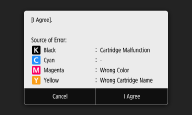
כדי להמשיך ולהשתמש במחסנית הטונר, לחץ על <I Agree>. אם תבחר באפשרות זו, פעולת המכשיר אינה מובטחת.
כדי להחליף את מחסנית הטונר, לחץ על <Cancel>.
אם אינך בטוח בנוגע לפתרונות, צור קשר עם המשוק המורשה המקומי של Canon שממנו רכשת את מחסנית הטונר.
An error occurred during certificate verification.
פג תוקפו של האישור, או שהוא כולל מידע שגוי.
התקן את אישור רשות האישורים הנכון.
רישום המפתח והאישור עבור תקשורת רשת
רישום המפתח והאישור עבור תקשורת רשת
בדוק את תקופת התקפות של האישור ואת שם התחום.
An invalid paper size/type combination was detected. Drawer: XXXX Check the position of the paper guides in the drawer and [Paper Settings] on the Home screen.
XXXX מציג מקורות נייר (1 עד 4) של מגירת הנייר.
הגדרות הנייר במגירת הנייר שונות מהנייר שנטען.
בדוק את הגדרות הנייר במידע על הנייר שב-<Paper Settings>. אם הגדרות הנייר שגויות, התאם אותן לגודל וסוג הנייר של הנייר שנטען. ניתן לקבוע את הגדרות הנייר לכל הסוגים והגדלים של הנייר שהוגדרו במגירות הנייר ב-<Paper Settings>.
ציון גודל וסוג הנייר במגירת הנייר
ציון גודל וסוג הנייר במגירת הנייר
Black & White copying is restricted. Only Color copying is available.
צילום בשחור לבן מושבת בניהול מזהי המחלקות.
כדי לצלם בשחור לבן, היכנס באמצעות מזהה מחלקה שעבורו צילום בשחור לבן אינו מוגבל. לבירור מזהה המחלקה וה-PIN, פנה למנהל המערכת.
הגדרת ניהול מזהה מחלקה
הגדרת ניהול מזהה מחלקה
Black & White printing is restricted. Only Color printing is available.
הדפסה בשחור לבן מושבתת בניהול מזהי המחלקות.
כדי להדפיס בשחור לבן, היכנס באמצעות מזהה מחלקה שעבורו צילום בשחור לבן אינו מוגבל. פנה למנהל המערכת כדי לברר את מזהה המחלקה ואת ה-PIN.
הגדרת ניהול מזהה מחלקה
הגדרת ניהול מזהה מחלקה
Cannot analyze the authentication server certificate.
ייתכן שאישור שרת האימות אינו תקף, או שהאישור בתבנית שהמדפסת אינה תומכת בה.
בדוק את האישור של שרת האימות.
קביעת התצורה של הגדרות אימות IEEE 802.1X
קביעת התצורה של הגדרות אימות IEEE 802.1X
Cannot change the destination type of destinations registered to a group.
לא ניתן לבחור יעד שנבחר מפני שהוא רשום בחיוג קבוצתי.
כדי לשנות היעד שרשום בחיוג הקבוצתי, מחק תחילה את היעד הרשום מהחיוג הקבוצתי. לאחר מכן, שנה את סוג היעד ורשום את היעד שוב בחיוג הקבוצתי.
Cannot find the access point.
בעת ניסיון להגדרה אוטומטית עם WPS, לא הייתה אפשרות לאתר נתב אלחוטי במהלך פרק זמן ספציפי.
התחבר שוב ושים לב למגבלת הזמן.
הגדרת החיבור באמצעות מצב לחצן WPS
הגדרת החיבור באמצעות מצב קוד PIN של WPS
הגדרת החיבור באמצעות מצב לחצן WPS
הגדרת החיבור באמצעות מצב קוד PIN של WPS
SSID או מפתח רשת אלחוטית של נתב אלחוטי הוזן באופן ידני, אך הערך היה שגוי.
בדוק את ה-SSID ואת מפתח הרשת, והזן שוב את הערכים הנכונים.
בדיקת ה-SSID ומפתח הרשת
הגדרת החיבור על ידי ציון הגדרות מפורטות
בדיקת ה-SSID ומפתח הרשת
הגדרת החיבור על ידי ציון הגדרות מפורטות
לא הייתה אפשרות לאתר נתב אלחוטי עקב בעיות בהגדרות של הרשת לחיבור.
בדוק אם המכשיר הותקן כראוי ומוכן לחיבור לרשת.
בעיות בהגדרות
בעיות בהגדרות
אם הבעיה נמשכת, בדוק את הגדרות האבטחה של הנתב האלחוטי.
Cannot print RX data.
לא ניתן להדפיס מסמכים שהתקבלו עקב מצב מסוים כלשהו.
בדוק אם אחד מהמצבים הבאים התרחש. אם הודעות הכוללות סיבות ופתרונות מופיעות בתצוגה, בדוק את תוכנן.
 יש מכסה פתוח.לא נטען נייר.נייר נתקע.מחסנית הטונר ריקה.אירעה שגיאה.
Cannot receive the fax. Make sure the fax was sent correctly by the sender.
מכשיר הנמען לא הגיב תוך 35 שניות.
בקש מהשולח לשלוח שוב את הפקס. אם שמעת צפצוף, בחר <Start Receiving> כדי לקבל את הפקס.
קבלת פקסים
קבלת פקסים
Cannot scan from the feeder when Book->2 Pages is set.
אתה משתמש בפונקצייה שלא ניתן להשתמש בה כאשר מסמך מקור מונח במזין.
הנח את מסמך המקור על משטח הזכוכית.
Cannot send because more than one destination is specified.
שליחת פקס למספר יעדים מושבתת.
כדי לציין מספר יעדים, עליך להגדיר את <Restrict Sequential Broadcast> כ-<Off>. לקבלת מידע נוסף, פנה למנהל המערכת.
הגבלת שידורים סדרתיים
הגבלת שידורים סדרתיים
Cannot specify group destinations, or multiple destinations at the same time.
ציינת מספר יעדים או חיוג קבוצתי לאחר בחירה באפשרות <Hook>.
לאחר בחירה באפשרות <Hook>, אינך יכול לציין מספר יעדים או חיוג קבוצתי. ציין יעדים בלי לבחור באפשרות <Hook> ושלח מסמכים בפקס.
Cannot specify group destinations when on-hook.
חיוג קבוצתי צוין כיעד לאחר בחירה באפשרות <Hook>.
לאחר שבחרת באפשרות <Hook>, אינך יכול לציין יעדים בחיוג קבוצתי. ציין יעדים כדי לשלוח מסמכים בפקס בלי לבחור באפשרות <Hook>.
Cannot use these settings. Sending to the specified destination is restricted.
המכשיר מוגדר כך שהמשתמש המחובר כעת לא יכול לשלוח לכתובות הרשומים ב-<Favorite Settings> שנבחרו.
שנה את מגבלות השליחה של המשתמש המחובר.
הגדרת ניהול מזהה מחלקה
הגדרת ניהול מזהה מחלקה
Cartridge Communication Error A counterfeit or non-Canon cartridge may be in use.
ייתכן שמחסנית טונר לא הותקנה כראוי או שהיא פגומה.
התקן שוב את מחסנית הטונר. אם התקנה חוזרת של מחסנית הטונר לא מוחקת את הודעת השגיאה, ייתכן שמחסנית הטונר פגומה. פנה לחנות שבה רכשת את מחסנית הטונר או התייעץ עם מרכז העזרה ללקוחות של Canon. הליך להחלפת מחסנית הטונר
ייתכן שמחסנית הטונר שבשימוש אינה מוצר מקורי של Canon.
יש להשתמש אך ורק במחסניות טונר מקוריות של Canon כמחסניות טונר להחלפה. חומרים מתכלים
Change the authentication password.
תוקף הסיסמה פג.
הגדר סיסמה חדשה.
Check the authentication settings.
שיטת האימות שהוגדרה במכשיר אינה מתאימה לשיטת האימות שהוגדרה בשרת RADIUS.
בדוק שאותה שיטת אימות מוגדרת במכשיר זה ובשרת RADIUS, והגדר את שיטת האימות הנכונה.
קביעת התצורה של הגדרות אימות IEEE 802.1X
קביעת התצורה של הגדרות אימות IEEE 802.1X
Color copying is restricted. Only Black & White copying is available.
צילום בצבע מושבת בניהול מזהי המחלקות.
כדי לצלם בצבע, היכנס באמצעות מזהה מחלקה שעבורו צילום בצבע אינו מוגבל. פנה למנהל המערכת כדי לברר את מזהה המחלקה ואת ה-PIN.
הגדרת ניהול מזהה מחלקה
הגדרת ניהול מזהה מחלקה
Color printing is restricted. Only Black & White printing is available.
הדפסה בצבע מושבתת בניהול מזהי המחלקות.
כדי להדפיס בצבע, היכנס באמצעות מזהה מחלקה שעבורו הדפסה בצבע אינה מוגבלת. פנה למנהל המערכת כדי לברר את מזהה המחלקה ואת ה-PIN.
הגדרת ניהול מזהה מחלקה
הגדרת ניהול מזהה מחלקה
Copying is restricted.
צילום מושבת בניהול מזהי המחלקות.
היכנס באמצעות מזהה מחלקה שעבורו צילום אינו מושבת. לבירור מזהה המחלקה וה-PIN, פנה למנהל המערכת.
הגדרת ניהול מזהה מחלקה
הגדרת ניהול מזהה מחלקה
Could not connect.
החיבור בנקודת הגישה נכשל עקב שגיאה.
המתן מספר רגעים ונסה שוב. אם עדיין אינך מצליח להתחבר, נסה לכבות את המכשיר לזמן קצר.
חיבור ישיר (מצב נקודת גישה)
חיבור ישיר (מצב נקודת גישה)
Could not connect. Check the PSK settings.
מפתח הרשת (PSK) של נתב אלחוטי לחיבור אינו מוגדר למכשיר כראוי.
בדוק את מפתח הרשת (PSK) של הנתב האלחוטי, והגדר אותו שוב במכשיר.
בדיקת ה-SSID ומפתח הרשת
הגדרת חיבור על ידי בחירת נתב אלחוטי
הגדרת החיבור על ידי ציון הגדרות מפורטות
בדיקת ה-SSID ומפתח הרשת
הגדרת חיבור על ידי בחירת נתב אלחוטי
הגדרת החיבור על ידי ציון הגדרות מפורטות
אם הבעיה נמשכת גם לאחר בדיקת מפתח הרשת, בדוק אם המכשיר מותקן כראוי ומוכן לחיבור לרשת.
בעיות בהגדרות
בעיות בהגדרות
Could not connect using the wireless LAN. Turn the main power OFF and ON, then configure the settings again.
חיבור נכשל עקב שגיאה במהלך הגדרת חיבור LAN אלחוטי.
הפעל מחדש את המכשיר והגדר שוב.
אם הבעיה נמשכת גם לאחר הפעלה מחדש של המכשיר, בדוק אם המכשיר מותקן כראוי ומוכן לחיבור לרשת.
בעיות בהגדרות
בעיות בהגדרות
אם הבעיה נמשכת גם לאחר בדיקת חיבור ה-LAN האלחוטי, בדוק את הגדרות האבטחה של הנתב האלחוטי.
Could not connect using WPS. Wait a moment, then configure the settings again.
בעת ניסיון להגדרה אוטומטית עם WPS, החיבור נכשל עקב שגיאה.
המתן זמן מה והגדר שוב. אם הבעיה נמשכת, בדוק אם הנתב האלחוטי תומך ב-WPS.
אם WPS נתמך:
בדוק אם המכשיר הותקן כראוי ומוכן לחיבור לרשת.
בעיות בהגדרות
בעיות בהגדרות
אם WPS אינו נתמך:
הגדר תוך שימוש בשיטת חיבור אחרת.
חיבור ל-LAN אלחוטי
חיבור ל-LAN אלחוטי
Could not connect. The maximum number of devices that can connect to the access point has been reached.
המכשיר ניסה להתחבר לנתב LAN אלחוטי שאליו כבר מחובר המספר המרבי של מכשירים.
צמצם את מספר המכשירים (לקוחות) שמחוברים לנתב ה-LAN האלחוטי. למידע על המספר המרבי של מכשירים שניתן לחבר, עיין במדריך ההוראות של נתב ה-LAN האלחוטי או פנה ליצרן.
Could not detect any connections from wireless devices.
איתור מכשירים ניידים אינו אפשרי במהלך פרק הזמן שנקבע מראש.
התחבר שוב ושים לב למגבלת הזמן.
חיבור ישיר (מצב נקודת גישה)
חיבור ישיר (מצב נקודת גישה)
Could not perform cleaning.
נייר נתקע במהלך הניקוי.
הכמות שנותרה במחסניות הטונר שדרושה לניקוי מערך התיקון אינה מספיקה.
לניקוי דרושה כמות מספיקה במחסנית הטונר. החלף את מחסנית הטונר ובצע את הניקוי שוב.
הליך להחלפת מחסנית הטונר
הליך להחלפת מחסנית הטונר
Could not perform correction.
נייר מתאים הנדרש לתיקון לא נטען במגירת הנייר.
תמונת כוונון הנדרשת לתיקון לא מונחת על משטח הזכוכית כראוי.
הנח את תמונת הכוונון על משטח הזכוכית כשהצד המודפס פונה למטה והפס השחור פונה לכיוון גב המכשיר.
כוונון מלא
כוונון מלא
נייר נתקע במהלך תיקון.
הוצא את הנייר שנתקע ובצע את התיקון שוב.
ניקוי חסימות נייר
ניקוי חסימות נייר
הכמות שנותרה במחסניות הטונר שדרושה לתיקון אינה מספיקה.
לתיקון דרושה כמות מספיקה במחסנית הטונר. החלף את מחסנית הטונר ובצע שוב את הניקוי.
הליך להחלפת מחסנית הטונר
הליך להחלפת מחסנית הטונר
Could not perform Open System authentication. Check the WEP settings.
שיטת האימות של המכשיר מוגדרת בתור <Open System>, אך נתב אלחוטי מוגדר ל"מפתח משותף".
התחבר שוב על ידי שינוי ידני של אימות ה-WEP ל-<Shared Key>.
הגדרת החיבור על ידי ציון הגדרות מפורטות
הגדרת החיבור על ידי ציון הגדרות מפורטות
כתובת ה-MAC של המכשיר נדחית מפני שמסנן כתובות ה-MAC מוגדר לנתב אלחוטי.
הגדר שהנתב האלחוטי ירשה את כתובת ה-MAC של המכשיר והמחשב שלך. למידע נוסף על ההגדרה, עיין במדריכים של התקני הרשת שלך או צור קשר עם היצרן. כדי לבדוק את כתובת ה-MAC של המכשיר, בחר <Menu>  <Preferences> <Network> <Wireless LAN Settings> <Connection Information>.
הצגת כתובת ה-MAC ברשת LAN קווית
<Preferences> <Network> <Wireless LAN Settings> <Connection Information>.הצגת כתובת ה-MAC ברשת LAN קווית
Could not perform Shared Key authentication. Check the WEP settings.
מפתח הרשת (מפתח WEP) של נתב אלחוטי לחיבור אינו מוגדר למכשיר כראוי.
בדוק את מפתח הרשת (מפתח WEP) של הנתב האלחוטי, והגדר אותו במכשיר שוב.
בדיקת ה-SSID ומפתח הרשת
הגדרת החיבור על ידי ציון הגדרות מפורטות
בדיקת ה-SSID ומפתח הרשת
הגדרת החיבור על ידי ציון הגדרות מפורטות
התחבר שוב על ידי בחירת נתב אלחוטי או על ידי שינוי ידני של שיטת אימות ה-WEP ל-<Open System>.
הגדרת חיבור על ידי בחירת נתב אלחוטי
הגדרת החיבור על ידי ציון הגדרות מפורטות
הגדרת חיבור על ידי בחירת נתב אלחוטי
הגדרת החיבור על ידי ציון הגדרות מפורטות
שיטת האימות של המכשיר מוגדרת בתור <Shared Key>, אך נתב אלחוטי מוגדר ל"מערכת פתוחה".
שנה את שיטת אימות ה-WEP ל"מפתח משותף" בנתב האלחוטי, והתחבר שוב. למידע נוסף על השינוי, עיין במדריכים של התקני הרשת שלך או צור קשר עם היצרן.
Direct Connection terminated.
הייתה הפרעה לחיבור באמצעות מכשיר נייד.
צור שוב חיבור ישיר.
חיבור ישיר (מצב נקודת גישה)
חיבור ישיר (מצב נקודת גישה)
Faxing is restricted.
שליחת פקסים מושבתת בניהול מזהי מחלקות.
היכנס באמצעות מזהה מחלקה שעבורו שליחת פקסים אינה מושבתת. לבירור מזהה המחלקה וה-PIN, פנה למנהל המערכת.
הגדרת ניהול מזהה מחלקה
הגדרת ניהול מזהה מחלקה
Google Cloud Print Authentication Error
ל-Cloud Print לא הייתה אפשרות לבצע אימות שרת, או שהוא לא הצליח להשיג מידע לרישום.
בדוק אם הגדרות השעה והתאריך צוינו כראוי.
<Date/Time Settings>
<Date/Time Settings>
Google Cloud Print Communication Error
Cloud Print אינו זמין עקב שגיאה.
ייתכן שיציאה המשמשת את Cloud Print חסומה על ידי חומת אש או הגנה אחרת. בדוק אם יציאה 5222 זמינה במחשב שלך.
אם נעשה שימוש בשרת proxy ברשת, בדוק אם הגדרות ה-proxy במכשיר והשרת נכונות. לפרטים, פנה למנהל הרשת.
הגדרת Proxy
הגדרת Proxy
Information about the remaining amount of toner cannot be detected properly. A non-Canon toner cartridge or a toner cartridge with the wrong name may be inserted. To use this cartridge, press [I Agree]. Source of Error
ייתכן שתוכנס מחסנית טונר עם מספר דגם שגוי, או שמחסנית הטונר עשויה להינזק.
יש לוודא שבדקת את סטטוס המכל שהוכנס, אשר מוצג באזור שבתוך המסגרת. להוראות על בדיקת מספר הדגם של מחסנית הטונר, ראה חלקי חילוף.
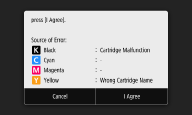
כדי להמשיך ולהשתמש במחסנית הטונר, לחץ על <I Agree>. אם תבחר באפשרות זו, פעולת המכשיר אינה מובטחת.
כדי להחליף את מחסנית הטונר, לחץ על <Cancel>.
אם אינך בטוח בנוגע לפתרונות, צור קשר עם המשוק המורשה המקומי של Canon שממנו רכשת את מחסנית הטונר.
Insert the waste toner container.
מכל פסולת הטונר אינו מותקן כראוי.
התקן את מכל פסולת הטונר כראוי.
החלפת מכל פסולת הטונר
החלפת מכל פסולת הטונר
Load paper.
לא נטען נייר במגירת הנייר או בחריץ ההזנה הידנית.
טען את הנייר.
טעינת נייר
טעינת נייר
נייר שעליו ניתן להדפיס דוחות או רשימות לא הוטען.
ניתן להדפיס דוחות או רשימות על נייר רגיל/ממוחזר/צבעוני בגודל A4 או Letter. טען נייר מתאים וקבע הגדרות של גודל וסוג הנייר.
טעינת נייר
קביעת גודל וסוג הנייר
טעינת נייר
קביעת גודל וסוג הנייר
נייר שעליו ניתן להדפיס מסמכים שהתקבלו לא נטען.
טען נייר מתאים להדפסת מסמכים שהתקבלו וקבע הגדרות של גודל וסוג הנייר.
טעינת נייר
קביעת גודל וסוג הנייר
נייר זמין
טעינת נייר
קביעת גודל וסוג הנייר
נייר זמין

אם מודפסים מסמכים שהתקבלו על נייר שאינו בגודל A4 או Letter, ייתכן שחלקים מהתמונה יהיו חסרים או שהתמונה תודפס בחלקים על מספר גיליונות.
Load staples into the stapler unit.
במחסנית המהדק שביחידת ההידוק (אופציונלי) נגרמו המהדקים.
החלף את מחסנית המהדק.
חידוש מלאי המהדקים (אופציונלי)
חידוש מלאי המהדקים (אופציונלי)
Memory Full (Secure Print)
הזיכרון התמלא במסמכים מאובטחים שלא הודפסו.
הדפס את המסמכים המאובטחים שנשמרו בזיכרון.
הדפסה באמצעות הדפסה מאובטחת
הדפסה באמצעות הדפסה מאובטחת
Memory Full (Skip Error)
הזיכרון התמלא בנתוני הדפסה שלא הודפסו עקב שגיאות.
בטל את ההדפסה של מסמכים שבהם התרחשה שגיאה, או הדפס מסמכים על ידי בחירה באפשרות <Skip Error> במסך בעת בדיקת מצב ההדפסה.
ביטול הדפסה
ביטול הדפסה
Memory Media Print is restricted.
הפונקציה להדפסת קבצים מהתקן זיכרון בחיבור USB מושבתת.
הגדר את <Use Print Function> ב-<Memory Media Settings> כ-<On>.
הגבלת פונקציית ההדפסה ל-USB
הגבלת פונקציית ההדפסה ל-USB
No reply from the destination.
ייתכן שיש כבל רשת מנותק או שיש בעיה במתג.
בדוק את המצב של כבלי הרשת והמתגים.
No response from the host.
המכשיר לא מחובר כראוי לרשת.
בדוק את המכשיר ואת הגדרות הרשת והתחבר שוב.
הגדרת סביבת הרשת
הגדרת סביבת הרשת
Paper jammed.
חסימות נייר.
Paper Settings and Loaded Size Mismatch
הגדרת גודל הנייר בלוח ההפעלה לא מתאימה לגודל הנייר שנטען.
התאם בין הגדרת גודל הנייר שצוינה ב-<Paper Settings> ובין גודל הנייר שנטען בפועל.
כדי להשתמש בנייר שנטען
שנה את ההגדרה של <Paper Settings> כך שתתאים לגודל הנייר שנטען.
קביעת גודל וסוג הנייר
קביעת גודל וסוג הנייר
אם אתה מדפיס ממחשב, בדוק אם הגדרת גודל הנייר במנהל המדפסת מתאימה לגודל הנייר שנטען.
כדי לטעון נייר ללא שינוי ההגדרות
בדוק שמובילי הנייר במגירת הנייר מוגדרים במיקום הנכון.
טעינת נייר
טעינת נייר
Printing is restricted.
הדפסה מושבתת בניהול מזהי מחלקות.
היכנס באמצעות מזהה מחלקה שעבורו הדפסה אינה מושבתת. לבירור מזהה המחלקה וה-PIN, פנה למנהל המערכת.
הגדרת ניהול מזהה מחלקה
הגדרת ניהול מזהה מחלקה
Remote scanning is restricted.
סריקה המופעלת באמצעות מחשב מושבתת במנהל מזהי מחלקות.
היכנס לממשק המשתמש המרוחק במצב מנהל מערכת, הצג את מסך העריכה של ניהול מזהי מחלקות ובחר בתיבת הסימון [Allow Scan Jobs with Unknown IDs].
הגדרת ניהול מזהה מחלקה
הגדרת ניהול מזהה מחלקה
Replace the waste toner container.
לא ניתן להדפיס מאחר שמכל פסולת הטונר מלא.
החלף את מכל פסולת הטונר.
החלפת מכל פסולת הטונר
החלפת מכל פסולת הטונר
Replace toner cartridge.
לא ניתן להדפיס מאחר שהטונר נגמר.
החלף את מחסנית הטונר במחסנית טונר חדשה של המכשיר.
החלפת מחסנית הטונר
החלפת מחסנית הטונר
Scanning is restricted.
סריקה מושבתת בניהול מזהי מחלקות.
היכנס באמצעות מזהה מחלקה שעבורו סריקה אינה מושבתת. לבירור מזהה המחלקה וה-PIN, פנה למנהל המערכת.
הגדרת ניהול מזהה מחלקה
הגדרת ניהול מזהה מחלקה
Set the correct authentication information.
פרטי אימות הלקוח (מפתח ואישור, שם משתמש וסיסמה או אישור רשות אישורים) לא הוגדרו כראוי.
בדוק את שיטת האימות שצוינה ואת פרטי האימות (מפתח ואישור, שם משתמש וסיסמה ואישור רשות אישורים).
קביעת התצורה של הגדרות אימות IEEE 802.1X
קביעת התצורה של הגדרות אימות IEEE 802.1X
Set the information necessary for authentication.
אימות IEEE 802.1X לא הוגדר כראוי.
הגדר את IEEE 802.1X כראוי בממשק המשתמש המרוחק.
קביעת התצורה של הגדרות אימות IEEE 802.1X
קביעת התצורה של הגדרות אימות IEEE 802.1X
Specifying and registering new destinations is restricted.
ניתן לציין רק יעדים שרשומים בפנקס הכתובות לשליחת פקס או דואר אלקטרוני.
כדי להזין יעד חדש באמצעות לוח ההפעלה או כדי להוסיף או לערוך יעד בפנקס הכתובות, עליך להגדיר את <Restrict New Destinations> כ-<Off>. לקבלת מידע נוסף, פנה למנהל המערכת.
הגבלת יעדים חדשים שניתן לציין
הגבלת יעדים חדשים שניתן לציין
The authentication server certificate has expired.
פג תוקפו של אישור השרת שנשלח משרת RADIUS.
בדוק את תקופת התקפות של אישור השרת בשרת ה-RADIUS.
קביעת התצורה של הגדרות אימות IEEE 802.1X
קביעת התצורה של הגדרות אימות IEEE 802.1X
The authentication server certificate is incorrect.
אין אישורי רשות אישורים רשומים במדפסת שתואמים לאישור שרת האימות.
בדוק שאישור רשות אישורים רשום במדפסת ושהוא תואם לאישור שרת האימות.
קביעת התצורה של הגדרות אימות IEEE 802.1X
קביעת התצורה של הגדרות אימות IEEE 802.1X
The computer is restricted.
סריקה המופעלת באמצעות לוח ההפעלה מושבתת במנהל מזהי מחלקות.
היכנס לממשק המשתמש המרוחק במצב מנהל מערכת, הצג את מסך העריכה של מזהה המחלקה המתאים ובחר בתיבת הסימון [Allow Scan Jobs with Unknown IDs].
הגדרת ניהול מזהה מחלקה
הגדרת ניהול מזהה מחלקה
The memory is full.
אין אפשרות לשלוח או לקבל פקס, או שלא הייתה אפשרות לסרוק מסמך מקור עקב מחסור בזיכרון.
אם עבודת שליחה או הדפסה נמצאת בתור, המתן עד להשלמת העבודה.
אם מסמך שהתקבל נשמר בזיכרון, הדפס או מחק אותו.
שמירת מסמכים שהתקבלו במכשיר (קבלה לזיכרון)
שמירת מסמכים שהתקבלו במכשיר (קבלה לזיכרון)
אם אתה שולח מסמך מקור עם דפים רבים, חלק אותו למספר חלקים.
אם אתה שולח פקס, הפחת את הרזולוציה של סריקת המקור.
פעולות בסיסיות בשליחת פקסים
פעולות בסיסיות בשליחת פקסים
אם אתה סורק, שנה את תבנית הקובץ כדי להקטין את גודל הקובץ של הסריקה.
פעולות בסיסיות לסריקת מסמכי מקור
פעולות בסיסיות לסריקת מסמכי מקור
לא הייתה אפשרות לשמור מסמך מקור סרוק בהתקן זיכרון בחיבור USB עקב מחסור בזיכרון.
מחק נתונים מיותרים כדי לפנות מקום בהתקן הזיכרון בחיבור USB, או חבר התקן זיכרון אחר בחיבור USB.
חיבור התקן זיכרון USB
חיבור התקן זיכרון USB
The memory is full. Enter the original type settings again.
לא הייתה אפשרות לסרוק מסמך מקור מפני שהזיכרון התמלא במהלך צילום.
הגדר את <Original Type> כ-<Text/Photo/Map (Speed)> וצלם.
בחירת סוג מסמך המקור עבור צילום
בחירת סוג מסמך המקור עבור צילום
The memory is full. Scanning will be canceled. Do you want to print?
לא הייתה אפשרות לסרוק מסמך מקור עקב מחסור בזיכרון.
בחר אם להדפיס את הדפים שנסרקו או אם לבטל את העבודה.
צלם את המקור בשני חלקים או יותר.
לא הייתה אפשרות לסרוק את כל הדפים במהלך מיון וצילום.
בחר אם להדפיס את הדפים שנסרקו או אם לבטל את העבודה.
אם מדובר בעבודת צילום, צלם את המקור בשני חלקים או יותר או שנה את ההגדרה <Original Type> ל-<Text/Photo/Map> וצלם את המקור.
בחירת סוג מסמך המקור עבור צילום
בחירת סוג מסמך המקור עבור צילום
The number of entered characters is incorrect or invalid characters are used.
מפתח הרשת (מפתח WPA/WPA2-PSK או WEP) של נתב אלחוטי לא הוזן כראוי.
בדוק את מפתח הרשת (מפתח WPA/WPA2-PSK או WEP) של הנתב האלחוטי והגדר אותו שוב במכשיר. למידע נוסף על בדיקת מפתח הרשת, עיין במדריכי ההוראות של התקני הרשת או פנה ליצרן.
בדיקת ה-SSID ומפתח הרשת
הגדרת חיבור על ידי בחירת נתב אלחוטי
הגדרת החיבור על ידי ציון הגדרות מפורטות
בדיקת ה-SSID ומפתח הרשת
הגדרת חיבור על ידי בחירת נתב אלחוטי
הגדרת החיבור על ידי ציון הגדרות מפורטות
The paper size/type combination is invalid.
הגדרות הנייר במגש הרב-תכליתי שונות מהנייר שנטען.
בדוק את הגדרות הנייר במידע על הנייר שב-<Paper Settings>. אם הגדרות הנייר שגויות, התאם אותן לגודל וסוג הנייר של הנייר שנטען. ניתן לקבוע את הגדרות הנייר לכל הסוגים והגדלים של הנייר שהוגדרו במגש הרב-תכליתי ב-<Paper Settings>.
ציון גודל וסוג הנייר במגש הרב-תכליתי
ציון גודל וסוג הנייר במגש הרב-תכליתי
The USB memory is restricted.
הפונקציה לשמירת מסמך מקור סרוק בהתקן זיכרון בחיבור USB מושבתת.
הגדר את <Use Scan Function> כ-<On>.
הגבלת פונקציית הסריקה ל-USB
הגבלת פונקציית הסריקה ל-USB
The WEP key is not set correctly. Check the WEP settings.
מפתח הרשת (מפתח WEP) של נתב אלחוטי לחיבור אינו מוגדר למכשיר כראוי.
בדוק את מפתח הרשת (מפתח WEP) של הנתב האלחוטי, והגדר אותו במכשיר שוב.
בדיקת ה-SSID ומפתח הרשת
הגדרת חיבור על ידי בחירת נתב אלחוטי
הגדרת החיבור על ידי ציון הגדרות מפורטות
בדיקת ה-SSID ומפתח הרשת
הגדרת חיבור על ידי בחירת נתב אלחוטי
הגדרת החיבור על ידי ציון הגדרות מפורטות
שיטת האימות של המכשיר מוגדרת בתור <Shared Key>, אך נתב אלחוטי מוגדר ל"מערכת פתוחה".
התחבר שוב על ידי בחירת נתב אלחוטי או על ידי שינוי ידני של שיטת אימות ה-WEP ל-<Open System>.
הגדרת חיבור על ידי בחירת נתב אלחוטי
הגדרת החיבור על ידי ציון הגדרות מפורטות
הגדרת חיבור על ידי בחירת נתב אלחוטי
הגדרת החיבור על ידי ציון הגדרות מפורטות
שנה את שיטת אימות ה-WEP ל"מפתח משותף" בנתב האלחוטי, והתחבר שוב. למידע נוסף על השינוי, עיין במדריכים של התקני הרשת שלך או צור קשר עם היצרן.
Toner low. (Rplct. not yet needed.)
הטונר נגמר ובקרוב המכשיר לא יוכל להדפיס.
הכן מחסנית טונר חדשה לפני שהטונר נגמר.
Use Remote UI to set the information necessary for authentication.
הגדרות IEEE 802.1X אינן נכונות.
בדוק אם [Login Name] מוגדר כראוי.
בדוק אם תיבת הסימון [Use TLS], [Use TTLS] או [Use PEAP] נבחרה.
אם אתה משתמש ב-TLS, בדוק אם "מפתח ואישור" רשומים.
אם אתה משתמש ב-TTLS או PEAP, בדוק אם שם משתמש וסיסמה הוגדרו כראוי.
קביעת התצורה של הגדרות אימות IEEE 802.1X
קביעת התצורה של הגדרות אימות IEEE 802.1X