Front Side
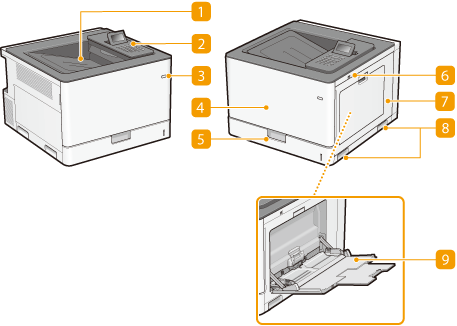
 Output tray
Printed paper is output to the output tray.
 Operation panel
The operation panel consists of numeric keys, a display, status indicators, etc. You can perform all the operations and specify settings from the operation panel. Operation Panel Display
 Power switch
Press the power switch to turn ON the power. When turning OFF the power, do not use this switch, but follow the procedures shown in Turning OFF the Power (Performing a Shutdown).
 Front cover
Open the front cover when replacing toner cartridges or drum cartridges. How to Replace Toner Cartridges How to Replace Drum Cartridges
 Paper drawer
Load the type of paper you frequently use into the paper drawer. Loading Paper in the Paper Drawer
 USB memory port (For USB memory)
You can connect a USB memory device to the machine and directly print the data from the USB memory device. You can directly print the data in the USB memory device without using a computer. (Printing from USB Memory (USB Direct Print)). Also, connect a USB memory device when exporting or importing the settings of the machine (Import/Export Set.).
 Right cover
Open the right cover when clearing paper jams.
 Lift handles
Hold the lift handles when carrying the machine. Relocating the Machine
 Multi-purpose tray
Load the paper into the multi-purpose tray when you want to temporarily use a type of paper different from that which is loaded in the paper drawer. Loading Paper in the Multi-Purpose Tray