Managing the Scan Status by Group
You can gather users into groups such as departments and manage the scan status by department ID.
This function is called Department ID Management.
When the Department ID Management function is set, only users authenticated on the device can scan using this driver.
This explains the procedure for scanning and the procedure for saving the authentication information required for the Department ID Management function.
Saving the Authentication Information Required for the Department ID Management Function
You can eliminate the need to set authentication information each time you scan by following this procedure to save the information in advance.
Prerequisites
Setting the Department ID Management function on the device side
For details, refer to the manual of the device.
Procedures
1.
In the Color Network ScanGear 2 Tool, select the device to use as a scanner.
2.
In [Scanner Information] > [User Management], select [Dept. ID Management].
Only [Dept. ID Management] may be displayed in [User Management], depending on the selected scanner.
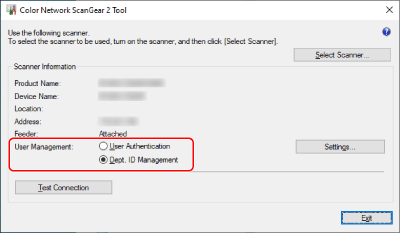
3.
Click [User Management] > [Settings].
4.
In the [Department ID/PIN Settings] dialog box, enter [Department ID] and [PIN] → click [OK].
To enter a PIN, select [Save PIN] and enter the PIN.
To confirm the department ID and PIN when scanning, select [Confirm Authentication Information When Scanning].
5.
Click [Exit] for the Color Network ScanGear 2 Tool.
Scanning with the Department ID Management Function Set
Prerequisites
Selecting the scanner in the Color Network ScanGear 2 Tool
Confirming that the scanner is online
Procedures
1.
Save the authentication information as required.
Configure the settings by following the procedure below.
2.
Execute scanning.
3.
If the [Confirm Department ID/PIN] dialog box is displayed, enter [Department ID] and [PIN] → click [OK].
Scanning starts.
 NOTE
NOTEThe [Confirm Department ID/PIN] dialog box may not be displayed, depending on the combination of application and operating system used.
In this case, save the authentication information in advance in the [Department ID/PIN Settings] dialog box of the Color Network ScanGear 2 Tool in order to use the user management function.