
Changes Regarding the Display and Input
 (Ver.2.04-)
Support for Welsh
The touch panel display can now be switched to Welsh.
|
When the touch panel display is set to Welsh, <English (UK) Layout> is used for the keyboard layout. For information on switching the display language, see "Basic Operations"  "Switching the Displayed Language" in the User's Guide. "Switching the Displayed Language" in the User's Guide. |
Support for the Hebrew Keyboard Layout
The layout of the keyboard screen on the touch panel display can now be switched to Hebrew.
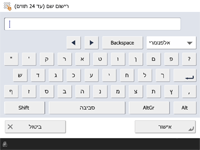
|
For information on switching the display language, see "Basic Operations" "Switching the Displayed Language" in the User's Guide. |
 (Ver.2.02-)
2-Sided Setting Renamed
The 2-sided setting displayed for each function has been renamed. The way the setting works has not been changed.
Functions | Before change | After change |
<Copy> | <2-Sided> | <2-Sided Settings> |
<Fax>/<Scan and Send>/<Scan and Store> | <2-Sided Original> | <2-Sided Original Settings> |
<Access Stored Files> | <2-Sided Printing> | <2-Sided Printing Settings> |
Changes to the Destination View Area
When no fax destinations are specified, the message "Enter using the numeric keys to the right of the screen." is now displayed in the destination view area.