Loading Tab Paper in the Paper Drawer
This section describes how to load tab paper in the paper drawer.
NOTE
You can also load tap paper in the following paper sources:
Loading tab paper in the multi-purpose tray Loading Paper in the Multi-purpose Tray
Loading tab paper in POD Deck Lite-C Loading Paper in POD Deck Lite-C (Option)
Loading tab paper in Multi-drawer Paper Deck-E Loading Paper in Multi-drawer Paper Deck-E (Option)
Loading tab paper in Document Insertion Unit-R Loading Paper in Document Insertion Unit-R (Option)
Preparations for Using the Tab Paper
There are two kinds of tab paper: right order tab paper and reverse order tab paper.
Right order tab paper
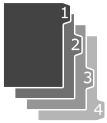
Reverse order tab paper

When you load tab paper into the paper drawer, load reverse order tab paper face down with the tabs on the left side.

Loading Tab Paper in the Paper Drawer
1
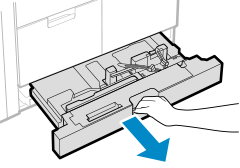
Pull the paper drawer toward you until it stops.
2
Move the paper guides to the outside.
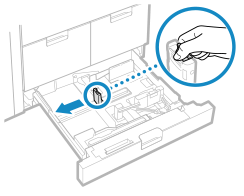
While holding the top part of the left guide, move the paper guide.
3
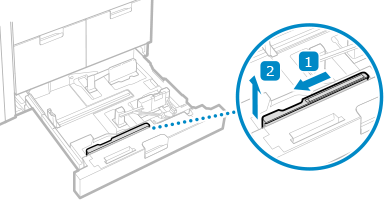
Remove the tab feeding attachment that is stored in the paper drawer.
4
Attach the tab feeding attachment aligning the A4 size indicator.
1
Install the tab feeding attachment so it is lined up with the A4 size indicator.
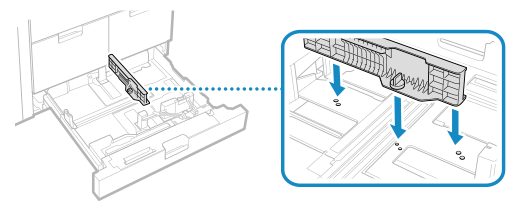
2
Turn the knob to secure the tab feeding attachment.
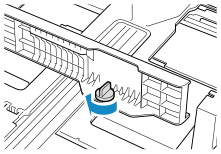
5
Load the tab paper.
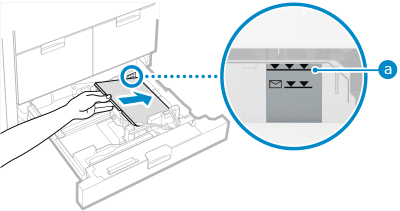
Load the tab paper with the tabs on the left side.
Make sure the loaded paper does not exceed the load limit line ( ). If it exceeds the load limit line, there may be misfeeds or a paper jam.
). If it exceeds the load limit line, there may be misfeeds or a paper jam.6
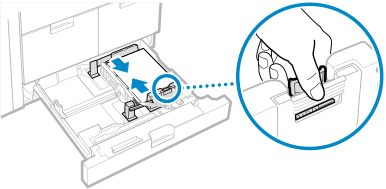
Align the front paper guide with the length of the paper.
1
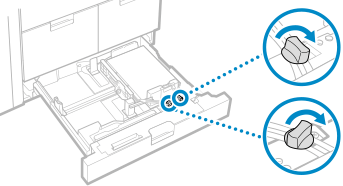
Loosen the fixing screws.
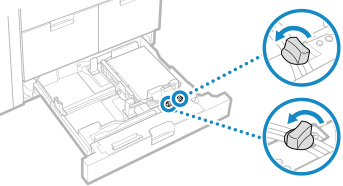
2
While holding the top of the front paper guide, align the paper guide with the length of the paper.
3
Tighten the fixing screws.
7
Push the paper drawer gently into the machine.
8
Set the paper size and type. Setting the Paper Size and Type for the Paper Deck and Paper Drawer
If you do not change the settings, the machine cannot print properly.