Zobrazí sa hlásenie
Ak sa na ovládacom paneli zobrazí hlásenie, vyberte ho zo zoznamu nižšie a zistite, ako problém odstrániť.
23 PLNÁ PAMÄŤ
K dispozícii nie je dostatok pamäte na zaregistrovanie prekrytí a externých znakov.
Stlačte položku [Preskočiť chybu] a pokračujte v tlači.
Ak túto chybu preskočíte, údaje, ktoré sa nepodarilo zapísať kvôli nedostatku pamäte, sa nezobrazia.
Zrušte tlač, inicializujte funkcie tlačiarne a skúste tlačiť znova.
Inicializáciou funkcií tlačiarne sa zvýši množstvo dostupnej pamäte. Týmto sa však vymažú všetky údaje o tlači v pamäti zariadenia. [Resetovať tlačiareň]
27 ODMIET. ÚLOHA
Zadaná emulácia neexistuje.
Stlačte položku [Preskočiť chybu] a pokračujte v tlači.
Ak túto chybu preskočíte, údaje, ktoré chybu spôsobili, sa nevytlačia.
Podporuje dané zariadenie uvedenú emuláciu?
Ak je táto funkcia podporovaná, nastavte režim prevádzky a skúste tlačiť znova. [Personalizácia]
33 PRAC. PAMÄŤ PLNÁ
Tlač nebola možná, lebo vyhradená pracovná pamäť je nedostatočná.
Stlačte položku [Preskočiť chybu] a pokračujte v tlači.
Ak chybu preskočíte, údaje, pri ktorých sa chyba vyskytla, sa nevytlačia správne.
* Uložené údaje, ako napríklad prekrývacie vrstvy alebo makrá, môžu byť vymazané.
Zrušte tlač, inicializujte zariadenie a skúste tlačiť znova.
Inicializáciou zariadenia sa zvýši množstvo dostupnej pamäte. Týmto sa však vymažú všetky údaje o tlači v pamäti zariadenia. [Resetovať tlačiareň]
52 ODMIET. OBRAZ. REŽIM
Počas tlače obrázka sa prijali údaje, ktoré nie je možné spracovať.
Stlačte položku [Preskočiť chybu] a pokračujte v tlači.
Ak túto chybu preskočíte, údaje, ktoré chybu spôsobili, sa nevytlačia.
Podporuje ovládač tlačiarne tento formát obrazových údajov?
Skúste tlačiť znova pomocou ovládača tlačiarne, ktorý podporuje daný formát obrazových údajov.
Informácie stránky Active Directory sú neplatné. Kontaktujte správcu systému.
Informácie o lokalite Active Directory nie sú správne nastavené.
Znovu nastavte informácie o lokalite služby Active Directory.
V Remote UI (Vzdialené PR) skontrolujte, či sú možnosti [Timing of Site Information Retrieval] a [Site Access Range] nastavené správne. Registrácia údajov o overovacom serveri
Nemožno overiť CRL.
Nepodarilo sa overiť CA certifikát certifikačnej autority, ktorá vydala zoznam zrušených certifikátov (CRL).
Zaregistrujte CA certifikát certifikačnej autority, ktorá vydala zoznam zrušených certifikátov (CRL).
D0-nn chyba (kde nn sú dva alfanumerické znaky)
Funkcia tlačiarne tohto zariadenia nefunguje správne kvôli chybe.
Reštartujte stroj.
Ak sa správa zobrazuje aj po reštartovaní zariadenia, zapíšte si jej obsah a kontaktujte svojho predajcu alebo servisného zástupcu.
Nový kód PIN nemožno odoslať cez e-mail. Skontrolujte nastavenia.
E-mail na obnovenie PIN kódu ani priložený súbor s novým vzorom sa nepodarilo odoslať.
Je e-mailová adresa prihláseného používateľa nastavená správne?
Skontrolujte e-mailovú adresu prihláseného používateľa. Registrácia informácií o používateľovi
Sú nastavenia siete a odosielania e-mailov správne?
FF PAMÄŤ PÍSMA
Informácie o písmach sa nepodarilo zaregistrovať do oblasti na ukladanie informácií o písmach (tabuľky písiem), pretože počet písiem určených na registráciu bol príliš veľký.
Stlačte položku [Preskočiť chybu] a pokračujte v tlači.
Ak chybu preskočíte, údaje, ktoré sa nepodarilo zaregistrovať, sa nevytlačia správne.
Zrušte tlač, inicializujte zariadenie a skúste tlačiť znova.
Inicializáciou zariadenia sa zvýši množstvo dostupnej pamäte. Týmto sa však vymažú všetky údaje o tlači v pamäti zariadenia. [Resetovať tlačiareň]
FM DL SIZE ERROR n (kde n je jednočíselný alfanumerický znak)
Funkcia tlačiarne tohto zariadenia nefunguje správne kvôli chybe.
Reštartujte stroj.
Ak sa správa zobrazuje aj po reštartovaní zariadenia, zapíšte si jej obsah a kontaktujte svojho predajcu alebo servisného zástupcu.
FM DL SCALE ERROR n (kde n je jednočíselný alfanumerický znak)
Funkcia tlačiarne tohto zariadenia nefunguje správne kvôli chybe.
Reštartujte stroj.
Ak sa správa zobrazuje aj po reštartovaní zariadenia, zapíšte si jej obsah a kontaktujte svojho predajcu alebo servisného zástupcu.
FM PAMÄŤ PÍSEM DL PLNÁ
Funkcia tlačiarne tohto zariadenia nefunguje správne kvôli chybe.
Reštartujte stroj.
Ak sa správa zobrazuje aj po reštartovaní zariadenia, zapíšte si jej obsah a kontaktujte svojho predajcu alebo servisného zástupcu.
FM CHYBA PRÍSTUPU K SÚBORU
Funkcia tlačiarne tohto zariadenia nefunguje správne kvôli chybe.
Reštartujte stroj.
Ak sa správa zobrazuje aj po reštartovaní zariadenia, zapíšte si jej obsah a kontaktujte svojho predajcu alebo servisného zástupcu.
FM SC WORK MEM. ERROR n (kde n je jednočíselný alfanumerický znak)
Funkcia tlačiarne tohto zariadenia nefunguje správne kvôli chybe.
Reštartujte stroj.
Ak sa správa zobrazuje aj po reštartovaní zariadenia, zapíšte si jej obsah a kontaktujte svojho predajcu alebo servisného zástupcu.
FM CHYBA ZAROVNANIA
Funkcia tlačiarne tohto zariadenia nefunguje správne kvôli chybe.
Reštartujte stroj.
Ak sa správa zobrazuje aj po reštartovaní zariadenia, zapíšte si jej obsah a kontaktujte svojho predajcu alebo servisného zástupcu.
FM CHYBA PARSINGU PÍSMA
Funkcia tlačiarne tohto zariadenia nefunguje správne kvôli chybe.
Reštartujte stroj.
Ak sa správa zobrazuje aj po reštartovaní zariadenia, zapíšte si jej obsah a kontaktujte svojho predajcu alebo servisného zástupcu.
FM PAMÄŤ PÍSEM PLNÁ
Funkcia tlačiarne tohto zariadenia nefunguje správne kvôli chybe.
Reštartujte stroj.
Ak sa správa zobrazuje aj po reštartovaní zariadenia, zapíšte si jej obsah a kontaktujte svojho predajcu alebo servisného zástupcu.
FM CHYBA PRAC. PAMÄTE
Funkcia tlačiarne tohto zariadenia nefunguje správne kvôli chybe.
Reštartujte stroj.
Ak sa správa zobrazuje aj po reštartovaní zariadenia, zapíšte si jej obsah a kontaktujte svojho predajcu alebo servisného zástupcu.
Chyba IEEE 802.1X. Nastavte správne inform. o over.
Metóda overovania alebo informácie o overení IEEE 802.1X nie sú správne nastavené.
Znova nastavte spôsob overovania a informácie na overenie (kľúč a certifikát, používateľské meno, heslo a certifikát CA).
Chyba IEEE 802.1X. Žiadna odpoveď z miesta určenia.
Počas komunikácie s autentifikátorom (prepínačom LAN) došlo k chybe.
Skontrolujte stav pripojenia autentifikátora (prepínača LAN).
Skontrolujte stav ethernetového kábla a prepínača.
Skontrolujte nastavenia servera autentifikátora.
Chyba IEEE 802.1X. Nemožno analyzovať certifikát.
Analýza certifikátu servera odoslaného overovacím serverom zlyhala.
Skontrolujte certifikát overovacieho servera a podľa potreby zmeňte nastavenie.
Chyba IEEE 802.1X. Certifikát je neplatný.
Certifikát CA, ktorý podporuje certifikát overovacieho servera, nie je zaregistrovaný v zariadení.
Skontrolujte informácie o certifikáte overovacieho servera a zaregistrujte podporovaný certifikát CA.
Chyba IEEE 802.1X. Vypršala doba platn. certifikátu.
Platnosť certifikátu servera odoslaného z overovacieho servera uplynula.
Skontrolujte platnosť certifikátu overovacieho servera.
Chyba IEEE 802.1X. Zmeňte overovacie heslo.
Chyba IEEE 802.1X. Skontrolujte nastavenia overenia.
Metóda overenia nastavená v zariadení sa nezhoduje s metódou nastavenou na overovacom serveri.
Skontrolujte metódu overenia nastavenú na overovacom serveri a správne ju nastavte.
Nastavte IP adresu.
Adresa IP zariadenia nie je nastavená.
Znova nastavte adresu IP a reštartujte zariadenie.
Nemožno získať informácie z Microsoft Entra ID. Informácie o nastaveniach pre Microsoft Entra ID sú nesprávne. Kontaktujte správcu systému.
Informácie o serveri Microsoft Entra ID nie sú správne nastavené.
Skontrolujte informácie o serveri Microsoft Entra ID a podľa potreby upravte nastavenia.
Nemožno získať informácie z Microsoft Entra ID. Nedostatok informácií o zariadení na prístup. Kontaktujte správcu systému.
Informácie o serveri Microsoft Entra ID nie sú správne nastavené.
Skontrolujte informácie o serveri Microsoft Entra ID a podľa potreby upravte nastavenia.
Nemožno získať informácie z Microsoft Entra ID. Nedostatok informácií o používateľovi na prístup. Kontaktujte správcu systému.
Informácie o serveri Microsoft Entra ID nie sú správne nastavené.
Skontrolujte informácie o serveri Microsoft Entra ID a podľa potreby upravte nastavenia.
Nedá sa prihlásiť, pretože sa vyskytla chyba Microsoft Entra ID. Kontaktujte správcu systému.
Zariadenie nefunguje správne kvôli chybe na serveri Microsoft Entra ID.
Reštartujte stroj.
Ak sa správa zobrazuje aj po reštartovaní zariadenia, zapíšte si jej obsah a kontaktujte svojho predajcu alebo servisného zástupcu.
Vyskytla sa chyba Microsoft Entra ID. Kontaktujte správcu systému.
Zariadenie nefunguje správne kvôli chybe na serveri Microsoft Entra ID.
Reštartujte stroj.
Ak sa správa zobrazuje aj po reštartovaní zariadenia, zapíšte si jej obsah a kontaktujte svojho predajcu alebo servisného zástupcu.
Nedá sa pripojiť k Microsoft Entra ID. Overenie certifikátu servera získaného z Microsoft Entra ID zlyhalo. Kontaktujte správcu systému.
Informácie o serveri Microsoft Entra ID nie sú správne nastavené.
Skontrolujte informácie o serveri Microsoft Entra ID a podľa potreby upravte nastavenia.
Ako predvolené nemožno uložiť PDF s voľbou Formátovať na PDF/A. Všetky ostatné nastavenia boli uložené.
Pokúsili ste sa uložiť predvolené nastavenia pre každú funkciu s formátom PDF nastaveným na [Formátovať na PDF/A]. [Formátovať na PDF/A] nie je možné zaregistrovať s predvolenými nastaveniami.
* Tieto nastavenia môžete uložiť ako predvolené nastavenia zariadenia, nie však pre každú funkciu. [Formátovať PDF na PDF/A]
Skontrolujte názov servera v nastav. SMB servera.
V databáze WINS alebo v pracovnej skupine, do ktorej dané zariadenie patrí, sa nachádza počítač alebo iné zariadenie s rovnakým názvom ako počítač, ktorého názov sa používa na identifikáciu zariadenia v sieti.
Skontrolujte, či je zariadenie zaregistrované pod rovnakým názvom počítača ako tento počítač alebo iné zariadenie.
Chyba TCP/IP
IP adresa nie je správne nastavená alebo sa nedá získať automaticky.
IP adresu sa nemusí podariť získať automaticky prostredníctvom protokolu DHCP a funkcie Auto IP.
Hoci je adresa IPv4 nastavená na automatické získanie, ak sa IP adresa zobrazuje ako „0.0.0.0“, adresa sa automaticky získať nedá. Skontrolujte pripojenie ethernetového kábla a nastavenia servera DHCP.
Pri používaní vedľajšej linky správne nastavte adresu IPv4 vedľajšej linky.
Pri manuálnom nastavovaní adresy IPv4 ju nastavte správne.
Pri používaní adresy bez stavu skontrolujte, či bola každá adresa získaná.
Ak adresu nie je možné získať, skontrolujte nastavenia smerovača a servera DHCPv6.
* Rozhodnutie o bezstavovej adrese môže trvať niekoľko minút.
Je adresa servera DNS nastavená správne?
Skontrolujte, či je adresa servera DNS nastavená správne v IPv4 a IPv6. Konfigurácia DNS
Chýbajú prostriedky. Chvíľu počkajte a potom to skúste znova.
Počas alebo po nepretržitom odosielaní zo zariadenia prostredníctvom protokolu FTP alebo Windows (SMB) došlo k nedostatku zdrojov TCP/IP.
Chvíľu počkajte a skúste to znova.
Chvíľu počkajte a skúste to znova.
Skontrolujte TCP/IP.
Protokol TCP alebo IP zariadenia nefunguje.
Skontrolujte nastavenia adresy IPv4, DHCP a Auto IP.
Pri používaní vedľajšej linky skontrolujte aj adresu IPv4 a nastavenia DHCP tejto vedľajšej linky.
Skontrolujte TCP/IP. (hlavná linka)
Adresa IPv4 hlavnej linky je nastavená na „0.0.0.0“.
Nastavte správnu adresu IPv4.
Skontrolujte TCP/IP. (vedľajšia linka)
Adresa IPv4 vedľajšej linky je nastavená na „0.0.0.0“.
Nastavte správnu adresu IPv4.
Chyba TLS
Server WebDAV alebo server proxy nepodporuje komunikáciu šifrovanú pomocou TLS.
Skontrolujte nastavenia servera WebDAV.
Keď používate komunikáciu šifrovanú pomocou TLS, nastavte komunikáciu šifrovanú pomocou TLS na serveri WebDAV.
Keď používate server, skontrolujte jeho nastavenia.
Keď používate komunikáciu šifrovanú pomocou TLS, nakonfigurujte komunukáciu šifrovanú pomocou TLS na serveri proxy.
Implicitný kód nie je možné vymazať, pretože ho používa TLS alebo iné nastavenia. Skontrolujte nastavenia.
Kľúč, ktorý sa pokúšate vymazať, sa práve používa na komunikáciu šifrovanej pomocou TLS.
Skontrolujte funkcie využívajúce komunikáciu šifrovanú pomocou TLS.
Ak niektorá funkcia používa kľúč a certifikát, ktoré ste sa pokúsili vymazať, deaktivujte nastavenie komunikácie šifrovanej pomocou TLS. Používanie protokolu TLS
Univerzálna tlač: Vyskytla sa chyba komunikácie so serverom.
Mohol sa vyskytnúť problém so sieťovým pripojením.
Skontrolujte stav pripojenia a nastavenie siete.
Ak zariadenie nie je pripojené do siete, znova nakonfigurujte nastavenia siete.
Skontrolujte sieťový kľúč (heslo) smerovača bezdrôtovej siete LAN a správne nakonfigurujte nastavenia v zariadení.
Vyskytla sa na serveri nejaká chyba?
Skontrolujte správnu funkčnosť servera.
Blokuje brána firewall komunikáciu so serverom?
Vypnite blokovanie brány firewall.
Univerzálna tlač: Nepodarilo sa overenie servera.
Pri overovaní servera sa vyskytla chyba.
Reštartujte stroj.
Ak sa správa zobrazuje aj po reštartovaní zariadenia, zapíšte si jej obsah a kontaktujte svojho predajcu alebo servisného zástupcu.
Univerzálna tlač: Vypršala platnosť certifikátu.
Platnosť certifikátu uplynula.
Vymažte toto zariadenie zo servera Microsoft Entra ID a z počítača, znova ho zaregistrujte a následne aktualizujte certifikát.
Vymažte toto zariadenie zo servera Microsoft Entra ID a z počítača, znova ho zaregistrujte a následne aktualizujte certifikát.
Univerzálna tlač: Vyskytla sa interná chyba.
Zariadenie nefunguje správne kvôli chybe.
Reštartujte stroj.
Ak sa správa zobrazuje aj po reštartovaní zariadenia, zapíšte si jej obsah a kontaktujte svojho predajcu alebo servisného zástupcu.
Univerzálna tlač: Tlačiareň nie je zaregistrovaná.
Nepodarilo možné komunikovať so zariadením, pretože bolo vymazané zo servera Microsoft Entra ID.
Zariadenie znovu zaregistrujte na serveri Microsoft Entra ID.
Zariadenie znovu zaregistrujte na serveri Microsoft Entra ID.
Skontrolujte adaptér káblovej LAN pripojený do portu USB.
Je pripojených viacero adaptérov USB-LAN alebo adaptér USB-LAN nie je pripojený/rozpoznaný.
Skontrolujte pripojenie adaptéra USB-LAN.
Ak ste adaptér USB-LAN pripojili znova, reštartujte zariadenie.
Špecifikované hodnoty X a Y sú nastavenia, ktoré nie je možné skombinovať. Zadajte nastavenia znova. Podrobnosti nájdete v príručke.
Bola zadaná nepodporovaná kombinácia čísel pre X a Y.
Skontrolujte hodnoty X a Y a zadajte nastavenia znovu.
Skontrolujte hodnoty X a Y a zadajte nastavenia znovu.
Chyba rozsahu tlače XPS
V rozsahu nastavenom na tlač nie sú žiadne spracovateľné strany.
Zadajte správny rozsah strán a zopakujte tlač.
Zadajte správny rozsah strán a zopakujte tlač.
XPS chyba dát obrázka
Nepodarilo sa roztiahnuť obrazové údaje.
Nahraďte obrazové údaje v súbore XPS a zopakujte tlač.
Nahraďte obrazové údaje v súbore XPS a zopakujte tlač.
XPS pamäť radenia plná
K dispozícii nie je dostatok pamäte na spracovanie údajov súboru XPS.
Reštartujte zariadenie a zopakujte tlač. Ak tlač napriek tomu nie je možná, rozdeľte strany do viacerých súborov a vytlačte ich samostatne.
Reštartujte zariadenie a zopakujte tlač. Ak tlač napriek tomu nie je možná, rozdeľte strany do viacerých súborov a vytlačte ich samostatne.
XPS chyba dát
Je zadaný neplatný príkaz v dôsledku poškodených údajov alebo iného faktora a nie je možné pokračovať v spracovaní.
Zopakujte tlač údajov XPS vo formáte, ktorý zariadenie podporuje.
Zopakujte tlač údajov XPS vo formáte, ktorý zariadenie podporuje.
XPS chyba nepodpor. obrázok
Dáta sú v nepodporovanom dátovom formáte.
Preveďte údaje do formátu TIFF alebo JPEG a zopakujte tlač.
Preveďte údaje do formátu TIFF alebo JPEG a zopakujte tlač.
XPS chyba písma
Nepodarilo sa analyzovať údaje písma.
Nahraďte údaje o písme v súbore XPS a zopakujte tlač.
Nahraďte údaje o písme v súbore XPS a zopakujte tlač.
XPS chyba dát strany
Nie je možné vygenerovať strany, lebo popis je nesprávny.
Zopakujte tlač údajov XPS vo formáte, ktorý zariadenie podporuje.
Zopakujte tlač údajov XPS vo formáte, ktorý zariadenie podporuje.
XPS plná pamäť
K dispozícii nie je dostatok pamäte na spracovanie údajov súboru XPS.
Stlačte položku [Preskočiť chybu] a pokračujte v tlači.
Ak túto chybu preskočíte, strana, ktorá chybu spôsobila, sa nemusí vytlačiť správne.
Nemáte oprávnenia na prístup k strane XXX.
Neoprávnený používateľ sa pokúsil prihlásiť.
Prihláste sa ako oprávnený používateľ.
Prihláste sa ako oprávnený používateľ.
Vypršala platnosť účtu. Kontaktujte správcu systému.
Možno uplynula platnosť certifikátu alebo účtu.
Skontrolujte platnosť certifikátu priradeného k zariadeniu.
Ak platnosť certifikátu uplynula, zaregistrujte nový certifikát. Registrácia kľúča a certifikátu alebo certifikátu CA získaného od vydávajúceho orgánu
Skontrolujte dobu platnosti účtu.
Ak platnosť účtu uplynula, znovu nastavte dobu platnosti používateľského účtu. Registrácia používateľských údajov do lokálneho zariadenia
Chyba pripojenia príst. bodu. Skontrolujte inf. bezdr. siete LAN.
Nepodarilo sa nájsť prístupový bod.
Skontrolujte nastavenia bezdrôtovej siete LAN.
Režim AP: Ukončené kvôli chybe.
Už viac ako tri minúty nedošlo k žiadnemu prenosu dát do alebo z pripojeného mobilného zariadenia.
Znovu pripojte mobilné zariadenie.
Režim AP: Ukončený, pretože sa nenašlo žiadne ďalšie zariad.
Nenašlo sa žiadne mobilné zariadenie, s ktorým by sa bolo možné pripojiť.
Zapnite Wi-Fi v mobilnom zariadení a skúste sa pripojiť znova.
Ak je funkcia Wi-Fi na mobilnom zariadení vypnutá, zapnite ju.
Presuňte mobilné zariadenie bližšie k zariadeniu a skúste sa pripojiť znova. Pripojenie mobilného zariadenia priamo k zariadeniu (priame pripojenie)
Ak sa vám nedarí správne pripojiť k zariadeniu, kontaktujte svojho predajcu alebo servisného zástupcu.
* V závislosti od mobilného zariadenia nemusí zariadenie fungovať správne.
Režim AP: Dosiahol sa max. počet zariad., ktoré sa dajú pripojiť.
Pripojenie nie je možné, pretože bol dosiahnutý maximálny počet mobilných zariadení, ktoré môžu byť pripojené súčasne.
Odpojte nepotrebné mobilné zariadenie.
Po odpojení ďalšieho mobilného zariadenia skúste pripojenie znova. Pripojenie mobilného zariadenia priamo k zariadeniu (priame pripojenie)
Režim AP: Pripojené k iným zariadeniam.
Nedá sa pripojiť, lebo zariadenie je už pripojené k inému mobilnému zariadeniu.
Po odpojení druhého mobilného zariadenia sa znovu pripojte. Pripojenie mobilného zariadenia priamo k zariadeniu (priame pripojenie)
Po odpojení druhého mobilného zariadenia sa znovu pripojte. Pripojenie mobilného zariadenia priamo k zariadeniu (priame pripojenie)
Cannot start this application because system resources (memory, threads, sockets, file descriptors, disk space, or screen size) required to start the application may not be available. <Resources>
Aplikáciu nie je možné používať, pretože potrebné systémové zdroje, ako sú kapacita pamäte alebo disku, nemusia byť k dispozícii.
Zatvorenie ostatných aplikácií vám môže umožniť spustiť požadovanú aplikáciu.
Zatvorenie ostatných aplikácií vám môže umožniť spustiť požadovanú aplikáciu.
Cannot download application logs because application logs do not exist.
Denník aplikácie neexistuje.
S denníkom nie je možné pracovať, pretože neexistuje. Stlačením položky [Back] vykonáte návrat na predchádzajúcu obrazovku.
S denníkom nie je možné pracovať, pretože neexistuje. Stlačením položky [Back] vykonáte návrat na predchádzajúcu obrazovku.
The contents of the file for the application to install are incorrect or information is missing. Check the file.
Aplikáciu nie je možné nainštalovať, pretože obsah uvedeného súboru je nesprávny alebo chýbajú niektoré informácie.
Ak je obsah súboru nesprávny, aplikáciu nie je možné nainštalovať. Ak aj po skontrolovaní obsahu súboru pretrvávajú problémy, kontaktujte vývojára aplikácie alebo oddelenie technickej podpory pre danú aplikáciu.
Ak je obsah súboru nesprávny, aplikáciu nie je možné nainštalovať. Ak aj po skontrolovaní obsahu súboru pretrvávajú problémy, kontaktujte vývojára aplikácie alebo oddelenie technickej podpory pre danú aplikáciu.
The contents of the file for the license to install are incorrect or information is missing. Check the file.
Licenčný súbor nie je možné nainštalovať, pretože obsah uvedeného súboru je nesprávny alebo chýbajú niektoré informácie.
Ak je obsah súboru nesprávny, licenčný súbor nie je možné nainštalovať. Ak aj po skontrolovaní obsahu súboru pretrvávajú problémy, kontaktujte vývojára aplikácie alebo oddelenie technickej podpory pre danú aplikáciu.
Ak je obsah súboru nesprávny, licenčný súbor nie je možné nainštalovať. Ak aj po skontrolovaní obsahu súboru pretrvávajú problémy, kontaktujte vývojára aplikácie alebo oddelenie technickej podpory pre danú aplikáciu.
Zvýšilo sa riziko bezp. problémov počas pripojenia na internet.
Je možný neoprávnený prístup prostredníctvom Remote UI (Vzdialené PR).
Odporúča sa používať dvojfaktorové overovanie pre Remote UI (Vzdialené PR).
|
Prihláste sa do Remote UI (Vzdialené PR) v režime správcu
 kliknite na [Settings/Registration] [User Management] [Authentication Management] [Basic Settings] [Edit...] vyberte [All Users] alebo [Administrators Only] pre položku [Always Require Two-Factor Authentication] v časti [Remote UI Authentication] kliknite na [Settings/Registration] [User Management] [Authentication Management] [Basic Settings] [Edit...] vyberte [All Users] alebo [Administrators Only] pre položku [Always Require Two-Factor Authentication] v časti [Remote UI Authentication] |
* Ak nemáte v úmysle používať dvojaké overovanie a chcete zabrániť zobrazovaniu tohto hlásenia, deaktivujte upozornenie na zistenie bezpečnostného problému na internete.
Could not delete application logs because an error occurred.
Výpis sa nepodarilo odstrániť, lebo sa vyskytla neznáma chyba.
Stlačením položky [Back] vykonáte návrat na predchádzajúcu obrazovku.
Stlačením položky [Back] vykonáte návrat na predchádzajúcu obrazovku.
Could not download application logs because an error occurred.
Výpis sa nepodarilo stiahnuť, lebo sa vyskytla neznáma chyba.
Stlačením položky [Back] vykonáte návrat na predchádzajúcu obrazovku.
Stlačením položky [Back] vykonáte návrat na predchádzajúcu obrazovku.
Could not delete authentication information because an error occurred.
Overovacie údaje sa nepodarilo odstrániť, lebo sa vyskytla neznáma chyba.
Kontaktujte svojho predajcu alebo servisného zástupcu.
Kontaktujte svojho predajcu alebo servisného zástupcu.
Could not set authentication information because an error occurred.
Overovacie údaje sa nepodarilo nastaviť, lebo sa vyskytla neznáma chyba.
Kontaktujte svojho predajcu alebo servisného zástupcu.
Kontaktujte svojho predajcu alebo servisného zástupcu.
Vyskytla sa chyba. Kontaktujte správcu systému.
Vybraný používateľ už bol odstránený alebo došlo k neočakávanej chybe.
Prihláste sa znovu alebo sa prihláste s oprávneniami správcu a upravte údaje používateľa.
Ak sa nemôžete prihlásiť, kontaktujte správcu.
Prihláste sa znovu alebo sa prihláste s oprávneniami správcu a upravte údaje používateľa.
Ak sa nemôžete prihlásiť, kontaktujte správcu.
Žiadna odozva.
Odoslanie sa nepodarilo z dôvodu chyby servera alebo chyby protokolu TCP/IP.
Skontrolujte stav pripojenia a nastavenie siete.
Ak zariadenie nie je pripojené do siete, znova nakonfigurujte nastavenia siete.
Vyskytla sa na serveri nejaká chyba?
Skontrolujte správnu funkčnosť servera.
Prehodnoťte prostredie používania pre odp. bezp. nastavenia.
Prostredie používania bolo skontrolované v časti „Odporúčané nastavenia zabezpečenia pre prostredie používania“ alebo sa výsledok odporúčania zmenil v dôsledku zmeny v prostredí pripojenia.
Odporúčame skontrolovať odporúčané prevádzkové prostredie a podľa potreby zmeniť príslušné nastavenie zabezpečenia.
* Ak nemáte v úmysle meniť nastavenia zabezpečenia a chcete zabrániť zobrazovaniu tohto hlásenia, deaktivujte upozornenie na aktualizáciu odporúčaného prostredia používania.
Zás. spotr. ton. je skoro plný. Vým. zatiaľ nie je potr.
Zásobník spotrebovaného tonera je takmer plný.
Pripravte si nový zásobník spotrebovaného tonera a podľa potreby vymeňte starý.
Majte vždy po ruke pripravený nový zásobník spotrebovaného tonera. Ak teraz vymieňate zásobník spotrebovaného tonera, stlačte ikonu zobrazenú v pravom dolnom rohu obrazovky a postupujte podľa pokynov vo videu. Výmena zásobníka spotrebovaného tonera
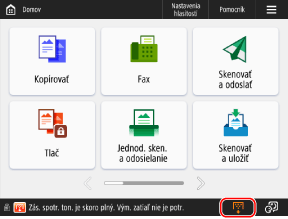
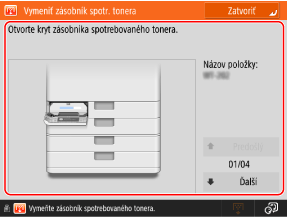
Vymeňte zásobník spotrebovaného tonera.
Nedá sa tlačiť, pretože je plný zásobník spotrebovaného tonera.
Podľa pokynov na obrazovke vymeňte zásobník spotrebovaného tonera. Výmena zásobníka spotrebovaného tonera
Podľa pokynov na obrazovke vymeňte zásobník spotrebovaného tonera. Výmena zásobníka spotrebovaného tonera
Z nejakého dôvodu nemožno vyvolať nast. tlačidla.
Bolo použité osobné tlačidlo alebo zdieľané tlačidlo obsahujúce funkciu, ktorú zariadenie nepodporuje.
Znova zaregistrujte osobné alebo zdieľané tlačidlá do zariadenia.
Ak nemôžete používať osobné alebo zdieľané tlačidlo importované z iného multifunkčného zariadenia Canon, znova zaregistrujte toto tlačidlo v tomto zariadení. Pridávanie tlačidiel na obrazovku [Domov] (osobné a zdieľané tlačidlá)
Nemožno vyvolať nastavenia tlačidla, pretože z funkcie pre tlačidlo nie je žiadna odozva.
Stlačením tlačidla sa nepodarilo vykonať operáciu, lebo príslušná funkcia je zastavená.
Aktivujte pozastavenú funkciu a stlačte tlačidlo znovu.
Aktivujte pozastavenú funkciu a stlačte tlačidlo znovu.
Táto funkcia momentálne nie je dostupná kvôli chybe vo voliteľnom úložisku.
Voliteľná súprava na ukladanie údajov nebolo možné správne rozpoznať.
Skontrolujte, či sa na obrazovke [Skontr. konf. zariadenia] zobrazí hlásenie Voliteľná súprava na ukladanie údajov.
Ak sa nezobrazuje, kontaktujte svojho predajcu alebo servisného zástupcu. Kontrola voliteľného vybavenia pripojeného k zariadeniu
Synchr. užív. nastavenia: Niektoré nastavenia sú zakázané.
Počas synchronizácie personalizovaných údajov bol server vypnutý alebo nefunguje správne.
* Chyba synchronizácie údajov mohla spôsobiť, že sa nastavenia počas zobrazenia správy nevykonali správne.
Je počítač servera spustený?
Ak počítač servera ešte nebol spustený, spustite ho.
Je server pripravený na pripojenie?
Ak je ethernetový kábel správne pripojený, skontrolujte stav sieťového pripojenia a nastavenia servera.
Synchronizovať užív. nastavenia: Vyskytla sa chyba.
V procese spustenia synchronizácie došlo k chybe.
Skontrolujte nastavenia a stav synchronizácie klientskeho počítača.
Skontrolujte, či je adresa servera, ku ktorému sa chcete pripojiť, správna.
Skontrolujte, či je synchronizácia spustená, a ak nie je, spustite ju. Spustenie a zastavenie synchronizácie (klientske zariadenie)
Reštartujte stroj.
Ak problém pretrváva aj po reštarte, pošlite príkaz ping na IP adresu, ktorá má byť nastavená ako cieľ pripojenia, a skontrolujte, či sa nezobrazí chyba.
Synchronizovať užív. nastavenia: Aktivujem synchronizáciu...
Prebieha spúšťanie synchronizácie vlastných nastavení.
Počkajte chvíľu, kým sa proces dokončí.
Počkajte chvíľu, kým sa proces dokončí.
Synchronizovať užív. nastavenia: Na synchr. sa prihláste znova.
Údaje o synchronizácii medzi serverom a klientskými počítačmi, ktoré sa používajú na synchronizáciu vlastných nastavení, nie sú konzistentné.
Odhláste sa a znova sa prihláste.
Odhláste sa a znova sa prihláste.
Synchronizovať užív. nastavenia: Nedá sa nájsť server.
Prístroj slúžiaci na synchronizáciu vlastných nastavení sa nepodarilo nájsť pomocou automatického vyhľadávania.
Je počítač servera spustený?
Ak počítač servera ešte nebol spustený, spustite ho.
Je sieťový kábel odpojený od serverového zariadenia?
Ak je sieťový kábel v poriadku, skontrolujte sieťové nastavenia.
Skontrolujte nastavenia a stav synchronizácie klientskeho počítača.
Skontrolujte, či serverové zariadenie spĺňa podmienky pre automatické vyhľadávanie. Ak nie je možné použiť automatické vyhľadávanie, nastavte adresu servera, ku ktorému sa chcete pripojiť, a hĺbku vyhľadávania (smerovač). Spustenie a zastavenie synchronizácie (klientske zariadenie)
Skontrolujte, či je synchronizácia spustená, a ak nie je, spustite ju. Spustenie a zastavenie synchronizácie (klientske zariadenie)
Reštartujte stroj.
Synchronizovať užív. nastavenia: Chyba overenia servera.
Na serveri nie je možné vykonať overenie.
Nastavili ste na klientskom zariadení správny používateľský účet pre overenie?
Na serverovom zariadení nastavte používateľa s oprávneniami správcu. Spustenie synchronizácie v klientskom zariadení
Zastavila sa synchronizácia vlastných nastavení?
Reštartujte stroj.
Synchronizovať užív. nastavenia: Nedá sa identif. server.
Automatickým vyhľadávaním bolo zistených viacero serverových zariadení, ktoré sa používajú na synchronizáciu vlastných nastavení.
Ak chcete povoliť identifikáciu serverového zariadenia, nastavte na klientskom zariadení informácie o serverovom zariadení, ku ktorému sa chcete pripojiť, alebo vypnite všetky nepotrebné serverové zariadenia.
Na klientskom zariadení nastavte adresu serverového zariadenia, ku ktorému sa chcete pripojiť, a hĺbku vyhľadávania (smerovač). Spustenie a zastavenie synchronizácie (klientske zariadenie)
Vypnite nepotrebné serverové zariadenia.
Uistite sa, že v tej istej sieti beží len jeden serverové zariadenie.
Skontrolujte kryty.
Kryt voliteľného zariadenia je otvorený.
Zatvorte kryt voliteľného vybavenia.
Zatvorte kryt voliteľného vybavenia.
Farebná tlač teraz nie je dostupná.
Farebná tlač je obmedzená a nie je možné ju používať.
Môžete tlačiť čiernobielo, takže podľa potreby upravte nastavenia kopírovania alebo tlače.
Môžete tlačiť čiernobielo, takže podľa potreby upravte nastavenia kopírovania alebo tlače.
An error occurred when auto exporting the audit log.
Nepodarilo sa exportovať denník auditu. Na serveri došlo k chybe, zariadenie sa nedokáže pripojiť k serveru alebo nastavenia automatického exportu nie sú správne.
Vyskytla sa na serveri nejaká chyba?
Skontrolujte správnu funkčnosť servera.
Skontrolujte stav pripojenia a nastavenie siete.
Ak zariadenie nie je pripojené do siete, znova nakonfigurujte nastavenia siete.
Je nastavenie automatického exportu správne?
Nedá sa generovať kľúč podpisu zariad. Nastavte e-mailovú adresu v menu Nastavenia komunikácie.
Pri použití podpisu zariadenia nebola nastavená e-mailová adresa zariadenia.
Pred vygenerovaním kľúča podpisu zariadenia nastavte e-mailovú adresu zariadenia.
The function may be stopped. Buttons could not be imported.
Medzi importovanými tlačidlami boli aj tlačidlá s nepodporovanými funkciami.
Skontrolujte zariadenie na kontrolu, že boli naimportované všetky potrebné tlačidlá.
Skontrolujte zariadenie na kontrolu, že boli naimportované všetky potrebné tlačidlá.
Registr. smerovania zlyhala. Skontr. nast. statického smerovania.
Nastavenia statického smerovania obsahujú záznam, ktorý sa nepodarilo zaregistrovať do tabuľky smerovania.
Skontrolujte, či sú adresa IP a adresa brány pre statické smerovanie nastavené správne.
Odoberte originál z kopírovacej dosky.
Na kopírovacej doske zostal originál.
Odstráňte originál z kopírovacej dosky a položte tam nový originál.
Odstráňte originál z kopírovacej dosky a položte tam nový originál.
Oblasť skenovania originálu (podávač) je špinavá.
Skenovacia oblasť podávača je znečistená prachom alebo inými nečistotami.
Vyčistite skenovaciu oblasť podávača dokumentov.
Oblasť sken. originálu (tenký prúžok skla) je špinavá.
Tenký sklenený pás v oblasti skenovania dokumentov je znečistený prachom alebo inými nečistotami.
Vyčistite skenovaciu oblasť podávača dokumentov.
Vráťte originály do správneho poradia a stlačte tlačidlo [Štart].
Skenovanie bolo zrušené, pretože v podávači došlo k neznámej chybe.
Vynulujte všetky pôvodné hodnoty a stlačte [ Štart].
Štart].
Vráťte originály do správneho poradia a stlačte [Štart]. (Veľkosť dát skenovaného originálu presiahla limit. Nastavenia sa automaticky opravia a originály sa znova naskenujú.)
Skenovanie sa stornovalo, pretože objem dát naskenovaného originálu prekračuje limit.
Vynulujte všetky pôvodné hodnoty a stlačte [ Štart].
Štart].
* Ak sa táto správa naďalej zobrazuje, skenovanie by ste mohli vykonať tak, že znížite ostrosť a typ originálu nastavíte na [Text].
The device is currently being used by another user. Wait a while, and then try to perform the operation again.
Zariadenie práve používa iný používateľ.
Chvíľu počkajte a skúste to znova.
Chvíľu počkajte a skúste to znova.
Počet výsledkov hľadania prekročil limit. Zmeňte podmienky hľadania a skúste to znova.
Počet miest určenia, ktoré spĺňajú vyhľadávacie kritériá, presahuje limit vyhľadávania.
Zmeňte podmienky vyhľadávania a vyhľadajte znova.
Zvýšte maximálny počet miest určenia pre vyhľadávanie.
Podmienky hľadania obsahujú znaky, ktoré nie je možné použiť so zvoleným serverom.
Podmienky vyhľadávania obsahujú znaky alebo kombinácie znakov, ktoré nie je možné použiť.
Obsahujú vyhľadávacie podmienky spätnú lomku („\“)?
Odstráňte spätnú lomku a vyhľadajte znovu.
Obsahujú vyhľadávacie podmienky správnu kombináciu zátvoriek a správne umiestnenú hviezdičku?
Skontrolujte nasledujúce údaje a vyhľadajte ich znova:
Je počet otváracích a uzatváracích zátvoriek („(“ a „)“) rovnaký?
Je hviezdička („*“) správne umiestnená medzi zátvorkami („( )“)?
Obsahujú vyhľadávacie podmienky znaky mimo znakovej sady ASCII?
Ak je možnosť [Verzia servera LDAP a kódovanie znakov] nastavená na [ver.2 (JIS)], je možné používať len znaky kódu ASCII (0x20 až 0x7E). Odstráňte zakázané znaky a skúste hľadať znova.
Pri overovaní sa vyskytla chyba.
Certifikát je nesprávny.
Zaregistrujte správny certifikát a znova nakonfigurujte nastavenia.
Toto CRL je neplatné.
Zoznam zrušených certifikátov (CRL) môže byť poškodený alebo sa používa podpisový algoritmus, ktorý zariadenie nepodporuje.
Zaregistrujte správny zoznam zrušených certifikátov (CRL).
Vypršala doba platnosti tohto CRL.
Dátum začatia platnosti zoznamu zrušených certifikátov (CRL) je možno nastavený v budúcnosti.
Skontrolujte dátum platnosti zoznamu zrušených certifikátov (CRL) zaregistrovaného v zariadení.
Ak je dátum začatia platnosti nastavený na dátum v budúcnosti, použite zoznam zrušených certifikátov (CRL) po dátume začatia platnosti. Registrácia zoznamu zrušených certifikátov (CRL) na overenie certifikátu
Skontrolujte, či je v zariadení správne nastavený dátum a čas.
This application does not support the security policy function.
Aplikácia MEAP, ktorú ste sa pokúsili spustiť, nemusí fungovať v súlade s politikami zabezpečenia tohto zariadenia.
Skontrolujte bezpečnostné funkcie aplikácie, aby ste sa rozhodli, či ju budete používať.
Skontrolujte bezpečnostné funkcie aplikácie, aby ste sa rozhodli, či ju budete používať.
Registrácia sa nepodarila, lebo algoritmus kódu nie je podporovaný.
Pokúsili ste sa zaregistrovať súbor kľúča a certifikátu s nepodporovaným šifrovacím algoritmom.
Zaregistrujte súbor kľúča a certifikátu s podporovaným šifrovacím algoritmom.
Nie je možné nastaviť ako implicitný kód, lebo tento kód je poškodený alebo neplatný.
Kľúč priradený k zariadeniu je poškodený a nie je možné ho nastaviť.
Zaregistrujte kľúč znova.
Tento certifikát bol odvolaný.
Certifikát sa nachádza na zozname zrušených certifikátov (CRL).
Zaregistrujte nový certifikát.
Tento certifikát je neplatný.
Certifikát je nesprávny.
Zaregistrujte správny certifikát a znova nakonfigurujte nastavenia.
Vypršala doba platnosti tohto certifikátu.
Možno uplynula platnosť certifikátu.
Skontrolujte platnosť certifikátu priradeného k zariadeniu.
Ak platnosť certifikátu uplynula, zaregistrujte platný certifikát. Registrácia kľúča a certifikátu alebo certifikátu CA získaného od vydávajúceho orgánu
Skontrolujte, či je v zariadení správne nastavený dátum a čas.
Túto úlohu nemožno tlačiť.
Úloha bola zrušená, pretože sa dosiahol maximálny počet hárkov, ktoré možno dosiahnuť zošitím.
Skontrolujte maximálny počet hárkov, ktoré možno zošiť, a skúste to znova.
* Spôsob spracovania môžete zmeniť, keď sa dosiahne maximálny počet hárkov, ktoré je možné zviazať.
The specified application cannot be installed on this device.
Pokúsili ste sa nainštalovať aplikáciu, ktorá nie je súčasťou systému rozšírení.
Znovu zadajte aplikáciu, ktorú chcete nainštalovať.
Znovu zadajte aplikáciu, ktorú chcete nainštalovať.
Táto funkcia momentálne nie je dostupná. Z tlačidla [Domov] môžete použiť iné funkcie.
Vybrali ste funkciu, ktorej používanie je v režime obmedzených funkcií zakázané.
Vyberte použiteľnú funkciu. Používanie zariadenia s obmedzenými funkciami po výskyte chyby
Vyberte použiteľnú funkciu. Používanie zariadenia s obmedzenými funkciami po výskyte chyby
Žiadna odozva servera. Skontrolujte nastavenia.
Uvedený server nemusí byť správne nakonfigurovaný, môže byť vypnutý alebo môže dochádzať k nedostatku zdrojov.
Chvíľu počkajte a znova nastavte server. Ak server stále nereaguje, vyberte iný server.
Chvíľu počkajte a znova nastavte server. Ak server stále nereaguje, vyberte iný server.
Nedá sa spustiť hľadanie, pretože nastavenia verzie servera nie sú správne. Skontrolujte nastavenia.
Nastavenia verzie LDAP na LDAP serveri a na počítači sa nezhodujú.
Skontrolujte kombináciu verzie LDAP servera a znakovej sady.
Skontrolujte LDAP server a nastavte verziu LDAP. Registrácia serverov LDAP
Skontrolujte server.
Nepodarilo sa nadviazať spojenie so serverom WebDAV alebo má server WebDAV nedostatočné miesto na disku.
Skontrolujte nastavenie servera WebDAV a servera Proxy.
Správne nakonfigurujte nastavenia tak, aby ste mohli pristupovať k serveru WebDAV cez proxy.
Nastavte parametre tak, aby bol povolený prístup k miestu určenia.
Serveru proxy sa asi nepodarilo nadviazať komunikáciu s nadradeným serverom. Skontrolujte, či sú nastavenia konfigurované tak, aby umožňovali komunikáciu.
Vypnite odosielanie rozdelených blokov.
Skontrolujte miesto na disku servera WebDAV.
Uistite sa, že na serveri WebDAV je dostatok miesta na disku pre požiadavky z tohto zariadenia.
Nie je k dispozícii vhodný formát papiera (XX).
Nie je vložený papier optimálnej veľkosti alebo je vložený papier typu, ktorý nie je možné vybrať pri automatickom výbere zdroja papiera.
* Formát papiera je uvedený v časti XX hlásenia.
Vložte papier zobrazenej veľkosti.
Manuálne zadajte zdroj papiera.
Zadajte zdroj papiera, do ktorého je vložený papier zobrazeného formátu.
Nastavte, aby sa automaticky vyberal zdroj papiera, do ktorého je vložený papier optimálneho formátu.
Vedľajšia linka bola odpojená kvôli konfliktu masky podsiete.
Došlo ku konfliktu sieťových adries hlavnej a vedľajšej linky.
Skontrolujte nastavenia adresy IP a masky podsiete hlavnej a vedľajšej linky.
Bol pripojený nepodporovaný adaptér káblovej LAN.
Adaptér USB-LAN nie je pripojený alebo je pripojený adaptér USB-LAN, ktorý nie je k dispozícii pre pripojené zariadenie.
Skontrolujte pripojenie adaptéra USB-LAN.
Adaptér USB-LAN, ktorý je k dispozícii pre toto zariadenie.
Podrobnosti o adaptéri USB-LAN, ktorý je k dispozícii pre zariadenie, získate od svojho predajcu alebo servisného zástupcu.
Príliš mnoho podadresárov.
Hierarchia je príliš hlboká a prekračuje povolený počet znakov, ktoré je možné zadať.
Zadajte iné miesto určenia.
Zadajte iné miesto určenia.
Odstráňte všetok vytl. papier.
Výstupný priečinok je plný.
Vyberte z výstupného priečinka všetok vytlačený papier.
Vyberte z výstupného priečinka všetok vytlačený papier.
Cannot install this application because an applet included in the specified application has exceeded the area that can be displayed in the device panel.
Aplikáciu nie je možné nainštalovať, pretože zobrazenie appletu presiahlo oblasť, ktorú možno zobraziť na obrazovke zariadenia.
Nainštalujte aplikáciu s apletom, ktorý sa zmestí do zobrazovacej oblasti zariadenia.
Nainštalujte aplikáciu s apletom, ktorý sa zmestí do zobrazovacej oblasti zariadenia.
The following information is missing in file for the specified application. Check the file. <Missing information>
Aplikáciu nie je možné nainštalovať, pretože súbor neobsahuje informácie potrebné pre túto aplikáciu.
Ak aj po skontrolovaní obsahu súboru pretrvávajú problémy, kontaktujte vývojára aplikácie alebo oddelenie technickej podpory pre danú aplikáciu vo veci chýbajúcich informácií zobrazovaných na obrazovke.
Ak aj po skontrolovaní obsahu súboru pretrvávajú problémy, kontaktujte vývojára aplikácie alebo oddelenie technickej podpory pre danú aplikáciu vo veci chýbajúcich informácií zobrazovaných na obrazovke.
The specified application does not support this device.
Zadanú aplikáciu nie je možné nainštalovať na zariadenie.
Niektoré aplikácie je možné nainštalovať len na určité modely. Nainštalujte aplikácie, ktoré toto zariadenie podporuje.
Niektoré aplikácie je možné nainštalovať len na určité modely. Nainštalujte aplikácie, ktoré toto zariadenie podporuje.
The contents of the specified file are incorrect or information is missing. Check the file.
Uvedený súbor nie je licenčným súborom alebo informácie o súbore nie sú dostatočné.
Zadajte správny licenčný súbor.
Zadajte správny licenčný súbor.
Cannot find the specified application. It may have been uninstalled by another user.
Uvedená aplikácia nie je v zariadení nainštalovaná.
Stlačením položky [Back] vykonáte návrat na predchádzajúcu obrazovku.
Stlačením položky [Back] vykonáte návrat na predchádzajúcu obrazovku.
The contents of the specified file may be incorrect.
Pokúsili ste sa zaregistrovať tlačidlo, ale pri importe ste špecifikovali iný súbor.
Zadajte správny súbor a skúste import zopakovať.
Zadajte správny súbor a skúste import zopakovať.
The specified license does not match this device. Specify an installable license.
Uvedený licenčný súbor nie je možné nainštalovať na toto zariadenie.
Zadajte licenčný súbor, ktorý zariadenie podporuje.
Zadajte licenčný súbor, ktorý zariadenie podporuje.
Nie je nastavený implicitný kód. Skontrolujte nastavenia TLS.
Kľúč a certifikát (certifikát servera TLS) nie sú zaregistrované.
Nastavte kľúč a certifikát na použitie pre komunikáciu šifrovanú pomocou protokolu TLS.
Nie je nastavený implicitný kód. Skontrolujte nastavenia Zoznam kódov a certifikátov v menu Nastavenia certifikátu.
Kľúč a certifikát (certifikát servera TLS) nie sú zaregistrované.
Zaregistrujte kľúč a certifikát na použitie pre komunikáciu šifrovanú pomocou protokolu TLS.
Kombinácia povolenej verzie a vybratého algoritmu je nevhodná. Zadajte nastavenia znova.
Kombináciu verzie TLS a algoritmu nemožno nastaviť.
Skontrolujte kombináciu verzie TLS a algoritmu a nastavte ju znovu.
Bol pripojený adaptér káblovej LAN, ktorý sa nedá použiť.
Je pripojený adaptér USB-LAN, ktorý sa nedá používať s týmto zariadením.
Informácie o kompatibilných adaptéroch USB-LAN získate u svojho predajcu alebo servisného zástupcu.
Informácie o kompatibilných adaptéroch USB-LAN získate u svojho predajcu alebo servisného zástupcu.
Nepodarilo sa overiť certifikát.
Nepodarilo sa overiť certifikát certifikačnej autority.
Zaregistrujte certifikát CA vydaný certifikačnou autoritou.
Aktualizovali sa informácie o odporúčanom prostredí používania.
Prostredie používania bolo skontrolované v časti „Odporúčané nastavenia zabezpečenia pre prostredie používania“ alebo sa výsledok odporúčania zmenil v dôsledku zmeny v prostredí pripojenia.
Odporúčame skontrolovať odporúčané prevádzkové prostredie a podľa potreby zmeniť príslušné nastavenie zabezpečenia.
* Ak nemáte v úmysle meniť nastavenia zabezpečenia a chcete zabrániť zobrazovaniu tohto hlásenia, deaktivujte upozornenie na aktualizáciu odporúčaného prostredia používania.
Nemožno vykonať úlohu, pretože skenované sú všetky prázdne strany.
Zistilo sa, že naskenovaný originál obsahoval len prázdne strany.
Ak originál obsahuje strany, ktoré nie sú prázdne, zaškrtnite políčko „Preskočiť prázdne strany“.
Nedá sa pripojiť.
Nemožno upravovať/mazať papier, pretože sa používa pre iné nastavenia v menu Nastavenia/Registrácia.
Pokúsili ste sa pomocou možnosti [Nastavenia správy typu papiera] upraviť alebo vymazať papier zaregistrovaný s inými nastaveniami.
Ak bol papier zaregistrovaný ako „obľúbený papier“, zrušte túto registráciu.
Ak je tento papier nastavený ako papier, ktorý sa má nastaviť alebo opraviť, nastavte ako papier, ktorý sa má nastaviť alebo opraviť, iný papier.
Úloha sa spracovala, skôr ako sa použili nastavenia. Skontrolujte nastavenia.
Tlačidlo [ Štart] bolo stlačené bez toho, aby bol pre mnohoúčelový priečinok zvolený formát a typ papiera. Stlačením tlačidla [OK] sa vráťte na obrazovku nastavení papiera.
Štart] bolo stlačené bez toho, aby bol pre mnohoúčelový priečinok zvolený formát a typ papiera. Stlačením tlačidla [OK] sa vráťte na obrazovku nastavení papiera.
Nastavenie veľkosti a typu papiera
Skontrolujte názov počítača v menu Nastavenia/Registrácia.
V databáze WINS alebo v pracovnej skupine, do ktorej toto zariadenie patrí, už existuje zariadenie alebo iné zariadenie s rovnakým názvom.
Nastavte [Nastavenia názvu počítača/názvu pracovnej skupiny] tak, aby nemal rovnaký názov ako iný počítač alebo zariadenie.
Možno bola vložená tonerová kazeta s nesprávnou farbou. Ak sa použije táto tonerová kazeta, môže dôjsť k poruche. Skontrolujte vloženú tonerovú kazetu.
Farba vloženého tonera môže byť nesprávna.
Skontrolujte stav zobrazenej tonerovej kazety.
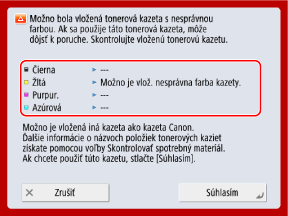
Ak chcete vymeniť kazetu s tonerom, stlačte tlačidlo [Zrušiť].
Ak chcete pokračovať v používaní v súčasnej podobe, stlačte položku [Súhlasím]. Záruka sa však nevzťahuje na problémy ako porucha zariadenia alebo nesprávne fungovanie niektorých funkcií.
V prípade problémov sa obráťte na predajcu alebo servisného zástupcu, u ktorého ste tonerovú kazetu zakúpili.
Nastavenia sa nedajú zmeniť, pretože sa zvolený kľúč používa.
Kľúč a certifikát, ktoré ste sa pokúsili odstrániť, sa používajú v šifrovanej komunikácii TLS alebo [Obmedziť príjem pre každú funkciu] na distribúciu informácií o zariadení.
Skontrolujte funkcie využívajúce komunikáciu šifrovanú pomocou TLS.
Ak niektorá funkcia používa kľúč a certifikát, ktoré ste sa pokúsili vymazať, deaktivujte nastavenie komunikácie šifrovanej pomocou TLS. Používanie protokolu TLS
Nedá sa nájsť zvolený server. Skontrolujte nastavenia.
Nepodarilo sa identifikovať IP adresu alebo sú overovacie údaje LDAP servera nastavené na hodnotu [Použiť (Over. bezpečnosti)], čo bráni identifikácii názvu hostiteľa.
Skontrolujte, či sú nastavenia DNS na zariadení a nastavenia na DNS serveri správne.
Nedá sa pripojiť k zvolenému serveru. Skontrolujte nastavenia.
Nepodarilo sa pripojiť k serveru LDAP.
Skontrolujte nastavenia a stav prevádzky servera LDAP.
Skontrolujte, či sú adresa servera a číslo portu servera LDAP správne nastavené. Registrácia serverov LDAP
Ak je hodnota [Informácie o overení] pre server LDAP nastavená na [Použiť (Over. bezpečnosti)], skontrolujte, či nie je paket UDP blokovaný filtrom. Registrácia serverov LDAP
Skontrolujte, či pracuje server LDAP správne.
Skontrolujte, či je adresa brány v nastaveniach protokolu TCP/IP správne nastavená.
Položka nastavenia špecifikovaná z menu Nastavenia sa aktuálne nedá použiť. Kontaktujte správcu systému.
Zvolenú položku nastavení nie je možné zmeniť alebo nie je podporovaná.
Kontaktujte správcu systému.
Kontaktujte správcu systému.
Vybrané tlačidlo môže byť nedostupné. Kontaktujte správcu systému.
Vybraný používateľ neexistuje alebo sú oprávnenia správcu deaktivované.
Vyberte iného používateľa s oprávneniami správcu.
Prihláste sa ako správca a zaregistrujte tlačidlo znova.
Nedá sa odoslať.
Odoslanie sa nepodarilo, pretože došlo k problému s odosielanými údajmi alebo serverom.
Došlo k chybe na serveri WebDAV alebo proxy serveri?
Ak sa vyskytne chyba, skontrolujte nastavenia servera WebDAV alebo nastavenia proxy servera.
Skontrolujte, či máte prístup k uvedenému súboru alebo priečinku, a skontrolujte cestu k priečinku.
Skontrolujte, či je server WebDAV správne nakonfigurovaný, aby bol povolený externý prístup k uvedenému súboru alebo priečinku.
Skontrolujte, či je miesto určenia nastavené správne a či nie je názov servera (názov hostiteľa) alebo cesta k priečinku príliš dlhá.
Chvíľu počkajte a skúste odoslanie vykonať znova.
WebDAV server môže byť momentálne vyťažený.
Vypnite odosielanie rozdelených blokov.
Zmenšite veľkosť odosielaných údajov a skúste ich odoslať znova.
Vypršal časový limit relácie. Chvíľu počkajte a skúste znova pristúpiť do databázy.
Platnosť relácie vypršala, lebo uplynul fixne stanovený časový limit.
Chvíľu počkajte a skúste znova získať prístup k databáze.
Ak platnosť relácie znova vyprší, reštartujte zariadenie. Reštartovanie zariadenie
Nedá sa dokončiť hľadanie vzhľadom na časové oneskorenie. Skontrolujte nastavenia.
Vyhľadávanie sa nepodarilo dokončiť v stanovenom čase.
Nastavte dlhší časový limit vyhľadávania.
Nemožno vykonať, pretože súbor obsahuje nepodporované dáta.
Nie je možné vygenerovať strany, lebo popis je nesprávny.
Zopakujte tlač údajov vo formáte, ktorý zariadenie podporuje.
Zopakujte tlač údajov vo formáte, ktorý zariadenie podporuje.
Priame pripojenie: Ukončené kvôli chybe.
Nepodarilo sa pripojiť k mobilnému zariadeniu alebo počas určitého časového obdobia nedošlo k prenosu údajov z pripojeného mobilného zariadenia ani doň.
Znovu pripojte mobilné zariadenie.
Priame pripojenie: Ukončené, pretože sa nenašlo žiad. ďalšie zar.
Nenašlo sa žiadne mobilné zariadenie, s ktorým by sa bolo možné pripojiť.
Skontrolujte, či je v mobilnom zariadení povolená funkcia Wi-Fi.
Ak je funkcia Wi-Fi na mobilnom zariadení vypnutá, zapnite ju.
Presuňte mobilné zariadenie k vášmu zariadeniu a skúste sa pripojiť znova.
Ak sa vám nedarí správne pripojiť k zariadeniu, kontaktujte svojho predajcu alebo servisného zástupcu.
* V závislosti od mobilného zariadenia nemusí zariadenie fungovať správne.
Nedá sa prihlásiť, pretože je povolená viacfaktorová autentifikácia. Kontaktujte správcu systému.
Informácie o serveri Microsoft Entra ID nie sú správne nastavené.
Skontrolujte informácie o serveri Microsoft Entra ID a podľa potreby upravte nastavenia.
Nastavenie gradácie... Chvíľu počkajte.
Zariadenie automaticky nastavuje gradáciu.
Po dokončení úprav sa tlač automaticky obnoví.
Po dokončení úprav sa tlač automaticky obnoví.
Nedá sa získať prístup k databáze. Reštartujte zariadenie.
Nepodarilo sa pripojiť k používateľskej databáze kvôli jej poškodeniu alebo inému dôvodu.
Reštartujte stroj.
Chyba prís. k cert. dig. pod.
Pri odosielaní používateľského podpisu alebo podpisu zariadenia sa nepodarilo získať prístup k certifikátu.
Skontrolujte obsah certifikátu používateľa alebo certifikátu zariadenia zaregistrovaného v zariadení.
Chyba dát. platnosti certif.
Platnosť certifikátu uplynula.
Skontrolujte platnosť certifikátu priradeného k zariadeniu.
Ak platnosť certifikátu uplynula, zaregistrujte platný certifikát. Registrácia kľúča a certifikátu alebo certifikátu CA získaného od vydávajúceho orgánu
Skontrolujte, či je v zariadení správne nastavený dátum a čas.
Nemožno sa prihlásiť, pretože pod rovnakým užívateľským menom je registrovaných viac užívateľov. Kontaktujte správcu systému.
Názov používateľa sa nepodarilo identifikovať, pretože nie je zapnuté rozlišovanie veľkých a malých písmen.
Zapnite rozlišovanie veľkých a malých písmen v používateľskom mene.
Zaregistrujte používateľa pod iným používateľským menom.
Nemožno registrovať, pretože množstvo dát pre registrované tlačidlá dosiahlo limit.
Dodatočné tlačidlá nie je možné zaregistrovať, lebo sa presiahol maximálny počet zaregistrovaných tlačidiel.
Prepíšte zaregistrované tlačidlo alebo odstráňte nepotrebné tlačidlá.
Cannot import because the number of buttons for registration has exceeded the upper limit.
Ďalšie tlačidlá nie je možné zaregistrovať, pretože počas importu bol dosiahnutý maximálny počet zaregistrovaných osobných alebo zdieľaných tlačidiel.
Odstráňte nepotrebné osobné alebo zdieľané tlačidlá a skúste importovať znova.
Nemožno uložiť, pretože počet uložených užívateľov dosiahol limit.
Dodatočných používateľov je možné zaregistrovať, lebo sa presiahol maximálny počet používateľov.
Odstráňte nepotrebných používateľov.
Vymeňte tonerovú kazetu. (XXXX)
Minul sa toner.
* Farba tonera je uvedená v časti (XXXX) hlásenia.
Vymeňte ju za novú tonerovú kazetu.
Stlačte ikonu zobrazenú v pravom dolnom rohu obrazovky a vymeňte tonerové kazety podľa pokynov na obrazovke. Výmena tonerových kaziet
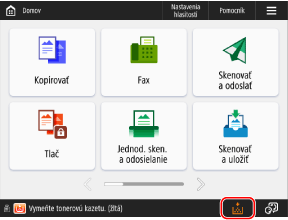
* Ak sa minie čierny toner, nemusíte stláčať ikonu v pravom dolnom rohu obrazovky. Obrazovka pre výmenu tonerovej kazety sa zobrazí automaticky.
Nemožno rozpoznať tonerovú kazetu. Vytiahnite tonerovú kazetu a potom ju znova vložte, inak sa informácie o zvyšnom toneri nedajú správne rozpoznať.
Tonerová kazeta nie je správne vložená, došlo k poruche tonerovej kazety alebo bol vložený toner s nesprávnym názvom produktu.
Skontrolujte stav zobrazenej tonerovej kazety.
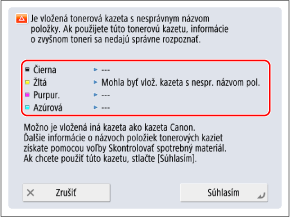
Znova nainštalujte tonerovú kazetu.
Ak chcete pokračovať v používaní v súčasnej podobe, stlačte položku [Zatvoriť]. Záruka sa však nevzťahuje na problémy ako porucha zariadenia alebo nesprávne fungovanie niektorých funkcií.
V prípade problémov sa obráťte na predajcu alebo servisného zástupcu, u ktorého ste tonerovú kazetu zakúpili.
Málo tonera vo farbe XXXX. Výmena zatiaľ nie je nutná.
Tonerová kazeta je prázdna.
* Farba tonera je uvedená v časti (XXXX) hlásenia.
Majte vždy po ruke novú tonerovú kazetu na výmenu.
Momentálne nie je potrebné vymeniť tonerovú kazetu.
Čistenie bubna... Čakajte.
V zariadení sa práve čistí bubon.
Po dokončení čistenia sa tlač automaticky obnoví.
Po dokončení čistenia sa tlač automaticky obnoví.
Zadaný kód PIN je nesprávny.
Bol zadaný nesprávny kód PIN.
Zadajte kód PIN znova.
Ak ste stratili kód PIN, obráťte sa na správcu.
Overovací server nebeží. Kontaktujte správcu systému.
Z neznámeho dôvodu sa nepodarilo nadviazať spojenie s overovacím serverom.
Nie je ethernetový kábel odpojený od zariadenia?
Je server Active Directory spustený?
Ak server Active Directory ešte nebol spustený, spustite ho.
Je služba Key Distribution Center (KDC) v službe Active Directory zastavená?
Skontrolujte stav služby podľa nasledujúceho postupu:
1. Spustite službu v nástroji na správu služby Active Directory v systéme Windows.
2. Skontrolujte stav služby domény Active Directory a spustite ju, ak ešte nie je spustená.
Skontrolujte, či firewall neblokuje komunikáciu so serverom Active Directory.
Odblokujte port služby Kerberos (predvolené nastavenie: 88) služby Active Directory, ak je blokovaná.
* Ak je služba Active Directory nastavená ako cieľové prihlasovacie umiestnenie, komunikácia obyčajne prebieha cez protokol UDP a port 88, ale ak komunikačné údaje presiahnu určitú veľkosť, môžu sa spracovávať prostredníctvom protokolu TCP.
Nemožno nájsť overovací server. Kontaktujte správcu systému.
Z neznámeho dôvodu sa nepodarilo nadviazať spojenie s overovacím serverom.
Nie je ethernetový kábel odpojený od zariadenia?
Je server DNS nastavený správne?
Skontrolujte nastavenia servera DNS v zariadení a nastavte ich znovu. Ak používate sekundárny server DNS, skontrolujte nastavenia aj tohto servera. Konfigurácia DNS
Je uvedený server DNS spustený?
Ak server DNS ešte nebol spustený, spustite ho.
Je služba daného servera DNS zastavená?
Skontrolujte stav servera DNS podľa nasledujúceho postupu:
1. Spustite službu v nástroji na správu servera DNS v systéme Windows.
2. Skontrolujte stav servera DNS a spustite službu, ak ešte nebola spustená.
Skontrolujte, či na serveri DNS existuje záznam o hostiteľovi.
Skontrolujte, či má server DNS záznam o hostiteľovi a či sú nastavenia smerovania správne.
Na strane over. servera nie je nastavené heslo. Kontaktujte správcu systému.
Pri konfigurácii alebo inovácii služby Active Directory nebolo na strane servera nastavené primerané heslo.
Obnovte heslo príslušného konta a špecifikujte nastavenia znova.
Obnovte heslo príslušného konta a špecifikujte nastavenia znova.
Nemožno sa prihlásiť, pretože anonymný prístup k overovaciemu serveru nie je povolený. Kontaktujte správcu systému.
Server LDAP neumožňuje anonymný prístup.
Nastavte informácie o overovaní pre prístup k serveru LDAP.
Na obrazovke zadávania údajov o serveri LDAP označte políčko [Use authentication information] potom zadajte používateľské meno a heslo podľa údajov zaregistrovaných na serveri LDAP. Registrácia údajov o overovacom serveri
Informácie k účtu potrebné na prihlásenie k overovaciemu serveru sú neplatné. Kontaktujte správcu systému.
Nepodarilo sa prihlásiť ako správca.
Sú používateľské meno a heslo správne?
Správne nastavte údaje účtu s oprávneniami správcu.
Skontrolujte, či sú atribúty nastavené správne.
Ak sú atribúty nastavené správne, skontrolujte, či sú hodnoty atribútov zaregistrované na serveri správne. Registrácia údajov o overovacom serveri
V sieti sa našla konrurenčná IP adresa.
V sieti, ku ktorej je zariadenie pripojené, už existuje nastavená rovnaká adresa IPv4, ako má zariadenie.
Zmeňte adresu IP zariadenia tak, aby nedošlo ku kolízii s adresou IP iného zariadenia.
Na sieti sa zistil konflikt IP adresy (hlavná linka).
V sieti, ku ktorej je zariadenie pripojené, už existuje nastavená rovnaká adresa IPv4, ako má hlavná linka zariadenia.
Zmeňte adresu IP hlavnej linky zariadenia, aby nebola v konflikte s adresou IP druhého zariadenia.
Na sieti sa zistil konflikt IP adresy (vedľajšia linka).
V sieti, ku ktorej je zariadenie pripojené, už existuje zadaná rovnaká adresa IPv4, ako má vedľajšia linka zariadenia.
Zmeňte adresu IP vedľajšej linky zariadenia, aby nebola v konflikte s adresou IP druhého zariadenia.
Operácia sa nedá vykonať, pretože sa vyskytla chyba siete.
Nepodarilo sa uložiť naskenované údaje ani počítačový súbor do položky Rozšírený priestor v mieste určenia pripojenia.
Skontrolujte, či sú nastavenia položky Rozšírený priestor v mieste ukladania nakonfigurované tak, aby zakazovali vytváranie priečinkov a ukladanie súborov.
Zápis z externých zdrojov je pre miesto určenia Rozšírený priestor zakázaný.
Skúšali ste uložiť súbor priamo do zdieľaného alebo osobného priestoru?
Súbory nie je možné ukladať priamo do zdieľaného priestoru (share) alebo osobného priestoru (users) v Rozšírený priestor. Uložte súbor do podpriečinka.
Nie je celá cesta k miestu ukladania (názov priečinka, ktorý označuje názov súboru a miesto uloženia) príliš dlhá?
Skráťte názov priečinka alebo názov súboru alebo zmeňte miesto ukladania tak, aby cesta vrátane výrazov „/share“ alebo „/users“ neprekračovala 256 znakov.
Vymažte všetky nepotrebné súbory z miesta ukladania alebo zmeňte miesto ukladania.
Počet súborov a priečinkov, ktoré je možné uložiť, pravdepodobne prekročil hornú hranicu, alebo je kapacita úložiska nedostatočná.
Skontrolujte sieťové pripojenie.
Ethernetový kábel nie je správne pripojený k zariadeniu.
Nie je ethernetový kábel odpojený od zariadenia?
Ak ste znova pripojili ethernetový kábel, reštartujte zariadenie. Reštartovanie zariadenie
Ak chcete zariadenie používať bez pripojenia k sieti, nastavte položku [Potvrdiť zmeny nast. pripojenia k sieti] na možnosť [Vyp.].
Skontrolujte sieťové pripojenie. (hlavná linka)
Ethernetový kábel hlavnej linky nie je správne pripojený k zariadeniu.
Nie je ethernetový kábel odpojený od zariadenia?
Ak ste znova pripojili ethernetový kábel, reštartujte zariadenie. Reštartovanie zariadenie
Ak chcete zariadenie používať bez pripojenia k sieti, nastavte položku [Potvrdiť zmeny nast. pripojenia k sieti] na možnosť [Vyp.].
Skontrolujte sieťové pripojenie. (vedľajšia linka)
Ethernetový kábel vedľajšej linky nie je správne pripojený k zariadeniu.
Nie je ethernetový kábel odpojený od zariadenia?
Ak ste znova pripojili ethernetový kábel, reštartujte zariadenie. Reštartovanie zariadenie
Ak chcete zariadenie používať bez pripojenia k sieti, nastavte položku [Potvrdiť zmeny nast. pripojenia k sieti] na možnosť [Vyp.].
Nastavili ste obdobie dlhšie ako platnosť hesla. Znova prejdite do nastavení.
Nastavená doba, počas ktorej nie je možné zmeniť heslo, je dlhšia ako doba platnosti hesla.
Nastavte obdobie, počas ktorého nie je možné zmeniť heslo, na kratšie, ako je platnosť hesla.
Voľba Eko (bez zošívania) teraz nie je dostupná.
Zariadenie bez svoriek nefunguje správne.
Kontaktujte svojho predajcu alebo servisného zástupcu.
Kontaktujte svojho predajcu alebo servisného zástupcu.
Úloha bola zrušená, pretože sú nastavené funkcie, ktoré sa nedajú použiť súčasne s voľbou Eko (bez zošívania). Zmeňte nastavenia a potom to skúste znova. Zmenou polohy zošitia alebo typu papiera môžete povoliť použitie voľby Eko (bez zošívania).
Poloha zošitia je v závislosti od typu papiera obmedzená.
Nastavte polohu zošívania na [Horný ľavý] alebo [Dolný pravý], prípadne zmeňte typ papiera.
Nastavte polohu zošívania na [Horný ľavý] alebo [Dolný pravý], prípadne zmeňte typ papiera.
Skenovanie sa zrušilo, pretože sa originály nepodávali správne.
V podávači došlo k zaseknutiu papiera, pretože bolo vložených viac originálov naraz alebo bol vložený originál nevhodného typu.
Vyberte originály z podávača a vložte ich znova.
Odstráňte zaseknuté originály. Zaseknutý papier v podávači
Skontrolujte, či sú originály správne, a vložte ich znovu. Vkladanie originálov
Odstráňte z podávača zachytené originály a všetky orig. ponechané v prieč. podáv., potom ich dajte späť do priečinka podávača a stlačte tlačidlo [Štart].
Skenovanie bolo zrušené, lebo originály sa zachytili v podávači.
Resetujte originály a stlačte [ Štart].
Štart].
Odoberte originál z podávača.
Používate funkciu, ktorú nemožno použiť na skenovanie s podávačom.
Vložte originál z podávača na kopírovaciu dosku.
Vložte originál z podávača na kopírovaciu dosku.
Nedá sa odoslať, pretože boli vybrané viaceré miesta určenia.
Sekvenčné vysielanie je obmedzené.
Nastavte položku [Zakázať sekv. vysielanie pri obsiahnutí m. urč. faxu] na [Vyp.].
Prebiehajú viaceré úlohy...
Súčasne so skenovaním prebieha viacero iných úloh, napríklad tlač a odosielanie údajov.
Počkajte chvíľu, kým sa skenovanie obnoví.
Počkajte chvíľu, kým sa skenovanie obnoví.
Nedá sa prihlásiť, pretože sa v správe ID oddelenia vyskytla chyba overenia. Kontaktujte správcu systému.
Pri používaní overovania používateľov je zapnutá správa ID oddelenia, ale používateľom neboli priradené ID ich oddelení.
Priraďte používateľom ID oddelení.
Ak sa žiadny zo správcov nemôže prihlásiť, kontaktujte svojho predajcu alebo servisného zástupcu.
PDL neplatný vstup DLG
Funkcia tlačiarne tohto zariadenia nefunguje správne kvôli chybe.
Reštartujte stroj.
Ak sa správa zobrazuje aj po reštartovaní zariadenia, zapíšte si jej obsah a kontaktujte svojho predajcu alebo servisného zástupcu.
PDL chyba vykreslenia DLG
Funkcia tlačiarne tohto zariadenia nefunguje správne kvôli chybe.
Reštartujte stroj.
Ak sa správa zobrazuje aj po reštartovaní zariadenia, zapíšte si jej obsah a kontaktujte svojho predajcu alebo servisného zástupcu.
PDL neznáma chyba DLG
Funkcia tlačiarne tohto zariadenia nefunguje správne kvôli chybe.
Reštartujte stroj.
Ak sa správa zobrazuje aj po reštartovaní zariadenia, zapíšte si jej obsah a kontaktujte svojho predajcu alebo servisného zástupcu.
PDL pamäť DLG plná
Pracovná pamäť nebola dostatočná na to, aby systém mohol spracovať údaje (najmä grafické a textové údaje).
Stlačte položku [Preskočiť chybu] a pokračujte v tlači.
Ak túto chybu preskočíte, strana s údajmi, ktoré chybu spôsobili, sa nemusí vytlačiť správne.
PDL chyba prirad. pamäte DLG
Funkcia tlačiarne tohto zariadenia nefunguje správne kvôli chybe.
Reštartujte stroj.
Ak sa správa zobrazuje aj po reštartovaní zariadenia, zapíšte si jej obsah a kontaktujte svojho predajcu alebo servisného zástupcu.
PDL neznáma poloha orig. GL
Funkcia tlačiarne tohto zariadenia nefunguje správne kvôli chybe.
Reštartujte stroj.
Ak sa správa zobrazuje aj po reštartovaní zariadenia, zapíšte si jej obsah a kontaktujte svojho predajcu alebo servisného zástupcu.
PDL výsledok koord. GL
Funkcia tlačiarne tohto zariadenia nefunguje správne kvôli chybe.
Reštartujte stroj.
Ak sa správa zobrazuje aj po reštartovaní zariadenia, zapíšte si jej obsah a kontaktujte svojho predajcu alebo servisného zástupcu.
PDL neplatný vstup GL
Funkcia tlačiarne tohto zariadenia nefunguje správne kvôli chybe.
Reštartujte stroj.
Ak sa správa zobrazuje aj po reštartovaní zariadenia, zapíšte si jej obsah a kontaktujte svojho predajcu alebo servisného zástupcu.
PDL kontrola rozsahu GL
Funkcia tlačiarne tohto zariadenia nefunguje správne kvôli chybe.
Reštartujte stroj.
Ak sa správa zobrazuje aj po reštartovaní zariadenia, zapíšte si jej obsah a kontaktujte svojho predajcu alebo servisného zástupcu.
PDL pamäť GL plná
Pracovná pamäť nebola dostatočná na to, aby systém mohol spracovať údaje (najmä grafické a textové údaje).
Stlačte položku [Preskočiť chybu] a pokračujte v tlači.
Ak túto chybu preskočíte, strana s údajmi, ktoré chybu spôsobili, sa nemusí vytlačiť správne.
PDL chyba prirad. pamäte GL
Funkcia tlačiarne tohto zariadenia nefunguje správne kvôli chybe.
Reštartujte stroj.
Ak sa správa zobrazuje aj po reštartovaní zariadenia, zapíšte si jej obsah a kontaktujte svojho predajcu alebo servisného zástupcu.
PDL chyba refer. dát IMG
Údaje TIFF alebo JPEG obsahujú údaje, ktoré nie je možné v zariadení spracovať.
Zrušte tlač, inicializujte zariadenie a skúste tlačiť znova.
Inicializáciou zariadenia sa zvýši množstvo dostupnej pamäte. Týmto sa však vymažú všetky údaje o tlači v pamäti zariadenia. [Resetovať tlačiareň]
PDL chyba inic. IMG
Na tlač súborov vo formáte TIFF alebo JPEG nie je dostatok pamäte.
Zrušte tlač, inicializujte zariadenie a skúste tlačiť znova.
Inicializáciou zariadenia sa zvýši množstvo dostupnej pamäte. Týmto sa však vymažú všetky údaje o tlači v pamäti zariadenia. [Resetovať tlačiareň]
PDL chyba sprac. IMG
Pri spracovaní údajov vo formáte TIFF alebo JPEG sa vyskytla neznáma chyba.
Zrušte tlač, inicializujte zariadenie a skúste tlačiť znova.
Všetky údaje o tlači v pamäti zariadenia sa vymažú. [Resetovať tlačiareň]
PDL neplatné dáta IMG
Údaje TIFF alebo JPEG obsahujú údaje, ktoré nie je možné v zariadení spracovať. Okrem toho môžu byť odoslané údaje, ktoré zariadenie nedokáže spracovať, pretože zariadenie má rovnakú IP adresu ako iné zariadenie v tej istej sieti.
Zmeňte adresu IP zariadenia tak, aby nedošlo ku kolízii s adresou IP iného zariadenia.
Stlačte položku [Preskočiť chybu] a pokračujte v tlači.
Ak túto chybu preskočíte, údaje, ktoré chybu spôsobili, sa nevytlačia.
PDL prac. pamäť IMG plná
Na spracovanie údajov TIFF alebo JPEG nie je k dispozícii dostatok pamäte.
Zrušte tlač, inicializujte zariadenie a skúste tlačiť znova.
Inicializáciou zariadenia sa zvýši množstvo dostupnej pamäte. Týmto sa však vymažú všetky údaje o tlači v pamäti zariadenia. [Resetovať tlačiareň]
Stlačte položku [Preskočiť chybu] a pokračujte v tlači.
Ak túto chybu preskočíte, údaje, ktoré chybu spôsobili, sa nevytlačia.
PDL prac. pamäť UFR II plná
Pamäť potrebná na spracovanie tlačových údajov je nedostatočná. Prípadne sa nepodarilo vyhradiť pamäť určenú pre režim UFR II.
Pri tlači súborov vo formáte TIFF alebo JPEG vytlačte údaje znovu v režime obrázkov.
V ovládači tlačiarne UFR II zmeňte [Grafika] na [Obrázky]. Ďalšie informácie nájdete v pomocníkovi ovládača tlačiarne UFR II.
Zrušte tlač, inicializujte zariadenie a skúste tlačiť znova.
Inicializáciou zariadenia sa zvýši množstvo dostupnej pamäte. Týmto sa však vymažú všetky údaje o tlači v pamäti zariadenia. [Resetovať tlačiareň]
Stlačte položku [Preskočiť chybu] a pokračujte v tlači.
Ak túto chybu preskočíte, údaje, ktoré chybu spôsobili, sa nevytlačia.
PDL chyba verzie UFR II
Zariadenie prijalo nepodporovanú verziu údajov UFR II.
Nainštalujte ovládač tlačiarne UFR II pre dané zariadenie a potom skúste tlačiť znova.
Inštalácia softvéru a ovládačov do počítača
Stlačte položku [Preskočiť chybu] a pokračujte v tlači.
Ak túto chybu preskočíte, údaje, ktoré chybu spôsobili, sa nevytlačia.
PDL chyba oblasti UFR II
Funkcia tlačiarne tohto zariadenia nefunguje správne kvôli chybe.
Reštartujte stroj.
Ak sa správa zobrazuje aj po reštartovaní zariadenia, zapíšte si jej obsah a kontaktujte svojho predajcu alebo servisného zástupcu.
PDL chyba správy UFR II
Funkcia tlačiarne tohto zariadenia nefunguje správne kvôli chybe.
Reštartujte stroj.
Ak sa správa zobrazuje aj po reštartovaní zariadenia, zapíšte si jej obsah a kontaktujte svojho predajcu alebo servisného zástupcu.
PDL nn Rendering Error (nn je názov modulu)
Funkcia tlačiarne tohto zariadenia nefunguje správne kvôli chybe.
Reštartujte stroj.
Ak sa správa zobrazuje aj po reštartovaní zariadenia, zapíšte si jej obsah a kontaktujte svojho predajcu alebo servisného zástupcu.
PDL chyba PDF
Boli odoslané údaje vo formáte PDF, ktoré zariadenie nedokáže spracovať.
Optimalizujte súbor PDF pomocou programu Adobe Acrobat a zopakujte tlač.
Otvorte súbor PDF v aplikácii a skúste ho znova vytlačiť pomocou ovládača tlačiarne.
Ak sa uvedenými postupmi nepodarí problém vyriešiť, zapíšte si hlásenie a kontaktujte svojho predajcu alebo servisného zástupcu.
PDL chyba dekód. dát PDF
Šifrovaný súbor PDF nie je možné dešifrovať.
Je heslo pre tlač nesprávne?
Zadajte správne heslo a skúste tlačiť znovu.
Nie je tlač povolená v nastaveniach zabezpečenia súboru PDF?
Ak tlač nie je povolená, zmeňte súbor PDF tak, aby bola povolená jeho tlač v aplikáciách na úpravu súborov PDF.
PDL pamäť PDF plná
K dispozícii nie je dostatok pamäte na spracovanie údajov súboru PDF.
Optimalizujte súbor PDF pomocou programu Adobe Acrobat a zopakujte tlač.
V programe Adobe Acrobat rozdeľte strany vo formáte PDF na viac súborov a skúste ich vytlačiť znova.
Otvorte súbor PDF v aplikácii a skúste ho znova vytlačiť pomocou ovládača tlačiarne.
PDL chyba sprac. RIP
Funkcia tlačiarne tohto zariadenia nefunguje správne kvôli chybe.
Reštartujte stroj.
Ak sa správa zobrazuje aj po reštartovaní zariadenia, zapíšte si jej obsah a kontaktujte svojho predajcu alebo servisného zástupcu.
PDL chyba XPS
Vyskytla sa nedefinovaná chyba.
Reštartujte stroj.
Ak sa správa zobrazuje aj po reštartovaní zariadenia, zapíšte si jej obsah a kontaktujte svojho predajcu alebo servisného zástupcu.
PDL chyba inicializácie XPS
Vyskytla sa neznáma chyba, napríklad počas inicializácie nie je možné vyvolať pamäť.
Reštartujte stroj.
Ak sa správa zobrazuje aj po reštartovaní zariadenia, zapíšte si jej obsah a kontaktujte svojho predajcu alebo servisného zástupcu.
PDL chyba vykreslenia XPS
V systéme vykresľovania sa vyskytla chyba.
Reštartujte stroj.
Ak sa správa zobrazuje aj po reštartovaní zariadenia, zapíšte si jej obsah a kontaktujte svojho predajcu alebo servisného zástupcu.
PDL chyba komp. obrázka
Funkcia tlačiarne tohto zariadenia nefunguje správne kvôli chybe.
Reštartujte stroj.
Ak sa správa zobrazuje aj po reštartovaní zariadenia, zapíšte si jej obsah a kontaktujte svojho predajcu alebo servisného zástupcu.
PDL čas. limit vykreslenia
Funkcia tlačiarne tohto zariadenia nefunguje správne kvôli chybe.
Reštartujte stroj.
Ak sa správa zobrazuje aj po reštartovaní zariadenia, zapíšte si jej obsah a kontaktujte svojho predajcu alebo servisného zástupcu.
PDL chyba prenosu dát
Funkcia tlačiarne tohto zariadenia nefunguje správne kvôli chybe.
Reštartujte stroj.
Ak sa správa zobrazuje aj po reštartovaní zariadenia, zapíšte si jej obsah a kontaktujte svojho predajcu alebo servisného zástupcu.
PDL chyba prístupu k reg.
Funkcia tlačiarne tohto zariadenia nefunguje správne kvôli chybe.
Reštartujte stroj.
Ak sa správa zobrazuje aj po reštartovaní zariadenia, zapíšte si jej obsah a kontaktujte svojho predajcu alebo servisného zástupcu.
Nedá sa pripojiť k serveru proxy. Kontaktujte správcu systému.
Informácie proxy severa nie sú správne nastavené.
Skontrolujte informácie proxy servera a podľa potreby upravte nastavenia.
Počas obdobia zákazu zmeny hesla nemôžete zmeniť heslo. Aktuálne heslo musíte použiť tento počet dní po jeho nastavení: @1
Pokúsili ste sa zmeniť heslo v období, keď je táto zmena zakázaná.
Zmeňte dĺžku obdobia, počas ktorého nie je možné zmeniť heslo, alebo zrušte toto nastavenie.
Registrácia do menu Domov sa zruší a vrátite sa do okna funkcie, pretože na registráciu tlačidiel nemáte povolenie. Prihláste sa ako správca a skúste znova.
Registrácia osobných alebo zdieľaných tlačidiel je obmedzená overovaním používateľov.
Prihláste sa ako správca a zaregistrujte tlačidlo znova.
Zdieľané tlačidlá je možné zaregistrovať po prihlásení sa ako správca.
Povoľte registráciu osobných a zdieľaných tlačidiel.
Ak chcete používateľovi povoliť registráciu tlačidiel, upravte nasledujúce nastavenia:
[Povoliť prispôsobenie obr. Domov pre bežné použitie]
[Povoliť registráciu/úpravu osobných tlačidiel]
Vložte svorky do stohovacej jednotky.
V puzdre na svorky zošívačky vo finišéri nie sú žiadne svorky.
Vložte svorky (vymeňte puzdro na svorky).
Heslo nespĺňa požiadavky opatrení. Zmeňte heslo.
Zadané heslo je v rozpore s politikou hesiel.
Zadajte heslo, ktoré dodržiava politiku hesiel.
Ak nepoznáte politiku hesiel, kontaktujte správcu.
Nastavenia časovača pre toto zariadenie a overovací server sa nedajú synchronizovať. Kontaktujte správcu systému.
Nastavenia dátumu a času v zariadení sú iné ako na overovacom serveri.
Synchronizujte nastavenia dátumu a času zariadenia s overovacím serverom.
Synchronizujte nastavenia dátumu a času zariadenia s overovacím serverom.
V nasledujúcich kazetách, ktoré boli vytiahnuté, je ešte stále toner
Zo zariadenia bola vyňatá tonerová kazeta, ktorá nebola prázdna.
Vráťte tonerovú kazetu do zariadenia.
Skontrolujte nastavenia bezdr. siete LAN pre výber príst. bodu.
Bezdrôtová sieť LAN cieľového miesta pripojenia nie je bezpečná, pretože prístupový bod nie je šifrovaný alebo používa bezpečnostný štandard WEP alebo WPA.
Použite prístupový bod, ktorý podporuje iný bezpečnostný štandard ako WEP a WPA.
* Ak nemáte v úmysle meniť bezdrôtovú sieť cieľového miesta pripojenia a chcete zabrániť zobrazovaniu tohto hlásenia, deaktivujte upozornenie na zistenie zraniteľnosti metódy šifrovania vo vybranej bezdrôtovej sieti.
Chyba komunikácie bezdr. siete LAN. Vypnite a zapnite hl. napáj.
Pri konfigurácii bezdrôtového pripojenia LAN sa vyskytla neznáma chyba.
Reštartujte stroj.
Chyba kom. bezdr. siete LAN. Skontr. inf. bezdr. siete LAN.
Pri konfigurácii bezdrôtového pripojenia LAN sa vyskytla neznáma chyba.
Skontrolujte nastavenia bezdrôtovej siete LAN.
Odhalený problém pripojenia príst. bodu bezdrôtovej siete LAN.
Bezdrôtová sieť LAN cieľového miesta pripojenia nie je bezpečná, pretože prístupový bod nie je šifrovaný alebo používa bezpečnostný štandard WEP alebo WPA.
Použite prístupový bod, ktorý podporuje iný bezpečnostný štandard ako WEP a WPA.
* Ak nemáte v úmysle meniť bezdrôtovú sieť cieľového miesta pripojenia a chcete zabrániť zobrazovaniu tohto hlásenia, deaktivujte upozornenie na zistenie zraniteľnosti metódy šifrovania vo vybranej bezdrôtovej sieti.
Nedá sa odosielať, pretože je plná pamäť. Chvíľu počkajte a skúste to znova.
Fax sa nepodarilo odoslať kvôli nedostatku pamäte.
Pri skenovaní originálu znížte rozlíšenie.
Vymažte z pamäte všetky nepotrebné súbory, aby sa zvýšila dostupná pamäť.
* Ak sa hlásenie zobrazuje často aj po použití vyššie uvedeného riešenia, obráťte sa na predajcu alebo servisného zástupcu.
Operácia sa nedá vykonať, pretože je plná pamäť.
Pri používaní funkcie Skenovať a uložiť bolo skenovanie zrušené, lebo počas skenovania originálu sa zaplnila pamäť.
Uvoľnite dostupnú pamäť odstránením nepotrebných údajov a skúste naskenovať originál znova.
Uvoľnite dostupnú pamäť odstránením nepotrebných údajov a skúste naskenovať originál znova.
Skenovanie sa zruší, pretože sa zaplnila pamäť. Chvíľu počkajte a skúste to znova.
Pri používaní funkcie kopírovania bolo skenovanie stornované, lebo počas skenovania originálu sa zaplnila pamäť.
Po dokončení tlače údajov z pamäte skopírujte zostávajúce originály.
Po dokončení tlače údajov z pamäte skopírujte zostávajúce originály.
Skenovanie sa zruší, pretože sa zaplnila pamäť. Chcete odoslať naskenované strany?
Pri používaní faxu alebo funkcie Skenovať a odoslať bolo skenovanie zrušené, lebo počas skenovania originálu sa zaplnila pamäť.
Stlačte položku [Áno], čím odošlete naskenované strany. Ostatné originály naskenujte po dokončení odosielania.
Stlačte položku [Áno], čím odošlete naskenované strany. Ostatné originály naskenujte po dokončení odosielania.
Skenovanie sa zruší, pretože sa zaplnila pamäť. Chcete vytlačiť naskenované strany?
Pri používaní funkcie kopírovania bolo skenovanie stornované, lebo počas skenovania originálu sa zaplnila pamäť.
Stlačte položku [Áno], čím vytlačíte naskenované strany. Ostatné originály skopírujte po dokončení tlače.
Stlačte položku [Áno], čím vytlačíte naskenované strany. Ostatné originály skopírujte po dokončení tlače.
Skenovanie sa zruší, lebo je plná pamäť. Chcete uložiť naskenované strany?
Pri používaní funkcie Skenovať a uložiť bolo skenovanie zrušené, lebo počas skenovania originálu sa zaplnila pamäť.
Stlačte položku [Áno], čím uložíte naskenované strany. Zvyšné originály naskenujte po dokončení ukladania.
Stlačte položku [Áno], čím uložíte naskenované strany. Zvyšné originály naskenujte po dokončení ukladania.
Množstvo dát uložených pre reg. užívateľov dosiahlo limit. Môžete vykonávať operácie, ale tentoraz nemôžete ukl.žiadne dáta (výpisy nast. úlohy, obsah osobn. nastavení a pod.). Aby ste mohli uložiť dáta z ďalšieho prihlásenia ostatným užívateľom musíte vymazať nepotrebné dáta. Pre podrobnosti kontaktujte správcu systému alebo si pozrite návod.
Informácie o nastavení nového používateľa sa nepodarilo uložiť, pretože bol dosiahnutý maximálny počet registrovaných používateľov.
Vymažte nepotrebné údaje o nastavení používateľov.
* Môžete nakonfigurovať nastavenia tak, aby sa staré údaje o nastaveniach používateľov automaticky vymazali po dosiahnutí maximálneho počtu registrovaných používateľov. [Akcia pri presahu max. počtu užívateľov]
Ak funkciu personalizácie nepoužívate, deaktivujte ju.
Ak je funkcia personalizácie zapnutá, informácie o nastaveniach používateľa sa uložia. Ak túto funkciu nepoužívate, vymažte uložené informácie o nastaveniach používateľa a deaktivujte funkciu personalizácie.
Registrácia do obrazovky Domov sa zruší, pretože nie ste prihlásení. Vráťte sa k oknu funkcie, prihláste sa a skúste to potom znova.
Registrácia zdieľaných tlačidiel je obmedzená overovaním používateľov.
Prihláste sa ako správca a zaregistrujte tlačidlo znova.
Zdieľané tlačidlá je možné zaregistrovať po prihlásení sa ako správca.
Skontrolujte užívateľské meno a heslo alebo skontrolujte nastavenia.
Pri overovaní na serveri LDAP bolo zadané nesprávne používateľské meno, heslo alebo názov domény.
Nastavte správne overovacie údaje servera LDAP.
Správne nastavte používateľské meno, heslo a názov domény podľa údajov zaregistrovaných na serveri LDAP. Registrácia serverov LDAP
Vložte papier.
V zdroji papiera došiel papier alebo sa nastavenia papiera líšia od vloženého papiera.
Vložte papier do zdroja papiera zobrazeného na dotykovom paneli.
Zarovnajte vodiace lišty papiera s okrajmi papiera.
Zarovnajte vodiace lišty zarovnajte s okrajmi papiera.
Ak nie sú vodiace lišty papiera správne zarovnané, formát vloženého papiera sa nerozpozná správne.
Ak nie sú vodiace lišty papiera správne zarovnané, formát vloženého papiera sa nerozpozná správne.
Stlačte [ Monitor stavu] a skontrolujte nastavenia papiera v položke [Spotr. mater./Iné].
Monitor stavu] a skontrolujte nastavenia papiera v položke [Spotr. mater./Iné].
Ak sa nastavenia papiera nezhodujú s vloženým papierom, zmeňte nastavenia formátu a typu papiera.
Ak používate mnohoúčelový priečinok, znova upravte vložený papier a zmeňte nastavenia.
Ak používate mnohoúčelový priečinok, znova upravte vložený papier a zmeňte nastavenia.
Skontrolujte nastavenia papiera v ovládači tlačiarne alebo v aplikácii.
Skontrolujte nastavenia papiera na obrazovke [Predvoľby tlače] ovládača tlačiarne alebo na obrazovke tlače v aplikácii. Ak sa nastavenia papiera nezhodujú s vloženým papierom, prispôsobte ich papieru alebo vložte správny papier.
Skenovanie bolo zrušené, pretože veľkosť dát skenovaného orig. presiahla limit. Skenovanie môže byť možné, ak sa zníži ostrosť alebo sa Typ orig. nastaví na Text.
Skenovanie sa stornovalo, pretože objem dát naskenovaného originálu prekračuje limit.
Zmeňte nastavenia a zopakujte skenovanie.
Skúste skenovať s nasledujúcimi nastaveniami: Úprava kvality obrazu
Upravte nastavenie [Ostrosť] na nižšiu hodnotu.
Nastavte položku [Typ originálu] na [Text].
Some applications require license confirmation.
Platnosť licenčného súboru aplikácie MEAP čoskoro uplynie.
Pridajte licenčný súbor.
Pridajte licenčný súbor.
Pre Vzdialené UR odporúčame vždy vyžadovať 2-faktorové over.
Je možný neoprávnený prístup prostredníctvom Remote UI (Vzdialené PR).
Odporúča sa používať dvojfaktorové overovanie pre Remote UI (Vzdialené PR).
|
Prihláste sa do Remote UI (Vzdialené PR) v režime správcu
kliknite na [Settings/Registration] [User Management] [Authentication Management] [Basic Settings] [Edit...] vyberte [All Users] alebo [Administrators Only] pre položku [Always Require Two-Factor Authentication] v časti [Remote UI Authentication] |
* Ak nemáte v úmysle používať dvojaké overovanie a chcete zabrániť zobrazovaniu tohto hlásenia, deaktivujte upozornenie na zistenie bezpečnostného problému na internete.
Chladím... Čakajte.
Vnútro zariadenia sa chladí, pretože sa zvýšila vnútorná teplota.
Počkajte chvíľu, kým sa proces dokončí.
Počkajte chvíľu, kým sa proces dokončí.
Informácie nastavené aktuálne prihláseným užív. sa neuložia.
Informácie o nastavení nového používateľa sa nepodarilo uložiť, pretože bol dosiahnutý maximálny počet registrovaných používateľov.
Vymažte nepotrebné údaje o nastavení používateľov.
* Môžete nakonfigurovať nastavenia tak, aby sa staré údaje o nastaveniach používateľov automaticky vymazali po dosiahnutí maximálneho počtu registrovaných používateľov. [Akcia pri presahu max. počtu užívateľov]
Login failed. Anonymous access to the LDAP server is not allowed.
Server LDAP neumožňuje anonymný prístup.
Nastavte overovacie údaje servera LDAP.
Na obrazovke zadávania údajov o serveri LDAP označte políčko [Use authentication information] potom zadajte používateľské meno a heslo podľa údajov zaregistrovaných na serveri LDAP. Registrácia údajov o overovacom serveri
Login failed. The account information required to log in to the LDAP server is incorrect. Check the user information used to log in to the LDAP server.
Používateľské meno alebo heslo servera LDAP nie sú správne nastavené.
Nastavte správne overovacie údaje servera LDAP.
Zadajte správne používateľské meno a heslo podľa informácií zaregistrovaných v serveri LDAP. Registrácia údajov o overovacom serveri
Nedá sa prihlásiť. Skontrolujte miesto určenia pre prihlásenie.
Informácie o mieste určenia zadané v mobilnom zariadení sú nesprávne
Skontrolujte miesto určenia prihlásenia a prihláste sa znovu.
Skontrolujte miesto určenia prihlásenia a prihláste sa znovu.
Heslo nemožno uložiť, pretože počet hesiel, ktoré je možné uložiť pre každého užívateľa, dosiahol limit.
Prihlasovacie heslo používateľa nie je možné uložiť, lebo sa presiahol maximálny počet hesiel.
Vymažte nepotrebné údaje o heslách.
Vymažte nepotrebné údaje o heslách.