Flow of Operations
This section describes the flow of migrating device management from iW Management Console V3.x to Enterprise Management Console V4.x.
NOTE |
Confirm the system requirements of the computer where Enterprise Management Console V4.x will be installed in advance. For details, see the following. "System Configuration" and "System Requirements" in the User's Guide |
Installing V4.x to a Computer where V3.x Is Not Operating
When installing Enterprise Management Console V4.x to the same computer where iW Management Console V3.x is operating, confirm the operation flow in the flowchart below.
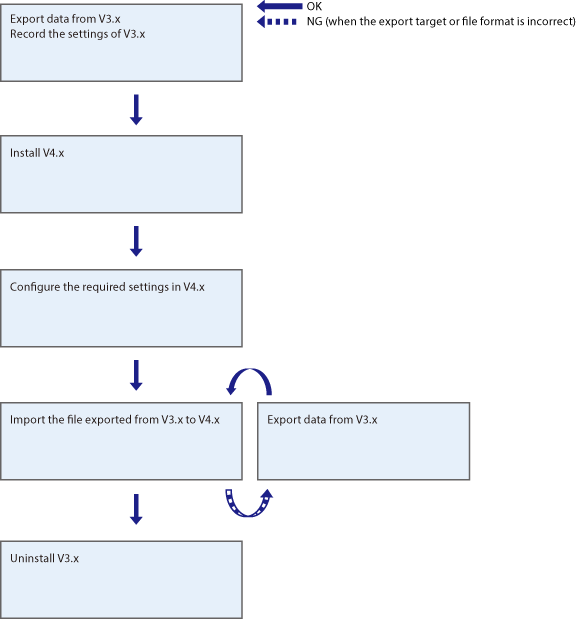
Installing V4.x to the Computer where V3.x Is Operating
This section describes the migration procedure when installing Enterprise Management Console V4.x to the computer where iW Management Console V3.x is running.
When V4.x Uses a Different Port Number from V3.x
This section describes the migration procedure when iW Management Console V3.x and Enterprise Management Console V4.x use a different HTTP/HTTPS port number.
Confirm the operation flow in the flowchart below.
When V4.x Uses the Same Port Number as V3.x
This section describes the migration procedure when iW Management Console V3.x and Enterprise Management Console V4.x use the same HTTP/HTTPS port number. In this case, it is necessary to stop one system in order to allow the other system to operate.
Confirm the operation flow in the flowchart below.
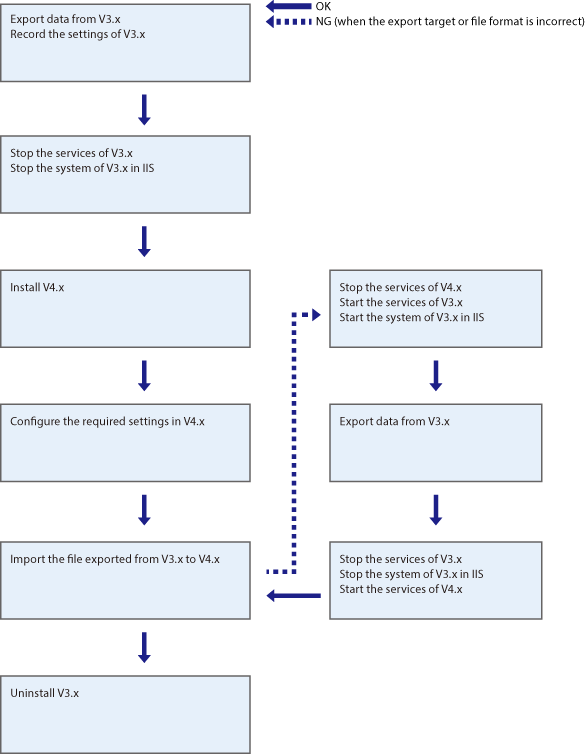
Flow of Operations
1. Exporting Data from iW Management Console V3.x
Export the data to migrate to Enterprise Management Console V4.x from iW Management Console V3.x.
2. Exporting Data from the Device
Export the data to import to Enterprise Management Console V4.x from the device.
3. Recording the Settings of iW Management Console V3.x
When configuring Enterprise Management Console V4.x, it is necessary to refer to the settings of iW Management Console V3.x.
Therefore, record the settings of iW Management Console V3.x.
4. Stopping iW Management Console V3.x
When installing Enterprise Management Console V4.x to the computer where iW Management Console V3.x was operating and using same the port number, stop the operation of iW Management Console V3.x before installing Enterprise Management Console V4.x.
5. Configuring the Printer Settings
It is necessary to configure Enterprise Management Console V4.x to manage some devices that were managed with iW Management Console V3.x.
6. Installing Enterprise Management Console V4.x
Install Enterprise Management Console V4.x, and log in.
7. Configuring the Initial Settings
Configure the initial settings required to operateEnterprise Management Console V4.x.
8. Configuring the Communication Settings
Configure the initial settings required forEnterprise Management Console to communicate with devices.
9. Importing the Data
Import the data exported from iW Management Console V3.x to Enterprise Management Console V4.x. Also import address lists exported from devices and the new device setting value data created in Device Settings Configurator to Enterprise Management Console V4.x.
NOTE |
In the following cases, export the data from iW Management Console V3.x again. (If iW Management Console V3.x was stopped, it is necessary to restart it.) When the imported data is not the desired data When data was exported in a file format that cannot be migrated |
10. Registering Tasks
If tasks were periodically executed in iW Management Console V3.x, register tasks to periodically execute in Enterprise Management Console V4.x.
11. Checking the Operation of Tasks
Try executing the registered tasks immediately and check the task execution results, as required.